Repository navigation
Backup Jobs
A backup job describes one backup: which folders go into which repository, what is left out and how it is compressed. A repository can have several jobs (for example Documents and Photos).

Each job shows its folders, what it keeps when cleaning up, and the outcome of its last run.
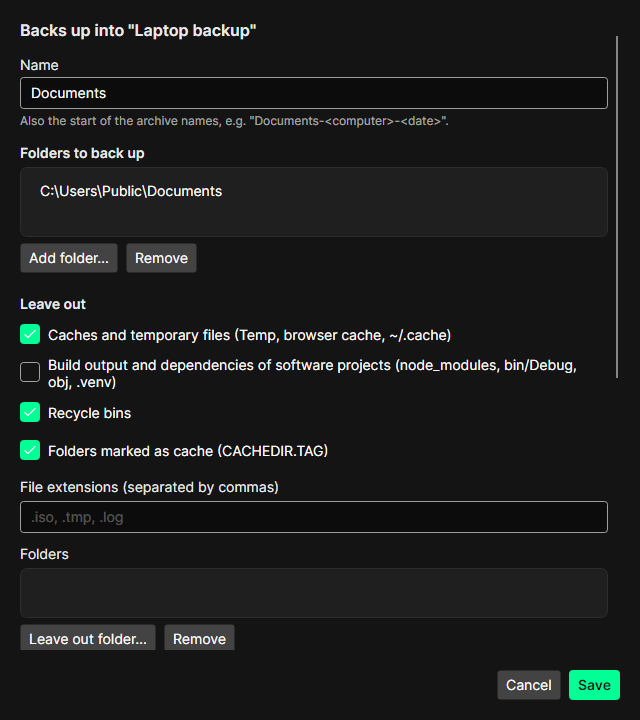
New job… or Edit opens the editor:
-
Name – also the start of the archive names:
<job>-<computer>-<date and time>, e.g.Documents-laptop-2026-11-09T20:00:00. Only archives with this computer's name are cleaned up by the job. - Folders to back up – one or more folders. A folder that no longer exists is pointed out.
-
Leave out
-
Caches and temporary files (Temp, browser caches,
~/.cache) -
Build output and dependencies of software projects (
node_modules,bin/Debug,obj,.venv) - Recycle bins
-
Folders marked as cache (containing a
CACHEDIR.TAGfile) - file extensions (e.g.
.iso, .tmp, .log), single folders, and your own borg patterns
-
Caches and temporary files (Temp, browser caches,
-
Compression –
zstd,3by default;lz4is faster, higher zstd levels are smaller. - Clean up after each backup – see Cleaning up.
The editor estimates how much data the job covers.
Select the job and click Back up now. While borg runs, BorgStudio shows
- what it reads and how much is new (deduplicated),
- the upload speed, the elapsed and the remaining time.
Cancel stops borg cleanly. borg keeps a checkpoint: the next run does not upload the same data again.
Files borg could not read (for example because another program has them open) are listed as warnings; the backup itself still succeeds.
After a successful backup the archive appears in the Archives tab, and – if switched on – old archives of the job are cleaned up.
While an archive of the repository is mounted, a backup first asks to unmount it: borg needs the repository's lock.
Not yet – planned for a later version. Until then, start backups with Back up now.