Repository navigation
Settings and Updates
Tools → Settings holds the language, the updates and the app lock.
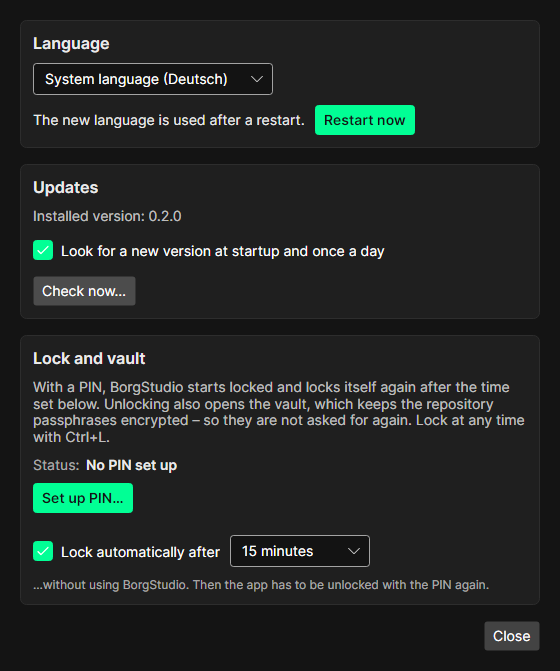
System language, English or Deutsch. Without a choice BorgStudio follows the system language and uses English when that is neither. A new language takes effect after a restart – Restart now does it right away (a running backup asks first, mounted archives are unmounted). Dates and numbers keep the system's format.
BorgStudio looks for a new version at startup and once a day (Look for a new version at startup and once a day; switch it off if you prefer). When there is one, a banner shows at the top:

Details…, Tools → Check for updates or Check now… open the update window:
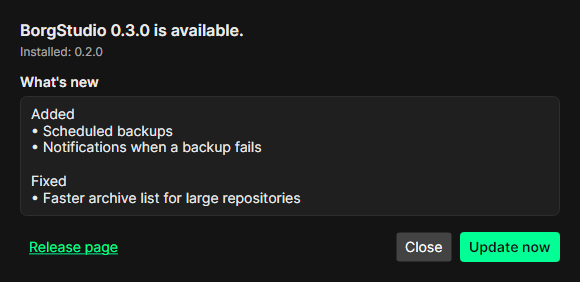
Update now
- downloads the package for your system, with progress and remaining time,
- checks it against the checksums published with the release (
SHA256SUMS) – a damaged download is refused, - closes BorgStudio the usual way (a running backup asks first, mounts are unmounted),
- lets the new version copy itself over the old files and start again. The status bar then says BorgStudio was updated to ….
Only the files of the package are written – nothing else in BorgStudio's folder is touched. Every replaced file is kept until the end and put back if anything goes wrong; the old version then starts again and says why. Between closing and starting again a few seconds can pass (virus scanners check the new file).
The update window offers the release page instead when BorgStudio cannot update itself:
- it lives in a folder it may not write to (for example
C:\Program Filesor/Applicationswithout rights), - there is no package for the system,
- it is a local development build.
Later hides the banner until the next start. BorgStudio contacts only GitHub's public release list for this.
PIN, automatic lock and vault: see Security.