Repository navigation
Repositories
A repository is where borg stores the backups. BorgStudio lists them on the left; the Overview tab of a repository shows where it is, how it is encrypted and where its passphrase is kept.
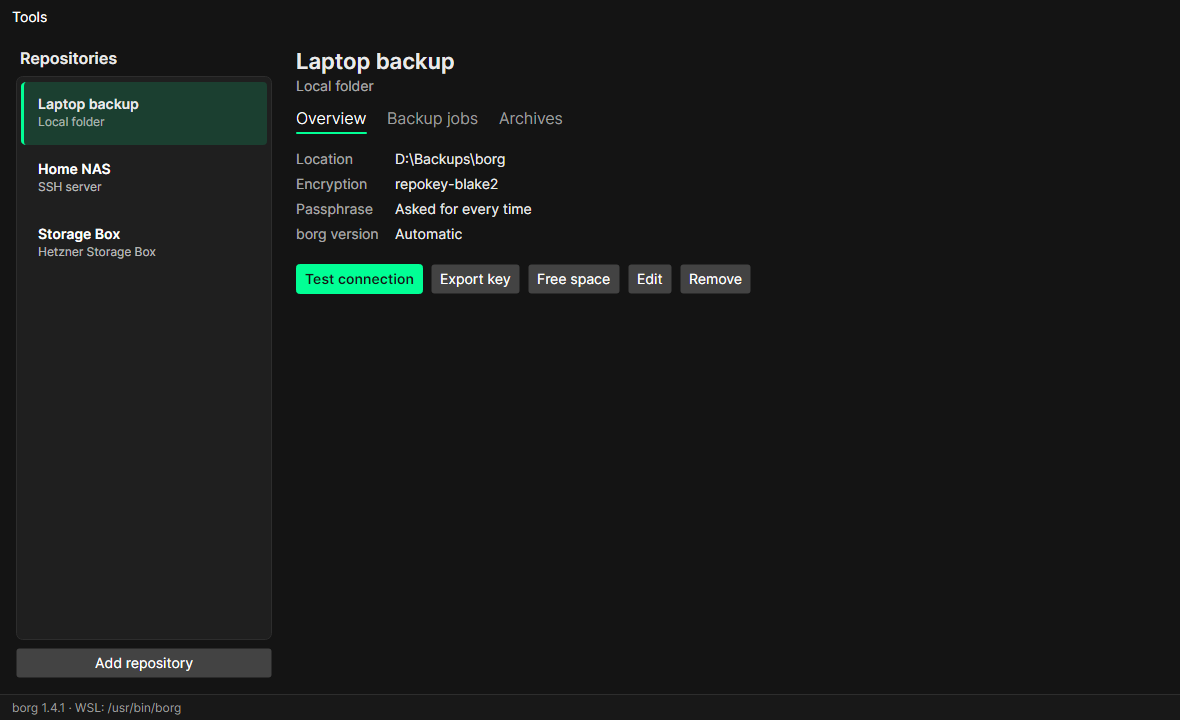
Each kind is a provider (a plugin, see Plugins). Three come with BorgStudio:
A folder on this computer or on an attached drive (USB disk, network drive). With borg in WSL, Windows paths such as
D:\Backups\borg work as they are.
Your own server, NAS or VPS with SSH access and borg installed. Enter host, port, user and the path of the repository. On the first connection BorgStudio shows the server's host key fingerprint and asks you to confirm it; afterwards a server with a different key is refused.
For the login BorgStudio uses an SSH key: pick one from Tools → SSH keys or create one. It can install the public key on the server for you – you type the server password once, it is not stored.
A Storage Box reached over SSH on port 23. Enable SSH support for
the box in the Hetzner Console first. Enter the user (e.g. u123456, or u123456-sub1 for a sub-account) and the path
relative to the box's home directory, e.g. backups/laptop. BorgStudio checks the box's host key against the
fingerprints Hetzner publishes and installs the login key itself.
borg version on the Storage Box: Hetzner offers several borg versions; borg 1.4 is recommended and works with borg 1.2 and 1.4 on your computer.

- Connect an existing repository – for repositories made with the borg command line, another computer or an earlier installation. BorgStudio reads its encryption and checks the passphrase.
-
Create a new repository –
borg initwithrepokey-blake2encryption (the key is stored inside the repository, protected by the passphrase).
Per repository, the passphrase is kept
- in BorgStudio's vault (needs a PIN, recommended),
- in the system keychain (Windows Credential Manager, macOS keychain, GNOME Keyring/KWallet), or
- nowhere – BorgStudio asks for it every time.
See Security.
Export key saves the repository key to a file. Keep it safe and separate from the passphrase: if the repository's key gets damaged, the exported key and the passphrase are the only way to your data.
- Test connection – checks that borg reaches the repository and the passphrase is right.
-
Free space – runs
borg compact; see Cleaning up. - Edit – rename, change the passphrase storage or the SSH key.
- Remove – removes the repository from BorgStudio's list only. The repository and its backups stay untouched; a stored passphrase is deleted (from the vault or the keychain). Its SSH key stays in the key list.