Repository navigation
Restoring Files
Restore files and folders from an archive with borg extract – into a folder of your choice or back to where they
came from.
- In the archive browser: tick files and folders, then Restore selection… – or Restore whole archive….
- From the versions of a file: restore one particular version.
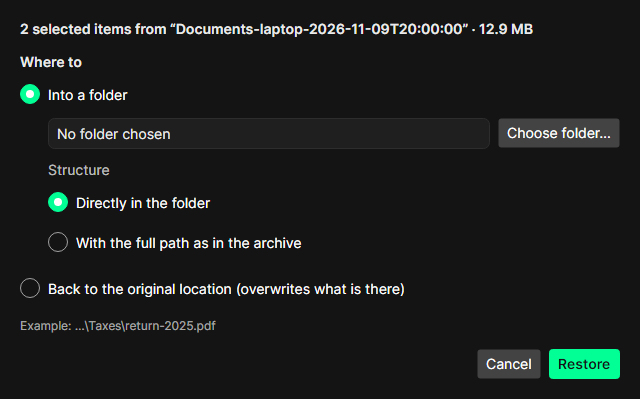
Into a folder (the safe choice): pick a folder, then the structure:
-
Directly in the folder – the selected items land in the folder itself (
…\Taxes\return-2025.pdf). -
With the full path as in the archive – the whole path is recreated below the folder
(
…\C\Users\Public\Documents\Taxes\…).
The line Example shows where a file will end up.
Back to the original location overwrites what is there now. With borg in WSL this works for Windows drives (one run per drive); with a native borg on Windows it is not possible.
BorgStudio checks which files already exist at the destination and asks before overwriting them. Files that were changed after the backup are named separately, so nothing newer is lost by accident.
The progress shows the amount restored, the speed (MB/s), the remaining time and the current file. Cancel stops borg; what was restored so far stays. Files borg could not write are listed at the end; Open folder shows the result.
To look at or copy a few files, mounting the archive is often quicker.