Repository navigation
Getting Started
From nothing to a first backup. You need BorgStudio and borg installed (Installation).
A repository is where borg keeps your backups: a folder on a disk, on a server or on a Storage Box.
-
Click Add repository (bottom left).
-
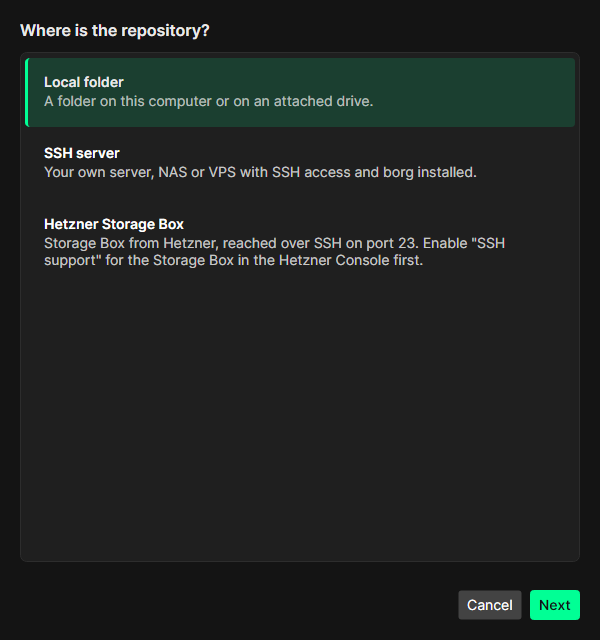
Choose where it is: Local folder, SSH server or Hetzner Storage Box.
-
Fill in the fields, choose Create a new repository (or Connect an existing repository) and enter a passphrase. Write the passphrase down – without it the backups cannot be restored.
-
Choose where BorgStudio keeps the passphrase: in its vault, in the system keychain or nowhere (asked every time). See Security.
-
After creating a repository, BorgStudio offers to export the repository key. Do it and keep the file safe, separate from the passphrase.
Details for each kind of repository: Repositories.
A backup job says what to back up into the repository.
- Select the repository and open the Backup jobs tab.
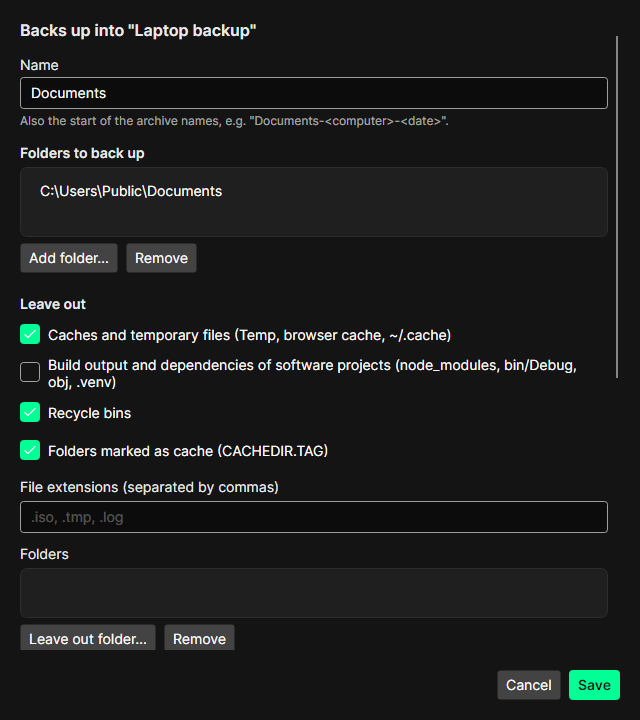
- Click New job…, give it a name (it starts the archive names, e.g.
Documents-<computer>-<date>) and add the folders to back up. - Leave out what you do not need – caches and temporary files, recycle bins and folders marked as cache are left out by default.
- Optionally switch on cleaning up so old archives are deleted after each backup (Cleaning up).
Select the job and click Back up now. BorgStudio shows what it is reading, the upload speed, the elapsed and the remaining time. Cancel stops borg cleanly; a checkpoint is kept and the next run continues from there.

The Archives tab lists every backup (an archive) with its size and what only this archive takes up in the repository. Double-click one to browse it, or see Archives and Restoring files.
Set up a PIN under Tools → Settings: BorgStudio then starts locked and keeps passphrases and SSH keys encrypted in its vault. See Security.