Repository navigation
Settings
English · Español
Every section of Settings and what each option does, in the order they appear.
On this page: Where they are · General · Alerts · Appearance · Pet · Assistant · Answers · Extensions · Island · Accounts · System · Terminal
| Place | How to open it | What's in it |
|---|---|---|
| Quick settings | The gear at the bottom of the icon's window, or Settings… in its menu. | The everyday ones, in five tabs: Alerts, Appearance, Assistant, Island and System. |
| Claupet Console | Settings on the rail, or All settings › Open at the bottom of quick settings. | Everything, in sections. |
In the tables, 🪟 marks what's only in Claupet Console. Options your system doesn't have yet don't appear; a section left empty says "Not available on this system yet."
The language, how Claupet starts and its shortcuts.
| Option | What it does |
|---|---|
| Language | Español or English. Changing it restarts Claupet. It also changes the language of the microphone and the voice. |
| Start with Windows / Start at login | Opens Claupet when you turn on your computer. |
| Shortcuts › In the Start menu 🪟 | Windows. A shortcut that opens Claupet Console (on by default). |
| Shortcuts › On the desktop 🪟 | Windows. The same, on the desktop. |
How Claupet lets you know when a session finishes or needs something.
| Option | What it does |
|---|---|
| Notifications | Shows notifications (see Notifications and the island). |
| Sound | Notifications play a sound. |
| Sound style | Classic, Giggles, Chibi, Dokki, Gemma or Ciel. |
| Show a sample notification | Shows one, with its sound. |
| Open sounds folder | To put your own sounds in propios. |
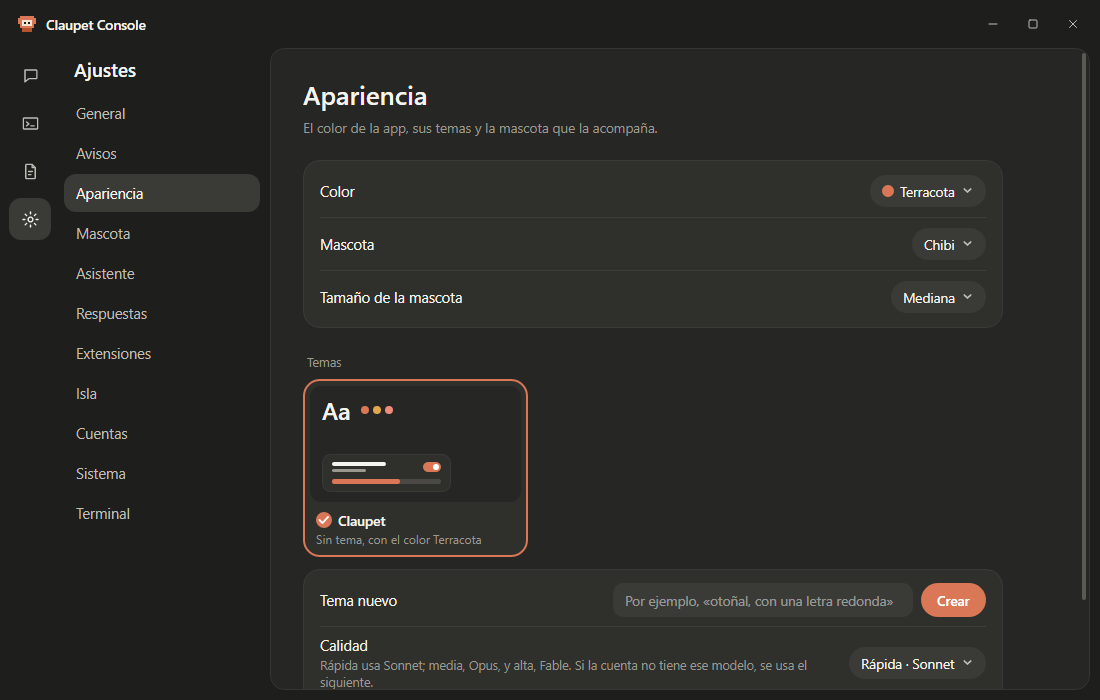
The app's color, your themes and the pet that keeps you company.
| Option | What it does |
|---|---|
| Color | Terracotta, Ocean, Forest, Lavender, Rose or Graphite. Picking one removes your own theme. |
| Pet | Classic, Chibi, Dokki, Gemma or Ciel; or just a refresh animation: Asterisk, Dots or None. |
| Pet size | Small, Medium, Normal or Large. |
| Themes 🪟 | The cards for your own themes. Tapping one selects it; its ⋯ menu exports or deletes it. |
| New theme 🪟 | Describe a theme and press Create: Claude designs it. |
| Quality 🪟 | Fast (Sonnet), Medium (Opus) or High (Fable). If the account doesn't have that model, it uses the next one. |
| Import a theme 🪟 | Brings in an exported theme (.json). |
More details in The pets.
What the pet does on the desktop. These rows appear when Desktop pet is on.
| Option | What it does |
|---|---|
| Desktop pet | The pet lives on top of your windows. |
| On every desktop 🪟 | Follows you when you switch virtual desktops (Spaces on macOS). |
| Flow gestures (what the session is doing) 🪟 | Shows each step: reading, searching, typing, building. Off, it dances while working. |
| Dance to music 🪟 | Windows. Bobs its head and dances when something is playing. |
| Notification gesture 🪟 | Repeats each notification's gesture. |
| Wave when appearing 🪟 | Waves when it appears. |
| Get angry at too many clicks 🪟 | Pouts, crosses its arms and fumes after lots of clicks. |
| Sleep with no sessions 🪟 | Sleeps when there are no sessions. |
| Talk (notifications in a bubble) 🪟 | Tells you each notification its own way. |
| Other agents › One pet per agent 🪟 | A pet for Codex, Gemini or Copilot, next to Claude Code's. |
| …'s pet 🪟 | Each agent's character. |
The chat with the pet, the voice and the keys.
| Option | What it does |
|---|---|
| Chat with the pet | A click on the pet opens its bubble to chat. |
| Pet model | Who answers in the bubble: Automatic, "Same as your sessions", Haiku (default), Sonnet, Opus, Fable or the local model. |
| Answering account 🪟 | Which Claude Code account answers. |
| Task folder 🪟 | Where sessions open for the tasks the assistant hands to Claude Code. |
| Analyze files you drop on it 🪟 | Summarizes files you drop on the pet. |
| Permissions 🪟 | One switch per capability (screenshots, calendar, notes, reminders, windows, computer, brightness, status, clipboard, folders). Off: it asks the first time. |
| Microphone | Talk to it with your voice. Downloads the Whisper model the first time. |
| Push-to-talk key 🪟 | Right Ctrl (default), Right Alt, Right Shift or another one you record. |
| Read answers aloud | Answers are spoken. |
| Voice 🪟 | Female or Male (Claupet's voice) or the system one. |
| Chat shortcut 🪟 | Windows. Ctrl+Alt+Space, or another combination you record. |
| Copilot key 🪟 | Windows. The Copilot key opens the chat or, with the microphone on, listens. |
| Keyboard shortcuts › View… 🪟 | Windows. The list of shortcuts, and whether another app is using any of them. |
More details in Assistant and voice.
🪟 Claupet Console only. Who answers each question: no AI, the local model or the cloud.
| Option | What it does |
|---|---|
| No AI | Always on, 0 tokens. |
| Local model | Windows. Qwen3.5 0.8B, 2B or 4B; the row below downloads it, shows the progress or deletes it. |
| Graphics card | Windows. Automatic, Always or Never. |
| Free the memory after | Windows. Minutes without use before the local model frees the memory. |
| Cloud | The cloud model to use. |
| Mode | Default, Token saver, Only on this computer or Custom (with a row per type of question). |
| Pass to the next engine | How far a question goes when it isn't understood. |
| Show who answered | A chip below each answer. |
| My city | For the weather: by IP, the Windows location or a city you type. |
| This week, without the cloud | How many answers didn't spend tokens. |
🪟 Claupet Console and Windows only. Installed extensions, Install from file… and the local API. Extensions explains it.
The island at the top edge: the chat, permissions and the weekly recap.
| Option | What it does |
|---|---|
| Island at the top edge | Turns on the island. |
| Island model | Who answers in the island chat ("Same as your sessions", by default). |
| Open on hover | Opens with the cursor over it; off, with a click. |
| Visible while something is working 🪟 | Stays compact and in view while any session is working. |
| Island permissions and questions › Set up… 🪟 | Adds the hook to answer Claude Code's permissions on the island. |
| Weekly recap on Mondays 🪟 | Every Monday, how your week went. |
| This week's recap › View now 🪟 | Shows it right away. |
🪟 Claupet Console only. The Claude Code accounts and other agents Claupet follows.
| Option | What it does |
|---|---|
| Claude Code | Each account, and whether its memory is its own or shared with another. |
| Add account… | Adds another config folder (see Getting started). |
| Other agents | A switch for each agent found (Codex CLI, Gemini CLI, GitHub Copilot CLI): whether it's followed in Usage and Activity. |
The permission hook, diagnostics and new versions.
| Option | What it does |
|---|---|
| Permission notifications (hook) › Set up… 🪟 | Opens the setup assistant. |
| If something isn't working › Copy diagnostics | Copies a summary, without emails or tokens, so you can ask for help. |
| Remove hook and Windows startup › Remove… 🪟 | Removes the Claude Code hooks and starting with the system. |
| Installed version 🪟 | The version that's running. |
| Check for updates 🪟 | Once a day, on GitHub. Nothing is installed without asking you. |
| Claupet X is available | Shows up when there's a new version: Download and install…, the progress or Restart now. |
🪟 Claupet Console only. How Claupet Terminal sessions look: font, size, line spacing, text color, background, session list, animations and linked projects. Claupet Terminal explains it.