Repository navigation
DNS Cache
The DNS Cache app explains and controls the laptop's local Unbound path: service state, boot state, active resolver, upstream forwarding, DNSSEC, firewall enforcement, travel-network fallback, and lookup testing.
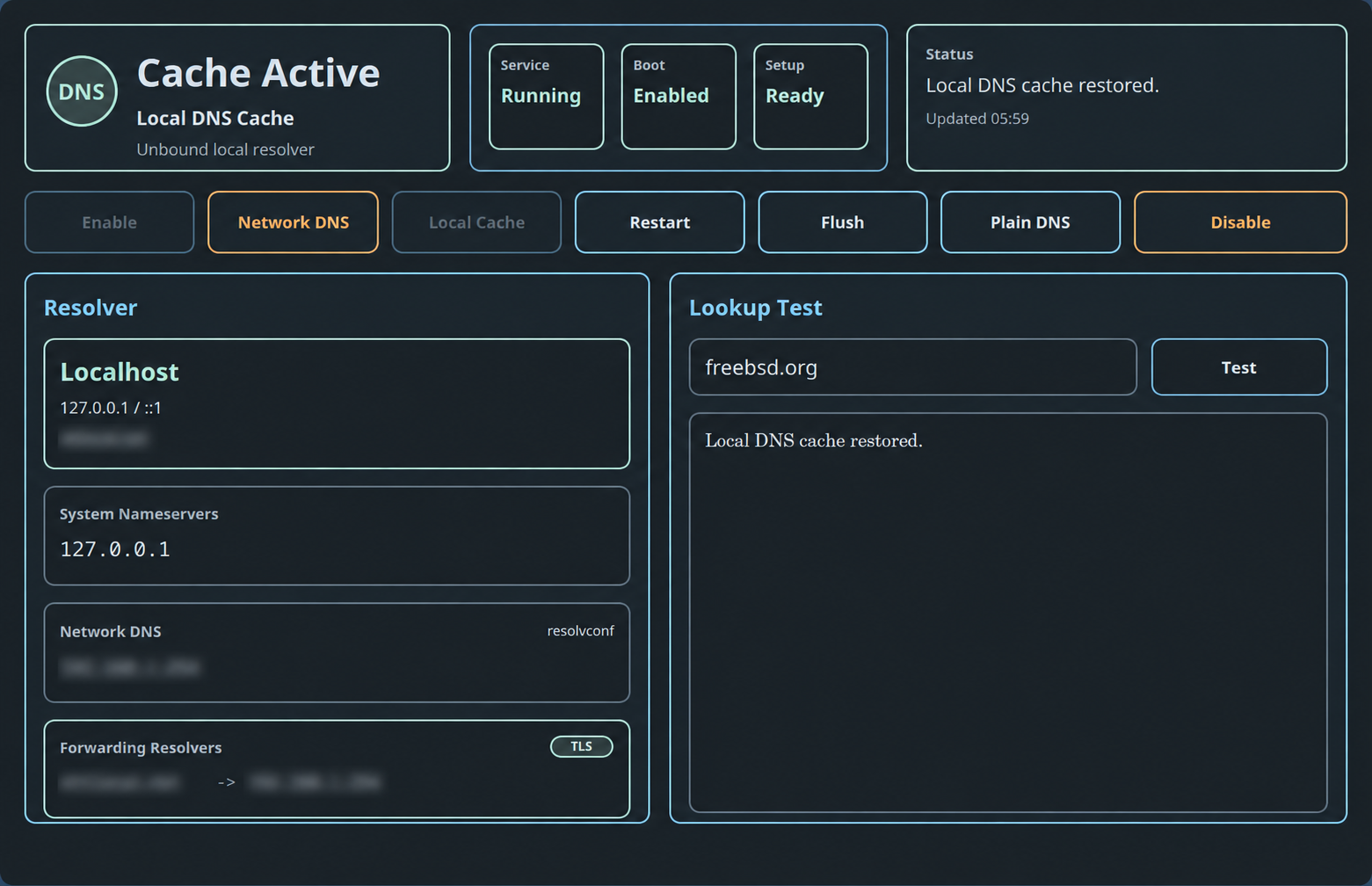
Choose DNS Cache in the App Launcher or run:
sh ~/.config/bsdrunner/scripts/bsdrunner-dns.shThe header distinguishes Cache Active, Network DNS, Running, Cache Off, and unavailable states. The summary cards show the local Unbound service, boot setting, and whether BSDRunner's setup helpers are ready. The status card reports the last refresh or action.
Actions are confirmation-gated:
- Enable starts local Unbound, enables it at boot, and routes the laptop through it.
- Network DNS temporarily uses DNS supplied by the current network—useful for captive portals.
- Local Cache restores the normal localhost resolver path.
- Restart restarts local Unbound.
- Flush clears cached answers.
- Encrypt DNS / Plain DNS toggles public forwarding between DNS-over-TLS and ordinary DNS.
- Disable stops local Unbound and disables it at boot.
Unavailable or already-satisfied actions are dimmed.
The Overview tab explains the active resolution path:
-
Resolver says whether
/etc/resolv.confpoints to localhost or external servers. - System Nameservers shows the addresses currently visible to applications.
-
Network DNS preserves the resolvers learned from
resolvconfor fallback discovery. - Forwarding Resolvers shows Unbound forwarding zones and targets, with a TLS or Plain badge.
Local router zones remain separate from public forwarding. Enabling encrypted forwarding uses certificate-verified public resolvers while retaining local-network routing where configured.
BSDRunner uses FreeBSD's native local_unbound_tls and local_unbound_forwarders settings. Running the setup path generates one root forwarding zone in /var/unbound/forward.conf; TLS mode points that zone at the Cloudflare and Google endpoints on port 853 and verifies their certificates with /etc/ssl/cert.pem.
The public forwarders are static, so a DHCP renewal cannot replace encrypted forwarding with the current network's resolver. Network-provided DNS remains available through the explicit Network DNS travel action.
Older BSDRunner versions wrote an additional root zone to /var/unbound/conf.d/public-forwarders.conf. On the first Encrypt DNS or Plain DNS action, the current backend preserves that managed file with a .bsdrunner-legacy suffix and removes it from the active include path. Configuration validation also treats duplicate-zone diagnostics as failures even if Unbound's checker exits successfully.
Enter a hostname such as freebsd.org and choose Test. The result area shows the resolver command output or the most recent action message. This is the quickest way to distinguish “the service is running” from “lookups actually work.”
The Protection tab joins the resolver and firewall views without exposing raw PF or Unbound configuration.

Resolver Path reports:
- whether applications are using the local
127.0.0.1/::1resolver; - whether public forwarding is ordinary DNS or certificate-verified DNS-over-TLS;
- the number of currently open DoT connections—
configured · idleis normal when Unbound has no upstream socket open; - whether the DNSSEC root trust anchor is configured.
Firewall Enforcement reports:
- whether PF is running and BSDRunner's DNS rules are loaded;
- whether the temporary Network DNS exception is closed or names specific DHCP-provided resolvers;
- packet counters for blocked application bypasses, Unbound's permitted plain-DNS fallback, and temporary captive-portal traffic;
- per-jail DNS policies and their permitted resolvers.
Choose Test Protection for an on-demand end-to-end check. It verifies that the local resolver answers, a direct application lookup to 8.8.8.8:53 is rejected, DNSSEC accepts a valid signed response and rejects a deliberately broken one, and public forwarding is configured for DoT. During intentional Network DNS mode, the result identifies the narrowly scoped temporary exception instead of claiming every direct DNS request is blocked.
The Firewall app owns the Block plain DNS bypasses setting. Change and apply that policy there; use this tab to inspect and verify the live result.
- Choose Network DNS and confirm.
- Complete the portal login in a browser.
- Choose Local Cache and confirm.
- Confirm that the Overview tab shows the single expected root forwarder and its TLS badge.
- Run a lookup test, then use Test Protection for the end-to-end check.
Network DNS is intentionally a temporary escape hatch. When DNS leak protection is active, BSDRunner permits port 53 only to the resolvers learned from the current network. Returning to Local Cache restores the localhost resolver and the persisted Plain/TLS forwarding choice, empties that PF exception table, and removes its existing states.
The managed PF policy blocks ordinary TCP and UDP DNS on port 53 when an application tries to bypass local Unbound. It still permits Unbound itself to use plain DNS when Plain DNS is selected, preserving usability on networks that block port 853. It does not attempt to identify or block application-managed DNS-over-HTTPS on port 443 or DNS-over-QUIC on UDP port 853; those share encrypted transports with ordinary web and QUIC traffic.
Back to the BSDRunner Apps overview.