Repository navigation
Firewall
The Firewall app manages BSDRunner's desktop-oriented PF profile. It translates common policy choices into a generated ruleset, validates that ruleset, and makes live PF and pflog state visible.
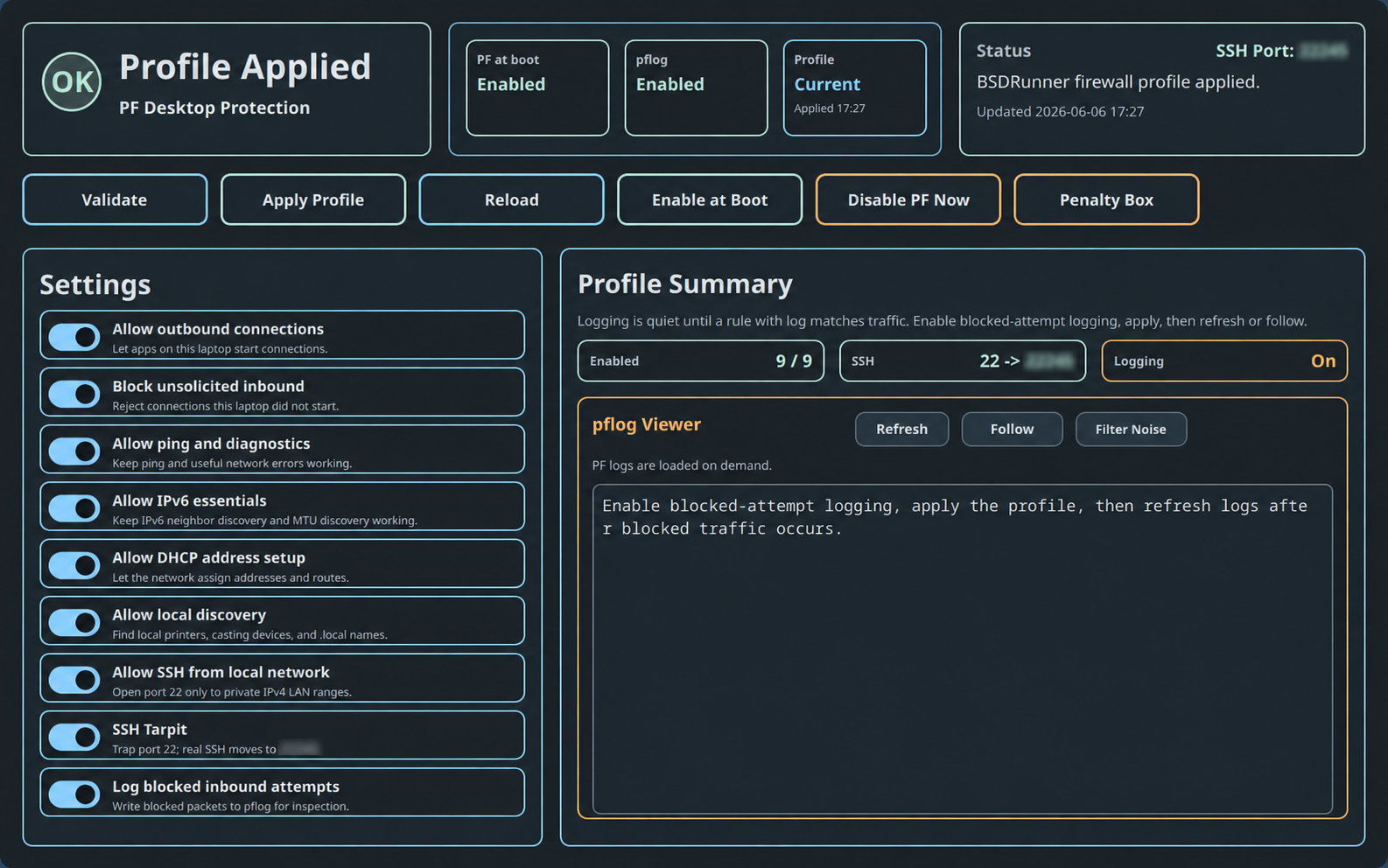
Machine-specific addresses in this screenshot are blurred.
Choose Firewall in the App Launcher or run:
sh ~/.config/bsdrunner/scripts/bsdrunner-pf.shThe protection card distinguishes Protected, Changes Pending, Profile Applied, External Config, PF Stopped, PF Not Loaded, and unavailable states. Summary cards show PF-at-boot, pflog, and whether the on-disk profile is current. The status card records the last validation or action.
- Validate renders and syntax-checks the proposed managed profile without loading it.
- Apply Profile validates, installs, and reloads BSDRunner's generated profile.
-
Adopt Profile appears when an external
/etc/pf.confis detected and explicitly replaces it with the managed profile. -
Reload reloads the current
/etc/pf.confwithout regenerating policy. - Enable at Boot enables and starts PF and pflog.
- Disable PF Now turns off live packet filtering without deleting the configuration.
-
Penalty Box opens the dynamic
ssh_abusetable viewer.
Actions that change live firewall behavior require confirmation.
The toggles describe policy rather than raw PF syntax:
- outbound connections;
- unsolicited inbound blocking;
- ping and diagnostic ICMP;
- IPv6 essentials;
- DHCP address setup;
- local mDNS discovery;
- blocking application attempts to bypass local Unbound with plain DNS;
- SSH from private LAN ranges;
- optional Endlessh SSH tarpit;
- blocked-attempt logging.
Changing a toggle updates the managed profile state. Apply the profile to make pending policy current. The SSH tarpit remains disabled until LAN SSH is enabled and Endlessh is installed; when active it traps port 22 and moves real SSH to the displayed alternate port.
Block plain DNS bypasses is enabled by default. After the profile is applied, PF rejects application-owned TCP and UDP traffic to port 53 while allowing local Unbound to resolve on the application's behalf. This prevents software from silently ignoring the system resolver and sending ordinary DNS to an arbitrary external server.
The policy preserves two deliberate usability paths:
- Unbound may use ordinary upstream DNS when the DNS Cache app's Plain DNS fallback is selected.
- Network DNS may temporarily allow only the DHCP-provided resolvers needed by captive portals; Local Cache closes that exception and removes its states.
Per-jail outbound policies similarly restrict each jail's DNS to its configured resolver. The Firewall app owns the policy toggle and profile application; the DNS Cache app's Protection tab shows live rule state, exceptions, counters, and an end-to-end test.
The summary reports enabled rules, SSH exposure, and logging state. The viewer can Refresh a bounded log snapshot or Follow live output. Filter Noise hides common SSDP/UPnP, Spotify broadcast, mDNS, and IGMP chatter from the display only; PF continues to block or log the packets.
Logging is intentionally quiet unless a rule uses log. Enable blocked-attempt logging, apply the profile, generate or observe blocked traffic, then refresh or follow.
This mode lists IP addresses in the ssh_abuse table. Select an address and use Clear Selected, or use Clear All to empty the table. These controls modify the dynamic table, not the base profile.
- Review every setting, especially LAN SSH and local discovery.
- Choose Validate.
- If an external configuration is detected, stop and decide whether BSDRunner should adopt it.
- Choose Apply Profile and confirm.
- Confirm the header says Protected and Profile Current.
- Enable logging only when you need visibility into blocked traffic.
Back to the BSDRunner Apps overview.