Repository navigation
Software
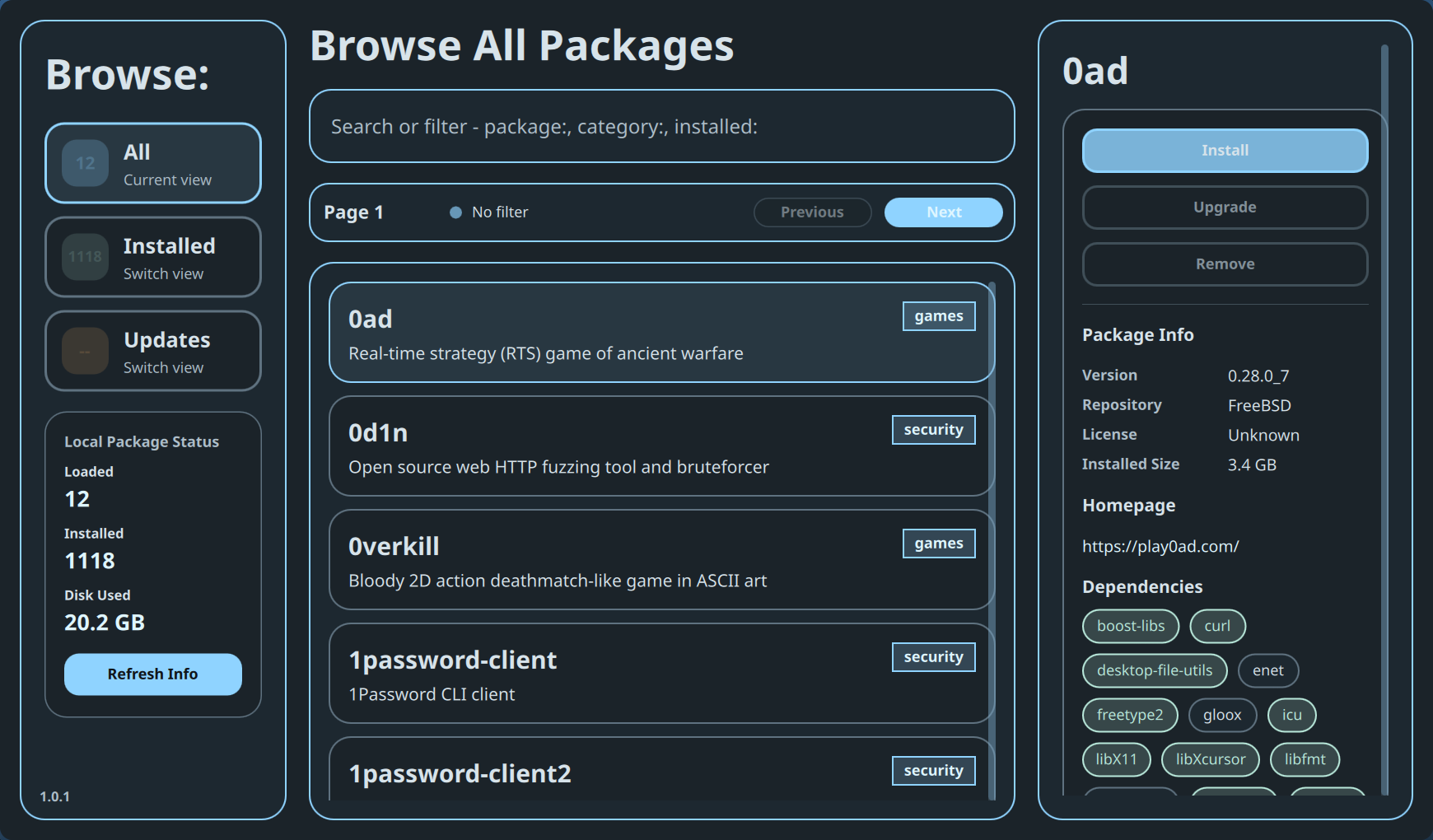
BSDRunner Software is a graphical front end for the FreeBSD pkg catalog. It separates discovery from mutation and shows package details before asking for confirmation.
Choose Package Manager in the App Launcher or run:
sh ~/.config/bsdrunner/scripts/bsdrunner-software.sh- All browses the configured package repositories.
- Installed limits the catalog to packages already present locally.
- Updates shows installed packages with a newer repository version and enables Upgrade All when applicable.
The Local Package Status card reports the loaded page size, total installed packages, installed disk use, active filter, and last refresh. Refresh Info re-queries pkg; it does not install updates by itself.
The search field accepts ordinary terms plus focused expressions such as package:, category:, and installed:. Results are paged in groups of twelve, with Previous and Next controls. Each package card communicates installation and upgrade state; selecting a card populates the detail pane.
The selected package shows name, version, comment, category, architecture, license, installed size, homepage, and dependencies when the repository provides them. Available actions depend on state:
- Install for a package not present locally.
- Reinstall for an installed package.
- Upgrade when a newer version exists.
- Remove for an installed, non-protected package.
- Start in All and search for the package name.
- Select the result and review its version, size, homepage, and dependencies.
- Choose Install, Reinstall, or Upgrade.
- Read the confirmation prompt and confirm only the intended transaction.
- Review the result panel; the catalog refreshes after a successful action.
Upgrade actions preview the pkg transaction first and stop if the plan would remove an installed package. Upgrade All is available only from Updates and uses the same guarded preview. Removal of core desktop/session packages such as Hyprland, Quickshell, Waybar, portals, Polkit, and the configured terminals is disabled in the UI.
The package manager still changes the host system. Read the proposed action and result instead of treating the confirmation as a formality.
Back to the BSDRunner Apps overview.