Repository navigation
Jails
The Jails app is a beginner-focused control surface for learning and operating FreeBSD jails. It inventories native and Bastille-managed jails, explains the five-part creation model, and exposes narrowly guarded management actions.

The screenshot uses demo data: web and postgres are existing native jails, while build is Bastille-managed. BSDRunner discovers native jails but its guided creation workflow currently requires Bastille.
Choose Jails in the App Launcher or run:
sh ~/.config/bsdrunner/scripts/bsdrunner-jails.shExplore safely with the bundled read-only fixture:
sh ~/.config/bsdrunner/scripts/bsdrunner-jails.sh --demoThe left inventory merges running jails reported by jls, configured native jails from jail.conf, and Bastille inventory. A row reports backend, state, and address. Selecting it fills the detail panel.
The Beginner Map explains the model used by the creation wizard:
- Storage — a filesystem root, normally on ZFS.
- Userland — a fetched FreeBSD release or base tree.
- Network — a non-overlapping jail address plus loopback, PF NAT, and anchors.
- Config — name, hostname, address, and startup behavior.
- Lifecycle — start, stop, restart, and console after creation.
Hide the map when more width is useful for management controls.
The metadata cards show JID, address, hostname, autostart, release, and root path. Below them:
- Outbound policy chooses Internet only, LAN + Internet, or No outbound for a Bastille jail.
- Port forwarding maps a unique host TCP/UDP port to a jail port and lists removable mappings.
- Simple services currently manages allowlisted nginx installation, runtime state, boot state, and exposure. A stopped jail dims service actions and says Start jail first.
- Actions provides state-aware jail Start, Stop, Restart, and Console controls.
Service state and jail state are separate. Stop nginx leaves the jail running. Stop in Actions shuts down the jail. Likewise, installing or starting nginx never publishes a port automatically.
An existing mapping such as host :8080 → nginx :80 appears in the service card instead of suggesting a duplicate.
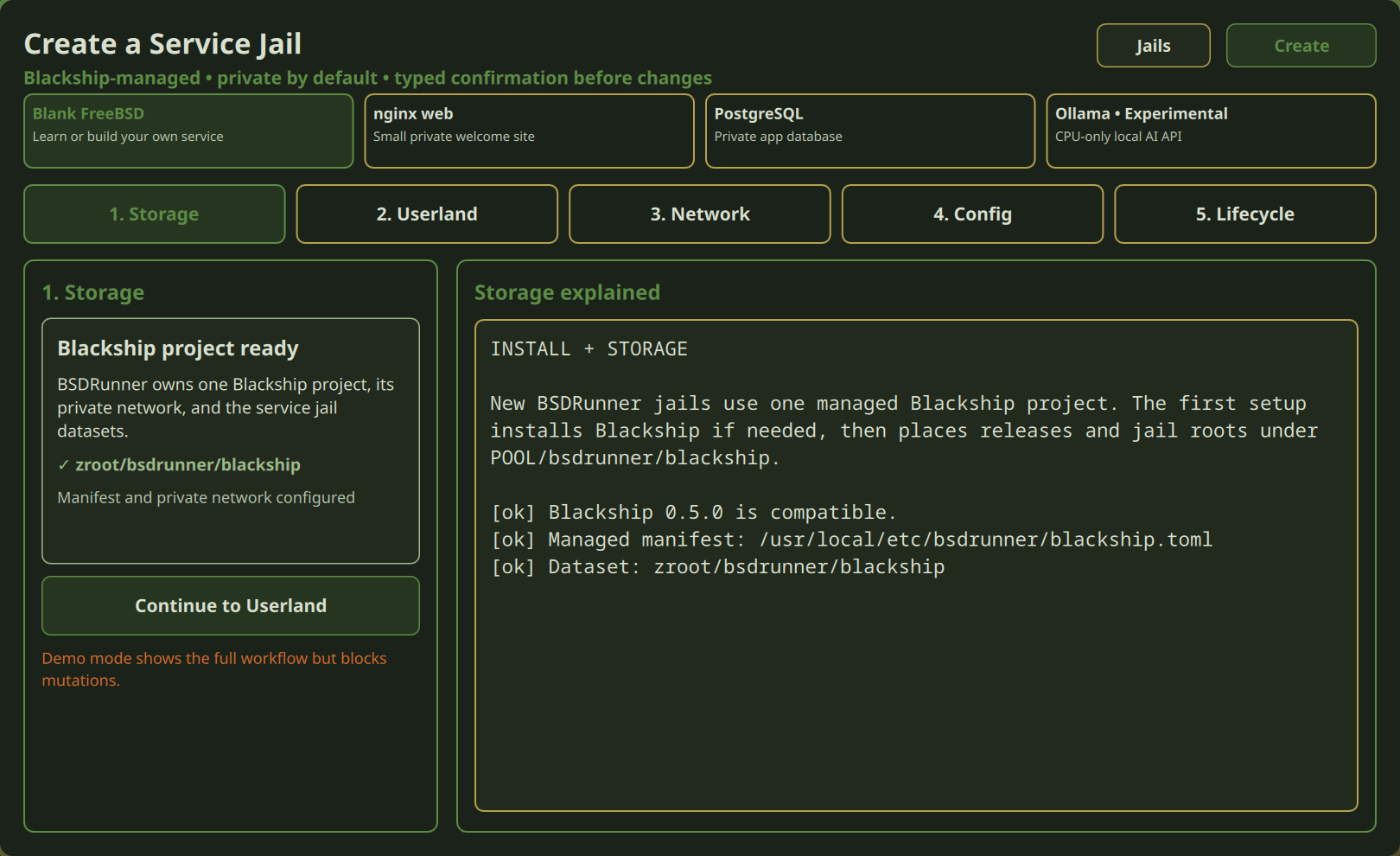
Select an existing ZFS pool and review the conventional POOL/bastille target. If needed, the guarded setup configures Bastille storage only; it does not run the broad all-in-one Bastille setup.
Choose a host-matched or bootstrapped FreeBSD release and select Thick or Thin. Thick gives the jail an independent userland copy and is the beginner default. Thin shares Bastille's base layout.
Review the detected uplink, proposed jail address, route-overlap checks, Bastille loopback, PF NAT, and anchors. The suggested address is revalidated immediately before creation. Network setup requires exact typed confirmation.
Choose a unique jail name, autostart behavior, and outbound policy. Internet only is the recommended default; LAN + Internet broadens reachability, while No outbound blocks new IPv4 connections from the jail.
Review the exact bootstrap, create, DNS-copy, and policy plan. Type the jail name to confirm. A missing release is bootstrapped first; an existing release skips that download. DNS is copied from a reachable host resolver so loopback-only host DNS does not break package access inside the jail.

- Start the Bastille jail.
- In Simple services, choose Install + start and confirm.
- Verify nginx is Running and optionally enable it at boot.
- In Port forwarding, choose TCP, a free host port such as 8080, and jail port 80.
- Confirm the PF change.
- Test
http://HOST_ADDRESS:8080from another machine.
The mapping means traffic arriving at host port 8080 is redirected to nginx on port 80 inside the jail. Removing the mapping does not stop nginx; stopping nginx does not remove the mapping.
Native jails can appear in inventory and receive state-appropriate lifecycle actions. Guided creation, per-jail outbound policy, port forwarding, and simple-service management are currently Bastille workflows. If Bastille is absent, the wizard explains the missing prerequisite rather than silently creating a native jail.
Creation, storage, networking, policy, forwarding, and service actions validate live state and require confirmation. Demo mode rejects mutations. The service backend accepts only allowlisted service names and verbs; it is not an arbitrary command runner. Partial success—such as a completed release bootstrap followed by failed creation—is reported explicitly.
Back to the BSDRunner Apps overview.