MasterDetail




The MasterDetail module can help you create platform agnostic master detail XAF views using only the Model Editor.
-
First you need the nuget package so issue this command to the
VS Nuget package consoleInstall-Package Xpand.XAF.Modules.MasterDetail.The above only references the dependencies and nexts steps are mandatory.
-
Ways to Register a Module or simply add the next call to your module constructor
RequiredModuleTypes.Add(typeof(Xpand.XAF.Modules.MasterDetailModule));
The module is not bound to DevExpress versioning, which means you can use the latest version with your old DevExpress projects Read more.
The module follows the Nuget Version Basics.
.NetFramework: v4.6.1
| DevExpress.Data | Any |
| DevExpress.ExpressApp | Any |
| Xpand.VersionConverter | 1.0.17 |
| Xpand.XAF.Modules.Reactive | 1.2.16 |
| fasterflect | 2.1.3 |
| Ryder | 0.8.0 |
| System.ValueTuple | 4.5.0 |
For Bugs, Questions or Suggestions use main project issues.
The module satisfies the following conditions:
-
If a
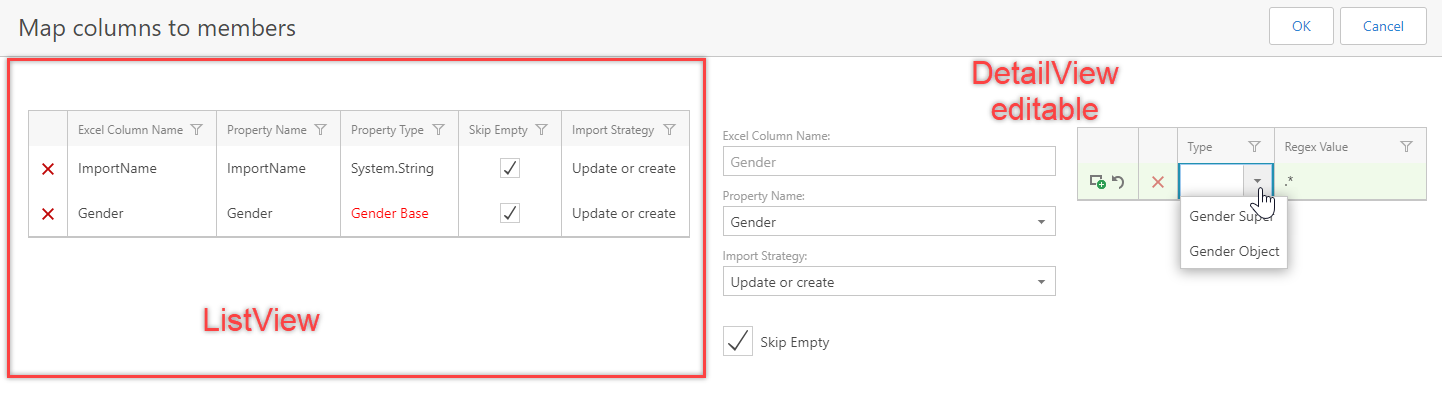
DashboardViewcontains aone ListView and one DetailViewof thesame type, then it will be Master-Detailenabled by default. It can be disabled by setting theIModelDashboardViewMasterDetail.MasterDetailto false.
-
Each time a ListView selection change, it will synchronize the DetailView CurrentObject with the selected from the ListView.
-
ALL CRUDoperations aresupported. A valuable module for forcing the DetailView to open in edit mode is the ViewEditModeModule. Additionaly you can use the [AutoCommitModule](https://github.com/eXpandFramework/DevExpress.XAF/tree/master/src/Modules/Agnostic/AutoCommit, for auto commiting the DetailView. -
Conditional detailviews can be configured from the model by creating
IModelMasterDetailViewObjectTypeLinks
The module is tested on Azure for each build with these tests
The module is integrated with the ExcelImporter, XtraDashboard modules.
Next screenshot is an example from ExcelImporter from the view tha maps the Excel columns with the BO members.