Repository navigation
Artifacts
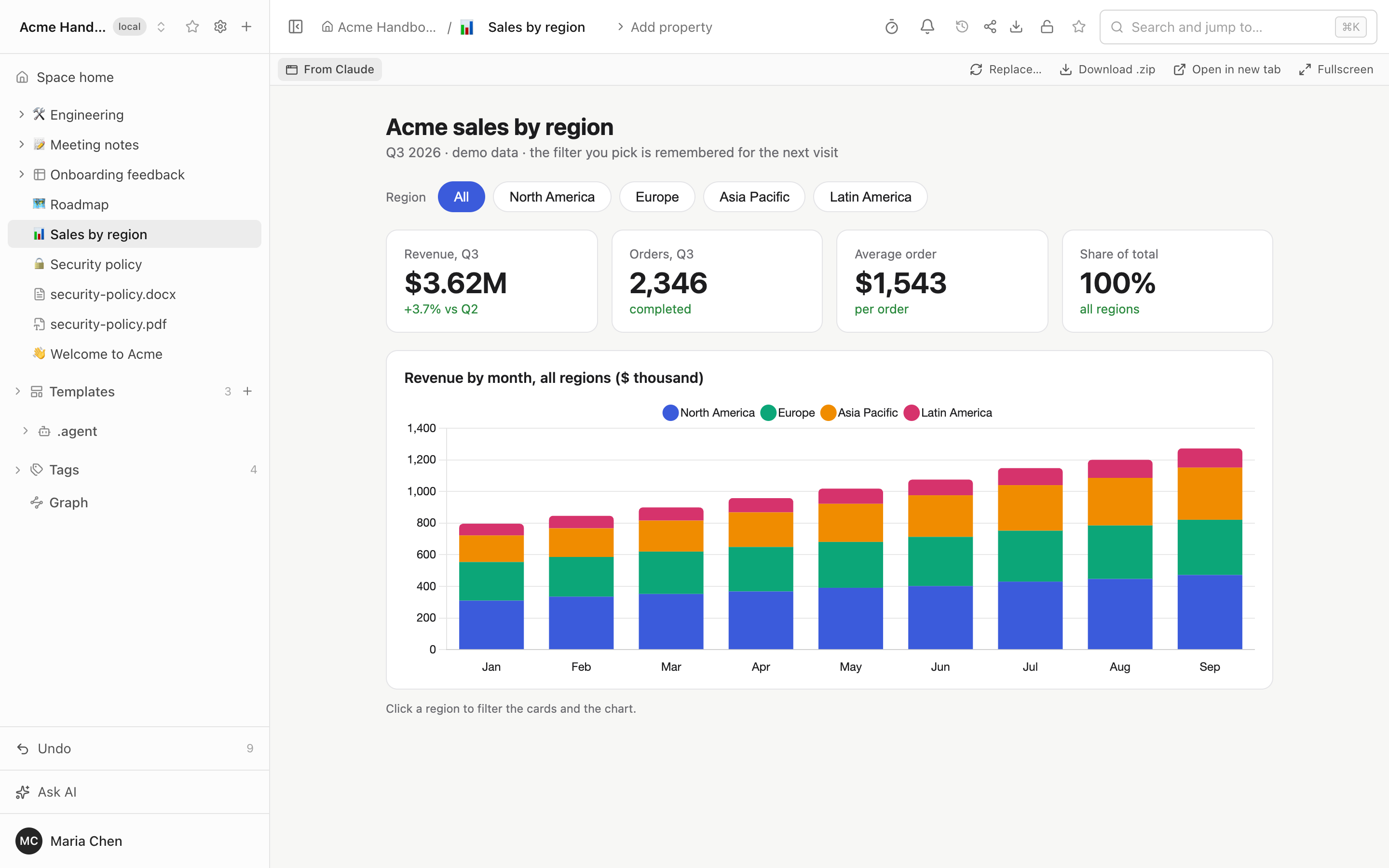
An artifact is an interactive page that an AI agent built (a Claude artifact, a Cursor canvas, any self-contained HTML page), kept in your wiki as a page: in the tree, in search, in Git, under the same access rights as everything else. Usually a dashboard or a calculator an agent builds lives in one chat and is gone with it. In Folio it stays, still interactive, and a teammate can open it without an account on any AI service.
Watch it in 93 seconds: Publish Claude artifacts into your team wiki.
Filters, tabs, charts and forms work on the page. Folio shows the finished page; it does not build React or TSX itself, so the agent sends HTML that already runs.
Connect the agent to Folio over MCP first (Connect AI Agents). The token needs the write scope, and the person it belongs to needs the editor role in the space. Then ask in plain words:
publish this dashboard to Folio, in Reports
That is enough. The agent calls the MCP tool publish_artifact: it finds the space, picks the folder (Reports), takes the title from the page, and sets the icon and the origin. If you do not say where the page should go, it asks. Other things that work the same way:
- "Put this canvas in Folio under Team / Planning."
- "Update the Q3 dashboard in Folio with the new numbers." The agent reads the artifact, then publishes again with its
idand the whole new page; the link, place in the tree, title, icon and properties stay. - For a React artifact or a Cursor canvas the agent builds one HTML page that loads React from a CDN and keeps your original JSX or TSX next to it as the source file.
Folio AI, the assistant in the side panel, can do it too in Agent mode, with the same tool and the same rights (Set Up Folio AI).
Links to claude.ai or Cursor shares are never downloaded: Folio cannot see a chat. Ask the agent to publish through MCP instead of pasting the link.
"+" menu, then Artifact... opens the import dialog with three tabs:
| Tab | What it takes |
|---|---|
| Link | A direct https link to an .html, .zip, .svg or .md file (up to 20 MB) |
| File | The same kinds of file from your computer |
| Paste HTML | The page as text, or the embed code ("Get embed code") of a Claude artifact |
A link from claude.ai, claude.site or Cursor is refused with a note that suggests publishing over MCP. A ZIP can hold up to 500 files and 50 MB unpacked. Give the page a name and a place, and Create adds it to the tree.
On the page itself:
- Show source lists the files of the artifact and the original code.
- Download .zip gives you the whole bundle.
- Replace... swaps the content and keeps the link and the place in the tree.
- A works partially note appears when the page expects things Folio does not provide: calls to Claude, network access or connectors.
In the space's repository an artifact is a folder whose name ends in .artifact:
Reports/
  q3-sales-dashboard.artifact/
    artifact.yaml      the manifest
    index.html         what is rendered
    dashboard.jsx      the original source, kept as it was sent
    assets/            files the page loads by relative path
Rename, move, copy and trash act on the whole folder. A .artifact folder with an index.html and no manifest is an artifact too; its title is the folder name, so a repository you did not write is not touched.
artifact.yaml is plain YAML:
folio: artifact
version: 1
title: Q3 sales dashboard
icon: "📊"
type: react
entry: index.html
source:
  origin: claude
  file: dashboard.jsx
capabilities: [storage]
owner: maria| Field | Meaning |
|---|---|
folio, version
|
Always artifact and 1
|
title, icon
|
What the tree shows |
type |
What the source was: html, react, svg, markdown, mermaid, canvas-tsx or embed. The page that runs is always entry
|
entry |
The HTML file inside the folder (not used for embed) |
source |
Where it came from: origin (claude, cursor, url, upload, other), url of the original (stored, never fetched), importedAt, and file, the original code |
embed |
Only for type: embed: an https url and a height, a frame of another host |
capabilities |
What the page expects from its host: storage, claude, network, connectors. The last three make Folio show "works partially" |
| anything else | Page properties. The Properties panel reads and writes them here, like tags and owner on any page |
Folio edits only the keys it owns and leaves every other line, comments included, as it was. Because the folder is in Git, an artifact has history, can be reviewed in a pull request, and can be edited with any editor and picked up with Sync.
The page gets a small bridge with two things:
-
window.storage, the API Claude artifacts use: asynchronousget,set,deleteandlist, string values, personal or shared. - A working
localStorage.
Both are kept per reader: in the database for a signed-in person, in the browser for a guest of a share link or a public site. Limits: a key up to 200 characters, a value up to 256 KB, 5 MB per reader and page, 5 MB shared. A checklist that people tick, or the tab someone last looked at, survives a reload.
An artifact is code someone else wrote, so it runs in a box:
- It sits in an
iframewith thesandboxattribute and withoutallow-same-origin, so it has no cookies, no access to your Folio session or API, and no access to the page around it. - Its files come from
/art/<signed token>/.... The token is tied to the page and the reader and is valid for 12 hours, and every response carries asandboxContent-Security-Policy. - Scripts, styles and fonts load only from a short list of CDNs:
cdnjs.cloudflare.com,cdn.jsdelivr.net,unpkg.com,cdn.tailwindcss.com,code.jquery.com,esm.shand Google Fonts. Requests to any other host are blocked, so data must be inlined in the page or shipped as files of the bundle. - Access follows the page: an artifact in a closed page is closed, in search and in the tree like any other page.
This is a sandbox, not a guarantee. Treat a page from a source you do not trust the way you would treat any web page.
- Replaced, not edited. There is no editor for the page inside Folio, no comments and no version list in the interface (Git keeps the history). Only the properties are edited in place.
-
No build step. Folio runs no JSX or TSX; a page that needs a bundler, or components that exist only inside Claude or Cursor (
cursor/canvas, shadcn), does not run until it is rewritten. -
Narrow reach.
window.claude.complete, network calls to your own services and connectors do not work. The page says "works partially" when it expects them. -
Search finds an artifact by title, properties and the visible text of its entry page (the first 100 KB), not by what a script draws later. Use
kind:artifactto list them (search operators). - Sizes. A bundle is up to 500 files and 50 MB, a download from a link 20 MB, an MCP request 25 MB (1 MB in the public demo).
- Share links and public sites show the live page; a guest's own state stays in their browser.
The complete list: LIMITATIONS.md.
Connect AI Agents · Set Up Folio AI · Sharing and Permissions · README section · MCP.md: publish_artifact · FEATURES.md