10 ‐ Pose and Motion Capture
A pixel measure can say that something moved; a skeleton can say that the left arm did. Pose estimation finds the body's joints in ordinary video—head, shoulders, elbows, down to the feet—and tracks where each one goes, and marker-based motion capture measures the same thing with reflective markers and specialised cameras, far more precisely. This page covers both: drawing skeletons and their trajectories, and reading the numbers behind them.
Three sources of pose and motion-capture data feed the downstream signal analysis on the other Sound–Movement Analysis Toolkit pages: rendered skeleton video and plots via MgVideo.pose() and friends, markerless landmark trajectories via _posetools, and marker-based motion capture I/O via _mocap. The rendering methods return MgVideo, MgFigure or MgImage objects for visualisation. _posetools and _mocap hand back plain numpy trajectory arrays instead.
One distinction runs through the whole chapter. What pose estimation returns is position: where each landmark sits in the image, frame by frame. A posture is a configuration the body holds for a while, and a pose is a posture that carries meaning, which the toolbox only ever proposes as a label. The Concepts page on the docs site lays out the full scheme; the posture segmentation section below puts it to work.
The default pose backend (MediaPipe) is an optional dependency:
pip install musicalgestures[pose]This pulls in mediapipe>=0.10. Without it, MgVideo.pose() still works—it falls back to the always-available OpenPose body_25 backend (Caffe weights, ~200 MB, auto-downloaded on first use)—but the array-level extract_pose_landmarks() requires MediaPipe and raises ImportError if it is missing.
Backend availability depends on your OpenCV. The OpenPose backends (
body_25,coco,mpi) are Caffe models, and OpenCV removed its Caffe importer in 5.0—on OpenCV 5 they cannot run at all, andpose()raises aMgDependencyErrorsaying so rather than failing deep in the run. MediaPipe is unaffected: it carries its own weights and never touchescv2.dnn. If you need the OpenPose skeletons,pip install 'opencv-python<5'. See Installation.MediaPipe has two API families, and both are supported. The legacy Solutions API (
mp.solutions.pose.Pose) is present in wheels up to roughlymediapipe==0.10.14. The newer Tasks API (PoseLandmarker,mp.tasks.vision) is the only option in newer0.10.xwheels, which droppedmp.solutionsentirely.extract_pose_landmarks()detects at runtime which family is available and uses whichever is present, so it works across the wholemediapipe>=0.10range without pinning a version.MgVideo.pose(model='mediapipe')always uses the Tasks API. With the Tasks API, the pose-landmarker model is a.taskfile (8–28 MB depending onmodel_complexity: lite/full/heavy) downloaded on first use and cached inmusicalgestures/models/, shared byMgVideo.pose()andextract_pose_landmarks()alike, with no repeat download.
Which backend to choose is usually simple. MediaPipe is fast on plain CPU, tracks one person, and returns 33 landmarks with depth and visibility estimates. The OpenPose variants are slower but handle multiple people in frame. If MediaPipe is not installed and the default model='mediapipe' is requested, pose() prints a notice and transparently falls back to the OpenPose body_25 backend.
A caution on what MediaPipe reports. It always emits 33 landmarks, and the visibility column is not a statement about whether a body part is in frame. On a close-up of a hand it will return a full skeleton, legs included, at high confidence. Do not use landmark visibility to decide how much of a body the camera can see; it does not answer that question.
All pose-rendering methods are called on an MgVideo object and return a result you can display or chain into further methods (for the complete MgVideo method index see Video Analysis).
-
pose()—skeleton estimation; MediaPipe (default; fast on plain CPU, 33 landmarks) or OpenPose (multi-person); optional per-marker motion trails (marker_history) (returnsMgVideo) -
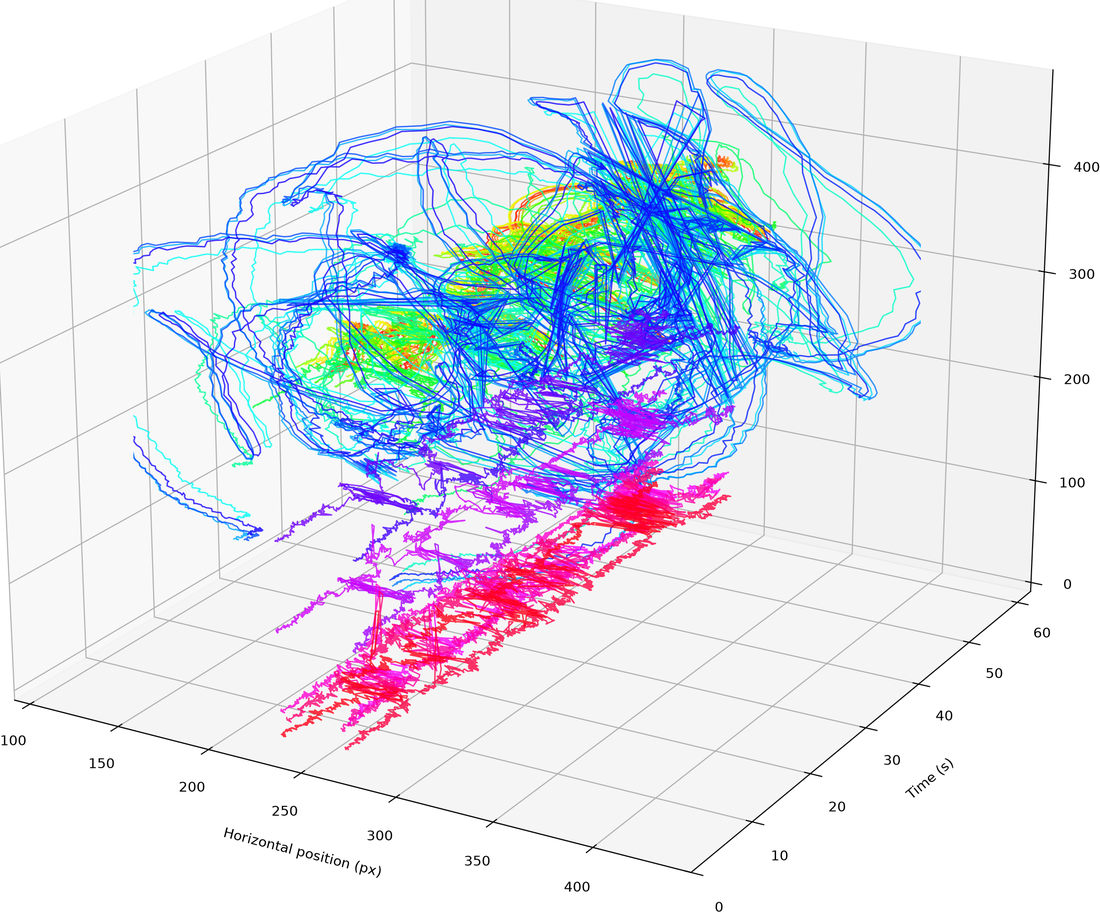
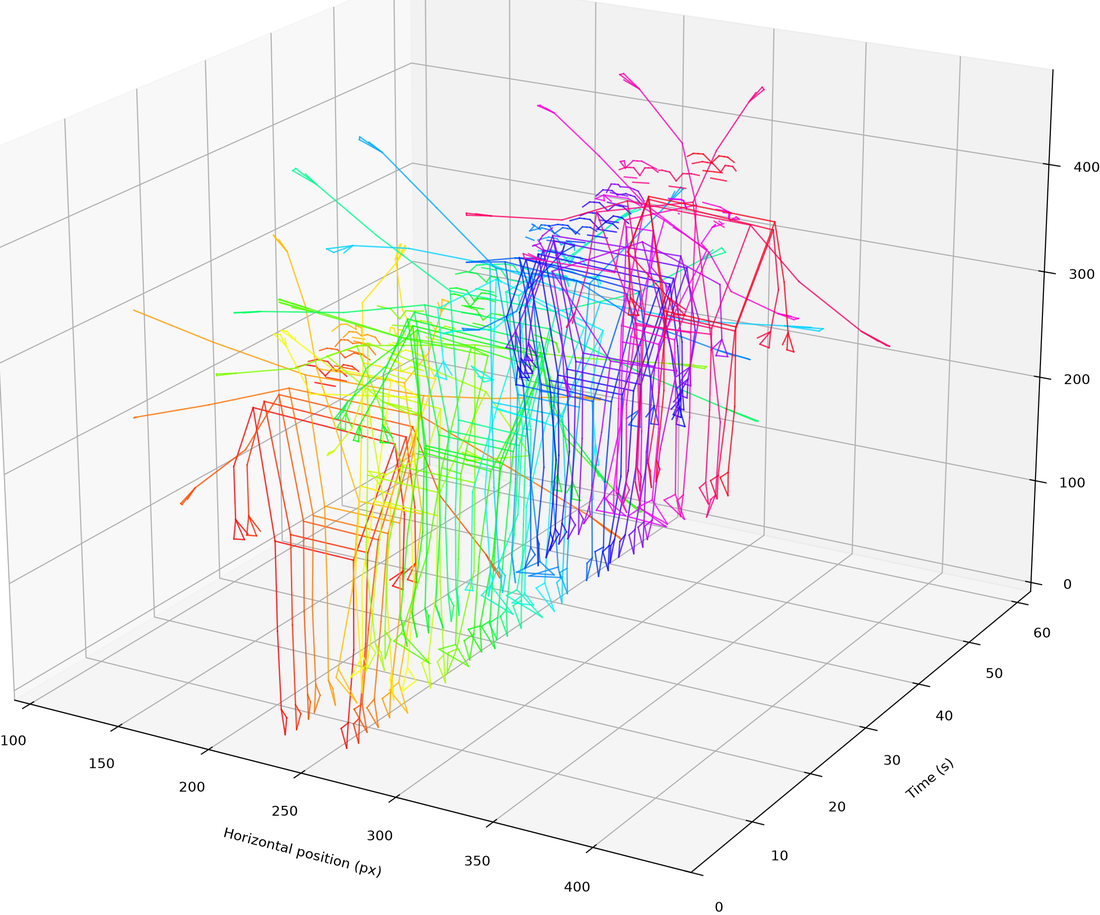
pose_waterfall()—3D spatio-temporal waterfall of pose markers in(x, time, y)space;style='trajectories'(default, continuous per-marker paths),'markers','skeleton', or'both'(markers/skeleton at sampled time slices);axes=Falsefor a clean render,crop=Trueto tighten to the data and trim whitespace; a pose-based counterpart tosilhouette_waterfall()(returnsMgFigure) -
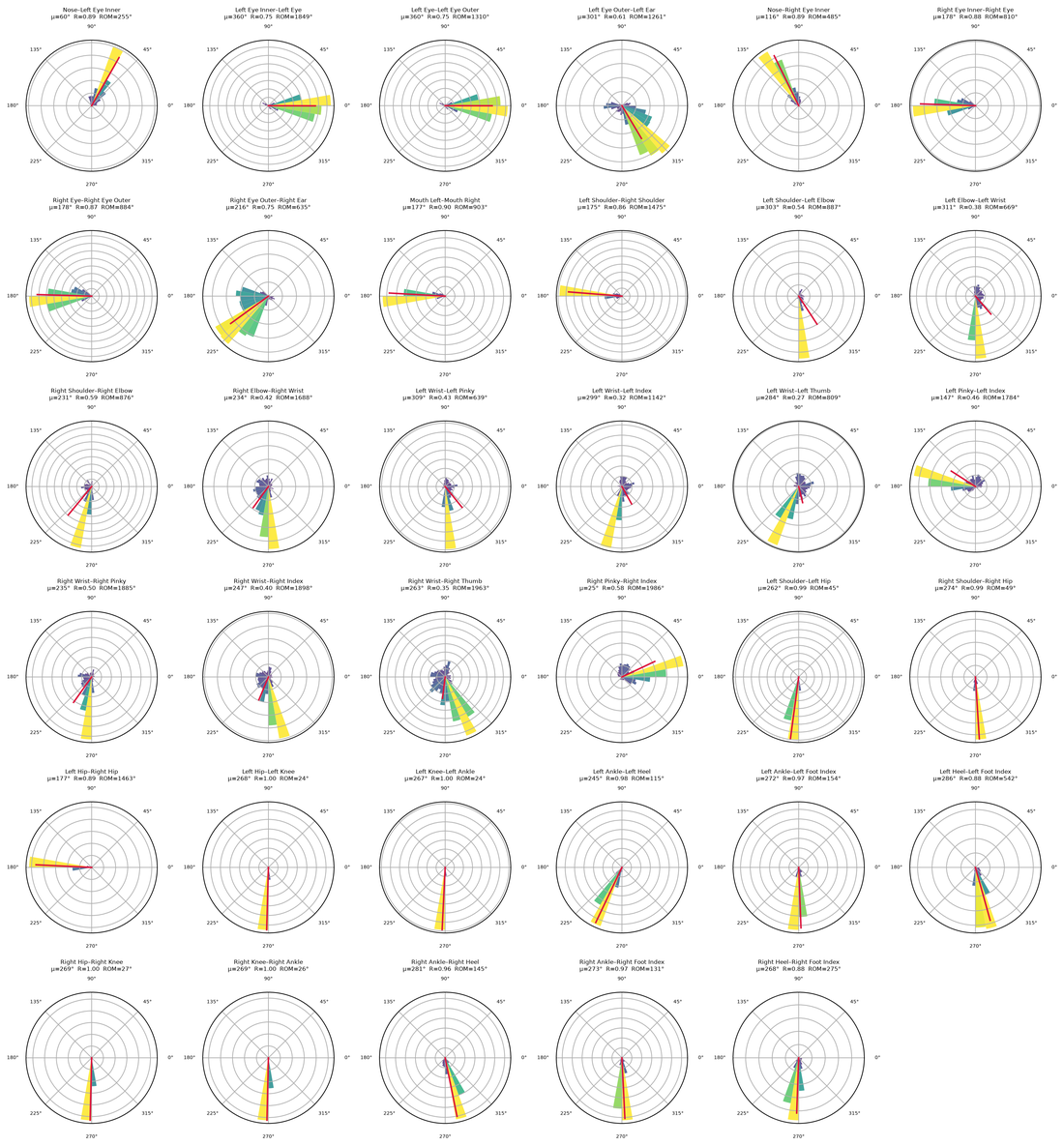
pose_segments()—circular (polar rose) motion plots + circular statistics (mean angle, resultant length R, circular std, range of motion, mean angular speed) for each body segment (the bone between two joints); saves a stats CSV. Reuses cached pose keypoints from a priorpose()call, otherwise runspose()first (returnsMgFigure) -
pose_center()—centre the pose data on its global centroid (a 2D port of the MoCap Toolboxmccenter) (returnsMgFigure) -
pose_distance()—per-marker cumulative distance travelled plus the average across markers (a 2D port of the MoCap Toolboxmccumdist) (returnsMgFigure)
import musicalgestures as mg

mv = mg.MgVideo('/path/to/video.avi')

mv.pose().show()                                       # skeleton video (MediaPipe by default)
mv.pose_waterfall(style='trajectories').show()         # 3D spatio-temporal waterfall
mv.pose_waterfall(style='skeleton', crop=True).show()  # sampled skeleton slices, cropped
mv.pose_segments(n_bins=24, cmap='magma', ncols=4).show()  # per-segment circular statistics
mv.pose_center().show()                                # centre pose data on global centroid
mv.pose_distance().show() # per-marker cumulative distanceThe skeleton video itself is adjustable, and the summary images are on by default:
mv.pose(style='markers', overlay=False)          # keypoints only, no video underneath
mv.pose(style='skeleton')                        # joint lines only
mv.pose(overlay=False, background='white')       # print-friendly, black skeleton on white
mv.pose(marker_history=10)                       # fading motion trail per marker
mv.pose(data_format=['csv', 'c3d'])              # also write a .c3d mocap file
The parameters worth knowing beyond style:
-
model—'mediapipe'(default, 33 landmarks with depth and visibility) or an OpenPose variant ('body_25','coco','mpi'). -
device—'cpu'or'gpu'. For MediaPipe this selects the inference delegate, and GPU falls back to CPU automatically when unavailable. For OpenPose, GPU needs a CUDA-enabled OpenCV build. -
threshold—normalised confidence below which a keypoint is discarded and substituted with(0, 0). Defaults to0.1. -
save_average_pose/save_trajectories—also render an average-pose image (markers coloured by normalised quantity of motion, labelled with dominant frequency) and a marker-trajectories image, each with a companion stats CSV. Both default toTrue.
Inference is the expensive part, and it only runs once. With use_cache=True (the default), a second pose() call with the same model and threshold reuses the already-computed keypoints, so trying a different style, overlay or background is near-instant:
mv.pose(style='markers')      # runs inference, caches keypoints
mv.pose(style='skeleton') # reuses cache: near-instant, no re-inferenceThe array-level counterpart to the rendering-oriented MgVideo.pose() pipeline above: use this module for plain numpy trajectories to feed into QoM/alignment/event-detection, rather than a rendered skeleton video. extract_pose_landmarks() decodes the video through an FFmpeg raw-video pipe (optionally resampled and resized first), runs MediaPipe Pose per frame, and returns tidy numpy trajectories, with no video output involved.
from musicalgestures import extract_pose_landmarks

traj = extract_pose_landmarks(
    'strike.mp4',
    fps=30,                # resample to 30 fps before inference (None = native)
    width=640,             # resize analysis frames to 640 px wide (None = native)
    model_complexity=1,    # 0=lite, 1=full, 2=heavy
    world_landmarks=False, # set True to also collect 3D world landmarks (metres)
    target_name='strike_pose.csv',   # optional: also write a tidy CSV
)

traj['landmarks']        # (F, 33, 3) — per-frame (x_px, y_px, visibility)
traj['detected']         # (F,) bool — per-frame detection flag
traj['detection_rate']   # fraction of frames with a detected pose
traj['fps'], traj['width'], traj['height']
traj['names']            # the 33 MediaPipe landmark names, row order of the landmark axis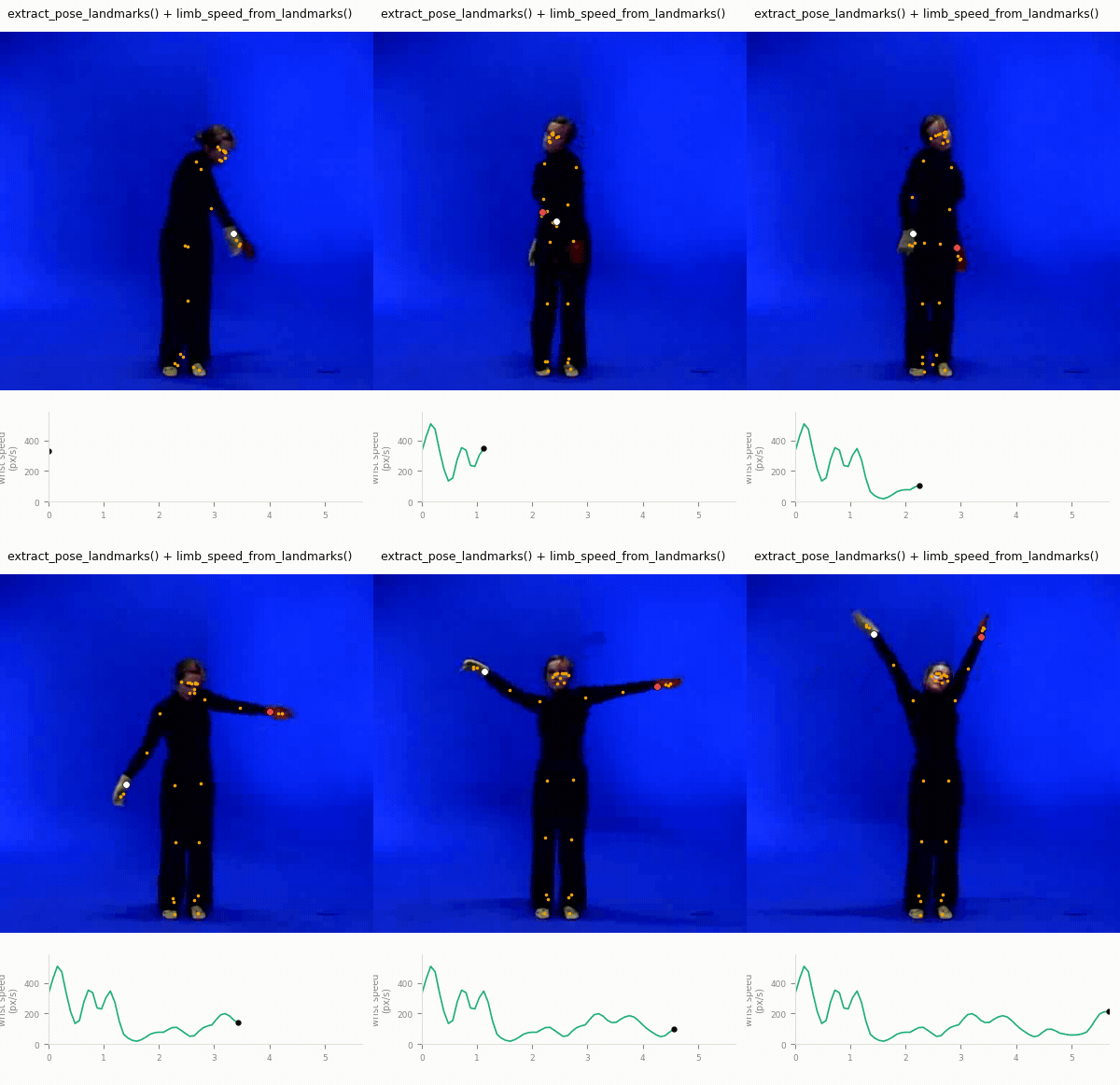
NaN/dropout semantics: on any frame where MediaPipe does not detect a pose, the corresponding row of traj['landmarks'] (and traj['world'], if requested) is filled with NaN across all 33 landmarks and 3 channels, rather than zeros or a dropped row. Every frame index still has a timestamp in traj['time'], so downstream signals stay aligned in time even across dropouts. The derived-signal helpers below are NaN-aware and propagate these gaps rather than silently treating them as valid zero-motion samples.
Detection-rate reporting: with verbose=True (the default), each call prints a one-line summary, e.g.:
strike.mp4: 900 frames at 30 fps (640x360), pose detected in 97% of frames.
traj['detection_rate'] carries the same number for programmatic use, for example flagging low-quality takes before running further analysis.
Only extract_pose_landmarks() needs MediaPipe, and it is imported lazily: importing musicalgestures and using the numpy-only derived-signal helpers below works even without MediaPipe installed.
One small helper belongs here too. midpoint(a, b) is the element-wise midpoint of two landmark trajectories, typically the shoulder midpoint (landmarks 11/12) as an upper-torso proxy point. NaNs propagate: the midpoint is NaN wherever either input is NaN.
from musicalgestures import midpoint

shoulders = midpoint(traj['landmarks'][:, 11, :2], traj['landmarks'][:, 12, :2])  # (F, 2)
For pose-derived quantity-of-motion metrics (pose_qom(), body_scale(), normalized_qom()), see the Quantity of motion section of the Motion, Audio and Posturography Toolkit page.
Once you have landmark trajectories—from extract_pose_landmarks(), MgVideo.pose()'s saved CSV, or any other source such as OpenPose, YOLO-pose or motion capture—two numpy-only functions turn them into motion signals and events.
limb_speed_from_landmarks(xy, confidence, fps, conf_gate=0.5, merge='max_lr', smooth_taps=3) computes the confidence-gated image-plane speed of one or more candidate limbs:
from musicalgestures import limb_speed_from_landmarks

wrists = traj['landmarks'][:, [15, 16], :2]   # left/right wrist, px
conf = traj['landmarks'][:, [15, 16], 2]      # MediaPipe visibility

speed = limb_speed_from_landmarks(wrists, conf, traj['fps'], conf_gate=0.5, merge='max_lr')
# speed: (F,) px/s — bilateral max of left/right wrist speed, lightly smoothed
Frames whose landmark confidence falls below conf_gate are masked to NaN before differentiation. The per-limb speed is the central-difference magnitude of the pixel path, in px/s. Candidate limbs are merged by element-wise maximum (merge='max_lr') so motion of either limb registers, and the result is lightly smoothed with a short NaN-aware moving average (smooth_taps=3 by default).
Speed precedes contact. A limb-speed peak marks the moment of maximum downstroke speed, not the moment of contact or arrest. A striking limb decelerates sharply at impact, so the speed peak—and any peak-picker run on this signal—occurs slightly before the contact event that an audio onset or an acceleration peak would register. Account for this bias when comparing event times against other modalities. This is also a single-camera 2D signal: motion towards or away from the lens is foreshortened, so pixel speed is not metric speed.
Peak-picking on the returned signal is left to you. The general adaptive peak-picker pick_peaks (_peaks module, covered on the Motion, Audio and Posturography Toolkit page) is a good default.
impact_events(pos_by_point, fps, rel_thresh=0.12, min_interval_s=0.10) finds candidate impacts from acceleration peaks:
from musicalgestures import impact_events

impacts = impact_events(wrists, traj['fps'], rel_thresh=0.12, min_interval_s=0.10)
impacts['time']        # impact times (s)
impacts['magnitude']   # merged acceleration magnitude at each impact
impacts['accel']       # the full merged acceleration-magnitude signal, for plotting
Each candidate point (e.g. the two wrist landmarks) is double-differentiated to acceleration by central differences, merged by element-wise maximum across points, and peak-picked with a relative threshold (rel_thresh × the signal's max) and a minimum inter-impact interval (min_interval_s). Double-differentiation is noisy and also responds to the backswing—not only the collision—so treat the results as candidate impacts and validate against another modality where possible, for example audio onsets or the mocap comparison below. For whole-image visual impact detection from video with no landmarks at all, use MgVideo.impacts() instead.
Postures and trajectories over time, flat enough to read at a glance—three views of one pose pipeline behind one function.
-
view='strip'—postures at regular instants, each centred and scaled so two are comparable even when the dancer stood at different distances.trajectories='traces'gives every landmark a fading history behind its own posture;'spatial'threads head, pelvis and feet through the postures instead. -
view='room'—skeletons where they actually stood, with the route drawn over them. Worth reaching for only when the dancer travels; on a recording made on one spot the skeletons pile up andstripis the view that reads. -
view='bands'—one row per body region carrying its joint angles, so a held posture is a flat band—whichposegramcannot show, since it carries landmark speed and a held limb has none. Frames the detector missed stay white: gaps are shown, not interpolated.
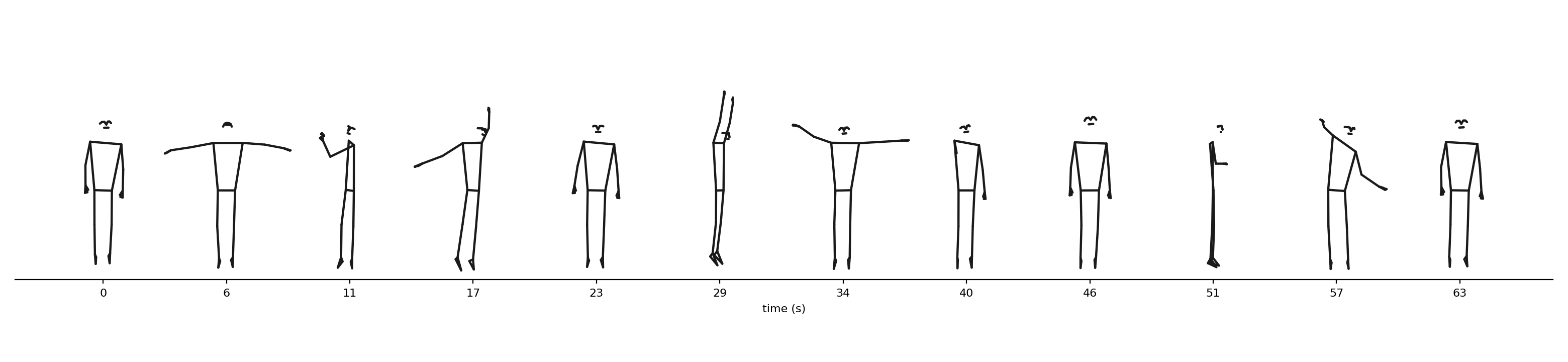
The bundled dancer.avi as a strip: twelve postures, one glance.
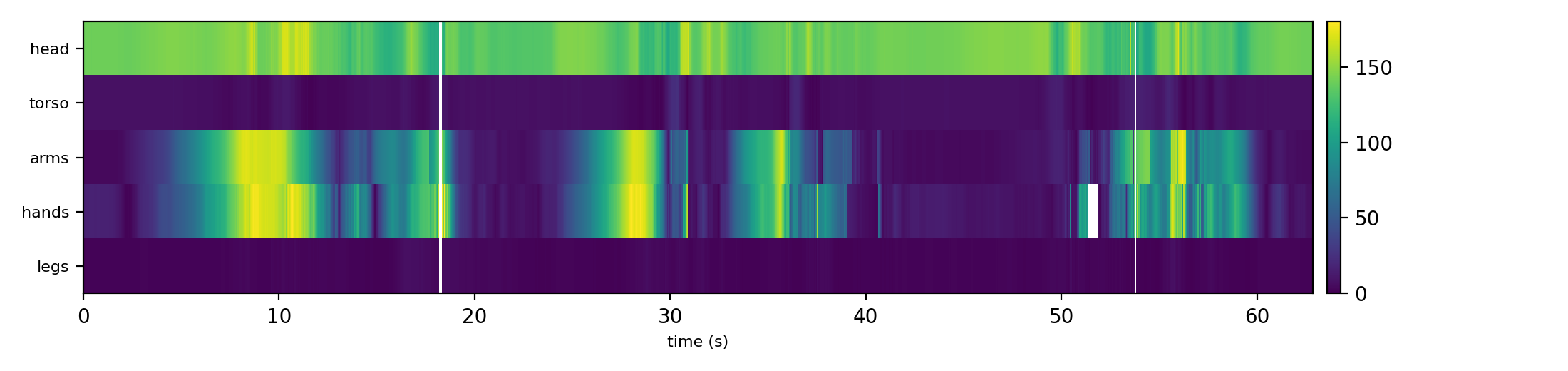
The same recording as bands: the arm and hand rows carry the dance, the legs hold still, and the white columns are frames the detector missed.
The posegram mentioned above is the timeline's complement: MgVideo.posegram() puts one landmark per row, ordered head to foot, coloured by that landmark's speed, so it answers what a motiongram answers for pixels—what was moving at 04:12. posegram_spatial() puts image position on the vertical axis instead, so it can be laid directly beside a motiongram. See the _posegram API reference.
video = mg.MgVideo('session.mp4')
video.pose_timeline(view='strip', trajectories='traces')   # -> MgFigure
video.pose_timeline(view='bands')
video.posegram() # landmark speed, head to footA dancer who walks across the stage in a held T-shape is holding one posture the whole way: position changes, configuration does not. The _postures module cuts landmark trajectories into such held configurations, and it keeps segmentation apart from recognition. A posture is a span where the body's configuration holds still; a pose, a posture that means something, is only ever proposed as a label. The Concepts page carries the full position/posture/pose scheme.
-
segment_postures(landmarks, fs, stability=0.1, min_duration=1.0, min_gap=0.25)—cuts(frames, 33, 3)trajectories intoPosturespans. Configurations are pelvis-centred and torso-scaled first, so the judgement is body-relative on both sides, and stationarity is judged on the fastest-moving landmark region. Frames the detector missed are unknown, not held: they never extend a posture. A recording in which the body never stops holds no postures, which is the correct answer for continuous movement, not an error. -
key_postures(postures, radius=0.2)—groups recurring postures by configuration distance, without deciding in advance which postures exist. Returns the groups sorted by total time held, longest first. -
average_posture(landmarks)—the per-landmark median configuration of a whole recording, body-normalised. -
match_postures(postures, template, name)—labels every posture whose configuration sits withinradiusof a template configuration; a pose defined by showing one. Postures that do not match stay exactly as they were, because an unlabelled posture is still a posture.
The normalisation underneath, normalise_poses(), is detector-agnostic: it recognises the skeleton topology by landmark count, so MediaPipe's 33 landmarks, YOLO's COCO-17 and the OpenPose skeletons all work unchanged, and an unknown skeleton can pass its own anchors.
from musicalgestures._postures import key_postures

video = mg.MgVideo('dance.mp4')
postures = video.postures_from_pose()      # reuses cached pose() landmarks when present
for p in postures:
    print(p)                               # <Posture 12.40-15.10s (landmarks)>

groups = key_postures(postures, radius=0.2)
print(f"{len(groups)} recurring postures, "
      f"the most-held one for {groups[0]['total_duration']:.1f} s in total")
Each Posture carries start, end, duration, a body-normalised configuration, a labels dict for recognisers to write into, and a features dict that describe_postures() fills with shape numbers (spread, width, height, all in torso lengths). Empty labels is the normal state: most postures are never named.
These three live in micromotion and are re-exported here, so their signatures and return values are documented once, at https://fourms.github.io/micromotion/. New code should import from micromotion directly.
-
read_qtm_tsv()—robust reader for Qualisys Track Manager (QTM) TSV exports: locates theMARKER_NAMESheader, autodetects the numeric data block, converts exact-zero XYZ gap-fills toNaN, falls back from UTF-8 to latin-1. Returns(marker_names, data, fs)withdataof shape(T, M, 3). -
compare_modality_envelopes()—resample two precomputed motion envelopes onto a common one-second grid and correlate them, for example to validate a video-pose QoM envelope against a mocap QoM envelope. Returns{"r", "n"}. -
dominant_frequency()—dominant Welch spectral peak of a signal within a band, for example a body-part speed or vertical-position signal. This one is not re-exported at the top level, because it would shadowmusicalgestures.dominant_frequencyfrom_analysis, which takes a different signature. Call it asmusicalgestures._mocap.dominant_frequency(...)or frommicromotion.mocap.
When both a video and a synchronised motion-capture recording exist, the two can check each other. Extract a pose envelope from the video, compute the same envelope from the mocap markers, and correlate:
from musicalgestures import (
    extract_pose_landmarks, pose_qom,
    read_qtm_tsv, group_qom, compare_modality_envelopes,
)

# 1. Video-derived pose envelope
traj = extract_pose_landmarks('take01.mp4', fps=30, width=640)
wrist = traj['landmarks'][:, 16, :2]                      # right wrist, px
qom_video, speed_video, fs_video = pose_qom(wrist, traj['fps'])

# 2. Motion-capture envelope, same body part
marker_names, mocap_data, fs_mocap = read_qtm_tsv('take01.tsv')
i = marker_names.index('RWrist')
speed_mocap, fs_mocap_out = group_qom(mocap_data[:, [i], :], fs_mocap)[1:]

# 3. Compare the two envelopes
result = compare_modality_envelopes(speed_video, speed_mocap, fs_video, fs_mocap_out)
print(f"video vs. mocap agreement: r={result['r']:.2f} over {result['n']} s")
compare_modality_envelopes deliberately takes precomputed 1-D envelopes rather than computing quantity of motion itself. It resamples both to a common one-sample-per-second grid, then returns their Pearson correlation (r) and the number of overlapping seconds (n); r is NaN if fewer than 3 s overlap or either envelope is constant. Because the per-second binning uses an integer-rounded step, non-integer frame rates (e.g. 29.97 fps) drift slightly over long signals. Treat this as a validation check, not a precise-alignment tool.
The pose-rendering MgVideo methods (pose(), pose_waterfall(), pose_segments()) are core toolbox features, not tied to a specific study; pose_center() and pose_distance() are 2D ports of the MoCap Toolbox's mccenter/mccumdist.
The mocap I/O and _posetools come from the still standing and Westney-comparisons studies (Jensenius). read_qtm_tsv() is a single robust QTM loader for the formats those studies used, and compare_modality_envelopes() is the MediaPipe-versus-mocap validation from the still standing study; both live in micromotion. _posetools covers the studies' landmark extraction plus the cymbal-comparison study's markerless striking-wrist speed and kinematic impact detection. That last pair follows the paper's method description, and its numeric defaults are that study's provisional values for 120 Hz mocap hand data, to be tuned per dataset.
- Pose Tracking on the docs site—the task-oriented summary of this chapter
-
_posetoolsAPI reference · source -
_posturesAPI reference—posture segmentation, key postures, template matching - micromotion documentation—the reference for the mocap I/O functions
-
Video Analysis on the docs site—full
MgVideoreference, includingpose()and related rendering methods