5 ‐ The Effects of Filtering
For exact filter semantics and defaults see _filter and _motionvideo on the docs site. This page is worked visual examples of what the threshold does.
A camera never records a perfectly still image: sensor noise makes every pixel flicker a little, even of an empty room. A threshold is the rule that says "ignore changes smaller than this", so that the flicker does not count as dance. Set it too low and the noise pollutes every measurement; set it too high and quiet motion disappears with it. This page shows, in pictures, what different settings keep and discard.
When working with the motion method, there is an option to filter the video frames after calculating the absolute difference between subsequent frames. The method itself is listed on Video Analysis.
The threshold filter "removes" pixels (i.e. turns them to black) if their luminosity is under a defined threshold. In MGT-python the threshold parameter works in a normalised space: 0 to 1 for 0% and 100% respectively, where 100% means white.
Finding the right threshold value is crucial for accurate motion extraction. A few examples follow.
The examples below are about the picture. What the threshold costs a measurement is a different question, and it has now been measured. On 345 clips of everyday sound-producing actions—each an event embedded in stillness—scored by how far the action stands above the lead-in it interrupts: no threshold improves the separation. More clips lose contrast than gain it at every step, and at the lower thresholds not by chance (202 of 345 at the
threshold=0.05default, sign test p = 0.002), but the median cost at that default is 0.2 %, against a per-clip spread of 0.39 to 2.66. The direction is real and the size is swamped, so the value that makes a motiongram legible is very nearly free for machine analysis of this kind of material. Usethreshold=0.0when you want the untouched signal.At
threshold=0.2the direction stops being significant (187 of 345, p = 0.13), so heavier filtering is not reliably worse either—it simply stops doing anything consistent.One limit, and one warning about samples. It scores a single criterion, and a threshold could be free for it while costing something nobody has measured. And watch how the number moved as the sample grew: 6 clips said no effect, 23 said 1.2 %, 83 said 0.4 %, 345 says 0.2 %. The corpus is heavy-tailed and the small samples were confidently wrong.
The trap worth knowing. A threshold also moves any landmark computed from the same series—an onset, for instance. Scored at each threshold's own onset the loss above reads as 23 %; with the boundary held still it is 9 %. The difference is the onset shifting under the threshold and dragging frames across the very boundary the statistic is measured against. That is not specific to motion.
Here is an example of extracting the motion without any threshold. This will result in a result in which much of the background noise will be visible, including traces of keyframes if the video file has been compressed.
source = musicalgestures.MgVideo('/path/to/source/video.avi', starttime=5, endtime=10, skip=0, contrast=100, brightness=20)
motiongrams = source.motiongrams(threshold=0.0)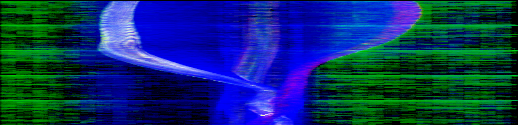 |
|---|
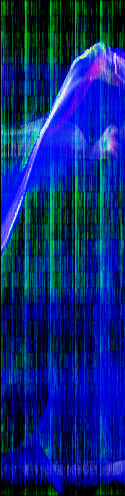 |
| Vertical (upper) and horizontal (lower) motiongrams, no threshold filter |
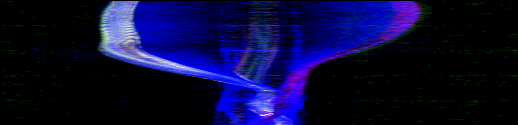
Adding just a little bit of thresholding (0.02 here) will drastically improve the final result.
 |
|---|
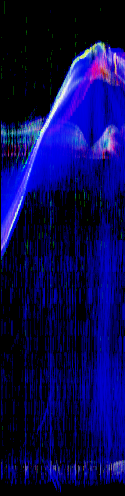 |
| Vertical (upper) and horizontal (lower) motiongrams, 2% threshold filter |
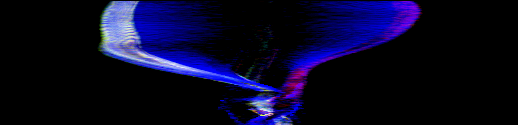
A moderate threshold such as 0.1 generally works well for many types of videos. (The MgVideo default is 0.05.)
 |
|---|
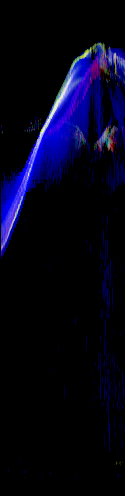 |
| Vertical (upper) and horizontal (lower) motiongrams, 10% threshold filter |
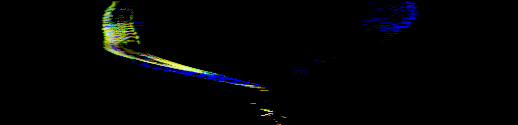
A more extreme value (for example 0.5) will remove quite a lot of the content, but may be useful in some cases with very noisy videos.
 |
|---|
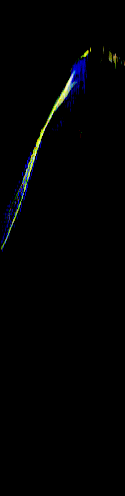 |
| Vertical (upper) and horizontal (lower) motiongrams, 50% threshold filter |
As the above examples have shown, choosing the threshold value is important for the final output result. While it often works to use the default value (0.05), you may improve the result by testing different thresholds.
threshold decides how much change counts; filtertype decides what happens to the pixels afterwards.
-
'Regular'(default) zeroes every pixel below the threshold and then applies a median filter, which removes salt-and-pepper speckle while keeping the grey levels of what remains. -
'Binary'turns every pixel that passes the threshold white and median-filters the result, so the picture answers "did anything move here" with yes or no. -
'Blob'applies erosion instead, eating away small isolated specks so that only larger connected regions survive.
The median and erosion kernels are set with kernel_size. See _filter for the exact semantics.
threshold gates the frame difference: a pixel whose change since the previous frame is
below the threshold contributes nothing, whatever the picture's own brightness there. The
same semantics hold on both processing paths, so the number means one thing wherever you
set it, and filtertype='Binary' keeps its separate meaning of all-or-nothing per pixel.
One compatibility note matters for old outputs: quantity-of-motion numbers produced by releases before 1.19.0 are not comparable with current output—on typical full-length recordings most of the old signal was ungated sensor noise—so recompute rather than mix the two in one analysis.
Everything above picks a threshold and applies it everywhere. That works while the material
is uniform, and stops working the moment two recordings have different noise. On a corpus of
six dance recordings the same threshold=0.05 lit 0.52 times the area the dancers
covered in one and 1.90 times it in another—simultaneously too tight and too loose,
at one number.
noise_floor measures
the floor instead. The room plate
says which pixels have nobody in front of them, and whatever their frame-to-frame difference
shows, nothing there moved. The gate is a quantile of that distribution, so the parameter you
choose is a false-positive rate and not a brightness.
import musicalgestures as mg

floor = mg.frame_difference_floor("session.mp4")     # grey levels, 0-255
floor = mg.motion_vector_floor("session.mp4")        # pixels of displacement
Both return a dict: threshold, refused, reason, foreground_kept—the last being
how much of the moving part the gate would leave standing, which is the cost of accepting it.
A detector with no way to decline will invent an answer. Otsu will split pure noise and
report a threshold looking exactly like a real one. So this refuses when there are too few
samples, and when the gate would keep almost none of the moving part—a camera move, a
light change, a recording with nothing in it. A refusal carries threshold: None, so there
is nothing to use by mistake.
Equalising the false-positive rate makes maps and pictures comparable across recordings. It does not make magnitudes comparable: every recording ends up at its own operating point. Comparing quantity of motion across sessions is therefore easier with one fixed threshold and harder with a measured one. Both are kept for that reason:
- comparing magnitudes across recordings → one fixed
thresholdeverywhere - comparing pictures, maps, or where motion happened → a measured floor per recording
One detail specific to motion vectors: H.264 codes to quarter-pel, so a gate at or below 0.25 px removes nothing at all—0.25 is the smallest non-zero displacement the format can express.
multishot() puts many moments of a recording into one picture. It absorbed
stroboscope(), which made the same picture a different way; that name still works and
delegates, and goes at 2.0.
| default |
stroboscope()'s way |
|
|---|---|---|
| frame choice | spatial separation | select='even' |
| background | median room_plate
|
background='average' |
| time cue | none | colorize=True |
Even sampling is what makes two bodies land in the same place, and a mean average background keeps a faint ghost of everyone who crossed—which is what a median plate exists to remove. That is why the defaults are what they are. But even spacing answers a real question, and it is the one the time tint belongs to: how a body looked at regular instants, the Muybridge reading, against where it went.
Both assume a performer who moves through space. On a seated musician they return moving limbs stacked in one place, because a static torso becomes part of the background and separation has nothing to separate. That is the picture reflecting the recording rather than a fault.
A note on segmentation. segmenter='auto' uses MediaPipe when it is installed, which is
the better mask where figure and ground are close in brightness. It masks only what the pose
detector finds, though—a small dark figure against a dark background is often not detected
at all, and then it falls back to the plate and says so.