Repository navigation
15 ‐ 360 Video Anglegrams and AEM
360 video wraps the whole scene around the camera, so where something moves becomes as interesting as how much. This page covers the directional analyses that Mg360Video adds on top of the flattening/stitching workflow (see Working with ambiscape for the camera-by-camera ingest table): the visual anglegram and the Audio Energy Map (AEM) overlay, both after Jinyue Guo's PhD work in the AMBIENT project (RITMO, University of Oslo) and his ambiviz toolbox.
Mg360Video detects the projection when you do not name it: spherical metadata (GoPro MAX exports, Insta360 Studio, Garmin, RICOH app), the .360 extension, or a 2:1 frame all resolve automatically.
import musicalgestures as mg

v = mg.Mg360Video('walkaround.mp4')                  # auto-detected equirectangular
v = mg.Mg360Video('GS010008.360', 'gopro_360')       # or name the projection explicitly
v.convert_projection('equirect') # flatten if neededOn an equirectangular frame the horizontal pixel axis is the azimuth axis. The anglegram collapses each inter-frame difference over image rows (weighted by cos(latitude), so the stretched poles do not dominate) into motion energy per azimuth, and stacks the columns over time—a time × azimuth heat map you read like a spectrogram with directions replacing frequencies.
ag = v.anglegram()                    # MgFigure; writes <name>_anglegram.png
ag.data['anglegram']                  # (n_bins, T-1) motion energy matrix
ag.data['azimuth'] # bin centers in degrees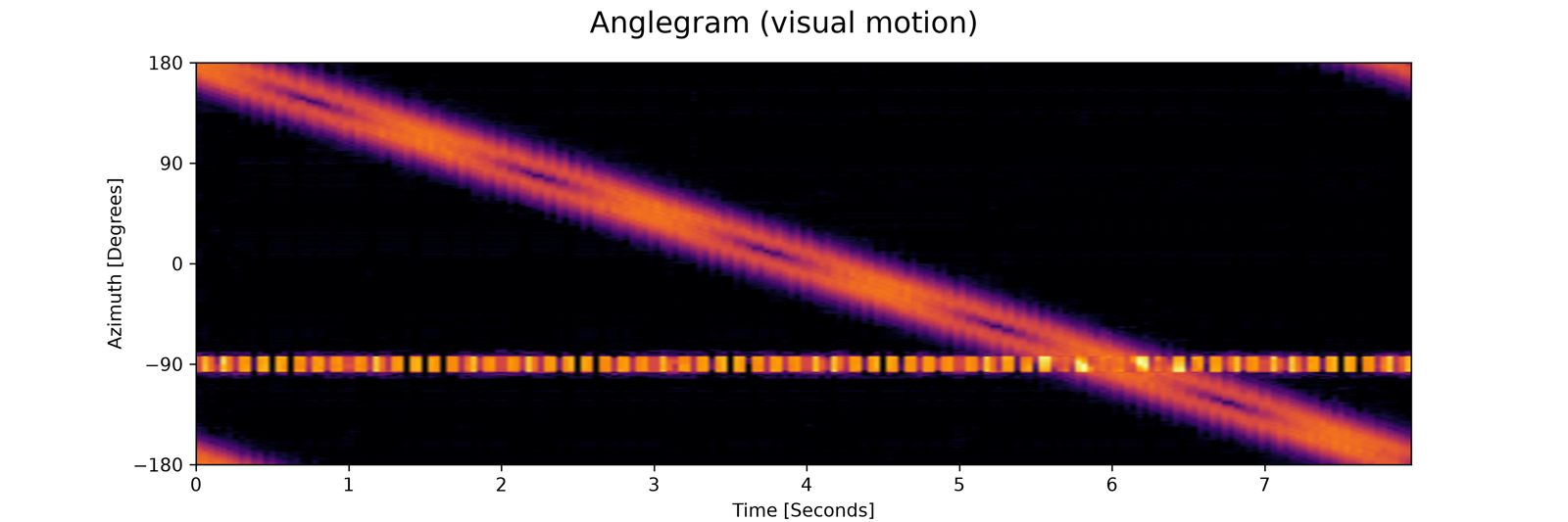 |
|---|
| Anglegram of a synthetic equirectangular clip: a bright source orbits the camera once (the diagonal trace) while a flickering doorway sits at azimuth −90° (the horizontal band) |
The y-axis defaults to the ambisonic convention (+90° = left of the camera, counterclockwise from front), which is what ambiscape's audio anglegram uses—so the two figures compare directly. Pass azimuth_convention='image' to keep azimuth increasing with image x instead. Whether the flip is right for your rig depends on how camera and microphone were mounted; verify with a clap from a known direction.
The audio side arrives through a file only—ambiscape (or any other tool) exports it, MGT renders it. The expected format is a CSV/TSV with a header naming time (s), azimuth (degrees, ambisonic convention), and energy (linear, or level_db in dB) columns, one sample per row, sparse or dense (see load_aem in the API reference).
v.aem_overlay('aem.tsv', on='anglegram')   # visual motion in grey, audio energy in colour
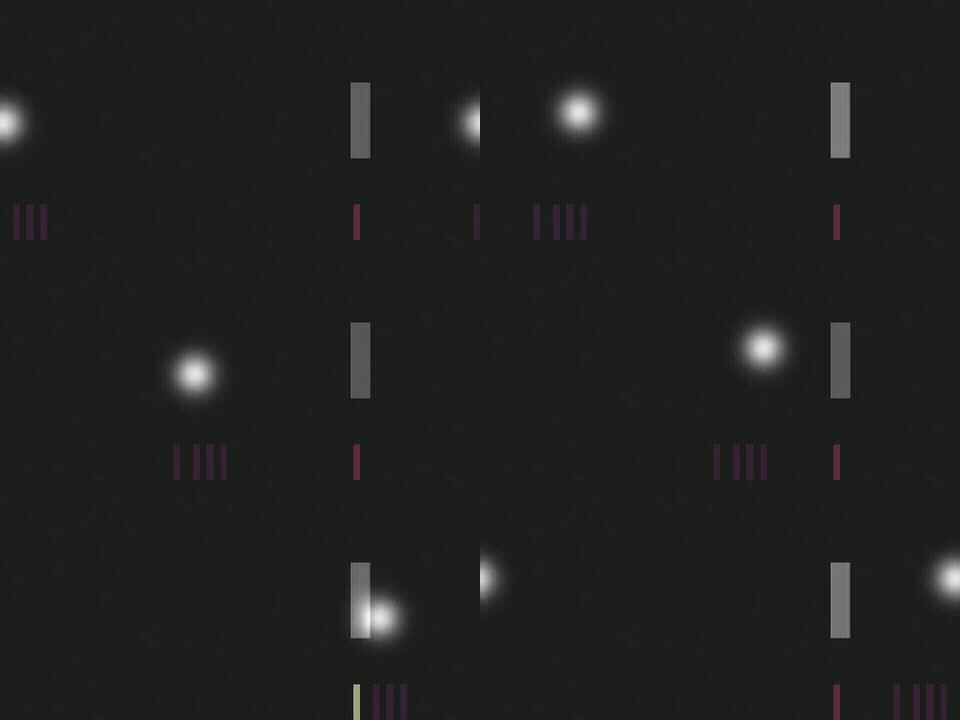
v.aem_overlay('aem.tsv', on='video') # translucent heat strip along the bottom of every frame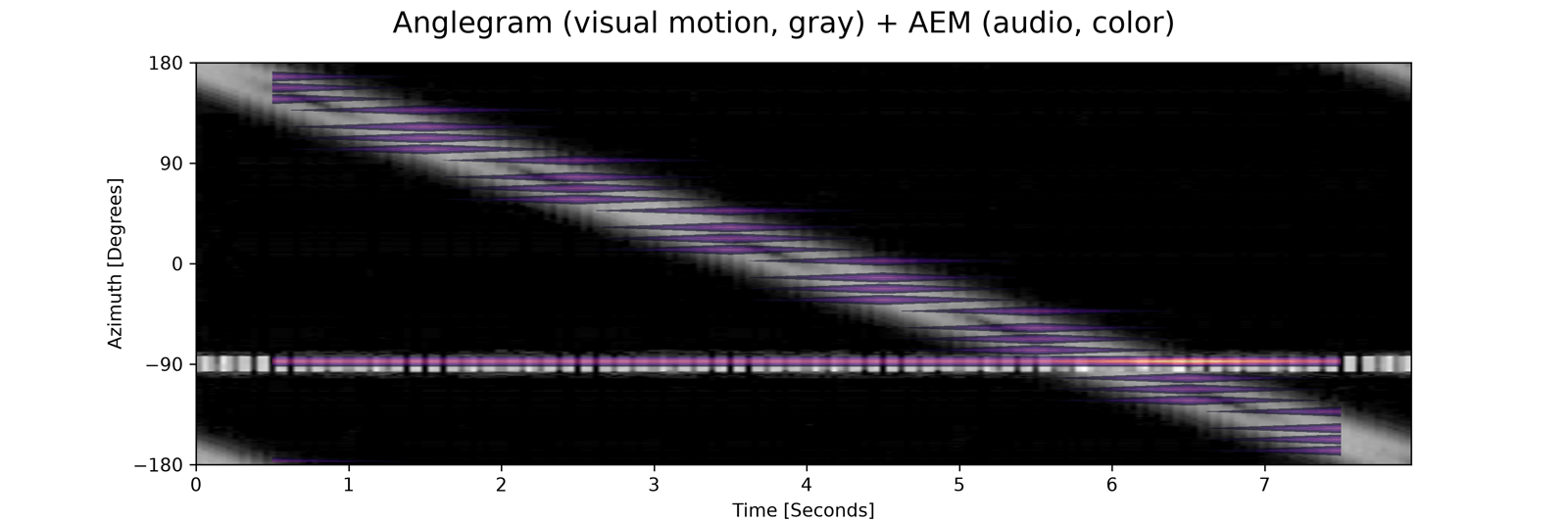 |
|---|
aem_overlay(on='anglegram'): visual motion in grey, audio energy in colour, on shared time and azimuth axes |
On the video, the strip's horizontal position is azimuth (aligned with the equirectangular longitude axis) and its colour and opacity follow the audio energy around that moment—a sounding doorway lights up the strip under the doorway.
 |
|---|
aem_overlay(on='video'): the strip along the bottom lights up under the azimuth the sound comes from |
Any standard MGT analysis can run on one direction of the scene: view() extracts a rectilinear (perspective) crop as a regular MgVideo, without touching the source object.
front = v.view(yaw=0, h_fov=90, v_fov=60)
front.motiongrams()
front.pose()- Working with ambiscape—shared clock, device sync, who ingests what
- API reference: _anglegram and _360video
- Video Analysis on the docs site—task snippets for the 360 methods alongside all other video analysis
- Guo's ambiviz—the audio-side AEM/anglegram origin