User Guide Lifecycles
Every record in Cairn, a risk, a scope, an incident, an action plan, sits on a step in a lifecycle. The step is not a label. It decides three things that matter far beyond the record itself.
| The step decides | Which means |
|---|---|
| Whether the record counts in reports | A draft risk does not inflate your risk count, and does not appear in the Statement of Applicability |
| Whether other records can link to it | A draft framework cannot be attached to an audit, because it is not settled yet |
| Whether it can be deleted | Once a record has been validated, deletion is no longer offered. It is archived instead |
This is why a number on the dashboard and a number in a list can legitimately differ : one counts what is in force, the other shows what exists.
Every detail page carries the same control, at the top, showing where the record has been, where it is, and where it can go.
It comes in two shapes, and which one you see depends on the record's lifecycle rather than on the page. A linear lifecycle, such as the default one, draws a connected row of pills. A graph lifecycle, such as an incident's, draws the steps as a network, because the route is genuinely not a line : an incident under investigation can be contained, reclassified as an event, or archived, and a row of pills would misrepresent that as an order.
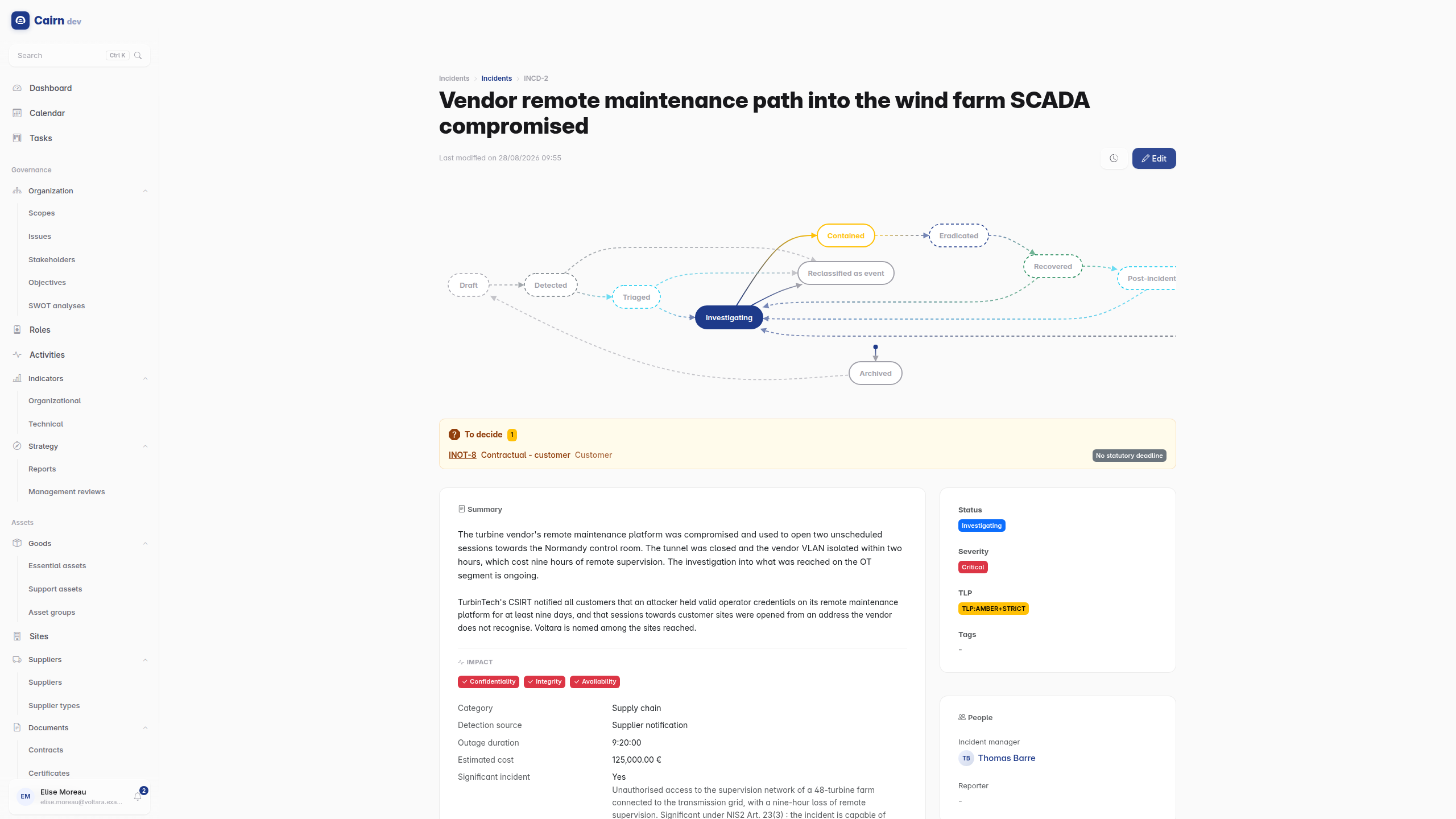
In both shapes the same rules apply.
- Done steps are behind you.
- The current step is highlighted.
- The next step is a button, and it is only offered if you have the permission for it. If you cannot see the button someone else can, that is the gate working.
- Future steps are shown greyed, so you can see the road ahead.
- Earlier pills are clickable, which is how you send something back. That is refusal and rework : an action plan submitted too early goes back to drafting, and the round trip is recorded.
- Archiving is the off-ramp, available from anywhere.
Some transitions require a comment, and Cairn will not let you proceed without one. Those are the moments where the reason matters as much as the decision : a refusal, an archive, a decision not to notify an authority.
The stepper is the only way a state changes. There is no status dropdown, and the API has no field you can patch to move a record. That is deliberate : the transition is where the permission check, the mandatory comment and the recorded event live, and a shortcut around it would be a hole in the audit trail.
Most records run a four-step lifecycle.
Draft ──▶ Pending validation ──▶ Validated ──▶ Archived
  ▲                                               │
  └───────────────── restore ─────────────────────┘
Draft is where you work. Only here can a record be deleted. Pending validation is submitted and waiting. Validated counts in reports and can be linked to. Archived is the exit : the record leaves the operational view without being destroyed, and can be restored to draft.
Where the business has real operational stages, the lifecycle reflects them rather than flattening them into "approved / not approved".
A scope runs Draft, Definition, Validation, In force, Review. Review loops back to In force, because a perimeter is re-examined periodically rather than re-created.
A site runs Draft, Commissioning, Operational, Review, with Decommissioned and Archived as exits.
An incident runs Detected, Triaged, Investigating, Contained, Eradicated, Recovered, Post-incident review, Closed. Each transition writes its own entry in the incident's chronology, so the timeline is a by-product of handling the incident rather than something someone has to remember to fill in.
A contract runs Draft, Active, then Expired or Terminated.
The complete set, with every step and transition, is in the lifecycle reference.
A transition can be gated three ways, and often is:
-
By permission. The
approveaction on the relevant feature. - By role. Restricted to whoever holds a given ISO 27001 role, for that record's perimeter. The person who wrote it is often not the person who validates it, and that separation is the point.
- By person. Some transitions are reserved for the record's own owner.
If a transition is not offered to you, one of these is why.
This is the distinction to internalise.
Archiving removes a record from the operational view. It stops counting in reports, stops being linkable, and keeps its entire history. It can be restored.
Deleting is only possible from a step marked deletable, in practice from draft, before the record has meant anything to anyone. Once something has been validated, deletion stops being offered.
If you find yourself wanting to delete a validated record, what you want is to archive it. The audit trail is the reason : a compliance platform where inconvenient records can disappear is a compliance platform nobody can rely on.
Under Administration -> Lifecycles, an administrator can edit the steps and transitions of any lifecycle : rename a step, add one, change what requires a comment, change which permission gates a transition.
This is powerful and it is not cosmetic. Adding a step changes what "validated" means for every existing record of that type. Change lifecycles deliberately, and preferably not in the middle of an audit.