Firearms and Travel
This page covers firearm ammunition, controls, attachments, and travel items.
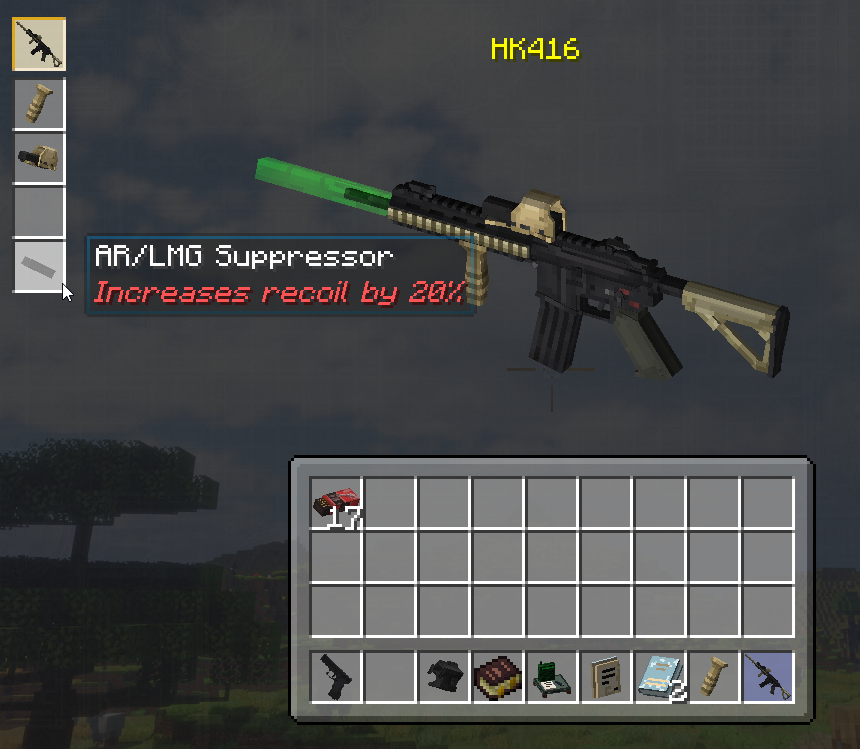
Guns use ammunition matched to their caliber. Keep compatible rounds in your inventory, hold the gun, and press R to reload. Shots attract infected.
| Key | Action |
|---|---|
R |
Reload |
B |
Change fire mode, when supported |
V |
Switch scope or optic view, when supported |
Y |
Open the weapon modding menu |
If another mod uses the same key, change it through Options → Controls → Key Binds.
Hold a gun and press Y. Choose an attachment slot, then select a compatible item from your inventory. The screen also shows installed attachments and their effects.
A suppressor reduces the investigation radius. Suppressed shots alert nearby infected; unsuppressed shots can attract infected from roughly 96 blocks away. See Stealth, Weight, and Noise for the full noise rules.
You must activate a Waystone before using it as a destination. Same-dimension Waystone travel costs experience based on distance.
Warp Stones have a 1.6-second charge and cost one experience level per 100 blocks by default. Warp Plates are free destinations and can connect routes between settlements.
- Compatible ammunition and a loaded weapon
- Canteen and purification plan
- Enough free capacity to stay as light as possible
- Infection treatment or a route to the medic
- A marked Waystone, Warp Stone, or return route
- The radio's weather and horde report
Next: choose a city objective or turn recovery into a contract.