Release v2.1.0

We are pleased to present 2.1.0! This release adds some significant new
features including:
- Multi-wiggle tracks - This allows, for example, multiple bigwig files to be
displayed in a single track with synchronized scalebar settings. See
multi-wiggle docs for more
info. - Undo and redo functionality, let's you undo an operation in the UI e.g.
closing a view, closing a track can be recovered - An alert when the dotplot view renders features that go beyond the bounds of
the selected region. This is often an indication that the wrong assembly is
being used or the query and target are backwards
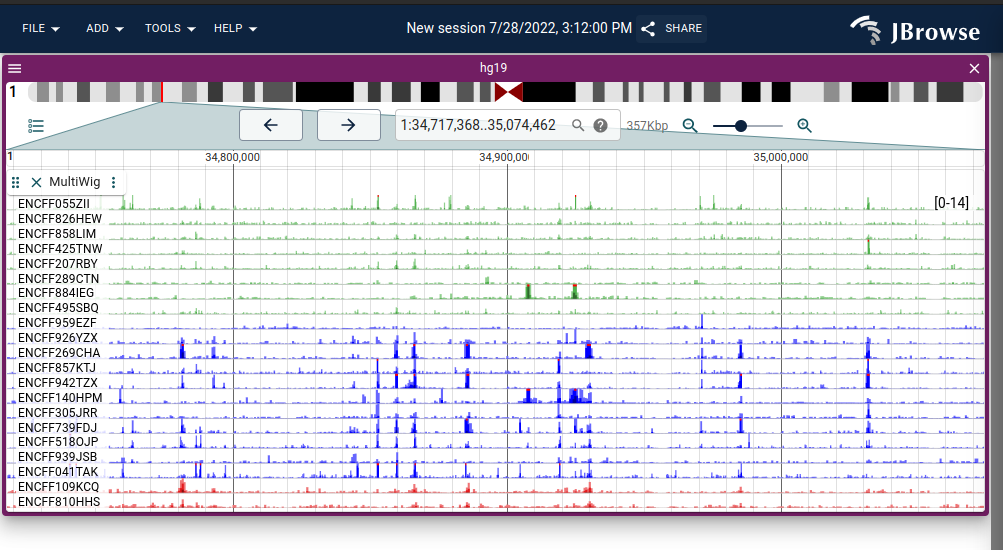
Multi-row plot showing 21 ENCODE bigWig tracks

Overlapping "xyplot" rendering multiwiggle rendering mode with "emphasised"
points showing tumor vs normal coverage

Dotplot view showing warnings from rendering dotplot, generally due to the
wrong assemblies being compared. Screenshot also shows the dropdown menu to
choose whether mouse click-and-drag pans the view or selects a region

Undo and redo buttons in the Tools menu, also accessible from keyboard
shortcuts ctrl+z/ctrl+y and cmd+z/cmd+shift+z. The Undo/Redo function is
available in jbrowse-web and jbrowse-desktop currently
🚀 Enhancement
core- #3111 Create undo manager in jbrowse-web and jbrowse-desktop (@cmdcolin)
- #3115 Add warning when dotplot renders outside of it's boundaries, and create click-and-drag panning of dotplot view (@cmdcolin)
- #3102 Allow creating alternative "add track workflows" from within the "Add track" widget (@cmdcolin)
- #3043 Create MultiWiggle track type, adapter, and renderers (@cmdcolin)
- Other
🐛 Bug Fix
- Other
- #3109 Better support for developing plugins from within yarn 2+ workspaces (include __virtual folder in build) (@garrettjstevens)
core- #3095 Add MUI exports to re-exports list (@garrettjstevens)
- #3092 Fix use of embedded components with vite 3.0 using tsc to compile @jbrowse/core (@cmdcolin)
📝 Documentation
Committers: 2
- Colin Diesh (@cmdcolin)
- Garrett Stevens (@garrettjstevens)