Repository navigation
GRAVES Radar
English · Italiano · Deutsch · Nederlands · Français · Español · Português · Português (Brasil) · Dansk · Norsk · Svenska · Íslenska · Eesti · Lietuvių · Latviešu · Polski · Čeština · Magyar · Română · Ελληνικά · Русский · Українська · Türkçe · Afrikaans · العربية · עברית · اردو · हिन्दी · বাংলা · ไทย · Bahasa Indonesia · Tagalog · 日本語 · 한국어 · 中文 · 中文 (繁體)
Tab: Live and real-time data › GRAVES radar.
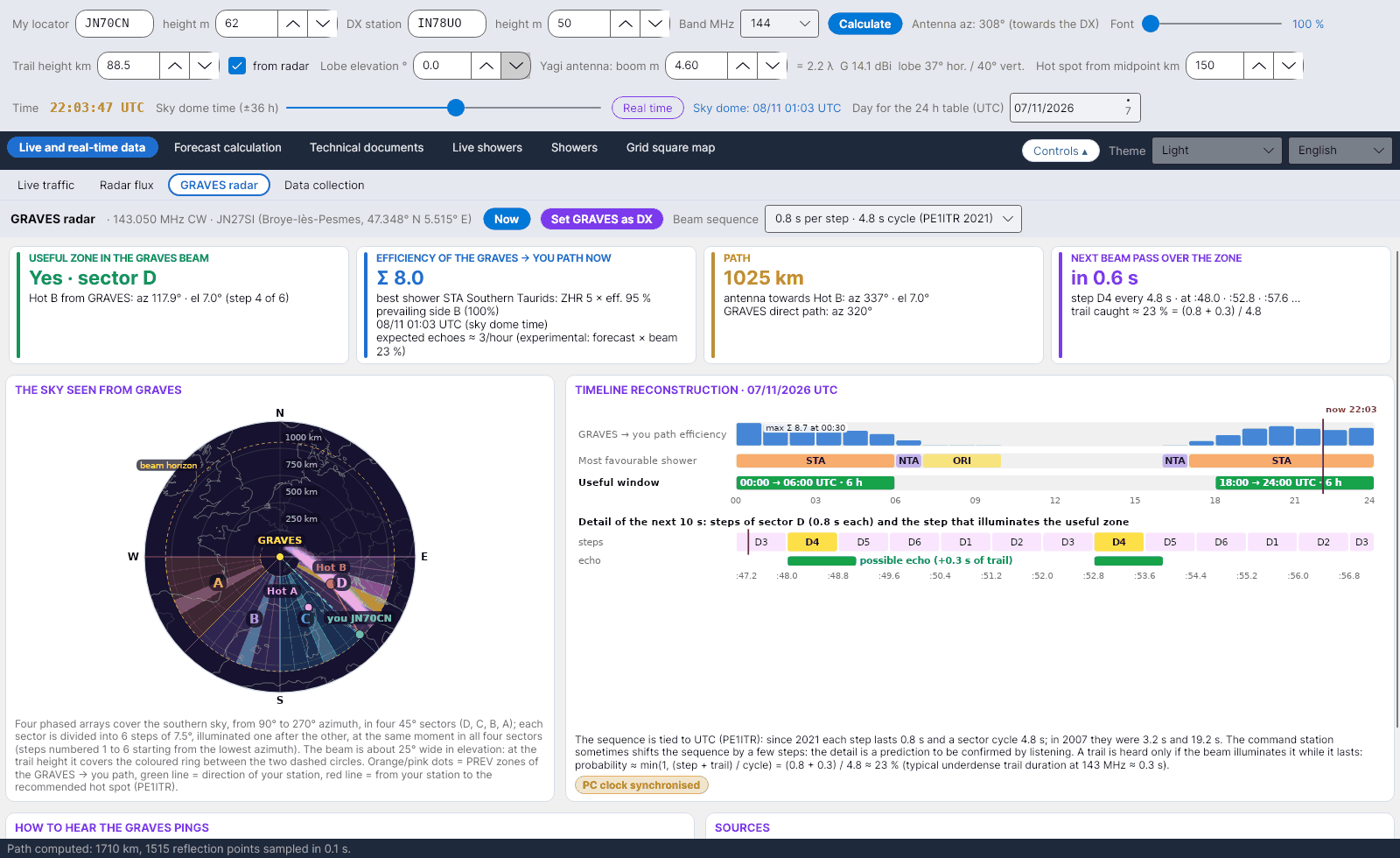
GRAVES is a French radar that transmits CW on 143.050 MHz from Broye-lès-Pesmes (47.348° N 5.515° E, locator JN27SI, about 200 m a.s.l.; Wikipedia). Meteor trails in the zone that both GRAVES and you can see reflect its signal to you by forward scatter: you hear short pings close to the carrier. This is how the RMOB observers on 143.050 MHz count meteors hour by hour, and it is a free, always-on test signal for your 2 m meteor-scatter station.
The tab treats GRAVES → you as a meteor-scatter path of its own: with the same functions as the main path (same trail height, lobe elevation and hot spot distance) it computes shower efficiency, recommended Hot and PREV zones, then checks whether that zone is inside the GRAVES beam and when the beam lights it.
| Control | What it does |
|---|---|
| Now | Brings the calculation back to real time: today's date and the hours slider at zero (the tab follows Calculation date and Hours). |
| Set GRAVES as DX | The DX station becomes GRAVES (JN27SI, height 200 m) and the main path is recalculated: all other tabs then show the GRAVES path. |
| Beam sequence | 0.8 s per step · 4.8 s cycle (PE1ITR 2021) (default) or 3.2 s per step · 19.2 s cycle (PE1ITR 2007). |
| Card | Content |
|---|---|
| USEFUL ZONE IN THE GRAVES BEAM | Yes · sector X with the azimuth and elevation of the recommended hot spot seen from GRAVES and the step (1–6); or No: outside the sectors / No: below the GRAVES horizon / No: above the beam (about 25°) |
| EFFICIENCY OF THE GRAVES → YOU PATH NOW | Path index Σ ZHR × efficiency, best shower, prevailing side A/B, and expected echoes ≈ …/hour (experimental, see below) |
| PATH | Distance to GRAVES; antenna towards the recommended Hot (azimuth and elevation); GRAVES direct azimuth |
| NEXT BEAM PASS OVER THE ZONE | now · … s left or in … s, the step (e.g. B4), the next three times (seconds within the minute) and the fraction of trails caught |
If no shower is useful at that moment, the program shows the hot spot best suited to the beam (inside the sectors, closest to south) and says so.
According to PE1ITR and the Bolidozor wiki, four phased arrays cover the southern sky from 90° to 270° azimuth in four 45° sectors:
| Sector | Azimuth from GRAVES |
|---|---|
| D | 90°–135° |
| C | 135°–180° |
| B | 180°–225° |
| A | 225°–270° |
Each sector is divided into 6 steps of 7.5°, numbered 1 to 6 from the lowest azimuth, lit one after the other, at the same moment in all four sectors. The beam is about 25° wide in elevation: at trail height it covers the coloured ring between the two dashed circles (beam horizon). On the drawing: orange/pink dots = PREV zones of the GRAVES → you path, green line = direction of your station, red line = from your station to the recommended hot spot; the step lit now is highlighted.
TIMELINE RECONSTRUCTION · date UTC (same day as the 24 h table): for each hour the GRAVES → you path efficiency, the most favourable shower and the useful window (hh:00 → hh:00 UTC · n h), with the maximum (max Σ … at hh:30) and a red now marker. Below, the detail of the next seconds: the six steps of the sector, the step that lights the useful zone, and possible echo (+0.3 s of trail).
The sequence is tied to UTC (PE1ITR): the step lit now is computed from the seconds since 00:00 UTC modulo the cycle (86 400 s is a multiple of both 4.8 s and 19.2 s). The command station sometimes shifts the sequence by a few steps, so the detail is a prediction to be confirmed by listening. The yellow pill PC clock synchronised reminds you: synchronise your PC with an NTP server (error of a few tenths of a second at most).
A trail is heard only if the beam lights it while it lasts:
0.3 s is a typical underdense trail duration at 143 MHz – a fixed value, choice of the program (the SM6FHZ λ² rule scales durations between bands but gives no starting value).
The forecast of Experimental forecasts (which already contains the station factor K) is scaled from its frequency f_fc to 143.050 MHz with the SM6FHZ rule (same exponent k), corrected by the ratio of the shower indices of the two paths (the constant 10 represents the sporadic background, as in the forecast) and multiplied by the detection factor. Indicative only: compare with RMOB observers.
| Step | What to do |
|---|---|
| Receiver | USB on 143.049 MHz (tone at about 1 kHz) or 143.050 MHz, slow or off AGC, audio bandwidth of at least 2.4 kHz |
| Antenna | Towards the recommended hot spot of the GRAVES → you path (PATH card), at low elevation |
| Waterfall | Pings are short lines close to the carrier; long (overdense) trails are wider and show Doppler |
| Counting | RMOB uses GRAVES for hourly meteor counts: compare your pings with the observers on 143.050 MHz (Experimental forecasts) |
- Rob Hardenberg PE1ITR, "The 143.050 MHz Graves Radar, a VHF Beacon" (DUBUS 4/2007) and "Graves Radar Update April 2021" – pe1itr.com/graves
- Bolidozor wiki, "Graves" – arrays, sectors and beam timing
- Wikipedia, "GRAVES (system)" – transmitter at Broye-lès-Pesmes (47.348° N 5.515° E)
- RMOB – observers on 143.050 MHz (rmob.org)
- YAEC by IC8TEM – GRAVES Radar tab (the mock-up this tab is derived from)