Home
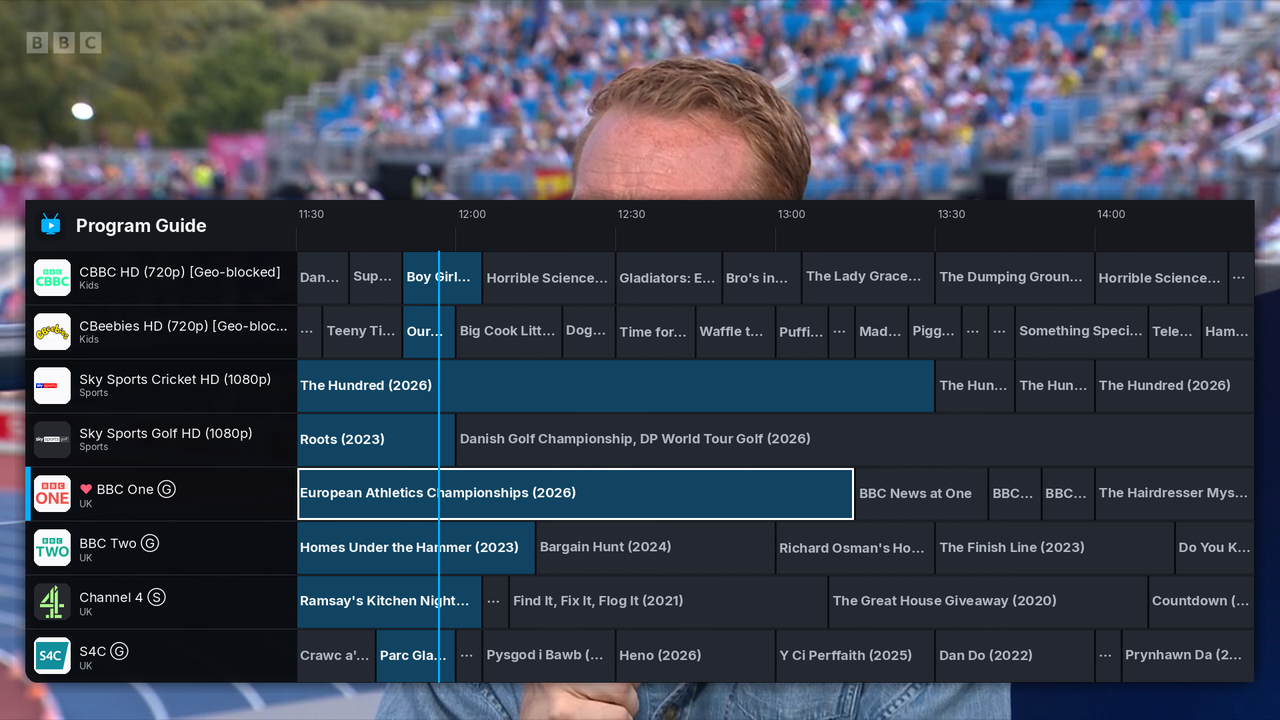
A command-line IPTV/media player built on mpv, with a TiviMate-style
on-screen program guide, rich EPG integration, and on-demand browsing
for Plex, local files, and YouTube. Primarily developed for and
packaged on Linux (.deb/.rpm); also packaged for Windows as a
self-contained installer.
This wiki is the deep dive into each source and feature. For install instructions, the full CLI options table, and a quick command cheat-sheet, see the README instead — the wiki cross-links back to it rather than duplicating it.
tvdinner takes one URL argument, and figures out what it's looking
at from its scheme (or, for a plain file, by sniffing its content) —
there's no separate flag to say "this is Plex" or "this is an M3U
file". Pick whichever row matches what you're pointing it at:
| You have... |
URL looks like |
You get | Page |
|---|---|---|---|
| An M3U/M3U8 playlist (a provider link, or a local file) | https://.../playlist.m3u8 |
Live channels, program guide, recording, scheduling | M3U Playlists |
| An Xtream Codes panel login | xtream://user:pass@host:port |
Same as M3U, plus the panel's own EPG and VOD API | Xtream Codes |
| A Stalker Portal / Ministra login (MAG box) | stalker://host:port/portal/path?mac=... |
Live channels, no EPG | Stalker Portal |
| An HDHomeRun network tuner | hdhomerun://host |
Live channels, EPG only with a paid DVR subscription | HDHomeRun |
| A Plex Media Server | plex://host:port?X-Plex-Token=... |
A movie/TV library browser — no live channels at all | Plex Media Server |
| A tvtimes account | tvtimes://host?token=... |
Its whole merged line-up + corrected guide, plus watchlist recording, watched state and favourites | tvtimes |
| A local video file | ~/Videos/Movie (2020).mkv |
Direct playback, guessed title, optional TMDB metadata | Local Video Files |
| A YouTube video link | https://youtube.com/watch?v=... |
Direct playback via mpv's own yt-dlp hook, plus an info overlay | YouTube |
Live-channel sources (M3U, Xtream, Stalker, HDHomeRun, tvtimes) all normalize into the same channel/playlist model, so the program guide, favorites, recording, and scheduling work identically regardless of which one you used — only how you load channels differs between them, which is what each of those pages actually covers. (tvtimes is the shallowest of those: its URL is pure sugar for an M3U + XMLTV pair.) Plex, local files, and YouTube are all on-demand instead: no channel list or live guide, just something to browse to or point directly at and play.
These work the same way across whichever source(s) apply to them:
- Program Guide, EPG & Favorites — the on-screen guide grid, filtering, per-channel clock-correction shifts, and favoriting channels/movies/shows.
- Recording & Scheduled Recordings — recording a live channel to disk, and scheduling one in advance from the guide.
- VOD Browsing & Resume — Xtream/Stalker's own VOD APIs, pulling an M3U group into the VOD browser, and resuming anything you left partway through.
- Casting to Chromecast — send whatever's currently playing to a Chromecast device on your LAN.
- TMDB Ratings & Metadata — gold-star ratings in the guide, plus poster/synopsis/director/rating overlays for movies and on-demand video.
- Watch History & Stats — a browsable log of what you've watched, and a summary of cache/disk usage and watch time.
- Backup, Restore, Bookmarks & Google Drive — saving playlists you use often, and backing up your configuration (optionally to Google Drive).
And once something's on screen, the same keys do the same things everywhere they apply — see the Keybindings Reference for the full list.
tvdinner checks GitHub Releases for a newer version at startup (at
most once every 24 hours, cached locally) and shows a small dismissible
card if one's out — --no-update-check turns that off. There's no
silent self-update on any platform; y on the card just opens the
release page for you.
Every credential a source needs (an Xtream password, a Stalker MAC, a Plex token) is stored as plain text wherever you save the source itself (a bookmark, a backup archive) — same as any player that has to hold onto it to reconnect — but always redacted before it ever reaches the log file. Each source's own page notes exactly what's stored and how it's redacted.