Program Guide and Favorites
The on-screen program guide works the same way for every live-channel source — M3U, Xtream, Stalker, HDHomeRun — wherever that source actually has EPG data to show (Stalker never does; HDHomeRun only with a paid DVR subscription; see each page for specifics). Plex has no guide at all — it's a library browser instead, see Plex Media Server.
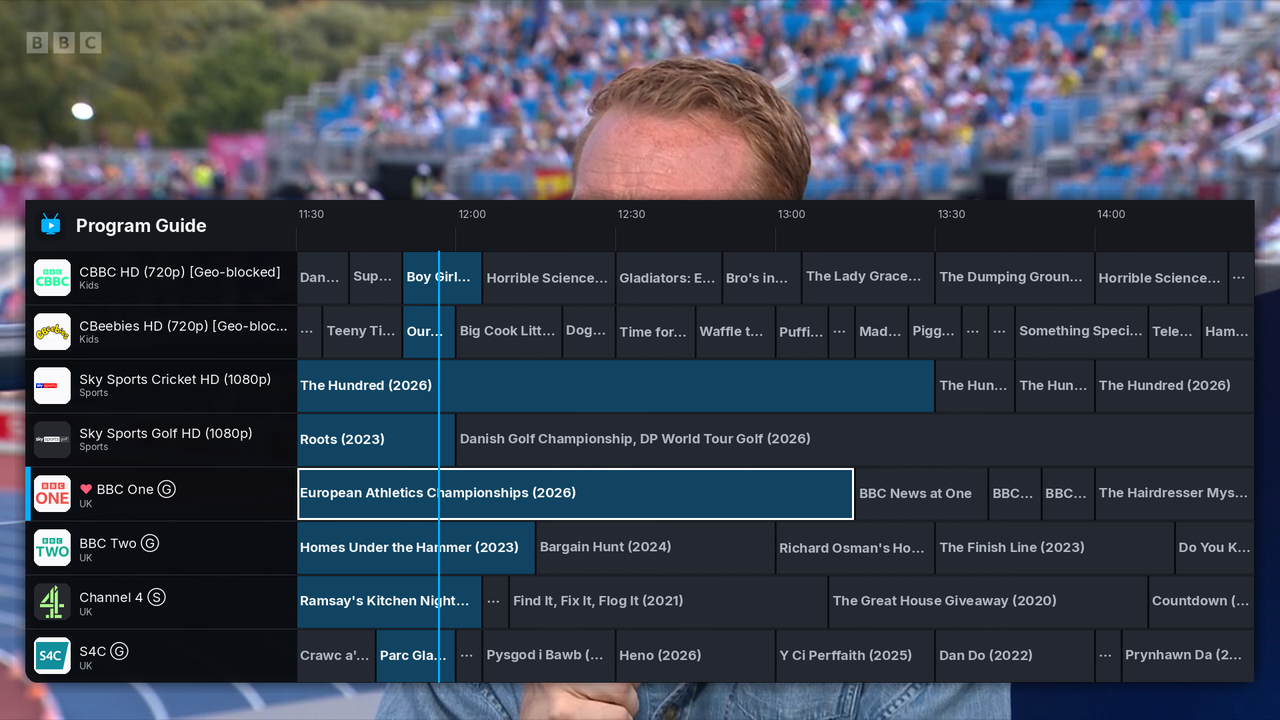
-
g— toggle the full guide grid: channels down the left, a timeline across the top, a live "now" marker. -
UP/DOWN— move the channel selection cursor. -
PGUP/PGDWN— move it a full page at a time. -
LEFT/RIGHT— page the timeline back/forward by 30 minutes. -
ENTER— switch to the selected channel and close the guide. -
i— show full details for the selected programme (poster, synopsis, times);ESCcloses that popup, or the guide itself if nothing else is open. -
MENU(tap) — same asi;MENU(hold 0.5s+) — same asg. The buttons most IR/BLE air-mouse remotes send. -
b— switch to the last-watched channel (like a TV remote's "last channel" button); repeated presses toggle back and forth.
Outside the guide, i shows a compact current/next-programme banner
instead (also shown briefly on every channel switch), with video/audio
quality badges — resolution, codecs, fps, HDR, channel layout.
-
f— open a text-entry prompt to filter the channel list by name or group (case-insensitive substring match against either, same values--listprints);ENTERapplies it,ESCcancels. -
c— clear any active filter.
-
h— toggle the selected guide channel as a favorite (or the currently-playing one, if the guide isn't open); saved to--favoritesimmediately. A favorited channel shows a heart next to its name. -
v— show only favorited channels.
Saved to a JSON file keyed by playlist URL/path, so different feeds
never share one favorites list (default:
~/.config/tvdinner/favorites.json on Linux,
%APPDATA%\tvdinner\favorites.json on Windows; override with
--favorites PATH).
In a Plex session, h/v favorite movies/shows
in the library browser instead — there's no guide to hold favorites
for there.
Some feeds report EPG times that don't quite match reality — often by a clean offset, sometimes different per channel (e.g. an East/West regional pair):
-
--time-shift SHIFT— a global correction applied to every channel without its own override, e.g.+1h,-30m, or minutes as a plain integer. -
--epg-shifts PATH— a JSON file mapping a channel's display name (nottvg_id— real-world playlists commonly share onetvg_idacross several distinct channels) to its own shift:{"BBC One": "+1h", "TCM US West": "-3h"}Default:
~/.config/tvdinner/epg_shifts.jsonon Linux,%APPDATA%\tvdinner\epg_shifts.jsonon Windows. A missing file isn't an error; malformed entries are reported as warnings on startup and skipped. -
[/]— nudge the selected guide channel's shift back/forward by 1 minute, live, writing straight back to--epg-shifts— the fastest way to dial one in while actually watching it drift.
-
--tz NAME— IANA timezone for displaying EPG times (e.g.Europe/London); defaults to the system's local timezone. -
--epg-cache-hours HOURS— how long a downloaded EPG is reused from disk before re-fetching (default: 24). -
--no-epg-cache— always re-download, and don't write a cache either. -
--refresh-epg-cache— force one fresh download now, ignoring any existing cache no matter its age, but keep caching normally after that. -
--no-online-logos— don't fall back to iptv-org's community channel/logo database for a channel with no logo of its own (common for bare M3U playlists); shares the same cache/flags as EPG data above.
-
Recording & Scheduled Recordings — scheduling a recording starts from a programme's details popup here (
s). - TMDB Ratings & Metadata — adds a gold-star rating to movie programmes in the grid.
- Keybindings Reference