Backup Restore and Bookmarks
Ways to avoid retyping the same source URL/options every time, and to carry your configuration to a new machine.
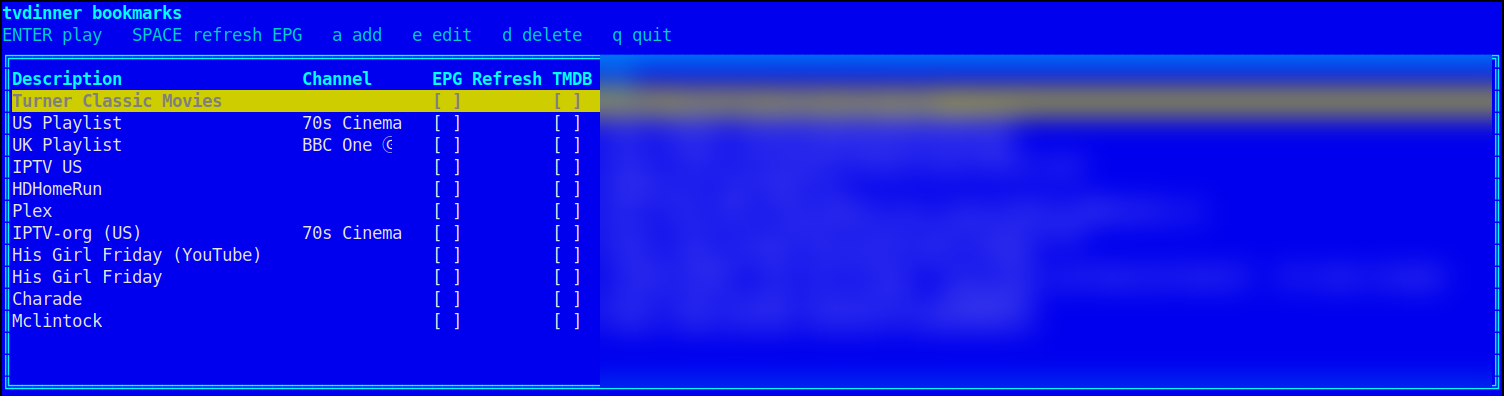
tvdinner bookmarks [--bookmarks-file PATH]
Opens an interactive terminal table of saved playlists — as does
running tvdinner with no arguments at all, rather than the usual
"the following arguments are required" error, since picking from
what's already saved is the natural thing to want with nothing else
typed.
-
a— add one: description, URL (anything theURLargument normally accepts — see Home for the full list of source types), optional EPG URL, optional default channel (e.g.CNN), optional TMDB token. -
e— edit the selected one. -
d— delete it (with confirmation). -
K/J— move the selected row up/down the list (saved immediately, same as add/edit/delete). -
SPACE— toggle that row's "EPG Refresh" checkbox (unchecked by default, and not remembered between sessions). -
ENTER— launch tvdinner with it, exactly as if its URL/--epg/--channel/--tmdb-api-tokenhad been typed directly — adding--refresh-epg-cachetoo if the checkbox was checked.
The table itself never shows a saved token or credential, only a
[x]/[ ] indicator for whether one is set. Saved to
~/.config/tvdinner/bookmarks.json by default
(%APPDATA%\tvdinner\bookmarks.json on Windows; override with
--bookmarks-file).
The same file can be read and written without the picker — for a
dotfiles setup, a provisioning script, or another tool that wants to
register a source as a bookmark (add a row whose --url is a merged
M3U playlist and --epg its XMLTV, and that provider is one ENTER
away next time you open the picker):
tvdinner bookmarks list [--json]
tvdinner bookmarks add --name NAME --url URL [--epg URL] [--channel C] [--tmdb-api-token TOKEN] [--replace] [--json]
tvdinner bookmarks edit NAME|INDEX [--name NAME] [--url URL] [--epg URL | --clear-epg] [--channel C | --clear-channel] [--tmdb-api-token TOKEN | --clear-tmdb-api-token] [--json]
tvdinner bookmarks remove NAME|INDEX [--json]
-
listprints the saved rows. Login credentials in a bookmark's URL are masked and its TMDB token is shown only as(set), the same as the picker.--jsoninstead emits the rawbookmarks.jsonarray — real URLs and tokens, the same bytes you could read from the file itself — for a script to consume. -
addappends a row.--urlaccepts anything theURLargument normally does (see Home). A name that's already taken is refused unless--replace, which overwrites that row in place, keeping its position in the list. -
editchanges fields on an existing row; anything you don't pass keeps its current value.--clear-epg/--clear-channel/--clear-tmdb-api-tokenunset an optional field. -
editandremoveidentify the row by an exact bookmark name, or by its 1-based position inlist(an all-digits argument is always read as a position, never a name). -
add/edit/removetake--jsonto print the affected row instead of a one-line status message. All four exit non-zero on a bad name, a duplicate, or nothing matching.
Writes go through a temp file and an atomic rename, so running one of
these while the picker (or another tvdinner bookmarks process) has the
file open never leaves it half-written. --bookmarks-file, --log-file
and --no-log work on every verb.
tvdinner backup [PATH] [--epg-shifts PATH] [--favorites PATH] [--bookmarks-file PATH] [--tmdb-token-file PATH] [--gdrive ...]
tvdinner restore [PATH] [--epg-shifts PATH] [--favorites PATH] [--bookmarks-file PATH] [--tmdb-token-file PATH] [-y] [--gdrive ...]
backup writes the EPG shifts, favorites, bookmarks, and stored
default TMDB token files into a single compressed archive (default
filename: tvdinner-backup-<timestamp>.zip in the current directory).
The EPG cache and log file are deliberately left out — they're
disposable, not configuration — and so are watch history, playback
positions, and the recording schedule, which are accumulated data
rather than something you'd want to carry to a new machine unchanged.
restore extracts a backup archive back onto disk, overwriting the
current files — it prompts for confirmation unless -y/--yes is
given.
Add --gdrive to either command to use Google Drive instead of/
alongside a local file — backup --gdrive still writes the local
archive too, then uploads it; restore --gdrive downloads it instead
of taking a local PATH (omit PATH in that case).
One-time setup:
tvdinner gdrive-login
Opens a browser for Google's sign-in/consent screen, using tvdinner's
own bundled OAuth client — no Google Cloud Console setup needed — then
stores the resulting credentials at
~/.config/tvdinner/gdrive_token.json
(%APPDATA%\tvdinner\gdrive_token.json on Windows): a refresh token
plus the client ID/secret, never your account password.
Since the app isn't Google-verified, the consent screen shows an "unverified app" warning first — click "Advanced" then "Go to tvdinner (unsafe)" to proceed; this is normal for a small open-source tool and doesn't mean anything is actually wrong (a Desktop-app OAuth client's secret isn't confidential in the first place — RFC 8252 treats it as a public identifier, not something to protect; the real security boundary is PKCE plus your own consent-screen approval).
tvdinner always prints the sign-in URL as a fallback alongside trying
to open it automatically; add --no-browser to just print the URL. On
a fully headless/SSH-only box, forward the local port the printed
URL's redirect_uri uses (ssh -L <port>:localhost:<port> user@host)
before opening the link elsewhere — the flow needs a browser redirect
to land back on 127.0.0.1 on the same machine.
From then on:
tvdinner backup --gdrive     # writes the local archive, then uploads it
tvdinner restore --gdrive    # downloads it and restores, prompting first
Both default to a Drive file named tvdinner-backup.zip
(--gdrive-filename NAME for a different one — e.g. one per machine);
backing up again updates that same file rather than duplicating it.
tvdinner gdrive-logout removes the stored credentials locally (it
doesn't revoke Google's own record of the grant — see
myaccount.google.com/permissions
to do that).
If you'd rather not share tvdinner's bundled OAuth client's request
quota, bring your own: create a project in
Google Cloud Console, enable the
Google Drive API, create a Desktop app OAuth client under
Credentials, then
tvdinner gdrive-login --client-id ID --client-secret SECRET (only
needed the first time, or after gdrive-logout).
tvdinner hard-reset [-y] [...various --*-file PATH overrides]
Deletes every file and directory tvdinner itself writes — bookmarks,
favorites, EPG shifts, a stored default TMDB token, scheduled
recordings, playback positions, watch history, update-check state, the
EPG/TMDB/image caches, and the log file — reverting it to exactly the
state a fresh install would be in. Prompts for confirmation (listing
every path first) unless -y/--yes is given.
It never touches --record-dir — a recording is real media you
made, not disposable app state, so resetting tvdinner has no business
deleting it.
-
Watch History & Stats —
tvdinner statsreads some of the same files this page's commands manage. - Keybindings Reference