Repository navigation
Releases: itsMattGuenther/Linger
Release list
Linger v0.5.0

Linger 0.5.0: reactions, polls, talking from inside a game, and a sturdier server
The biggest release so far. Reactions are back, the way Discord and Slack do
them. The host can ask a room a question with /poll. Push-to-talk works
with a game in front. You can leave a group DM. The crackle at the start of
every sentence in voice is fixed for real this time. And before the release,
the app and the server went through an audit for safety and speed: about
forty fixes came out of it, from a tiny picture that could stop a server to a
minimized window that kept drawing for nobody.
Everyone: update the app. The voice fix is in the app that's listening,
and most new things need the new app.
Hosts: update the server, and read For hosts
first. This update has more steps than usual. It changes the database,
so going back to 0.4.10 means restoring the copy update.sh makes. If you
run the voice relay, you need the new compose.yaml and more ports open, in
that order. Most of the new things need the server as well as the app.
The highlights
- Reactions are back (#485). A small pill under a message with the emoji
and how many people left it. Any emoji, six different ones on a message at
most, and they never notify anybody. - Polls (#474). The host or a co-host types
/pollin a room, and
everybody votes with a click. - Push-to-talk works with a game in front (#500), on Windows and Linux,
and with Linger minimized or in the tray. - No more crackle at the start of a sentence (#470). 0.4.10's fix was
aimed at the wrong cause. This one found the real one. - Leave a group DM (#565), and nobody can put you back.
- A forgotten password has a way back (#581): the host makes a sign-in
link in the app. No more stopping the server. - The server backs itself up every night (#582), and tells the host when
its disk is filling up. - Old files stay until the server needs the room (#583), instead of going
after a year.
Reactions
- Pills under a message (#485): other people's are grey, yours are blue
with an outline. Click one to add yours, and click yours to take it back.
Point at a pill to see who left it. On a phone, hold it (#573). - Any emoji, the server's own included. On a computer, point at a message
and click the smiley beside its ⋯, or the smiley-plus after its reactions.
On a phone, hold the message: it shows the six emoji you use most and a
button for every emoji. - Six different reactions on a message at most.
- Never a notification, a sound or a lit row.
- The host can turn them off for a room (Settings → Hosting → Rooms →
Edit → Reactions). They're hidden, not deleted. You can hide them for
yourself in Settings → Appearance → Show reactions. DMs always have them. - Removing one of the server's own emoji removes the reactions made with it.
- Friends on 0.4.10 or older don't see reactions until they update. On a
server that hasn't updated, the app shows no reaction buttons.
Polls
- Asking (#474). The host or a co-host types
/pollin a room's message
box, with the question after it if they like, and presses Enter. A panel
opens: two to ten choices, whether people can pick more than one, and when
it closes (a day to four weeks; a week to start with). Nothing is posted
until Post poll. Rooms only, not DMs. - Voting. Everybody votes with a click, the person who asked included.
Click another choice to move your vote, or yours to take it back, until it
closes. You see the results before you vote, and votes aren't secret: each
choice shows who picked it as dots in their colors. - Closing. It closes when its time is up, or when whoever asked presses
Close poll. A quiet grey line at the bottom of the room then says what
won, with See results. - It pokes nobody. A new poll makes the room look new, like anything
said. No notification and no sound. - Every
/command is the host's or a co-host's now. Anybody else's box
says who can, and nothing is sent. - Friends on an older app see the question and its choices as a list.
In the room
- "Jules joined voice" (#473). When somebody joins a room's voice and
stays ten seconds, the room gets one quiet grey line, so people reading can
see the talk moved to voice. Joins close together share one line. It's
written at most once per person per room every ten minutes, and it never
notifies. There's no line for leaving. - Fewer chimes (#473). Each person's join and leave chime plays at most
once a minute, so somebody dropping in and out doesn't ring the room each
time. Setting a message of the day no longer chimes either. - A time written with a zone reads in your own clock (#584). "8PM CDT"
gets a faint dotted underline. Point at it, or tap it on a phone, and it
says "9:00 PM for you". It works in messages, the message of the day and
polls, old messages included. Short names that mean more than one place
(CST, IST, BST) are left alone rather than guessed. - Your local time on your card, if you turn it on (#604): Settings →
Profile → Show my local time. Friends see "3:12 AM for Jules" on your card
and on your Knock button, so they know it's late before they knock. It
starts off, and it follows the computer or phone you last opened Linger on.
On a server that hasn't updated, the switch stays off and says "This server
needs updating before it can show your time." (#640)
Group DMs
- Leave a group DM (#565): the ⋯ on its row or in its header, then
Leave this group…. It goes from your list on every device you're signed
in on. The others get a quiet line, "Callie left". Asking for a DM with the
same people again makes a new one, so nobody is pulled back in. - The last person out deletes it, messages and files, since nobody could
ever read it again. The question says so first. Export before you leave if
you want a copy. - A one-to-one DM can't be left: it's that friend's row.
- Friends on an older app see "left" as an ordinary message from that person.
Push-to-talk with a game in front
- The talk key works while another app is in front (#500), and with
Linger minimized or in the tray, the way Discord does. Linger listens for
that one key, and only while you're in voice with push to talk on. It sees
no other key and sends nothing about your keys anywhere. The game still
gets the key too. - Windows: it just works, and the key can be a mouse's middle or side
button (Mouse 4, Mouse 5). A game run as administrator hides its keys from
Linger, as it does from Discord. - Linux: your desktop hands Linger the key. KDE and GNOME ask which key
the first time you join voice with push to talk on. On Hyprland (Omarchy
included), Settings → Sound & Voice shows one line to add to your config.
It needs Linger installed (the Arch package,.deb,.rpmor AppImage).
The user guide has the details. - A Mac built from source asks macOS about the key the same way (#587). It
hasn't been tried on a real Mac yet. - The tray icon shows you're in voice (#601). The door gets an amber
microphone while your microphone is on, and a grey crossed-out one while
you're muted or deafened. On Windows, pointing at it says where you are.
A forgotten password
- The host makes a sign-in link (#581) in Settings → Hosting → People →
Sign-in Links: pick the person, press Make a sign-in link, and send it
the way you'd send an invite. It works once, for 24 hours. Only the host
can make one, not a co-host, and nobody can make one for the host. - The friend pastes it into Server or link, chooses a new password, and
is in. Every other place they were signed in is signed out. - Nobody is surprised. Their Settings → Account & App says a link was
made for them, and when it was used. The sign-in screen now says "Forgot
your password? Ask the host for a sign-in link".
Invite links in a browser
- A page instead of an error (#578). A friend who opens an invite link
before they have Linger used to get an empty error page. Now they see
"You're invited to …", how long the invite has left, where to get Linger,
and a Copy button. A used-up or expired invite says so. A setup link
gets the same page, with a red "Don't share this link". - Open in Linger (#607). A friend who already has Linger gets a button
on that page that opens the app with the invite in its box. They check the
address and press Continue: nothing is contacted until they do. With an
older app the button does nothing, so copy and paste the link as before.
Media and exports
- Leaving soon (#583), a new filter in Media, shows which files would be
cleared next, so you can star what you want to keep. While the server has
plenty of room it shows nothing. - Exports open in any web browser (#585). Unzip and double-click Open
me.html: every room and DM, laid out like Linger, with pictures, videos,
sound, reactions and polls. It works offline, years from now. Each
conversation is also there as a.jsonfile, for programs. - An export's link lasts a week (#504), and the app says the date it
stops working.
Voice
- No crackle at the start of a sentence (#470). Everybody's first words
had a little crackle, on any connection, a wired one included. 0.4.10
blamed packets arriving late, and that was wrong. The real cause was the
app's own queue of sound waiting to play: it slipped tiny bits of silence
into the rising first syllable of nearly every sentence. Now it only adds
silence where there already is some. The fix is in the app that's
listening, so you hear clean voices once your own app is 0.5.0. - The microphone turns off when you're dropped from voice (#589). After
...
Linger v0.4.10
Linger 0.4.10: clear voices, and a message of the day
A quick release to fix a crackle in voice that 0.4.9 brought in: a voice could
crackle for a moment right when somebody started talking after a pause. It's
gone. This release also gives every room a message of the day, a note on
what's happening now that sits under the room's header, and the phone app now
says which version it is.
Everyone: update the app. The crackle is fixed in the app that's
listening, so you hear clean voices as soon as your own app is 0.4.10, whatever
the people talking are on.
Hosts: update the server for the message of the day. The voice fix doesn't
need it. This one changes the database, so going back to 0.4.9 means
restoring the backup update.sh makes. For hosts
has the steps.
The highlights
- No more crackle when somebody starts talking (#462). See Voice.
- A message of the day for each room (#464). See
The message of the day. - The phone app says which version it is (#459), in Settings → Account &
App, under This Phone.
Voice
- The start of a sentence comes through clean (#462). Since 0.4.9, apps
send nothing while you're quiet, which is what lets a voice room hold a raid.
But it meant every sentence started with nothing waiting to play, so the
first bit of sound that arrived a moment late left a gap, and the gap was the
crackle. Your app now waits 60 ms (about a sixteenth of a second) before it
plays a voice that's starting again after a pause, so a late bit has time to
arrive. A bit that turns up after the one that followed it is skipped and its
gap smoothed over, where it used to be played out of order. Mid-sentence
nothing changes, and voice still sounds as good as 0.4.9 made it.
The message of the day
A room's topic says what the room is about, like "World of Warcraft news".
Its message of the day says what's happening now, like "We will be meeting
on Friday, Oct 9 @ 8PM CDT to discuss faction choice" (#464).
- It sits whole under the room's header, with who set it and when.
- Fold it to one line with the arrow on its right. It stays folded on that
computer or phone, even after you quit Linger, until somebody sets a new one. - The host or a co-host sets it from the room's own message box: type
/motdand the words, then press Enter./motdon its own clears it. It's
also beside the topic in Settings → Hosting → Rooms. Up to 300 characters. - Setting it puts a line in the room, "Matt set the message of the day",
with the words under it. The line stays in the history and can't be edited. - It never pokes anybody. No notification and no sound, even when it names
somebody, and it doesn't make the room look new in anybody's list. - Friends on an older app don't see the strip. They see the line as an
ordinary message from whoever set it.
The phone app
- Settings → Account & App says which version you're on (#459), under
This Phone. The phone has no Updates section, since it doesn't update itself.
Under the hood
- The release's Android check reads the build machine's wording for the
signer (#457), the reason the last two releases' check failed. - Five of the release's package checks moved from Python to bash and Node
(#460). - The README has the new logo: the door beside the name (#458).
Known issues
- "App not installed" on Android when installing over a Linger that was
signed differently, like a test build from a computer. Uninstall it once,
which signs you out, then install this one. Releases install over each other. - Read positions don't move live between two devices that are both open.
Read a room on the phone while the computer is open, and the computer shows
it as new until it next connects afresh (a restart, say). Your own messages
are fine either way. - The phone app doesn't update itself. Install each new
.apkover the
old one. - On Hyprland (Omarchy included), the mouse pointer jumps into a
conversation that opens in a window of its own. The
user guide has the two lines that turn it
off. - The AppImage doesn't play AV1 videos (#358). Windows and the Arch,
.deband.rpmpackages do.
For hosts: updating the server
Server image: ghcr.io/itsmattguenther/linger:0.4.10 (x86-64 only), also
tagged latest.
What changes for you:
- The message of the day is yours and your co-hosts' to set, with
/motd
in a room or in Settings → Hosting → Rooms. Nobody else can set it. - A database change (the message of the day).
update.shsaves the
database intobackups/before it starts 0.4.10, and that backup is how
you'd go back. - Nothing else: no new settings, and no change to
compose.yamlor.env.
Run these on the server, one block at a time.
1. Go to the folder with your compose.yaml (the linger folder from
setup):
cd ~/linger2. Only if you skipped 0.4.9, get the newer update.sh (the
0.4.9 notes say why). If you updated
to 0.4.9 with it, the one you have is fine.
curl -fLO https://raw.githubusercontent.com/itsMattGuenther/Linger/main/deploy/update.sh
chmod +x update.sh
3. Update:
./update.sh(Use sudo ./update.sh if you type sudo before docker commands.) It
downloads 0.4.10 while the server keeps running, stops it for a few seconds to
save the database into backups/, starts everything again, and prints the
version before and after.
4. Check it worked:
curl -f https://linger.example.com/api/v1/healthWith your own address in place of linger.example.com, it should print
{"ok":true,"version":"0.4.10"}.
If something goes wrong, update.sh prints the commands that put 0.4.9
back with the backup it just made. Going back needs that backup: 0.4.9
won't start on a database 0.4.10 has changed. Anything sent after the update
is lost when you go back, so decide soon if you're going to.
Install or update
Use the in-app update: Update… at the foot of the list, or Settings →
Account & App → Updates. Windows users should keep the same installer format
(.exe or .msi) when upgrading. Linux packages are .AppImage, .deb and
.rpm; on Omarchy or Arch, Linger updates with your system. Windows
installers are updater-signed, not Authenticode-signed; SmartScreen may still
warn about an unfamiliar app.
On Android, download Linger_0.4.10_android-arm64.apk from this release on
the phone and install it over the old one. You stay signed in. A first install
is step by step in the 0.4.8 notes.
New to Linger? Which file do I want?
| Your computer | Download the file ending in |
|---|---|
| Windows | -setup.exe |
| Debian, Ubuntu or Mint | .deb |
| Fedora, RHEL or openSUSE | .rpm |
| Any other Linux | .AppImage — make it executable and run it |
| macOS | Not built yet — see decisions.md |
| Android phone | _android-arm64.apk — download it on the phone |
| iPhone | Not yet |
The .msi is for companies rolling it out to many machines at once.
If you are not sure, you want the .exe.
The .sig files and latest.json are how an installed copy checks
that an update is genuine. You do not need to download them.
Windows will warn you. You get "Windows protected your PC", and
Run anyway is behind the small More info link. That is Windows
saying the installer has not been through a paid signing process. It
has not — that is a
known decision,
not a broken download.
Android will ask before installing. The phone says it won't
install apps from your browser until you allow it: tap Settings,
turn on Allow from this source, and go back. That is Android's
rule for any app that isn't from the Play Store. The phone app
doesn't update itself: install each new one from its release page,
right over the old one, and you stay signed in.
Checks on installed clients
Record OS, package type, previous and new version, and headset or microphone
with any failure. Use made-up messages, and keep private conversations out of
screenshots.
- Voice, the start of a sentence, with three or more people on 0.4.10,
across two real networks if you can (a home connection and a phone hotspot,
say): pause, then start talking again, a few times each. The first word
comes through clean, with no crackle (#462). - The message of the day, as the host:
/motdand some words in a room.
Everybody sees the strip and the line; nobody gets a notification, and the
room doesn't go bold in anybody's list./motdalone clears it (#464). - Folding it: fold the strip, quit Linger, open it again: still folded.
Have the host set a new one: it opens (#464). - As somebody who isn't the host or a co-host, type
/motd hello: the
box says who can, and nothing is sent (#464). - On 0.4.9: a friend who hasn't updated sees the line as an ordinary
message from whoever set it. - Phone: Settings → Account & App says "You're on version 0.4.10"
under This Phone (#459).
Linger v0.4.9
Linger 0.4.9: room for a raid, and every emoji
Voice holds a raid now: 60 people in a room, and when a dozen cheer at once
you hear the six loudest instead of a wall of noise. Every room sounds better
too, because a lost packet no longer cuts a voice out for everybody. The emoji
picker has every emoji there is, Discord's :shortcodes: work, and a host can
add the server's own. Rooms stop showing as new when you've read them, and a
person who dropped out of voice stops showing up there two or three times.
Hosts: update the server. The voice fixes, emoji and read positions all
need it. This one changes the database, so going back to 0.4.8 means
restoring the backup update.sh makes. A server with no voice address set
turns voice on after this update. For hosts has
the steps.
Everyone: update the app. A raid wants everybody in voice on 0.4.9.
Older apps keep sending silence, which costs the server, and when seven or
more people talk at once, an older app's voice is the first left out.
The highlights
- A raid fits in one voice room (#197). Up to 60 people, up from 25. Apps
send nothing while you're quiet, and the server passes on the six loudest
voices at once, so twelve people cheering when the boss goes down still
sounds like a crowd and doesn't swamp the server. - A lost packet doesn't stop a voice (#438). One packet lost on the way to
the server made that person go silent for about a third of a second, for
everybody in the room. That has happened in every voice room since 0.4.1. - Every emoji, and a server's own (#359). See Emoji.
- Rooms you've read stop looking new (#453, #454), on the phone after
it's been put away and on your other devices after you send something. - You show up in voice once (#451). A friend showed as "you, you, you"
in a room's voice, because connections that had dropped kept their seats.
Voice
- Sixty people a room (#197), up from 25. Your app sends nothing while
you're quiet, muted or not pressing push-to-talk, the way Discord's does. It
used to send fifty packets of silence a second, and the server copied every
one to everybody. - The six loudest voices (#197). However many people talk at once, the
server passes on the six loudest. Somebody already talking keeps their
place unless a newcomer is clearly louder, so nobody is cut off mid-word. - Better sound in rooms of up to twenty (#431). Everybody sends at
128 kbit/s, more than twice what voice used before. From twenty-one people
the room steps down to 96 kbit/s, and back up once it's down to sixteen.
Nobody sets it, and nobody hears the switch. - A lost packet doesn't stop a voice (#438). See the highlights. In a big
room it got worse fast: with 60 people and 8 talking, listeners heard 78%
of what was said. Now it's 99%. - A room filling all at once could leave somebody hearing nobody (#197).
In about one in ten joins of 60 people at once, one person's app refused
the server's call setup and heard silence. Fixed. - The voice bar in a big room (#197). With more than six people, it
keeps six places: you, then whoever just talked, lit while they talk.
Somebody new who talks takes the place of whoever spoke longest ago, so
nobody jumps around while talking. Everyone in the room is a small dot in
their own color underneath, ringed while they talk. Click the dots to see
everyone by name, type to find somebody, and press Enter to set their
volume. A room of six or fewer looks as it did. - You show up in voice once (#451). See the highlights. Behind the scenes,
your other connections were sometimes hung up on as well, and reconnected
so fast nobody noticed. - A microphone or speaker that stops working (#442) waits its half second
before Linger opens it again. A second report of the same stop could cut
that wait short, and the microphone could open once more just after you
left voice.
The list on a big server
- People shows the people you talk to (#197), on a server with more than
twelve people here or away: anybody you've ever had a DM with. Everyone
else folds under Everyone else, which starts folded. A smaller server's
list is unchanged. - A busy room's row shows up to 16 dots, up from 5, so a full raid looks
full. - One line per person, a new switch in Settings → Appearance, off to
start. Every row in the list is one line, and a status shows when you point
at somebody. The phone keeps two lines.
Emoji
- Every emoji there is (#359), up from 66. Search by name or by a word
for it ("hello" finds 👋), jump to a group with the tabs, and the emoji you
use come back at the top. The hand beside the search sets a skin tone once. - Shortcodes. Type a colon and two letters,
:smi, and pick from the
list, the way@offers people. A whole name,:smiley:, turns into 😃 as
you type it. The names are Discord's (:thumbsup:,:slight_smile:), and
GitHub's and Slack's work too. - A message of just a few emoji is drawn big, as Discord does.
- A server's own emoji. The host (or a co-host) adds pictures in
Settings → Emoji, and each becomes an emoji at once, named from its file:
party-parrot.gifis:party_parrot:. Animated GIFs stay animated. Up to
200 a server. - Emoji are drawn by your computer's own emoji font, so they look a little
different on Windows and Linux, and an older Windows 10 leaves out the
newest few dozen.
Reading
- Coming back to the phone app no longer lights up nearly every room
(#453). The app asked the server how far you'd read once per connection,
and if that one ask failed, every room looked new until a restart. A phone
coming back from the background often asked before Android had let its
network back in. It now asks again, and asks after every fresh connection
too. - Your own message no longer shows as new on your other devices (#454).
Sending a message now marks it read on the server, for every device you
use. A phone put away straight after sending used to lose that. - How far you've read only moves forward. One device can no longer pull
back what another one read.
Linux
- Opening Linger while it's already running no longer turns the GPU path
off (#447). Opening it again from the menu left a marker behind that the
next start took for a crash, so it switched WebKit's faster drawing off.
Typing then ran a beat behind, and on a computer with two graphics chips the
window could go grey. If typing has felt slow since, delete the
gbm-off-…file in~/.local/state/linger/and open Linger again. - A computer with two graphics chips shows the app, not a grey window
(#433). With WebKit's GPU path off (the AppImage always has it off), the
page could draw on one chip while the window was on the other. Linger now
sends the picture through ordinary memory in that case, which either chip
can show.
Under the hood
- The release's Android check shows what apksigner printed when it can't
find a signer (T-1604). That's how this release found why the check kept
failing: the build machine words the line differently. This release's
.apkwas built by hand from the same code and key, as 0.4.8's was, and
the check is fixed for the next one. - CI's final check fails when GitHub never ran a job, instead of passing
(#445). - The README has badges, a link to the website, and the website is step 5 of
a release.
Known issues
- Read positions don't move live between two devices that are both open.
Read a room on the phone while the computer is open, and the computer shows
it as new until it next connects afresh (a restart, say). Your own messages
are fine either way. - The phone app doesn't update itself. Install each new
.apkover the
old one. - On Hyprland (Omarchy included), the mouse pointer jumps into a
conversation that opens in a window of its own. The
user guide has the two lines that turn it
off. - The AppImage doesn't play AV1 videos (#358). Windows and the Arch,
.deband.rpmpackages do.
For hosts: updating the server
Server image: ghcr.io/itsmattguenther/linger:0.4.9 (x86-64 only), also
tagged latest.
What changes for you:
- Voice turns on by itself, if it was off. A server works out where voice
goes from its name (LINGER_DOMAIN) now. If you never set
LINGER_VOICE_ADDRESS, your server had no voice and now has it, as long as
UDP 3479 is open (Voice in the host guide). To
keep voice off, setLINGER_VOICE_ADDRESS=off(in.env, or in the
environment:part of an oldercompose.yaml) before updating. If you set
an address already, nothing changes. - A database change (server emoji).
update.shsaves the database into
backups/before it starts 0.4.9, and that backup is how you'd go back. - Server emoji are yours (and your co-hosts') to add in Settings → Emoji.
Friends on an older app see them as:name:until they update. - A raid needs everybody on 0.4.9. The server now throws away the silence
older apps send, but they still send it, and that costs your server. An
older app also can't say how loud it is, so when seven or more people talk
at once, its voice is the first left out. Upload for fifty people stays near
35 Mbps however many talk. The host guide has the
numbers. - The data folder fixes itself. The image makes
datawritable on its
own, so no morechownafter setting up or moving a server. - Setting up a new server is one script,
deploy/setup.sh, and every
setting lives in.env. An oldercompose.yaml...
Linger v0.4.8
Linger 0.4.8: the phone app
Linger is on Android now: download it from this release, sign in, and your
rooms, DMs and voice messages are in your pocket. On the computer, wireless
headsets that Linger couldn't hear now work, someone talking in a room's voice
shows in that room, the host can take somebody out of voice when they walk
away with their microphone on, and the host can name co-hosts for when they're
away.
Hosts: update the server. Report and block, co-hosts, and taking somebody
out of voice need it. This one changes the database, so going back to 0.4.7
means restoring the backup update.sh makes. For hosts
has the steps.
Everyone: update the app. The headset fix and everything else on the
computer is in the app.
The highlights
- The phone app, on Android (#253). Download
Linger_0.4.8_android-arm64.apkfrom this release on your phone and open it.
The phone app says what it does and doesn't do. - Wireless headsets work in voice (#398). A SteelSeries Arctis Nova 5
joined voice but Linger never heard it, even after 0.4.7. Its wireless
receiver reports a tiny glitch every few moments, and Linger took each one
as "the microphone died" and started it over, so it never heard a word.
Glitches are now let go, as Discord does. - Being in a room's voice is being in that room (#420). Somebody talking in
#general with a game in front of them used to drop out of #general and show
as idle. Now their dot stays on the room and People says "in #general". - The host can take somebody out of voice (#423). For somebody who walked
away with their headset on and unmuted. - Co-hosts (#424). The host can make somebody a co-host, who can do what
the host does in the app while the host is away. - Report and block (T-1605), on the computer and the phone.
The phone app
Android first. iPhone comes later, once the Android app has done well.
- Installing, on the phone itself (Android 7 or newer, 64-bit: nearly every
phone from the last eight years):- Open this release page in Chrome, scroll to Assets (tap it if it's
folded up), and tapLinger_0.4.8_android-arm64.apk. - Chrome may say the file might be harmful: tap Download anyway.
It says that about any app that isn't from the Play Store. - Tap Open when it's downloaded (or find it in the Files app,
under Downloads). - Android says it isn't allowed to install unknown apps from this
source: tap Settings, turn on Allow from this source, and tap
back. - Tap Install. If Google Play Protect asks, tap More details,
then Install anyway (or Install without scanning). - Open Linger. Paste the invite link your host sent you and tap
Continue, or type your server's address and sign in if you already
have an account.
- Open this release page in Chrome, scroll to Assets (tap it if it's
- What it does: rooms, DMs, your status, Media, Search, sending pictures
from your phone, and voice messages. One screen at a time, with ← Back, the
way phone chat apps work. - What it doesn't do: voice rooms, and notifications. Nothing wakes it and
it shows nothing on your lock screen; when you open it, it catches up. - Its sounds follow your phone. Chimes play while the app is open, a short
buzz on vibrate, and nothing on silent. - Updating. It doesn't update itself yet. For a new version, download the
new.apkfrom its release page and install it over the old one. You stay
signed in. - Your phone's backups leave Linger out, so what it keeps never reaches
Google's cloud.
Voice
- Wireless headsets (#398). See the highlights. This also steadies other
wireless headsets: before, every glitch made Linger restart the microphone,
which you'd hear as a short dropout. - When the microphone you picked won't open (#398). If you picked a
microphone in Settings → Sound & Voice and it won't open (another program
holding on to it, say), Linger still uses your computer's default so you can
talk, and now the voice bar says so, with your computer's reason. It used to
switch without a word. - Taking somebody out of voice (#423), for the host. Click their name in
the voice bar, or open their card and its ···, and choose Take out of
voice. They leave the call as if they'd pressed Leave, their app says they
were taken out of voice, and they can join again whenever they're back. It isn't a
mute: nobody can mute anybody else or turn anybody's microphone on. - Voice messages from the phone (#401). Recorded on a phone, they play on
the computer, and the other way round. Android asks for the microphone the
first time you press Record.
Rooms and people
-
Co-hosts (#424). Open somebody's card, its ···, and choose Make
Jules a co-host. A co-host can do what the host does in the app: rooms,
the server's name and color, invites, reports, removing and restoring
members, deleting messages, and taking somebody out of voice. Two things
stay the host's: making or removing co-hosts, and anything done to the host
themselves. Their card says "co-host". Undo it from the same menu. A
co-host never sees a report about themselves. -
In a room's voice is in the room (#420). Their dot shows on the room for
as long as they're in its voice, and People says "in #general", not "idle".
Reading another room while they talk, they show in both. An away they set
themselves still shows. -
Report and block (T-1605).
- Report a message (last in its actions) or a person (their card's
···) to the host, with a note if you like. It goes to the host and
nobody else, and the person isn't told. - Block somebody from their card. Their messages fold into a grey line
you can open, their DMs never light up or chime, their knocks stop
reaching you, and nothing of theirs shows in Media or Search. They aren't
told. Unblock any time, there or in Settings → Account. - The host sees one quiet row at the top of the list when there's a
report to look at, never a number, and handles it in Settings → People.
- Report a message (last in its actions) or a person (their card's
-
Pins on pictures and links (T-908). A pinned picture, file, voice
message or link now shows its pin beside it. A link's pin didn't show at
all, and a picture's sat above it.
Under the hood
- Each release now carries a signed Android app, checked against the release
key before and after it's built (T-1604). - The Windows installer check gives up on a stuck installer after five minutes
and says which one it was, instead of hanging for half an hour (#414).
Known issues
- The phone app doesn't update itself. Install each new
.apkover the
old one. - On Hyprland (Omarchy included), the mouse pointer jumps into a
conversation that opens in a window of its own. The
user guide has the two lines that turn it
off. - The AppImage doesn't play AV1 videos (#358). Windows and the Arch,
.deband.rpmpackages do.
For hosts: updating the server
Server image: ghcr.io/itsmattguenther/linger:0.4.8 (x86-64 only), also
tagged latest.
What changes for you:
- A database change (report and block, and co-hosts).
update.shsaves
the database intobackups/before it starts 0.4.8, and that backup is how
you'd go back. - Reports come to you. One quiet row at the top of your list says there's
one to look at; Settings → People shows who sent it and about what, and
Let it go or Delete message closes it. - You can take somebody out of voice (#423).
- You can name co-hosts (#424) from a person's card, for when you're away.
Updating the server stays yours: the app has nothing to do with that. - No new setting. ARM servers stay on 0.4.4.
Run these on the server, one block at a time.
1. Go to the folder with your compose.yaml (the linger folder from
setup):
cd ~/linger2. Update:
./update.sh(Use sudo ./update.sh if you type sudo before docker commands. No
update.sh in the folder? The 0.4.5 notes
show how to get it.) It downloads 0.4.8 while the server keeps running, stops
it for a few seconds to save the database into backups/, starts everything
again, and prints the version before and after.
3. Check it worked:
curl -f https://linger.example.com/api/v1/healthWith your own address in place of linger.example.com, it should print
{"ok":true,"version":"0.4.8"}.
If something goes wrong, update.sh prints the commands that put 0.4.7
back with the backup it just made. Going back needs that backup: 0.4.7
won't start on a database 0.4.8 has changed. Anything sent after the update
is lost when you go back, so decide soon if you're going to.
Install or update
Use the in-app update: Update… at the foot of the list, or Settings →
Account & App → Updates. Windows users should keep the same installer format
(.exe or .msi) when upgrading. Linux packages are .AppImage, .deb and
.rpm; on Omarchy or Arch, Linger updates with your system. Windows
installers are updater-signed, not Authenticode-signed; SmartScreen may still
warn about an unfamiliar app. The Android app installs from this release page
(see The phone app).
Checks on installed clients
Record OS, package type, previous and new version, and headset or microphone
with any failure. Use made-up messages, and keep private conversations out of
screenshots.
- Windows, a SteelSeries Arctis Nova 5 (or another wireless headset):
join voice. Your name lights when you talk and others hear you (#398). - Android: install the
.apkon a phone that never had Linger, sign in
...
Linger v0.4.7
Linger 0.4.7: headsets and voice messages
Gaming headsets on Windows now work in voice: no more joining and not being
heard. You can record a voice message in any conversation, hear it back, and
send it or throw it away. And a few things got easier to notice: still being
away, which picture you're about to send, and where Linger went when you
closed its list.
Hosts: update the server so people can send voice messages. There's no
database change and no new setting. 0.4.7 apps work with a 0.4.6 server,
except that a voice message can't be sent until the server is updated.
0.4.6 apps work with a 0.4.7 server, and play voice messages as ordinary
audio files.
For hosts has the steps.
Everyone: update the app. The headset fix is in the app, so it reaches
you when you update, whatever your server runs.
The highlights
- Gaming headsets work in voice on Windows (#398). A Logitech PRO X 2 set
to 7.1 surround couldn't join voice at all, and a SteelSeries Arctis Nova 5
joined but nobody could hear it. Linger now opens every microphone and
speaker in the format it already runs in, and turns that into voice itself.
If you set your headset to "Stereo, 16 bit, 48000 Hz" in Control Panel to
get around this, you can set it back. - Voice messages (#401). Press the microphone beside + in the message
box, then Record and Stop. Listen back, then Send voice message
or Discard. Up to five minutes. - Still being away is hard to miss (#392). While you're away, the top of
your list turns a warm cream with a filled I'm back, and when you come
back to your computer, it says "Welcome back. You're still away."
Voice
- Headsets in their own format (#398). On Windows, Linger used to ask every
headset for 16-bit stereo sound at 48 kHz, and some refused: surround-sound
headsets, 24-bit ones, and ones running through SteelSeries Sonar. Now it
takes whatever the headset gives. Nothing changes on Linux or for
headsets that already worked. - Voice messages (#401).
- Record and Stop are presses, never a hold, so you can let go of the mouse
while you talk. Lines move with your voice, and the time counts up. - Stopping never sends anything. You hear it back first.
- At five minutes it stops by itself and keeps what you have.
- It records from the microphone picked in Settings → Sound & Voice, or your
computer's default. - In the conversation it shows as Voice message with a play button and
its length, and it plays on Windows and Linux alike. - Voice rooms are still never recorded. A voice message is a clip you
record of yourself and choose to send, like sharing an audio file. - The desktop app records them. The phone app will later.
- Record and Stop are presses, never a hold, so you can let go of the mouse
- Why voice didn't start, in full (#399). When voice fails to start, the
short reason above the conversation is now a button. Click it and the whole
reason opens and stays open, including your computer's own words for what
failed, with a Copy button for sending it to your host.
Your status
- Away looks like away (#392). While you're away:
- Your card at the top of the list is tinted a warm cream, not the amber of
something new. - Your away message sits in a box with the moon, where your status was.
- I'm back is filled in the same cream.
- Settings → Profile's "You're away" box matches.
- Your card at the top of the list is tinted a warm cream, not the amber of
- Coming back says so (#392). When you come back to your computer after
ten minutes or more and you're still away, the card says "Welcome back.
You're still away." I'm back is right there, or ✕ to stay away.
Linger never sets you back by itself.
Sharing files
- A picture shows a small preview before you send it (#397). A phone
photo is called something like9D836261-01DD-….jpg, so the name alone
didn't say which one you'd picked. Now a picture's line above the box starts
with a small square of it, made on your computer. Other files keep the file
icon.
Closing the list
- Linger says where it went (#400). Closing the list keeps Linger running
in the tray, with voice, as before. The first time you do it on a computer,
a notification says Linger is still running, where its icon is, and that
you're still in voice if you are. It says it once, and never again. - On Windows 11 the tray icon starts out hidden under the ^ by the
clock. Windows doesn't let an app show its own icon, but you can: Settings →
Personalization → Taskbar → Other system tray icons → Linger. The
user guide has this too.
Under the hood
- Two browser tests that failed at random on a busy machine are steady
(#394, #396). This changes only the checks.
Known issues
- On Hyprland (Omarchy included), the mouse pointer jumps into a
conversation that opens in a window of its own (popped out, or with
Each in its own window). Conversations beside the list don't do this.
It's Hyprland's behaviour when an app brings a window forward, and the
user guide has the two lines that turn it
off. - The AppImage doesn't play AV1 videos, which some NVIDIA and OBS game
recordings and Pixel 10 phones make. Its own video decoders cover H.264 and
H.265, which almost every phone and recorder uses (#358). Windows and the
Arch,.deband.rpmpackages play AV1.
For hosts: updating the server
Server image: ghcr.io/itsmattguenther/linger:0.4.7 (x86-64 only), also
tagged latest.
What changes for you:
- Voice messages are accepted (#401). They're ordinary audio files, about
half a megabyte a minute, and count against your storage limit like any
other file. The server doesn't convert them, so there's nothing to install. - No database change and no new setting. The image is still x86-64 only.
ARM servers stay on 0.4.4. - Nothing else about voice changes on the server. The headset fix is in
the app.
Run these on the server, one block at a time.
1. Go to the folder with your compose.yaml (the linger folder from
setup):
cd ~/linger2. Update:
./update.sh(Use sudo ./update.sh if you type sudo before docker commands. No
update.sh in the folder? The 0.4.5 notes
show how to get it.) It downloads 0.4.7 while the server keeps running, stops
it for a few seconds to save the database into backups/, starts everything
again, and prints the version before and after.
3. Check it worked:
curl -f https://linger.example.com/api/v1/healthWith your own address in place of linger.example.com, it should print
{"ok":true,"version":"0.4.7"}.
If something goes wrong, update.sh prints the commands that put 0.4.6
back. With no database change, going back is safe. Voice messages sent in the
meantime stay, but a 0.4.6 server offers them as downloads instead of
playing them, until you update again.
Download the app
Install the app on your own computer. Hosts run the separate server image.
| Your computer | Download |
|---|---|
| Windows | Linger_0.4.7_x64-setup.exe |
| Omarchy or Arch | Nothing to download: curl -fsSL https://raw.githubusercontent.com/itsMattGuenther/Linger/main/packaging/arch/setup.sh | bash once, then update with your system |
| Ubuntu, Debian or Mint | Linger_0.4.7_amd64.deb |
| Fedora or openSUSE | Linger-0.4.7-1.x86_64.rpm |
| Other Linux | Linger_0.4.7_amd64.AppImage |
The .msi is an alternative Windows installer. The app uses .sig files and
latest.json for updates; you do not need to download them yourself. macOS and
ARM desktop installers are not available. Windows installers are updater-signed,
not Authenticode-signed, so SmartScreen may warn: Run anyway is behind More
info. See the
user guide
for installation and troubleshooting.
Updating the app
Choose Update… at the foot of your list, or open Settings → Account & App →
Updates, or close Linger and install the new download. You stay signed in.
Windows users should keep the same installer format (.exe or .msi). On
Omarchy or Arch, the package updates with your system.
Linux, with a .deb or .rpm you updated from inside the app: add the
video decoders once, then restart Linger.
- Debian and Ubuntu:
sudo apt install gstreamer1.0-libav - Fedora:
sudo dnf install gstreamer1-plugin-libav
Hosts: see For hosts above.
Checks on installed clients
Record OS, package type, previous and new version, and headset or microphone
with any failure. Use made-up messages, and keep private conversations out of
screenshots.
- Windows, with a gaming headset (a Logitech PRO X 2 in 7.1, a
SteelSeries Arctis Nova 5, or SteelSeries Sonar on): join voice. Your name
lights up when you talk, others hear you, and you hear them (#398). - Windows, a headset set to Stereo, 16 bit, 48000 Hz that already
worked: it still does (#398). - After the host updates the server: record a voice message, stop, play
it back, and send it. A friend on Windows and one on Linux both play it.
Discard one instead: nothing is sent (#401). - Close the list with ✕ for the first time on a computer: a notification says
where Linger went, and mentions voice if you're in it. Close it again:
nothing (#400). - Press Away: your card turns cream with a filled I'm back. Leave the
computer for over ten minutes, then move the mouse over Linger: "Welcome
back. You're still away." (#392). - Attach a phone photo: a small preview shows above the box (#397).
- Windows, with the microphone privac...
Linger v0.4.6
Linger 0.4.6: lighter
Linger now uses far less memory with photos and videos, most of all on Linux.
Photos in conversations and Media are shown from a smaller copy the server
makes, and videos and audio load nothing until you play them. Windows gets a
minimize button on every window.
Hosts: update the server to make photos lighter. This release changes the
server's database (one new column, added by itself on start), and the first
start makes smaller copies of the photos already on it, in the background.
0.4.6 apps work with a 0.4.5 server, where photos are simply shown at full
size as before, and 0.4.5 apps work with a 0.4.6 server.
For hosts has the steps.
Everyone: update the app.
The highlights
- Photos take a fraction of the memory (#382). Conversations and Media
show a copy the server makes, 960 pixels on its longest side; click a photo
and it opens full size. Ten phone photos in a conversation went from about
900 MB of extra memory to about 65 MB in WebKit, the Linux engine. - Videos and audio load nothing until you play them (#381). The poster
and the length show until then. Five unplayed videos went from about
1,060 MB to 144 MB on Linux, and from 463 MB to 216 MB in Chromium, the
engine behind Windows' WebView2. - A minimize button on Windows (#386), just before the close button on
every window.
Photos and videos
- Photos are shown from a smaller copy (#382). When you share a photo
bigger than 960 pixels on its longest side, the server keeps it full size
and also saves a copy that size beside it. The conversation and Media show
the copy, so they load quickly and use little memory. Click a photo for
the full picture; downloads and exports are full size too.- Smaller images, and animated GIFs, are shown as they are.
- Photos shared before the update get their copies once the host updates
the server. Until then they show full size, as before. - Someone still on 0.4.5 sees full-size photos everywhere, as before.
- Shared videos and audio load nothing until played (#381). Each unplayed
video used to build a whole player as soon as you scrolled past it, about
190 MB each on Linux with NVIDIA graphics. Now the poster and the server's length stand in until
you press play. After a failed load, Load again still loads straight
away.
Windows
- Minimize (#386) is just before the close button on the list, on the
conversations beside it, on a room or DM in a window of its own, and on
Settings, Search, Media and signing in. It sends the window to the taskbar,
where a DM still makes its button flash. Linux has none: a tiling desktop
can't minimize, and other desktops keep their shortcuts.
Under the hood
- The package check's chime test plays its sounds again, once, when a busy CI
machine loses part of one on the way to the virtual speaker (#384), and it
now compares every chime with the sound the app made (#387). This changes
only the checks.
Known issues
- On Hyprland (Omarchy included), the mouse pointer jumps into a
conversation that opens in a window of its own (popped out, or with
Each in its own window). Conversations beside the list don't do this.
It's Hyprland's behaviour when an app brings a window forward, and the
user guide has the two lines that turn it
off. - The AppImage doesn't play AV1 videos, which some NVIDIA and OBS game
recordings and Pixel 10 phones make. Its own video decoders cover H.264 and
H.265, which almost every phone and recorder uses (#358). Windows and the
Arch,.deband.rpmpackages play AV1.
For hosts: updating the server
Server image: ghcr.io/itsmattguenther/linger:0.4.6 (x86-64 only), also
tagged latest.
What changes for you:
- A small database change. One column is added by itself the first time
0.4.6 starts.update.shbacks up the database before it updates, as
always. - Photos get smaller copies (#382). New photos get theirs as they're
shared. Photos already on the server get theirs in the background after the
first start, newest first, a few at a time. On a server with many photos
that uses some CPU for a while; everything keeps working, and those photos
show full size until their copy is ready. When it's done, the log says
made display copies for earlier images. - Copies are small, usually a couple of hundred KB a photo. They aren't
counted against your storage limit, they aren't in exports, and they're
deleted with their photo. - No new setting, and the image is still x86-64 only. ARM servers stay on
0.4.4.
Run these on the server, one block at a time.
1. Go to the folder with your compose.yaml (the linger folder from
setup):
cd ~/linger2. Update:
./update.sh(Use sudo ./update.sh if you type sudo before docker commands. No
update.sh in the folder? The 0.4.5 notes
show how to get it.) It downloads 0.4.6 while the server keeps running, stops
it for a few seconds to save the database into backups/, starts everything
again, and prints the version before and after.
3. Check it worked:
curl -f https://linger.example.com/api/v1/healthWith your own address in place of linger.example.com, it should print
{"ok":true,"version":"0.4.6"}. Later, see the copies finish:
docker compose logs linger | grep "display copies"A server with no photos yet prints nothing, and that's fine.
If something goes wrong, update.sh prints the commands that put 0.4.5
back with the backup it just made. Going back needs that backup: 0.4.5
won't start on a database 0.4.6 has changed. Anything sent after the update
is lost when you go back, so decide soon if you're going to.
Download the app
Install the app on your own computer. Hosts run the separate server image.
| Your computer | Download |
|---|---|
| Windows | Linger_0.4.6_x64-setup.exe |
| Omarchy or Arch | Nothing to download: curl -fsSL https://raw.githubusercontent.com/itsMattGuenther/Linger/main/packaging/arch/setup.sh | bash once, then update with your system |
| Ubuntu, Debian or Mint | Linger_0.4.6_amd64.deb |
| Fedora or openSUSE | Linger-0.4.6-1.x86_64.rpm |
| Other Linux | Linger_0.4.6_amd64.AppImage |
The .msi is an alternative Windows installer. The app uses .sig files and
latest.json for updates; you do not need to download them yourself. macOS and
ARM desktop installers are not available. Windows installers are updater-signed,
not Authenticode-signed, so SmartScreen may warn: Run anyway is behind More
info. See the
user guide
for installation and troubleshooting.
Updating the app
Choose Update… at the foot of your list, or open Settings → Account & App →
Updates, or close Linger and install the new download. You stay signed in.
Windows users should keep the same installer format (.exe or .msi). On
Omarchy or Arch, the package updates with your system.
Linux, with a .deb or .rpm you updated from inside the app: add the
video decoders once, then restart Linger.
- Debian and Ubuntu:
sudo apt install gstreamer1.0-libav - Fedora:
sudo dnf install gstreamer1-plugin-libav
Hosts: see For hosts above.
Checks on installed clients
Record OS, package type, previous and new version, and interface size with
any failure. Use made-up messages, and keep private conversations out of
screenshots.
- Share a phone photo in a room: it shows quickly. Click it: the full photo
opens, sharp. Open Media: its tile shows (#382). - As a host, after updating the server: a photo shared before the update
still shows, anddocker compose logs linger | grep "display copies"
says copies were made (#382). - Scroll past a few shared videos without playing them: each shows its
poster and length. Play one, skip around in it, and let it reach the end
(#381). - Windows: press minimize on the list, on the list with a room beside
it, and on a room in its own window. Each goes to the taskbar, and a click
there brings it back. With the list minimized, the tray brings it back too
(#386). - Windows: have a friend DM you while Linger is minimized: its taskbar
button flashes (#291, #386).
Linger v0.4.5
Linger 0.4.5: one window
Your list and your conversations now live in one window. Each friend has one
row: click it, and they open beside the list, their card on top and your
conversation underneath. Long messages use the whole width of a wide window,
and shared videos play with sound on Linux.
Hosts: updating is quick, and optional this time. The server hasn't
changed apart from its version number: no database change and no new
setting. 0.4.5 apps work with a 0.4.4 server. Your app will now tell you the
server is behind, though, so get the new update script and run it. On an
ARM server, such as a Raspberry Pi, stay on 0.4.4.
For hosts has the steps.
Everyone: update the app.
The highlights
- One window. Conversations, Media and Search open beside your list as
tabs, and fold back to just the list (#337). - One row per friend. Your DM with somebody lives on their row. Click it
and they open beside the list (#351). - Long messages use the whole width of a wide window (#334).
- Shared videos play with sound on Linux (#358).
- Hosts update with one command, and the app says when the server is
behind (#312, #314).
Your list and conversations
- The list is the one window (#337). Open a room or a person and the
window grows to the right to make room for it (to the left if your screen
ends there). The list and the conversation move, snap and minimize
together.- Each conversation gets a tab. Ctrl+Tab moves between them and
Ctrl+W closes one. - The fold button at the conversations' left edge folds the window back to
just your list and keeps your tabs. The button beside the gear brings them
back. Closing the last tab folds it too. - Drag the line between the list and the conversations to make the list
wider or narrower. Double-click it to put it back. - A maximized or snapped window keeps its size. On a tiling desktop like
Hyprland (Omarchy included), the window keeps its tile. If the tile is too
narrow for both, the conversation takes the whole window and the fold
button takes you back to the list. - Media and Search open as tabs too, and Ctrl+K opens Search. A
result opens its conversation as another tab, at the message. - The pop-out button still puts a tab in a window of its own, and Back
beside your list puts it back. If you'd rather every conversation had
its own window, choose that in Settings → Windows. - The separate chat window, with its own tabs, is gone.
- Each conversation gets a tab. Ctrl+Tab moves between them and
- One row per friend (#351). Every friend used to be in the list twice,
once under DMs and once under People. Now there's no DMs section: your DM
with somebody lives on their row in People.- Their row lights up when they've written something you haven't read,
even when Away or Offline is folded. - The people you're talking to come first in each group: whoever wrote
to you, then whoever you talked with most recently, then everyone else. - Click a person and they open beside the list: their name, where they
are, their whole status and fields, and Knock on top, your
conversation underneath. - That tab is a preview, its name in italics. Clicking the next person
replaces it, so looking around doesn't pile up tabs. Typing in it keeps
it. - Hover a person to see their whole status when the row had to cut it
short. The list marks whatever is showing beside it. - Group DMs sit with the rooms, after the server's own. The + on
the Rooms heading starts one. - The small card button on a person's row, next to Knock, opens just
their card, without opening a tab.
- Their row lights up when they've written something you haven't read,
- Long messages use the whole width (#334). A message's words used to
stop at 80 characters, however wide the window. Now they run up to the time
column. At a normal window size nothing changes. Search results keep the
shorter lines.
Fixes
- Linux: shared videos play with sound (#358). Most videos from a phone
or a screen recorder have AAC sound and an H.264 picture. Linux's media
system needs its libav decoders for both, and Linger never asked for them,
so those videos played silent or not at all.- The Arch and Omarchy package requires them now.
- A fresh install of the
.debor.rpmbrings them. - The AppImage carries its own, trimmed to what shared videos need. It
grew 1.4 MB. It doesn't play AV1, or older formats such as DivX. - Updating a
.debor.rpmfrom inside the app doesn't add them
(#377). Add them once with the command under
Updating the app.
- Linux: the desktop's play key can't start a song you paused (#353).
The play/pause key, or a mouse button the desktop treats as one, could
start a song posted in a room even though you'd paused it. Now Play only
resumes something the desktop itself paused. Pause and play in the middle
of a song work as before. - Names in Silkscreen show in Silkscreen (#318). In installed apps, a
name set in Silkscreen, and the small logo mark, fell back to another font.
It never worked before this release. - No yellow ring after switching workspaces (#375). Coming back to Linger
could leave a focus ring around whatever you'd last clicked. The ring now
shows only after you've used the keyboard. - End on a shared audio file's timeline goes to the end (#343). On Linux
it could turn the player into "Couldn't load this audio."
Known issues
- On Hyprland (Omarchy included), the mouse pointer jumps into a
conversation that opens in a window of its own (popped out, or with
Each in its own window). Conversations beside the list don't do this.
It's Hyprland's behaviour when an app brings a window forward, and the
user guide has the two lines that turn it
off.
For hosts: updating the server
Server image: ghcr.io/itsmattguenther/linger:0.4.5 (x86-64 only), also
tagged latest.
What changes for you:
- Nothing in the server itself. No database change and no new setting.
0.4.5 apps work with a 0.4.4 server. - Your app says when the server is behind (#314). Settings → Hosting →
Server shows the version your server runs. When a newer one is out, it
says so, with How to update and What's new. Only the host sees it. - One command updates the server (#312):
./update.sh. It backs up the
database first, and keeps the last five backups. - The image is for x86-64 (Intel or AMD) only from this release on
(#310). ARM servers stay on 0.4.4. - If you run the voice relay,
.env.examplenow has
COMPOSE_PROFILES=voice. Put that line in your.envand a plain
docker compose up -dstarts the relay too. It's optional, since
update.shworks it out either way.
Run these on the server, one block at a time.
1. Go to the folder with your compose.yaml (the linger folder from
setup):
cd ~/linger2. Check what your server runs on:
uname -mx86_64 means carry on. aarch64 or arm64 means an ARM server: stop
here. Change the image line to ghcr.io/itsmattguenther/linger:0.4.4 with
nano compose.yaml, and leave it there. Otherwise latest points at an
image your server can't run, and every update fails with "no matching
manifest". Your server is missing nothing that 0.4.5 apps need.
3. Get the update script. Once only; servers set up from 0.4.5 on already
have it:
curl -fLO https://raw.githubusercontent.com/itsMattGuenther/Linger/main/deploy/update.sh
chmod +x update.sh
4. Update:
./update.sh(Use sudo ./update.sh if you type sudo before docker commands.) It
downloads 0.4.5 while the server keeps running, stops it for a few seconds to
save the database into backups/, starts everything again, the relay too,
and prints the version before and after. If it stops because the image line
still says matthewguenther, change that line to
ghcr.io/itsmattguenther/linger:latest with nano compose.yaml and run it
again.
5. Check it worked:
curl -f https://linger.example.com/api/v1/healthWith your own address in place of linger.example.com, it should print
{"ok":true,"version":"0.4.5"}. Settings → Hosting → Server in your app
should now say it's the newest.
If something goes wrong, update.sh prints the commands that put 0.4.4
back. The database didn't change, so going back is only the image line:
change it to ghcr.io/itsmattguenther/linger:0.4.4 and run
docker compose up -d.
Download the app
Install the app on your own computer. Hosts run the separate server image.
| Your computer | Download |
|---|---|
| Windows | Linger_0.4.5_x64-setup.exe |
| Omarchy or Arch | Nothing to download: curl -fsSL https://raw.githubusercontent.com/itsMattGuenther/Linger/main/packaging/arch/setup.sh | bash once, then update with your system |
| Ubuntu, Debian or Mint | Linger_0.4.5_amd64.deb |
| Fedora or openSUSE | Linger-0.4.5-1.x86_64.rpm |
| Other Linux | Linger_0.4.5_amd64.AppImage |
The .msi is an alternative Windows installer. The app uses .sig files and
latest.json for updates; you do not need to download them yourself. macOS and
ARM desktop installers are not available. Windows installers are updater-signed,
not Authenticode-signed, so SmartScreen may warn: Run anyway is behind More
info. See the
user guide
for installation and troubleshooting.
Updating the app
Choose Update… at the foot of your list, or open Settings → Account & App →
Updates, or close Linger and install the new download. You stay signed in.
Windows users should keep the same installer format (.exe or .msi). On
Omarchy or Arch, t...
Linger v0.4.4
Linger 0.4.4: a big one
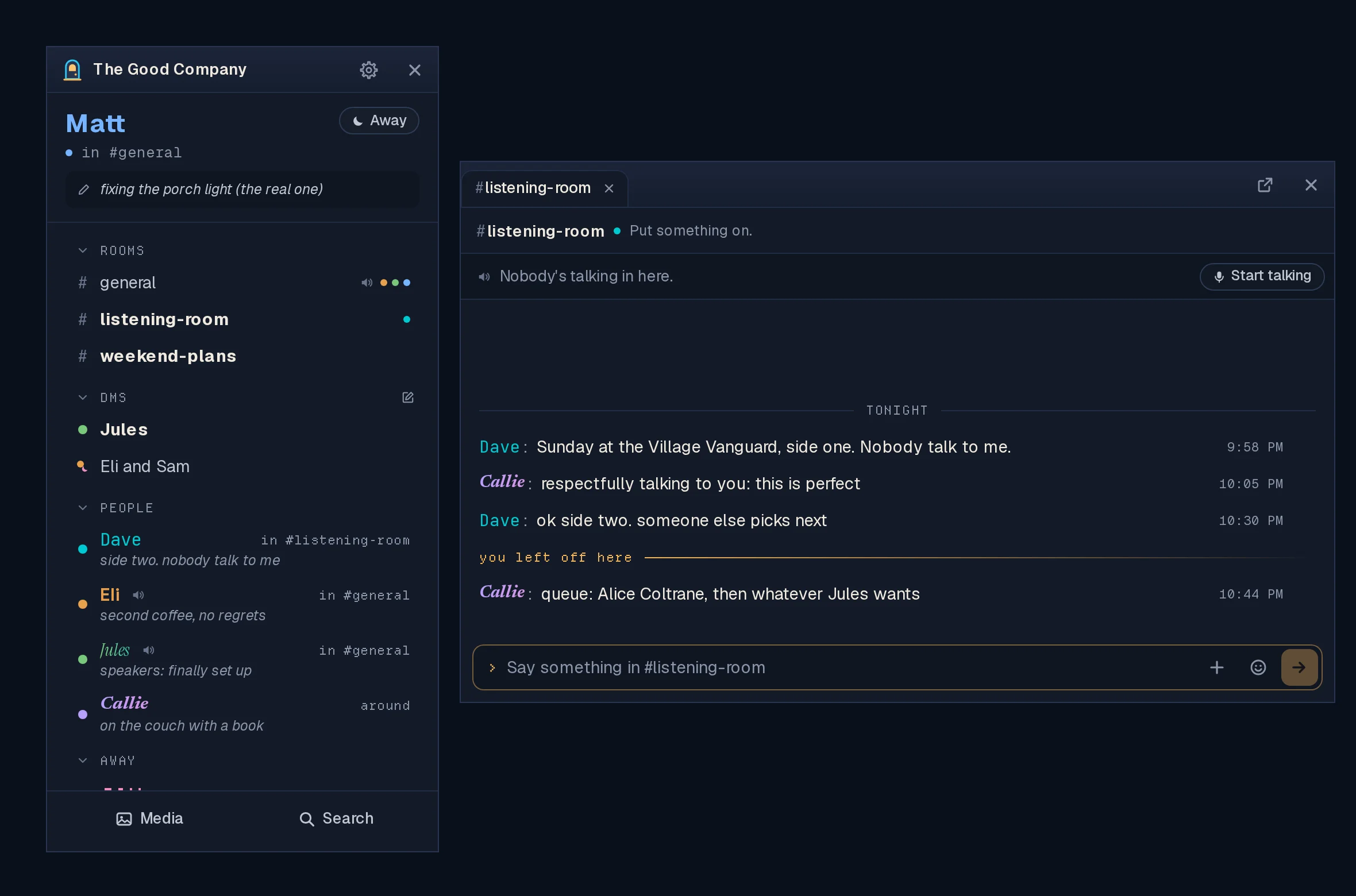
A day of real use turned into the biggest release since the Buddy list
arrived. You can now @ people by the name you know them by and paste
screenshots straight in. DMs you haven't read are hard to miss. Your status
has fields you label yourself. The list shows at a glance who's actually
here, and voice now always goes through the server.
Hosts: update the server, and make sure voice is set up first. Voice now
needs LINGER_VOICE_ADDRESS. A server without it carries no voice at all
after this update. The database also changes, so take a backup first.
For hosts has the exact commands.
Everyone: update the app. Apps older than 0.4.1 can no longer join voice.
The highlights
- @ opens a list of people, found by the name you know them by (#267).
- Paste a picture into the message box with Ctrl+V (#276).
- A DM you haven't read is lit, pops a banner and flashes the taskbar (#291).
- Status fields with your own labels, and links in them that open (#270).
- Lights off for idle, away and offline: only people who are here are lit (#301).
- A sender's name gets its own line, so every message starts on one edge (#295).
- Voice always goes through the server, and sound settings apply mid-call
(#306, #249).
Chat
- Mention people by the name you know (#267). Type
@at the start of a
word and a list of people opens by the message box. Search by display name
or username. Up and Down move through it, Enter, Tab or a click picks, and
Escape closes it. In a room it offers everyone on the server, with the
people in the room first; in a DM, only the people in it. When you read a
mention, it shows the person's display name, with their @username on hover. - Paste a picture from the clipboard (#276). A screenshot, or Copy Image
from a browser or image viewer, goes onto your message as a file, the same
as picking it with +. Plain text pastes as before. This never worked on
Linux until now. - A sender's name on its own line (#295). Messages used to start right
after "Name:", so a longer name pushed that person's words further in. Now
the name sits on its own line, and everybody's words start on one edge
just below it. A new speaker is easy to spot. - Line breaks and indentation are kept (#289). Lines typed with
Shift+Enter used to run together into one. - A very long message folds after twenty lines (#304), fading out, with
Show all under it and Show less once it's open. Only the words fold,
never a picture. Copying and screen readers still get all of it. - Back to the newest no longer loads the same page twice (#266).
DMs and notifications
- A DM you haven't read is lit (#291), not just bold. Its row gets a soft
fill and edge, and so do the DMs heading and the server's header while
they're folded, and its tab when another tab is showing. Reading it puts
the light out. Rooms stay bold only. - Every DM gets a desktop banner saying who it's from, and Linger's
taskbar button flashes until you look (Windows flashes the button, Linux
marks the window as wanting attention). Nothing happens for a DM you're
already reading. Turn both off in Settings → Notifications → Banners for
DMs. - DMs stay in order of the latest message while Linger runs (#248). They
used to go back to the order they had when Linger started, once read.
People and status
- The lights are off for idle, away and offline (#301, #274). Somebody
who's here has their name in their own style and a solid dot. Everybody
else's name is a dim grey, and their mark says which: a half-strength dot
for idle, a half-strength moon for away, a hollow dot for offline. Away
messages keep their warm color. Cards, conversations and your own name are
unchanged. - Status fields with your own labels (#270). A status had three fixed
fields: Listening to, Reading and Working on. Now you get up to three, and
you pick each label: Listening to, Reading, Working on, Playing, Watching,
or your own (24 characters). A web address in a field opens in your
browser. Your existing status carries over as it was. - A status is words now; status pictures are gone (#269). Saving one
often failed, and the Buddy list never showed them. Share a photo in a room
instead, where people see it and Media keeps it. Existing status pictures
are cleared when the server updates. - See your own card the way friends see it (#271). Click your own name,
at the top of the list or on one of your messages. Edit profile takes
the place of Message and Knock. - Display names refuse invisible and control characters (#296): line
breaks, tabs, direction controls, invisible characters outside emoji, piles
of accent marks, or nothing visible at all. Emoji, accents and every
language still work. Names saved before this keep working. - Names paint the same everywhere (#272, #287). A gradient name on a
person's card showed only its first color, and a glowing name's light
stopped at a hard edge in the list and in voice. Both are fixed.
Voice and sound
- Voice always goes through the server (#306). It has carried every call
since 0.4.1, with the older direct way kept as a fallback. That fallback is
gone, and so is the Voice through the server switch in Settings. A
room holds up to 25 people. A server that isn't set up for voice now says
"Voice isn't set up on this server" instead of offering a call nobody
could hear. - Changing your microphone or speakers applies to the call you're in
(#249). You no longer have to leave and rejoin. - When voice won't start, it says why (#261, #273), on the room's voice
line, and Start talking stays there for another go. If your default
microphone or speakers won't open, it says so, with a Pick yours in
Settings button. More microphones and headsets open than before. - Linger's own sounds play on the Speakers you picked (#250). Chimes,
knocks and the voice sounds used to go to the system default, even with
voice on your headset. - The knock is twice as loud, and mute and unmute 1.6 times (#252). They
were the hardest sounds to hear on laptop speakers.
Knocks
- Knock says why it can't (#288). While somebody is offline, Knock stays
greyed out and says "Can't knock while Jen is offline." It comes back the
moment they're online. A refused knock from a DM says why. - The knock limit says when you can knock again (#268): "Three knocks
this hour. You can knock again in 20 minutes." - Windows: a knock no longer flashes scroll bars on the list (#251).
Media, links and invites
- Shared audio gets Linger's own player (#247), with a volume slider, the
same on Linux and Windows. Linux had no way to turn a shared audio file
down. The last volume you set is kept for the next file. - A YouTube link's card shows the video's title (#300), not just
"youtube.com". Needs the updated server. - An invite for Anyone has no limit (#246). It used to run out after the
first person joined. Needs the updated server. Invites made as Anyone
before the update stay single-use, so make a new one.
Gone in this release
- The previous look (
LINGER_CLASSIC=1) is deleted (#306). The Buddy list
has been the app since 0.4.0. - Voice straight between people's computers (#306). Voice goes through the
server only. - Status pictures (#269).
Known issues
- On Hyprland (Omarchy included), opening a conversation moves the mouse
pointer into the chat window. That's Hyprland's own behaviour when an app
brings a window forward, and Linger leaves it to your desktop. The
user guide has the two lines that turn it
off, if you'd rather it didn't.
For hosts: updating the server
Server image: ghcr.io/itsmattguenther/linger:0.4.4 (amd64 and arm64), also
tagged latest.
What changes for you:
- Voice needs
LINGER_VOICE_ADDRESS. Before, a server without it fell back
to voice straight between people's computers. Now it carries no voice at
all. If you already run voice through the server (you set this up for
0.4.1), nothing changes. - The database changes (two migrations, run by themselves at startup).
Status pictures are cleared, and statuses move to the new fields. An older
server won't start on the updated database, so the backup is your only
way back to 0.4.3. - No new settings.
Run these on the server, one block at a time.
1. Go to the folder with your compose.yaml (the linger folder from
setup):
cd ~/linger2. Check voice is set up:
grep -nE '^\s*#?\s*LINGER_VOICE_ADDRESS:|3479:3479' compose.yamlYou want two lines back: LINGER_VOICE_ADDRESS: with an IP address and
no # in front of it, and - "3479:3479/udp". If either is missing or
starts with #, set up voice now, before updating, or voice stops working
after the update:
curl -4 https://api.ipify.org
nano compose.yaml
The first command prints your server's public IP address. In compose.yaml,
remove the # before LINGER_VOICE_ADDRESS and put that address after it. A
compose.yaml from before 0.4.1 has neither line, so add both to the linger
service:
    environment:
      # ...what's there already...
      LINGER_VOICE_ADDRESS: 203.0.113.7
    ports:
      - "3479:3479/udp"
Then open UDP port 3479, in your cloud provider's firewall and on the machine:
sudo ufw allow 3479/udp3. Check the image name. grep image: compose.yaml should show
ghcr.io/itsmattguenther/linger:latest. If it says...
Linger v0.4.3
Linger 0.4.3: the first weekend's fixes
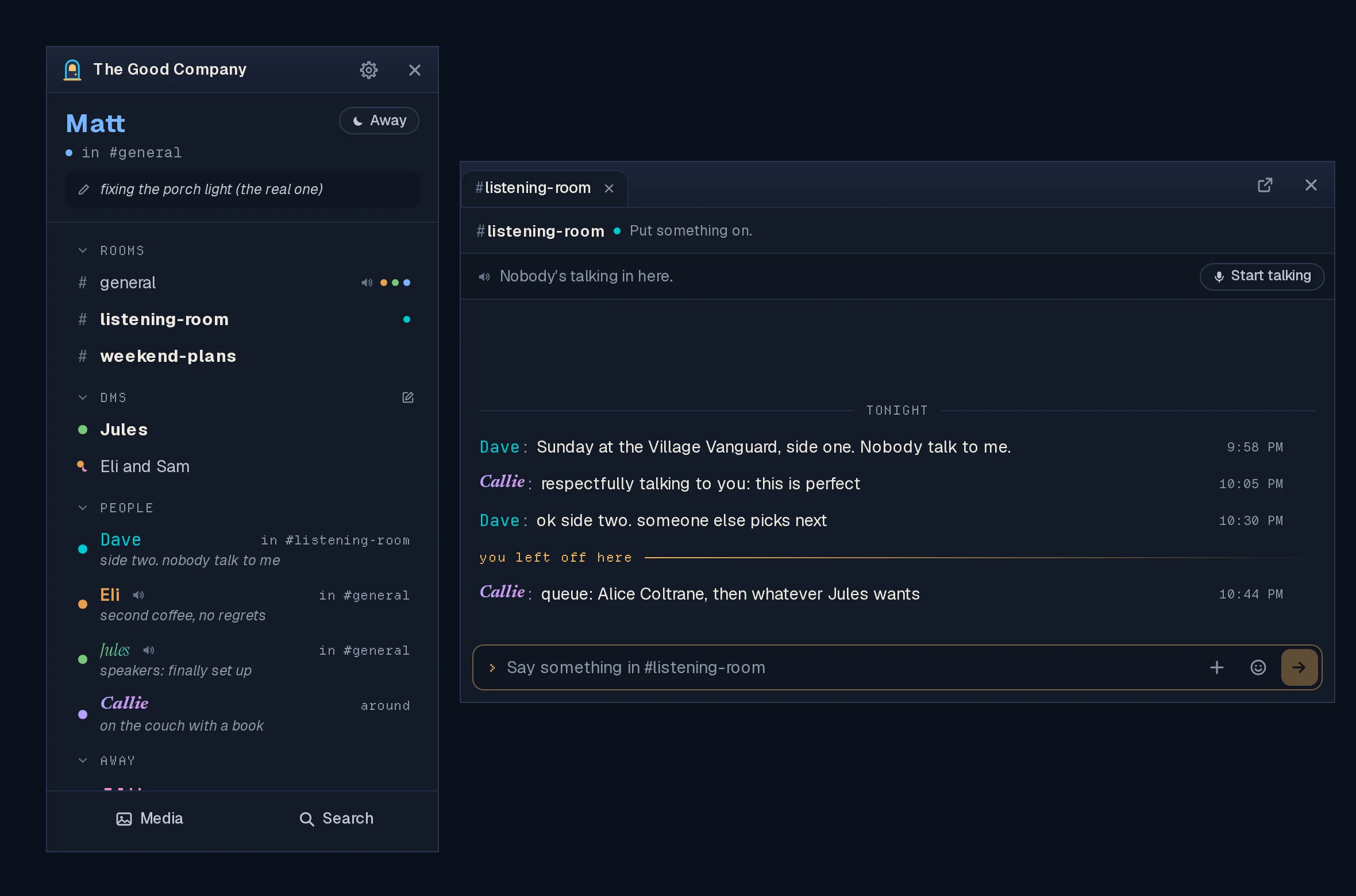
Fixes and small things from the first weekend of real use: shared videos you
can jump around in, push-to-talk that doesn't look like mute, a volume for
Linger's own sounds, and a Windows window you can actually move.
Hosts: update the server. Jumping around a shared video's timeline needs
the new server (#222). Everything else is in the app.
Shared videos (#222)
- Jumping around a video's timeline works. On servers that keep files on
their own disk, dragging or clicking the timeline turned the video blank with
"error" until you left the room. The server now sends the part of the file the
player asks for. Servers that keep files in S3 were never affected. - A video that fails to load says so, with Load again, right where it is,
and picks up where it had got to. No more leaving the room and coming back.
Voice
- Push-to-talk no longer shows you as muted (#232). With push-to-talk on,
not holding the key closed your microphone by really muting you, so everyone
saw a crossed-out microphone beside your name. Now nobody sees anything: they
see you light up when you talk. Mute and Deafen still show, because those are
choices you made, and the Mute button is there with push-to-talk too. - Turning push-to-talk on or off applies to the call you're in (#231). Before,
it only took effect after leaving and joining again. Changing the talk key
applies at once too. A mute you chose stays when you turn push-to-talk off. - Mute, Deafen and Leave in the voice bar are symbols (#230), the same as in
the room's chat window. Hover one for its name; screen readers still read it. - Their sounds come with the click (#241). Pressed in the room's chat window,
Mute and Deafen sounded seconds late on Linux. The window you click now plays
the sound, and only once.
A volume for Linger's sounds (#234)
Settings → Sound & Voice → Sound volume: one slider for Linger's own sounds
(chimes, knocks, the door chime and the voice sounds), from silent to 400%. It
starts at today's level. Let go of it to hear one. How loud people are in voice
is separate and unchanged.
Starting when you sign in (#228)
Settings → Account & App → This Computer → Start Linger when I sign in to the
computer. Off unless you turn it on. On Windows it shows in Task Manager's
Startup apps; on Linux it's an entry in your autostart folder. Some Linux
setups, Omarchy's Hyprland among them, don't start what's in that folder by
themselves; Settings says so and links to the one line to add. The
user guide has how to undo it by hand.
Smaller things
- Windows: the tabbed chat window moves (#225). In tabs mode it couldn't be
dragged by its title bar, and always opened in the same spot. Drag it by the
empty space beside the tabs; double-click there to maximize. It now reopens
where you left it, on the same display. - New Room asks for the name first (#221), and the address after the
#
fills itself in:Screenshots and Clipsbecomesscreenshots-and-clips. You
can still type your own. - Older NVIDIA cards on Linux (#229): on NVIDIA's 580 "legacy" driver (GTX 900
and 1000 series cards), Linger could close when you resized one of its windows
while another was open. On that driver Linger now draws without the graphics
card, which stops it. Typing may feel a beat behind there. The
user guide has the details.
Known issues
- On Hyprland (Omarchy included), opening a conversation moves the mouse
pointer into the chat window. That's Hyprland's own behaviour when an app
brings a window forward, and Linger leaves it to your desktop. The
user guide has the two lines that turn
it off, if you'd rather it didn't.
The previous look
Still inside 0.4.3 while voice through the server is tried: start Linger with
LINGER_CLASSIC=1 (on Linux, LINGER_CLASSIC=1 linger-client). It goes once
the new voice has proven itself.
Download the app
Install the app on your own computer. Hosts run the separate server image.
| Your computer | Download |
|---|---|
| Windows | Linger_0.4.3_x64-setup.exe |
| Omarchy or Arch | Nothing to download: curl -fsSL https://raw.githubusercontent.com/itsMattGuenther/Linger/main/packaging/arch/setup.sh | bash once, then update with your system |
| Ubuntu, Debian or Mint | Linger_0.4.3_amd64.deb |
| Fedora or openSUSE | Linger-0.4.3-1.x86_64.rpm |
| Other Linux | Linger_0.4.3_amd64.AppImage |
The .msi is an alternative Windows installer. The app uses .sig files and
latest.json for updates; you do not need to download them yourself. macOS and
ARM desktop installers are not available. Windows installers are updater-signed,
not Authenticode-signed, so SmartScreen may warn: Run anyway is behind More
info. See the
user guide
for installation and troubleshooting.
Updating
Existing clients: choose Update… at the foot of your list, or open Settings →
Account & App → Updates, or close Linger and install the new download. You stay
signed in. Windows users should keep the same installer format (.exe or .msi).
On Omarchy or Arch, the package updates with your system.
Hosts: update the server; jumping around a shared video needs it. It's
ghcr.io/itsmattguenther/linger:0.4.3 (amd64 and arm64) and latest:
docker compose pull && docker compose up -d (add --profile voice to both if
you run the voice relay). No database changes and no new settings.
Checks on installed clients
Record OS, package type, previous and new version, and interface size with
any failure. Use made-up messages, and keep private conversations out of
screenshots.
- With the server on 0.4.3, share a video in a room and jump around its
timeline, on Linux and on Windows. It keeps playing. - In voice with push-to-talk on: nobody sees a crossed-out microphone beside
you while the key is up, on your screen or theirs. Hold the key and talk.
Turn push-to-talk off in Settings mid-call: you're heard at once, without
rejoining. - In the room you're in voice in, press Mute, Deafen and Leave in its chat
window: each sound comes with the click, once. - Move Sound volume up and let go: one chime at the new level. At 400% it's
loud but clean. - Windows, tabs mode: drag the chat window by the empty space beside its tabs
to your other display, close it, open a room again: it comes back there. - Turn on starting at sign-in, sign out and back in: Linger starts. Turn it off:
it doesn't. On Windows, check Task Manager's Startup apps agrees. - Settings → Hosting → Rooms → New Room: type a name, and the address fills in.
- On a GTX 900 or 1000 series card with NVIDIA's 580 driver on Linux: tile two
Linger windows and drag the border between them. Nothing closes.
Linger v0.4.2
Linger 0.4.2: voice that holds
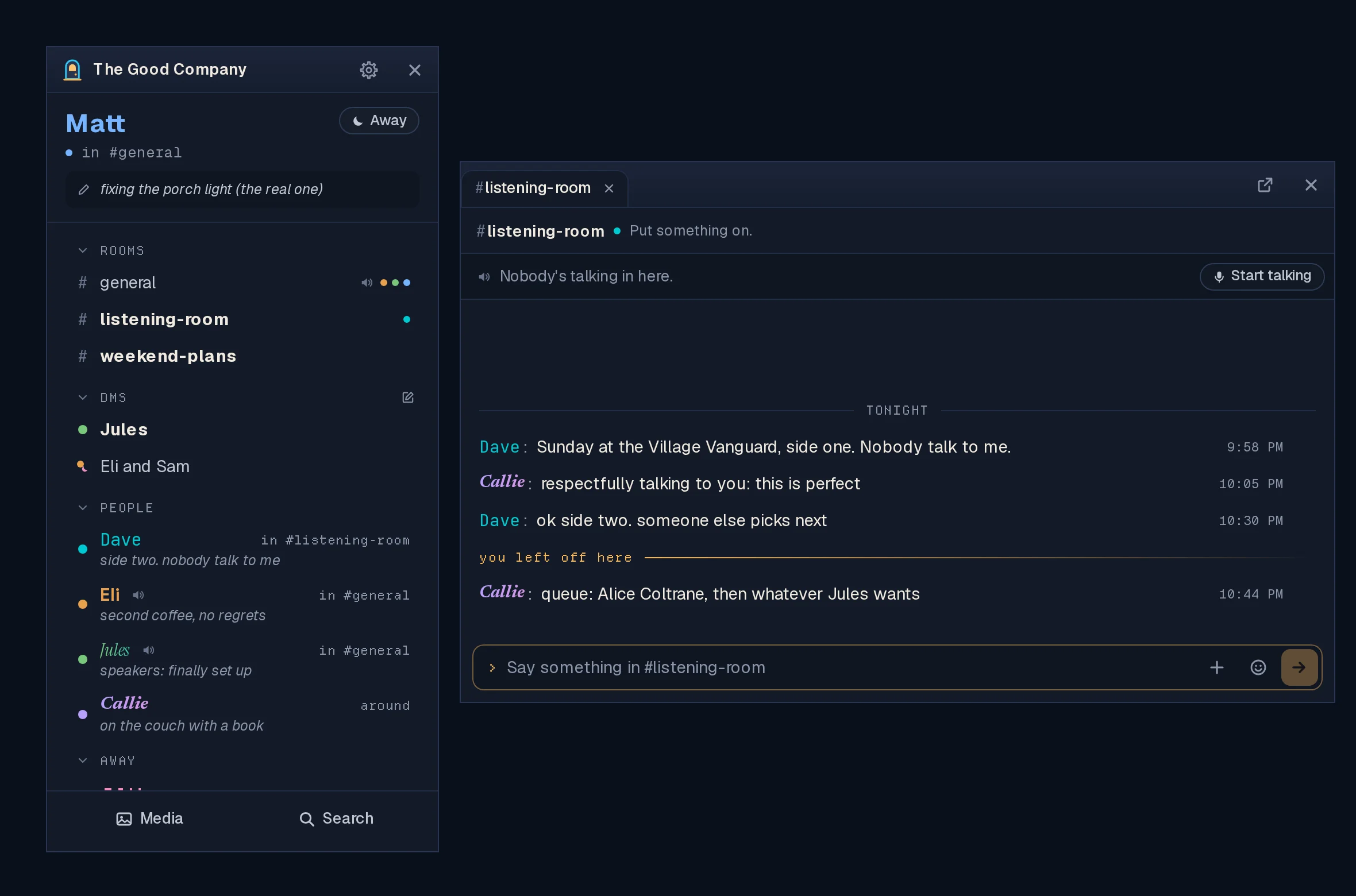
Voice through the server stopped cutting out, and a handful of fixes from the
first week of real use.
Hosts: update the server. The voice fix is in the server. With a 0.4.1
server, voice through the server still drops every fifteen seconds or so,
whatever app people have.
Voice through the server stays connected (#210)
- In 0.4.1, two people talking through the server lost each other over and
over: about fifteen seconds of voice, then half a minute of "can't reach".
The server only waited for each app to check in, and an app mid-conversation
never did. It now checks on each app itself, every few seconds, and a
moment's hiccup no longer ends a connection. - If you turned Voice through the server off to get around this, turn it
back on in Settings → Sound & Voice and join voice again.
Voice in the room's window (#216, #215)
- Mute, Deafen and Leave are now at the end of the voice line in the chat
window of the room you're in voice in, as symbols (hover one for its name).
No more finding the list to mute yourself. The voice bar in the list stays. - Your name lights up there when you talk, the same as everyone else's.
Smaller things
- A knock rocks the list of the person you knock, side to side, as the
design always had it (#211). Nothing moves with reduced motion turned on. - Back to tabs is now the pop-out button's mirror: the same box, with the
arrow coming in, and no words (#214). - Signing in with
http://in front of the address works (#208). Linger
always connects securely, so the address works however it's typed. The
sign-in screen also says plainly that a member signs in with the server's
address; an invite is only for a new account.
Known issues
- On Hyprland (Omarchy included), opening a conversation moves the mouse
pointer into the chat window. That's Hyprland's own behaviour when an app
brings a window forward, and Linger leaves it to your desktop. The
user guide
has the two lines that turn it off, if you'd rather it didn't. - Jumping around a shared video's timeline breaks it ("error", until you
leave the room and come back) on servers that keep files on their own disk.
Playing from the start works. The fix is in the server (#222).
The previous look
Still inside 0.4.2 while voice through the server is tried: start Linger with
LINGER_CLASSIC=1 (on Linux, LINGER_CLASSIC=1 linger-client). It goes once
the new voice has proven itself.
Download the app
Install the app on your own computer. Hosts run the separate server image.
| Your computer | Download |
|---|---|
| Windows | Linger_0.4.2_x64-setup.exe |
| Omarchy or Arch | Nothing to download: curl -fsSL https://raw.githubusercontent.com/itsMattGuenther/Linger/main/packaging/arch/setup.sh | bash once, then update with your system |
| Ubuntu, Debian or Mint | Linger_0.4.2_amd64.deb |
| Fedora or openSUSE | Linger-0.4.2-1.x86_64.rpm |
| Other Linux | Linger_0.4.2_amd64.AppImage |
The .msi is an alternative Windows installer. The app uses .sig files and
latest.json for updates; you do not need to download them yourself. macOS and
ARM desktop installers are not available. Windows installers are updater-signed,
not Authenticode-signed, so SmartScreen may warn: Run anyway is behind More
info. See the
user guide
for installation and troubleshooting.
Updating
Existing clients: choose Update… at the foot of your list, or open Settings →
Account & App → Updates, or close Linger and install the new download. You stay
signed in. Windows users should keep the same installer format (.exe or .msi).
On Omarchy or Arch, the package updates with your system.
Hosts: update the server; the voice fix is in it. It's
ghcr.io/itsmattguenther/linger:0.4.2 (amd64 and arm64) and latest:
docker compose pull && docker compose up -d (add --profile voice to both if
you run the voice relay). No database changes and no new settings. Turning on
voice through the server is in the
host guide.
Checks on installed clients
Record OS, package type, previous and new version, and interface size with
any failure. Use made-up messages, and keep private conversations out of
screenshots.
- With the server on 0.4.2 and Voice through the server on, two people on
different networks talk for five minutes without dropping. Then everybody
you can gather. - In the room you're in voice in, mute, deafen and leave from its chat
window; the voice bar in the list agrees. - Talk: your name lights up in the room's voice line.
- Knock somebody: their list rocks and the card says who.
- Pop a tab out and put it back with the arrow-in button.