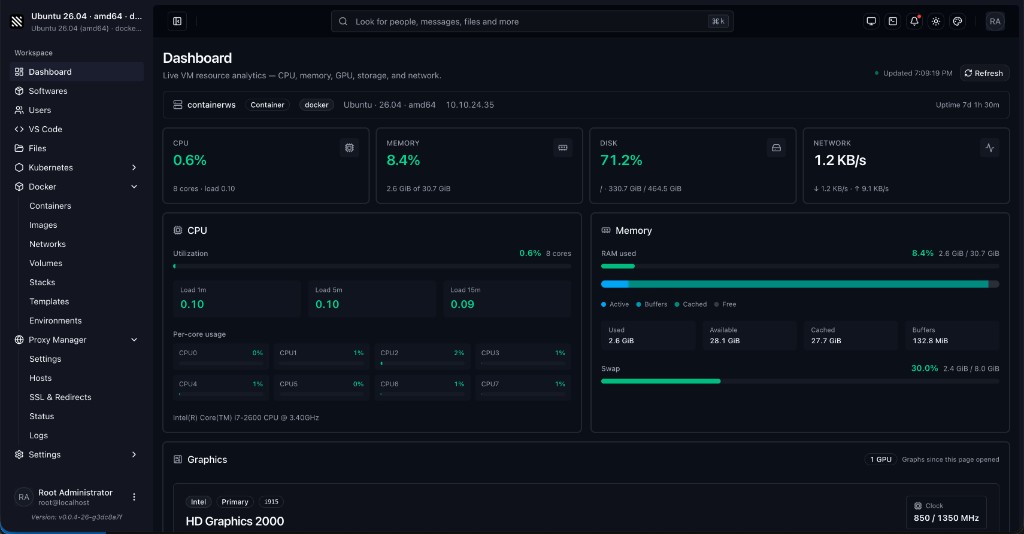
Container Workspace (ContainerWS) is a full Linux workspace: a web UI + API (cws on port 9000), Softwares catalog, Cloud Shell, MCP tools, nested Docker, and optional desktop apps (XFCE / noVNC, Chrome, VS Code, Cursor). Run it as a native binary on the host, or as a Docker image with systemd/SSH when available.
Docs: containerws.izetmolla.com · Docker Hub: izetmolla/containerws · Author: Izet Molla
Images are published as multi-arch (linux/amd64 + linux/arm64) under:
izetmolla/containerws:<distro>-<version>
After a release that publishes the tap:
brew install izetmolla/tap/containerwsOr:
brew tap izetmolla/tap
brew install containerws
Then run containerws / cws (same binary). Tap repo: izetmolla/homebrew-tap. Setup notes are under Binary releases → Homebrew tap.
Installs the latest GitHub Release binary, links cws / containerws, prepares /config/containerws, and starts a daemon that runs cws --start (systemd, launchd, OpenRC, FreeBSD rc, or direct mode when no init is available):
curl -sSL https://raw.githubusercontent.com/izetmolla/containerws/main/install/install.sh | bashOr download first:
curl -sSL https://raw.githubusercontent.com/izetmolla/containerws/main/install/install.sh -o /tmp/cws-install.sh
sudo bash /tmp/cws-install.sh
Useful flags:
sudo bash /tmp/cws-install.sh --version v0.2.0    # specific release
sudo bash /tmp/cws-install.sh --no-start         # install only, do not start
sudo bash /tmp/cws-install.sh --uninstall        # remove binary + daemon (keeps /config)
After install: open http://127.0.0.1:9000. Check status with systemctl status containerws (systemd) or /usr/local/lib/containerws/bin/cws-daemon.sh status (direct mode).
Full details: install/README.md.
| Image | Tag | Base OS | What it runs |
|---|---|---|---|
izetmolla/containerws |
ubuntu-26.04 |
Ubuntu 26.04 (Resolute) | Default / recommended. systemd + OpenSSH + cws (UI/API on :9000). Softwares catalog, nested Docker volume, desktop-capable. |
izetmolla/containerws |
ubuntu-26.10 |
Ubuntu 26.10 | Same stack on newer Ubuntu. |
izetmolla/containerws |
ubuntu-25.10 |
Ubuntu 25.10 (Questing) | Same stack on Ubuntu 25.10. |
izetmolla/containerws |
ubuntu-25.04 |
Ubuntu 25.04 (Plucky) | Same stack on Ubuntu 25.04. |
izetmolla/containerws |
debian-13 |
Debian 13 (Trixie) | Same app stack on Debian 13. |
izetmolla/containerws |
debian-12 |
Debian 12 (Bookworm) | Same app stack on Debian 12 (stable-oriented). |
izetmolla/containerws |
kali-rolling |
Kali Linux Rolling | Same app stack on kalilinux/kali-rolling (security toolkit base). |
izetmolla/containerws |
fedora-44 |
Fedora 44 | Same app stack on Fedora 44 (dnf / RPM world). |
izetmolla/containerws |
fedora-43 |
Fedora 43 | Same app stack on Fedora 43. |
Every runtime image:
- Starts via
/entrypoint.sh(CONTAINERWS_INIT=auto|systemd|direct) - Exposes 22 (SSH) and 9000 (Container Workspace web UI / API)
- Persists app data under
/config(SQLite, machine id, SSL, VNC pass, etc.) - Ships the Softwares catalog install scripts (Go, Node, Docker Engine, XFCE+noVNC, Chrome, VS Code, …)
Pick a tag that matches the distro you want inside the workspace. Behavior of cws is the same across tags; package managers and base packages differ.
| Image | Tag | Purpose |
|---|---|---|
izetmolla/binoptimization |
latest |
Build-only toolkit (strip + UPX) imported by OS Dockerfiles. Do not run as a workspace. |
izetmolla/containerws |
binoptimization |
Alias of the toolkit above (same purpose). |
Dockerfile sources live under docker/<os>/<version>/Dockerfile.
- Docker Engine or Docker Desktop (WSL2 backend)
- Docker Compose v2 (
docker compose) - Recommended: NVIDIA Container Toolkit if you want
gpus: all - Treat these containers as a trusted personal workspace (
privileged+ unconfined seccomp/apparmor are required for nested Docker and desktop apps)
Do not use cgroup: host or bind-mount host /sys/fs/cgroup into the container on WSL — that breaks systemd (ef53 / cgroup hierarchy issues).
This repo’s compose files use:
cgroup: private- no
/sys/fs/cgrouphost bind cap_drop: [SYS_MODULE]CONTAINERWS_INIT=auto(falls back to directcws+sshdif systemd cannot start)
If systemd still fails on your WSL build:
environment:
CONTAINERWS_INIT: directgit clone https://github.com/izetmolla/containerws.git
cd containerws
mkdir -p tmp/configDev build from this repo (default docker-compose.yaml):
# Optional: create an external network if your file expects one
docker network create --subnet=10.10.26.0/24 VLAN26 2>/dev/null || true

# Edit docker-compose.yaml:
#   - set ROOT_PWD
#   - adjust networks / IP, or switch to published ports (see below)
#   - keep ./tmp/config:/config

docker compose -f docker-compose.yaml up -d --build
Pull a published image (no local build) — example service:
services:
  containerws:
    image: izetmolla/containerws:ubuntu-26.04
    container_name: containerws
    hostname: containerws
    restart: unless-stopped
    tty: true
    stop_signal: SIGRTMIN+3
    privileged: true
    cgroup: private
    gpus: all          # remove if you have no GPU toolkit
    shm_size: "2gb"
    security_opt:
      - apparmor:unconfined
      - seccomp:unconfined
    cap_drop:
      - SYS_MODULE
    tmpfs:
      - /run:exec,mode=755
      - /run/lock:mode=755
      - /tmp:exec,mode=1777
    environment:
      ENV: production
      container: docker
      CONTAINERWS_INIT: auto
      ROOT_PWD: "CHANGE_ME"
      ROOT_SSH_PUBLIC_KEY: ""
      NVIDIA_VISIBLE_DEVICES: all
      NVIDIA_DRIVER_CAPABILITIES: all
    volumes:
      - ./tmp/config:/config
      - containerws-docker-data:/var/lib/docker
    ports:
      - "9000:9000"
      - "2222:22"
volumes:
  containerws-docker-data:
Save as docker-compose.local.yaml and run:
docker compose -f docker-compose.local.yaml up -d| Service | URL / command |
|---|---|
| Web UI / API | http://localhost:9000 |
| SSH | ssh -p 2222 root@localhost (if you published 2222:22) |
| Shell into container | docker exec -it containerws bash |
Data survives recreate as long as ./tmp/config (and the nested Docker volume) are kept.
| File | Audience | Notes |
|---|---|---|
docker-compose.yaml |
Linux / WSL dev | Builds docker/ubuntu/26.04/Dockerfile, mounts ./tmp/config, external VLAN26 network |
docker-compose-windows.yaml |
Windows Docker Desktop example | Pulls izetmolla/containerws:ubuntu-26.04, Windows-style host paths — adapt paths before use |
docker-compose-example.yaml |
Legacy example | Uses older cgroup: host + cgroup bind — avoid on WSL |
Pull and run Ubuntu 26.04 (recommended):
docker pull izetmolla/containerws:ubuntu-26.04

docker volume create containerws-docker-data
mkdir -p "$(pwd)/tmp/config"

docker run -d \
  --name containerws \
  --hostname containerws \
  --restart unless-stopped \
  --privileged \
  --cgroupns=private \
  --gpus all \
  --shm-size 2g \
  --security-opt apparmor=unconfined \
  --security-opt seccomp=unconfined \
  --cap-drop SYS_MODULE \
  --tmpfs /run:exec,mode=755 \
  --tmpfs /run/lock:mode=755 \
  --tmpfs /tmp:exec,mode=1777 \
  -e ENV=production \
  -e container=docker \
  -e CONTAINERWS_INIT=auto \
  -e ROOT_PWD='CHANGE_ME' \
  -e ROOT_SSH_PUBLIC_KEY='' \
  -v "$(pwd)/tmp/config:/config" \
  -v containerws-docker-data:/var/lib/docker \
  -p 9000:9000 \
  -p 2222:22 \
  -t \
  --stop-signal SIGRTMIN+3 \
  izetmolla/containerws:ubuntu-26.04
Other distros — only change the image tag:
docker pull izetmolla/containerws:debian-13
docker pull izetmolla/containerws:fedora-44
# …then docker run … izetmolla/containerws:debian-13
Without GPU, omit --gpus all and the NVIDIA_* env vars.
Useful commands:
docker logs -f containerws
docker exec -it containerws bash
docker stop containerws && docker start containerws   # update same container; /config keeps identity
docker rm -f containerws # remove container (keep volumes/config)| Variable | Default / example | Meaning |
|---|---|---|
ENV |
production |
App environment |
CONTAINERWS_INIT |
auto |
auto / systemd / direct — how PID 1 starts cws + sshd |
ROOT_PWD |
(set your own) | Root password configured at first boot |
ROOT_SSH_PUBLIC_KEY |
empty | Optional authorized key for root SSH |
container |
docker |
Hint for container-aware scripts |
NVIDIA_VISIBLE_DEVICES |
all |
GPU visibility (with NVIDIA toolkit) |
NVIDIA_DRIVER_CAPABILITIES |
all |
NVIDIA driver caps |
MCP_PORT |
unset | If set, starts standalone MCP HTTP listener |
MCP_TOKEN |
unset | Optional bootstrap MCP auth token |
DATABASE_URL |
/config/containerws/database/database.sqlite (prod) |
SQLite path |
| Port | Service |
|---|---|
| 9000 | Container Workspace web UI + REST API (+ /api/mcp when enabled) |
| 22 | OpenSSH |
Publish host ports with -p 9000:9000 -p 2222:22 (or your compose ports: / network IP).
| Mount | Purpose |
|---|---|
/config |
Persistent app state (DB, machine id, SSL, VNC, etc.). Keep this across recreate. |
/var/lib/docker |
Nested Docker Engine data (named volume recommended) |
Publish archives via GoReleaser on your machine (binaries only — no Docker images). There is no GitHub Actions Release workflow; normal CI still runs on branch pushes.
# needs: go, pnpm, goreleaser, GITHUB_TOKEN (or gh auth), and SSH access to GitHub
./scripts/release-local.sh patch       # or: minor | major | v0.2.0
./scripts/release-local.sh --existing-tag v0.1.0
./scripts/release-local.sh patch --snapshot   # dist/ only, no publish
./scripts/release-local.sh patch --skip-brew  # GitHub Release only (no tap push)
This bumps/tags, publishes the GitHub Release, then pushes dist/homebrew/Casks/containerws.rb to
[izetmolla/homebrew-tap](https://github.com/izetmolla/homebrew-tap) over SSH
(git@github.com) using your GitHub SSH key (~/.ssh/id_ed25519 or HOMEBREW_TAP_SSH_KEY).
No HOMEBREW_TAP_TOKEN is required for local releases.
Standalone tap publish (after a goreleaser run left dist/homebrew/...):
./scripts/publish-homebrew-tap.sh v0.1.3./scripts/release.sh patch # or: minor | major | v0.2.0
# → preflight, changelog, annotated tag, push — does not upload binaries
# Prefer release-local.sh when you want the GitHub Release + Homebrew tap.Preflight must pass before any tag is created. Use --skip-build / --skip-preflight only when you already built.
Local app build only: ./scripts/build.sh or task build.
Tooling versions match filebrowser CI: Go 1.26.x, Node 24.x, pnpm 10.
Updated automatically by release-local.sh / publish-homebrew-tap.sh over SSH.
One-time setup:
- Create the public tap (or run
./scripts/setup-homebrew-tap.sh):
gh repo create izetmolla/homebrew-tap --public --description "Homebrew tap for Container Workspace" --clone=false- Ensure your SSH public key can push that repo.
- Install:
brew install --cask izetmolla/tap/containerwsthensudo containerws setup.
Requires Docker Buildx. OS images import the binoptimization toolkit:
# Toolkit (once)
docker buildx build --platform linux/amd64,linux/arm64 \
  -f tools/binoptimization/Dockerfile \
  -t izetmolla/binoptimization:latest \
  --load .   # or --push

# One OS tag (example)
./deploy.sh ubuntu 26.04 --no-push

# Or raw buildx
docker buildx build --platform linux/amd64 \
  -f docker/ubuntu/26.04/Dockerfile \
  -t izetmolla/containerws:ubuntu-26.04 \
  --load .
List discoverable tags:
./deploy.sh --listAfter the container is up, install catalog tools from the UI (Softwares), CLI (cws software …), or MCP (softwares_lookup → softwares_install).
Examples: Go, Node.js, Docker Engine, XFCE + noVNC, Google Chrome, VS Code, VS Code Server, Cursor.
On app start, softwaresync checks software_installed vs the host and reinstalls missing catalog items in the background.
These images are intended as a developer workspace, not a locked-down multi-tenant sandbox. privileged, seccomp:unconfined, and apparmor:unconfined enable nested Docker and desktop/Electron apps. Do not expose them to untrusted networks without additional controls. Always set your own ROOT_PWD / SSH keys.
This project is open source under the MIT License.
Izet Molla — izetmolla@icloud.com