Compile firmware
There are severals ways to compile the firmware. As the traditional way, check the original Building from Source document, however, Docker is recommended because it provides a very clean way to go from source to a .bin file.
Using Buddyworks and other CI platforms
Debian setup script repository
- Install Docker
- Get Kitematic
- Install GitHub Desktop
If you are using Windows, line endings may produce some errors. For example: 'python/r' not found messages are product of a problem with the line endings. This must be done prior to cloning the repository for compilation to succeed. To prevent this, configure git to not manipulate these line endings, open a terminal and execute:
y
git config --global core.autocrlf false
You can also check the current configuration by omitting the false at the end of the command.
[[img/git_linefeed.png|600px]
Important: If you want to collaborate to the project, Fork the repository to your own account and continue this instructions from your own fork.
Open Github Desktop, and click "Open with Github Desktop" from the main page of the repository (or your fork), under the button "Code".
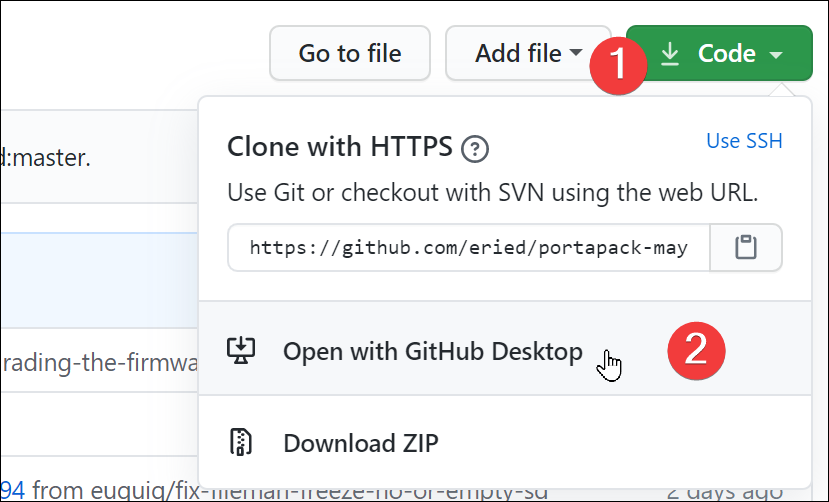
Finally, create a build folder inside of the repository. From Github Desktop, just click "Repository / Show in Explorer" and create an empty folder named build. This folder will be used for the compilation output.

You need to configure the path to the source code from the Volumes of the container as show in the image below.

Everytime you run the container you prepared in the previous step, it will compile the source and (if successful) leave the results in build/firmware/

If you have additional questions, please check this guide.
If you are inclined for using the command line, you can try the following:
- Clone the repository and submodules:
git clone https://github.com/eried/portapack-mayhem.git
cd portapack-mayhem
git submodule update --init --recursive
-
For building:
docker build -t portapackccache -f dockerfile-nogit . -
For running (in the root of the repo):
docker run -it -v ${PWD}:/havoc portapackccache
Remember that you have to create a build folder before running the image.
You can use the following _yml _as your template for your CI platform (pipeline export from buddy.works):
- pipeline: "Build firmware"`
  `trigger_mode: "ON_EVERY_PUSH"`
  `ref_name: "master"`
  `ref_type: "BRANCH"`
  `auto_clear_cache: true`
  `trigger_condition: "ALWAYS"`
  `actions:`
  `- action: "Build Docker image"`
    `type: "DOCKERFILE"`
    `dockerfile_path: "dockerfile-nogit"`
    `do_not_prune_images: true`
    `trigger_condition: "ALWAYS"`
  `- action: "Execute: mkdir build"`
    `type: "BUILD"`
    `working_directory: "/buddy/portapack-havoc"`
    `docker_image_name: "library/ubuntu"`
    `docker_image_tag: "18.04"`
    `execute_commands:`
    `- "mkdir -p build"`
    `volume_mappings:`
    `- "/:/buddy/portapack-havoc"`
    `trigger_condition: "ALWAYS"`
    `shell: "BASH"`
  `- action: "Run Docker Image"`
    `type: "RUN_DOCKER_CONTAINER"`
    `use_image_from_action: true`
    `volume_mappings:`
    `- "/:/havoc"`
    `trigger_condition: "ALWAYS"`
    `shell: "SH"
If you decide to ignore this guide and use the command line instead, you will need to include submodules
git clone --recurse-submodules --remote-submodules <url>
-
Untested on other linux flavors
-
Thanks to @aj#3566 from discord for it
-
For convenience the compiler will be installed to /opt/build
-
Needed steps
- update a Debian based OS
- install the necessary ARM compiler to /opt/armbin (if not done before)
- make user mayhem dir
- clone mayhem repository from GitHub (if not done before)
- do required modification for python 3 on source
- setup environmental variables for compiler
- create makefile through cmake and compile
- flash the firmware
-
Once done you only need to call 'make firmware' in the /opt/portapack-mayhem/firmware/build directory
-
You can speed up the building process by calling 'make -j 8 firmware' instead, where 8 is the number of physical CPU cores (if you have some compiling errors to check it's better to call it without '-j 8')
apt-get update
apt-get install -y git tar wget dfu-util cmake python3 bzip2 curl hackrf python3-distutils python3-setuptools
curl https://bootstrap.pypa.io/get-pip.py -o get-pip.py; python3 get-pip.py
pip install pyyaml
2. Install the necessary ARM compiler to /opt/armbin (as root) (if not done before, root needed if you install it in /opt)
mkdir /opt/build; cd /opt/build
wget -O gcc-arm-none-eabi.tar.bz2 'https://developer.arm.com/-/media/Files/downloads/gnu-rm/9-2020q2/gcc-arm-none-eabi-9-2020-q2-update-x86_64-linux.tar.bz2?revision=05382cca-1721-44e1-ae19-1e7c3dc96118&la=en&hash=D7C9D18FCA2DD9F894FD9F3C3DC9228498FA281A'
mkdir armbin
tar --strip=1 -xjvf gcc-arm-none-eabi.tar.bz2 -C armbin
mkdir /opt/portapack-mayhem
chown -R my_user:my_usergroup /opt/portapack-mayhem
git clone --recurse-submodules https://github.com/eried/portapack-mayhem.git /opt/portapack-mayhem/
sed -i 's/env python/env python3/g' /opt/portapack-mayhem/hackrf/firmware/libopencm3/scripts/irq2nvic_h
cd /opt/portapack-mayhem/firmware
mkdir build; cd build
PATH=/opt/build/armbin/bin:/opt/build/armbin/lib:$PATH
7. Create makefile through cmake and compile (as user) (it's important to call the PATH cmd in step 6 just before making the cmake)
cmake -B./ -S../../
make firmware
hackrf_spiflash -w /opt/portapack-mayhem/firmware/build/firmware/portapack-h1_h2-mayhem.bin
If you want to have all these commands in one go, go to https://github.com/GullCode/compile-flash-mayhem and download compile-flash-mayhem.sh and adjust it to fit your needs