forked from portapack-mayhem/mayhem-firmware
-
Notifications
You must be signed in to change notification settings - Fork 1
Main Menu
Jimi Sanchez edited this page Feb 12, 2022
·
1 revision

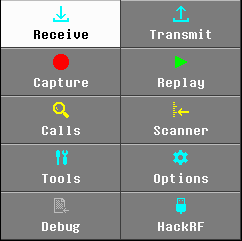
The Main Menu of Mayhem comprises a number of buttons to access the various functionality groups of the firmware.
| Button | Functional Group |
|---|---|
| Receive | Receiver Applications |
| Transmit | Transmit Applications |
| Capture | Permit Recording or 'Capture' of RF to facilitate analysis or Replay Attack |
| Replay | Transmit a previously recorded RF Capture file |
| Calls | Detect any signals within a specified bandwidth, similar to 'Close Call function on scanners |
| Scanner | Step through a list of pre-defined frequencies, stopping if squelch is broken (signal detected) |
| Tools | |
| Options | |
| Debug | |
| HackRF | Switch to HackRF mode for use from a USB Host device (eg. computer) |
- First steps
- Intended use and Legality
- Features
- Firmware update procedure
- Description of the hardware
- User interface
- Troubleshooting
-
Applications
- Receivers
- Transmitters
- ADS-B(S)
- APRS
- BHT Xy/EP
- GPS Sim
- Jammer
- Key Fob
- LGE Tool
- Morse
- Burger Pager
- POCSAG
- SSTV
- TEDI/LCR
- TouchTunes
- RDS
- OOK
- Soundboard
- Capture
- Replay
- Calls
- Scanner
-
Tools
- Freq manager
- File manager
- Signal gen
- Wave viewer
- Antenna length
- Wipe SD card
- Options
- Audio
- Radio
- Interface
- Date/Time
- Touchscreen
- Debug
- Memory
- SD Card
- Peripherals
- Temperature
- Buttons Test
- HackRF
- Compile From Source
- Description of the Structure
-
Software Dev Guides
- Create a Simple App
- Widgets
- SD Card
- Access Radio Hardware
- Create a Complex App
- Debug via SWD
- Tools
- Research
- UI Screenshots