Configuration Sun Tracking
| Variable | Default | Range | Description |
|---|---|---|---|
| Window Azimuth | 180 | 0–359 | Compass direction the window faces. Discoverable via Open Street Map Compass |
| Field of View Left | 90 | 0–180 | Unobstructed arc from window centre to the left, in degrees |
| Field of View Right | 90 | 0–180 | Unobstructed arc from window centre to the right, in degrees |
| Minimal Elevation | None | 0–90 | Sun must be above this angle before tracking activates |
| Maximum Elevation | None | 1–90 | Sun must be below this angle for tracking to activate |
| Enable Blind Spot | False | Enables the Blind Spot step — define an angular range where an obstruction blocks direct sun | |
| Enable Glare Zones | False | Enables the Glare Zones step (vertical blinds only) — protect named floor areas from direct sun |
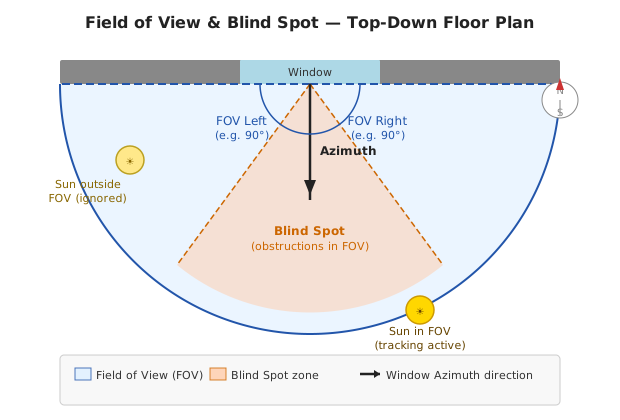
Field of View (FOV) defines the horizontal angular range where the integration actively tracks the sun. Outside this range the sun is treated as "not in front of the window" and the cover returns to the default position.
Measurement steps:
- Stand at the centre of the window, inside your room, looking straight out (perpendicular to the wall — this is the azimuth direction).
- Look left: find the furthest point where direct sunlight can enter through the window without being blocked by a wall, pillar, overhang, or neighbouring building. Estimate the angle between straight-ahead and that point. That is FOV Left.
- Repeat looking right for FOV Right.
- A smartphone protractor app (or a simple protractor held flat) makes this easier to measure accurately.
Recommended values by situation:
| Situation | FOV Left / Right |
|---|---|
| Standard window, no obstructions | 45° each side |
| Wide window or sliding glass door | 60–75° each side |
| Narrow window or recessed into a thick wall | 30° each side |
| Protecting furniture or artwork from any direct sun | Measure actual unobstructed angle (see below) |
Protecting fragile furniture or artwork: The default 90° per side (180° total) is intentionally wide to work for most installations. However, if your goal is to prevent any direct sunlight from reaching a specific area, use the actual unobstructed angle your window allows — not the default. Measure from the window centre to the edge of whichever wall, column, or frame first blocks direct sun on each side. A tighter FOV means the blind engages as soon as direct sun could enter, and stays in the default (typically more closed) position at all other times.
Example: A south-facing window set into a 60 cm thick wall may only allow direct sun within ±40° of perpendicular. Setting FOV Left and FOV Right to 40° each ensures the blind is always active during those hours, rather than the wider 90° default which would leave gaps.

🏠 Home · ✨ Features · 📰 What's New
🚀 Getting Started
- Installation
- Migrating from Custom Repository
- Migrating from Adaptive Cover
- First-Time Setup
- Cover Types
🧠 Core Concepts
📐 Cover Types
⚙️ Configuration
- Sun Tracking
- Position
- Position Matching
- Glare Zones
- Automation
- Custom Position
- Force Override
- Weather Safety
- Climate
- Templated Thresholds
- Blindspot
- Summary Screen
- Debug & Diagnostics
🔌 Entities & Services
- Entities
- Proxy Cover Entity
- Position Verification
- My Position Support (Somfy RTS)
- Runtime Configuration Services
🛠️ Operations
🔧 Advanced Use Cases
- Dynamic Temperature Thresholds
- Dynamic Tracking Window
- Bedroom Sleep Mode
- Handling Variable Cloud Cover
- Venetian Tilt-Only on Overcast Days
- Forecast-Based Shading
🎨 Dashboard
🧪 Testing & Simulation
📚 Reference
👩💻 For Developers