Venetian Blinds
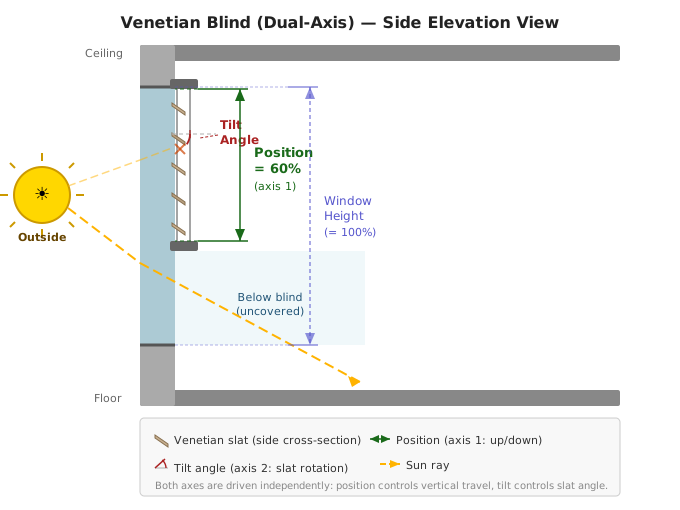
The Venetian Blind (Dual-Axis) cover type drives BOTH the vertical position
AND the slat tilt of a single Home Assistant cover entity from a single Adaptive
Cover Pro instance. It is the right pick when your blind exposes both
set_cover_position and set_cover_tilt_position services on one entity,
typical for KNX, Somfy IO/Tahoma, Shelly 2PM, and similar dual-axis hardware.
Closes #33. Shipped in v2.20.0; enhanced with tilt-only mode and continuous tilt tracking in v2.21.0.
| Use this if ... | Use Vertical or Tilt instead if ... |
|---|---|
| Your blind has both vertical movement AND slat tilt on the same HA cover entity | Your hardware separates them into two HA entities |
| You want one Adaptive Cover Pro instance to coordinate both axes | You want different position vs. tilt logic per blind |
| You see "manual override" trips every time the cover moves vertically (motor back-rotates the slats) | Your blind only has one axis |
If you currently run a paired cover_blind + cover_tilt setup against the
same physical blind, see Migration from paired instances
below.
The setup wizard's Geometry step for venetian collects BOTH vertical-blind and slat-tilt parameters in a single screen. Reuse the same values you'd use for their single-axis counterparts.
| Variable | Default | Range | Description |
|---|---|---|---|
| Window Height | 2.1 m | 0.1–50 m | Glass area covered (top to bottom of the protected zone) |
| Window Width | 1.0 m | 0.1–50 m | Width of the glass / blind |
| Window Depth | 0.0 m | 0–5 m | Reveal depth: how far the window sits inside the wall |
| Sill Height | 0.0 m | 0–50 m | Height of the sill above floor; used for sun-penetration math |
| Slat Depth | 3 cm | 0.1–15 cm | Width of each slat (front to back) |
| Slat Distance | 2 cm | 0.1–15 cm | Vertical centre-to-centre between slats |
| Tilt Mode | Bi-directional | mode1 / mode2 | mode1 = 0–90°, mode2 = 0–180° |
| Skip Tilt Above Position | 95 % | 50–100 % | Skip the tilt command when the commanded position exceeds this value. At high positions the slats are retracted into the housing — tilting is physically meaningless and causes an unnecessary motor back-drive. Increase this threshold if your blind can still tilt near the top; decrease it if the motor tries to tilt when fully raised. |
| Post-settle Hold | 2.0 s | 0.0–10.0 s | How long to wait after the carriage reports it has settled before sending the tilt command. Most motors (KNX, Somfy IO, Shelly 2PM) back-rotate the slats for ~1–2 s after vertical motion stops; the hold lets that firmware reassert finish so the tilt command lands after it instead of being overwritten. Raise this if you observe the slats snapping back to a stale angle a second or two after a position change (FGR223 with slower actuator firmware has been seen needing 3–4 s). Lower it toward 0 if your actuator commits to its final position instantly. |
| Operating Mode | position and tilt | position_and_tilt / tilt_only | See Operating modes below. |
| Inverse Tilt | off | on / off | Inverts the tilt axis only. Enable when your hardware's tilt 0 means slats-open and 100 means slats-closed (opposite of the HA convention). This is separate from the position-axis "Inverse state" toggle. Most covers do not need this — only enable if the slats move the wrong way. |
See Configuration-Vertical and Configuration-Tilt for diagrams of how each value is measured.
Two modes control how the position and tilt axes interact. Select one in the Geometry step under Operating Mode.
The cover lowers to the engine-calculated position and the slats tilt to the optimal angle for that position. Both axes move in sequence on each update cycle. Best for blinds where you want the position to track the sun's elevation while the slats fine-tune the angle.
- Position tracks sun elevation (same as
cover_blind) - Slat angle is derived from the position the engine chose
- Tilt updates continuously even when the position has not changed (e.g. when sun azimuth shifts but elevation holds steady)
The cover closes completely to position 0% whenever the sun is in the tracking window. Only the slat angle tracks the sun. Best when you always want full coverage and want maximum glare control through tilt alone.
- Position is forced to 0% (closed) while the sun is in the FOV
- Slat angle tracks the sun continuously on every update cycle
- Non-solar pipeline decisions (weather, manual override, force override, custom position) still work normally — the position rewrite only applies when the solar handler drives the result
Tilt is SOLAR-only: the tilt angle is only calculated and sent when the solar handler wins the pipeline. For all other control methods (default position, weather safety, manual override, force override, climate, etc.) no tilt command is issued — the slats remain at whatever angle the last solar cycle set them to.
When the engine resolves a new position for a venetian instance, the integration:
- Sends
cover.set_cover_positionwith the engine's resolved position. - Polls the cover's
current_positionattribute every 500 ms until either:- the cover reports a position within tolerance of the target, OR
- the position stops changing for 3 consecutive samples (handles motors that overshoot and back-track), OR
- the 60-second timeout fires.
- Waits Post-settle Hold seconds (default 2.0 s) after settle is reported. This lets the motor finish its back-rotate / firmware reassert before the next command lands.
- Sends
cover.set_cover_tilt_positionwith the slat angle the engine derives for that resolved position — unless the commanded position exceeds the Skip Tilt Above Position threshold (default 95 %), in which case step 4 is skipped entirely.
Continuous tilt tracking: when the sun azimuth shifts but the engine's calculated position is the same as the cover's current position, no set_cover_position command is sent. In that case the integration still sends a set_cover_tilt_position command to update the slat angle. This ensures the slats track the sun even when the blind's height stays constant throughout a portion of the day.
Real-motor venetians (KNX, Somfy IO, Shelly 2PM) back-rotate the slats as a side-effect of vertical motion. Sequencing the commands lets the motor finish its full vertical-then-back-rotate cycle before our tilt command lands, so the two commands do not fight.
Manual override on a venetian is hard because two events look identical from the outside: a non-ADP tilt change (Home Assistant UI, a physical or virtual remote, voice assistant, another automation) and the actuator back-rotating the slats as a side-effect of finishing a position command. Both arrive as a sudden tilt-axis delta with no ADP-issued command in flight. The integration uses layered timeouts to bias toward suppressing motor side-effects in the moments after a position command, then progressively reverts to override detection as time passes.
After a set_cover_position command lands, both the tilt axis and (from
v2.23.4) the position axis are gated by three windows that run concurrently.
Any one that's still open suppresses the manual-override path.
-
Command grace (5 s),
COMMAND_GRACE_PERIOD_SECONDS. Axis deltas in the first 5 seconds afterset_cover_positionare always suppressed. Catches the immediate hardware-acknowledged back-rotate that fires beforecover.stateeven leavesopening/closing. -
Post-settle delta cap (5 s window, delta ≤ 30 %),
VENETIAN_POST_SETTLE_CAP_GRACE_SECONDS. Oncecover.statereports settled, drift up to 30 % is suppressed for the next 5 seconds. Catches the normal back-rotate burst small actuators publish right after stop. -
Post-settle publish lag (default 45 s, any delta — configurable from v2.23.4),
see Publish-lag window below. The clock
starts the moment the sequencer observes the
moving → settledtransition inside its internal settle loop, not the moment the command was sent. Catches slow-bus republish on integrations like KNX and Somfy IO via Tahoma where the back-rotate value lands tens of seconds after the cover physically settles.
v2.23.4 — cross-axis suppression. Before v2.23.4 these windows protected only the tilt axis. A late position-state publish from a slow actuator (KNX, Fibaro, Shelly republish) could fire
manual_override_set30-90 s after a commanded move. From v2.23.4 the same three windows protect the position axis too, and the publish-lag window is exposed as a per-instance option. See #33.
VENETIAN_POSITION_SETTLE_STARTUP_GRACE_SECONDS = 6.0. Some actuators
(notably Somfy IO via Tahoma) take 3-5 seconds to begin physical travel
after the service call. During that pre-motion window cover.state still
reads open/closed and current_position is unchanged. Without this
grace, the settle detector would mistake the pre-motion same-position
samples for a stall, declare settle, and start the 45 s publish-lag clock
20-30 seconds before the cover actually stops moving. The 6 s startup
grace blocks stall declaration until either (a) the cover has been
observed in opening or closing at least once, or (b) 6 seconds of
wall-clock time have elapsed since the settle loop began.
When the layered timeouts catch a motor side-effect, the Decision Trace
shows manual_override_rejected_tilt_suppression. When a non-ADP tilt
change arrives after all three windows close (you adjusted the tilt
from Home Assistant, a remote, or another automation), the trace shows
manual_override_set and the manual-override switch flips.
A non-ADP tilt change that lands during one of the windows is treated as a motor side-effect and won't trip override: the integration can't tell the two apart while a command is still settling. If you adjust the tilt from outside ADP within ~45 s of an ADP-driven position command, the integration will keep tracking. The Reset Manual Override button on the integration's device page is the escape hatch.
From v2.23.4, the post-settle publish-lag window (third bullet above) is exposed as a per-instance option under Geometry → Publish-lag window (s). Default 45 s, range 15–180 s. The other two windows remain compile-time constants — open an issue if you need them tunable.
When to widen. The 45 s default suits Somfy IO via Tahoma and most KNX setups. Widen toward 60–120 s if:
- Your actuator publishes a stale
current_position(or stale tilt) 30–90 s after the cover has physically stopped — common on slow KNX bus, certain Fibaro / Shelly republish behaviour, and some Z2M reporting intervals. - You see
manual_override_setevents that fire well after a commanded move with no user touch, especially right when the sun leaves the FOV and the cover commands itself open.
How to identify the symptom from diagnostics. Download the integration's diagnostics JSON (Devices & Services → Adaptive Cover Pro → Download Diagnostics) and look in the debug block for:
-
primary_axis_suppression_last_24h— a per-entity counter of how many times the publish-lag window saved you from a false override in the last 24 hours. Absent or0means the window isn't firing for you and the default is fine. A daily count climbing into the dozens means the window is doing useful work and you should consider widening it so it covers the long tail. -
manual_override_rejected_primary_axis_suppressionevents in themanual_override_historyblock — the suppression's audit trail, one entry per fired suppression. The event records the delta and timing that triggered it.
A WARN-level log line also fires on the first suppression per process and no more than once per hour per entity, e.g.:
Primary-axis manual override suppressed for cover.living_room_blind
  (publish-lag, age=58.2s, count_last_24h=7).
  If this fires repeatedly for the same actuator, increase
  'venetian_backrotate_publish_lag' in options.
When to narrow. Decrease the window only if you have an unusually fast actuator and want tighter false-touch detection — most users should leave the default alone or widen it. Narrower windows let genuine user touches register sooner after an ADP-driven move, at the cost of risking the kind of false override #33 documented.
For venetian instances, the Decision Trace sensor adds a synthetic terminal
step labelled venetian_engine after the normal handler chain. Its
reason field shows the slat-angle calculation, and a new tilt attribute
appears alongside the position the pipeline resolved:
For position and tilt mode:
trace:
  - handler: solar
    matched: true
    reason: "sun in FOV — position 60%"
    position: 60
  - handler: venetian_engine
    matched: true
    reason: "slat angle for position 60% — tilt 80%"
    position: 60
    tilt: 80
For tilt only mode, an extra venetian_mode step appears before venetian_engine showing the position rewrite:
trace:
  - handler: solar
    matched: true
    reason: "sun in FOV — position 60%"
    position: 60
  - handler: venetian_mode
    matched: true
    reason: "tilt-only mode: position 60% → 0% (closed); tilt drives the slats"
    position: 0
    tilt: 80
  - handler: venetian_engine
    matched: true
    reason: "slat angle for position 0% — tilt 80%"
    position: 0
    tilt: 80
The diagnostics download includes a tilt field on the same level as
position whenever the cover type is cover_venetian.
The Maximum Position and Minimum Position options (in the Position Settings step) constrain the carriage (vertical) axis only. They set a floor and ceiling on how far the cover raises or lowers. They do not cap the slat tilt angle — tilt is computed from sun geometry and is not bounded by these values.
If you want to prevent the cover from opening above a certain point, set max_position. If you want to prevent it from closing below a certain point, set min_position. The slat angle will still track the sun freely within those carriage bounds.
Dedicated tilt-axis min/max limits are planned as a future enhancement; until then, the Skip Tilt Above Position threshold (Geometry step) is the closest equivalent — it suppresses the tilt command entirely when the cover is raised above that point.
These are still deferred; each is tracked and will land in a later release:
- Auto-suspend on physical switch open/close: fully opening the cover via a wall switch suspending auto-control until you fully close it. Raised in #33; needs more design before implementation.
-
Per-axis override config: today
force_override_position,custom_position_N, climate position, andsunset_positionare scalar (they set position; tilt is engine-derived). Adding optional per-axis tilt companions is a follow-up. -
Glare zones for venetian: currently
cover_blindonly. - Cloud-suppression staged tilt (#175): now unblocked.
Existing setups that used two Adaptive Cover Pro instances (one
cover_blind and one cover_tilt, both pointing at the same physical entity)
should consolidate to a single venetian instance:
- Note your existing settings: geometry, schedules, sensors, climate thresholds, force/weather/custom override config from both old instances.
- Delete both old instances from Settings → Devices & services → Adaptive Cover Pro.
- Add a new instance and pick Venetian Blind (Dual-Axis) as the cover type.
- Re-enter your geometry and any overrides. Most non-geometry options can be
copied over verbatim from the
cover_blindinstance; the venetian engine makes its own slat decisions, so thecover_tiltinstance's override config is no longer needed. - Use the Decision Trace sensor to sanity-check the first few cycles.
A guided merge flow inside the config UI is on the follow-up list. For v2.20.0, this manual migration is the recommended path.
These integrations have been confirmed compatible during the v2.20.0 beta cycle:
- KNX (single cover entity exposing both services)
- Somfy IO / Tahoma Switch (local API): single-motor blinds that close vertically then back-rotate to set tilt
- Shelly 2PM
If your dual-axis venetian uses a different integration and works (or doesn't), please report on #33 so we can expand this list.

🏠 Home · ✨ Features · 📰 What's New
🚀 Getting Started
- Installation
- Migrating from Custom Repository
- Migrating from Adaptive Cover
- First-Time Setup
- Cover Types
🧠 Core Concepts
📐 Cover Types
⚙️ Configuration
- Sun Tracking
- Position
- Position Matching
- Glare Zones
- Automation
- Custom Position
- Force Override
- Weather Safety
- Climate
- Templated Thresholds
- Blindspot
- Summary Screen
- Debug & Diagnostics
🔌 Entities & Services
- Entities
- Proxy Cover Entity
- Position Verification
- My Position Support (Somfy RTS)
- Runtime Configuration Services
🛠️ Operations
🔧 Advanced Use Cases
- Dynamic Temperature Thresholds
- Dynamic Tracking Window
- Bedroom Sleep Mode
- Handling Variable Cloud Cover
- Venetian Tilt-Only on Overcast Days
- Forecast-Based Shading
🎨 Dashboard
🧪 Testing & Simulation
📚 Reference
👩💻 For Developers