Releases: koprodev/Sumbo
Release list
Sumbo v1.2.0

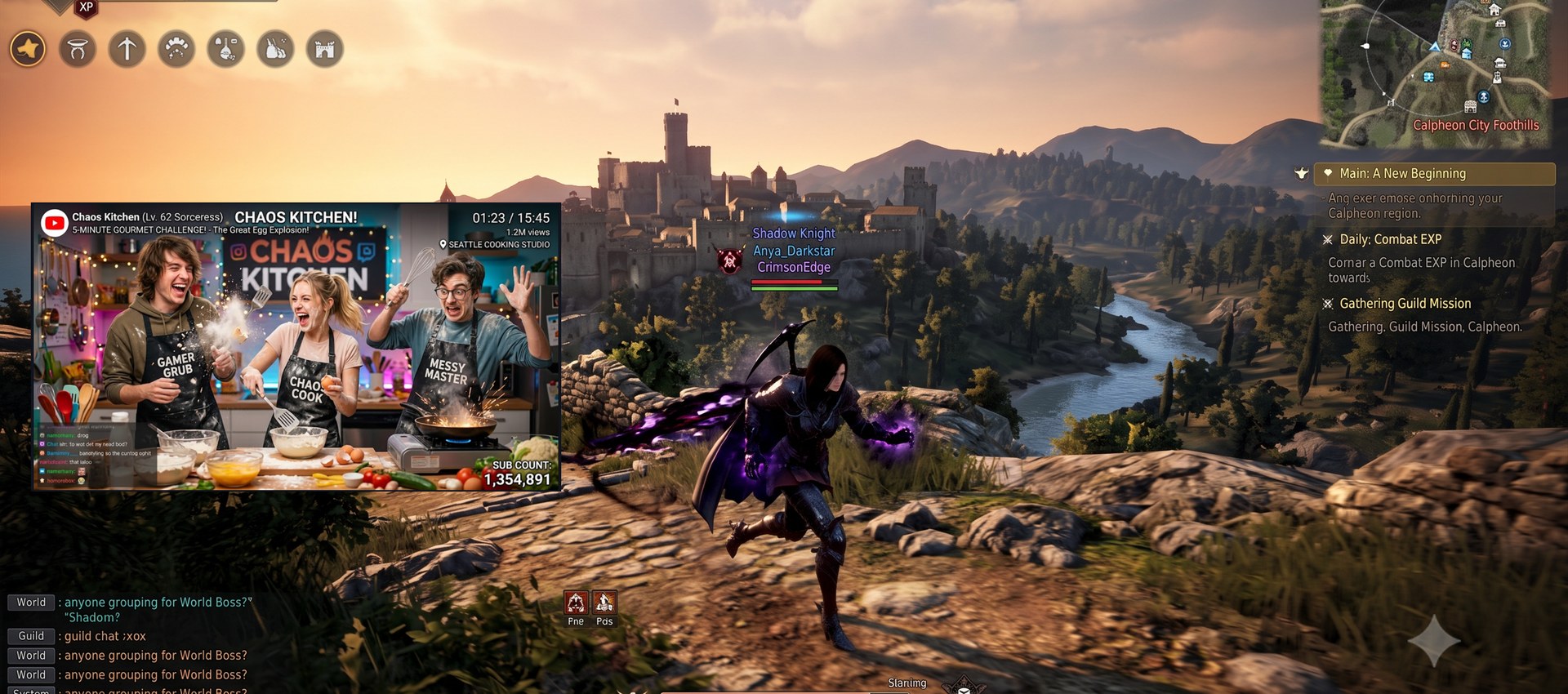
What's new in v1.2.0
Reworked right-click menu
- The mirror context menu is now organized into submenus: Target window (live window list — pick one straight from the menu), Region (select / clear), Window size (100% / 50% / 25% / fullscreen), Opacity, and Behavior (click forward / click through / lock / border / always on top).
- Right-click also works on the idle canvas — starting a mirror no longer requires the side panel.
Click forwarding actually reaches more windows
- Clicks now land on minimized source windows (e.g. a minimized Excel — cell clicks work through the mirror).
- Chromium-based windows (Chrome, Edge, Whale, Electron apps) no longer swallow forwarded clicks into their render-only overlay.
Click-through / overlay fixes
- Turning click-through off now returns to the state you were in — an overlay stays an overlay instead of popping the full control window back open.
Minimized-source hint
- When a long-minimized source stops producing frames (Chromium power saving) and Windows swaps in an icon ghost, the mirror now explains what happened and how to get frames back (restore the window) instead of showing a dead icon.
Update notification
- Sumbo now checks GitHub once at startup (opt-out in Settings) and offers the download page when a newer release is available.
Overlay usability
- Drag anywhere on the overlay canvas to move the window (with click-through off; click forwarding and region selection take priority).
- The overlay right-click menu now ends with an Exit item that fully quits Sumbo.
Downloads
| Asset | For |
|---|---|
Sumbo-1.2.0-win-x64.msi |
Installer — per-user, no admin/UAC, uninstall from Apps & Features |
Sumbo-1.2.0-win-x64.zip |
Portable — unzip and run, runtime bundled |
Sumbo-1.2.0-win-x64-lite.zip |
Lite portable — requires the .NET 10 Desktop Runtime |
Verify downloads against SHA256SUMS.txt. Binaries are not code-signed — if SmartScreen appears, choose More info → Run anyway.
한국어
우클릭 메뉴 재구성
- 미러 우클릭 메뉴가 서브메뉴 구조로 정리되었습니다: 대상 창 선택(실행 중 창 목록 — 메뉴에서 바로 미러링 시작), 영역 선택(선택/해제), 창 크기(100% / 50% / 25% / 전체화면), 불투명도, 동작 설정(클릭 전달·통과·잠금·테두리·항상 위).
- 미러가 없는 유휴 캔버스에서도 우클릭 메뉴가 열립니다 — 사이드 패널 없이 메뉴만으로 미러링을 시작할 수 있습니다.
클릭 전달 대폭 개선
- 최소화된 원본 창에도 클릭이 전달됩니다 (예: 최소화된 엑셀의 셀 클릭).
- 크로미움 계열(Chrome·Edge·웨일·Electron 앱)에서 렌더 전용 오버레이가 클릭을 삼키던 문제를 수정했습니다.
클릭 통과 / 오버레이 수정
- 클릭 통과를 끄면 켜기 전 상태로 돌아갑니다 — 오버레이(UI 숨김) 중이었다면 오버레이가 유지되고, 컨트롤 창이 갑자기 복귀하지 않습니다.
최소화 원본 안내
- 장시간 최소화된 크로미움 창이 화면 생성을 멈춰 아이콘 고스트만 남는 경우, 죽은 아이콘 대신 원인과 복구 방법(창 복원)을 미러 캔버스에 안내합니다.
업데이트 알림
- 시작 시 GitHub 최신 릴리스를 1회 확인하고(설정에서 끄기 가능), 새 버전이 있으면 다운로드 페이지를 열지 물어봅니다.
오버레이 사용성
- 오버레이 캔버스를 드래그해 창을 이동할 수 있습니다 (클릭 통과 꺼짐 시 · 클릭 전달/영역 선택이 우선).
- 오버레이 우클릭 메뉴 맨 아래에 숨보를 완전히 끝내는 종료 항목이 추가되었습니다.
Sumbo v1.1.1
What's new in v1.1.1
Overlay (UI-hidden) polish
- The overlay border now uses the theme accent blue instead of black (with Show border on).
- The overlay remembers its size and position — hide the UI again and it comes back exactly where you left it, instead of resetting to the auto-fit at the main window's corner.
- Entering overlay keeps the mirror at its currently displayed size (aspect preserved) instead of jumping to the source's 1:1 size.
- Selecting or clearing a region while in overlay now re-fits the window to the crop's shape — no more letterboxed bars around a narrow crop.
- Very small crops keep their aspect ratio (the minimum window size scales both axes instead of widening one).
Docs — refreshed the panel screenshots in the README.
Downloads
| Asset | For |
|---|---|
Sumbo-1.1.1-win-x64.msi |
Installer — per-user, no admin/UAC, uninstall from Apps & Features |
Sumbo-1.1.1-win-x64.zip |
Portable — unzip and run, runtime bundled |
Sumbo-1.1.1-win-x64-lite.zip |
Lite portable — requires the .NET 10 Desktop Runtime |
Verify downloads against SHA256SUMS.txt. Binaries are not code-signed — if SmartScreen appears, choose More info → Run anyway.
한국어
오버레이(UI 숨김) 개선
- 오버레이 테두리가 검은색 대신 테마 액센트 파란색으로 표시됩니다 (테두리 표시 켠 경우).
- 오버레이의 크기·위치를 기억합니다 — UI 를 다시 숨기면 마지막에 두었던 그 자리·그 크기로 복원됩니다.
- 오버레이 진입 시 소스 1:1 크기로 커지지 않고 현재 보이는 미러 크기를 유지합니다 (비율 보존).
- 오버레이 상태에서 영역을 선택/해제하면 창이 크롭 모양에 맞게 재조정됩니다 — 좁은 크롭 주변의 레터박스 여백이 사라졌습니다.
- 아주 작은 크롭도 비율이 유지됩니다 (최소 창 크기가 한 축만 늘리지 않고 양축 비례 확대).
문서 — README 패널 스크린샷 4종을 새로 교체했습니다.
Sumbo v1.1.0
What's new in v1.1.0
UI in 18 languages — English · 한국어 · 日本語 · 简体中文 · Español · Deutsch · Français · Português · Русский · Italiano · Bahasa Indonesia · Tiếng Việt · Türkçe · Polski · Nederlands · Українська · Ελληνικά · Filipino. The language picker in Settings is now a dropdown; switching applies instantly. (Non-English/Korean translations are first-pass — corrections welcome via Issues/PRs.)
Richer mirror right-click menu — also available from the overlay grip while the UI is hidden: position/size lock, always-on-top, opacity presets (100 / 75 / 50 / 25%), minimize-to-tray, and (in overlay mode) Exit. Global hotkeys now show inline next to their menu items.
Overlay improvements — with Show border on, the UI-hidden overlay draws a thin black frame around the mirror.
Fixes
- Closing the window (X) now really exits when Minimize to tray is turned off.
Docs — new FAQ · Tips section in the README: why Chromium-based browser videos (Chrome / Edge / Whale…) freeze when the browser window is fully covered (occlusion detection), and the --disable-features=CalculateNativeWinOcclusion fix.
Downloads
| Asset | For |
|---|---|
Sumbo-1.1.0-win-x64.msi |
Installer — per-user, no admin/UAC, uninstall from Apps & Features |
Sumbo-1.1.0-win-x64.zip |
Portable — unzip and run, runtime bundled |
Sumbo-1.1.0-win-x64-lite.zip |
Lite portable — requires the .NET 10 Desktop Runtime |
Verify downloads against SHA256SUMS.txt. Binaries are not code-signed — if SmartScreen appears, choose More info → Run anyway.
한국어
18개 언어 UI — 설정의 언어 선택이 드롭다운으로 바뀌었고, 전환은 즉시 적용됩니다. (한국어·영어 외 번역은 초벌 번역입니다 — 교정 제보 환영)
미러 우클릭 메뉴 확장 — UI 숨김 중 그립 메뉴에서도 동일: 위치·크기 잠금 / 항상 위에 표시 / 불투명도 프리셋(100·75·50·25%) / 트레이로 최소화 / (오버레이에서) 종료. 전역 단축키를 메뉴 항목 우측에 표시.
오버레이 개선 — 테두리 표시가 켜져 있으면 UI 숨김 상태에서도 검은 가는 테두리를 그립니다.
수정 — 트레이로 최소화를 끈 경우 창 닫기(X)가 실제로 종료되도록 수정.
문서 — README에 자주 묻는 질문 · 팁 신설: 크로미움 계열 브라우저(크롬·엣지·웨일) 영상이 브라우저 창이 가려지면 멈추는 원인(occlusion)과 --disable-features=CalculateNativeWinOcclusion 해결 방법.
Sumbo 1.0.2
Sumbo 1.0.2 — overlay control grip, single instance, and an MSI installer
Sumbo mirrors any window into a single always-on-top view using native DWM thumbnails — crop a region, adjust opacity, forward clicks to the source, or make the mirror click-through. Zero impact on the mirrored window: no capture, no injection.
What's new in 1.0.2
- Overlay control grip — while the UI is hidden, a small amber badge floats at the mirror's top-left. It keeps working even in click-through mode: left-drag moves the overlay, right-click opens the mirror menu, which now starts with Restore UI (also clears click-through, so the restored window is immediately usable).
- Frameless overlay — hide-UI now removes the frame entirely and auto-fits the window to the shown content (your crop region), so no black letterbox is left; grip-resize keeps the content's ratio.
- Single instance — launching Sumbo again surfaces the running window instead of starting a second process (which used to silently steal the global hotkeys — the "hotkey conflict" notice was usually this).
- Always-on-top applies at startup (previously it only took effect after toggling it off and on).
- New install options — a per-user MSI installer (no admin/UAC, Start-menu shortcut, uninstall from Apps & Features) and a tiny lite zip for machines with the .NET 10 Desktop Runtime.
Download
| Asset | Size | For |
|---|---|---|
Sumbo-1.0.2-win-x64.msi |
~38 MB | Installer — per-user (no admin), Start-menu shortcut, uninstall from Apps & Features. Runtime bundled. |
Sumbo-1.0.2-win-x64.zip |
~44 MB | Portable — unzip and run Sumbo.exe. Runtime bundled. |
Sumbo-1.0.2-win-x64-lite.zip |
~0.2 MB | Lite portable — requires the .NET 10 Desktop Runtime; Windows prompts with a download link if missing. |
- Verify with
SHA256SUMS.txt(PowerShell:Get-FileHash <file>). - SmartScreen: binaries are not code-signed — choose More info → Run anyway, or build from source (see README).
Requirements
- Windows 10 / 11 x64. First launch of the bundled builds may take a moment (single-file extraction).
Known limitations
- Click forwarding cannot reach elevated (administrator) windows (one-time notice shown).
- Multi-monitor per-monitor-DPI transitions have had limited real-hardware verification — reports welcome.
한국어
숨보("숨겨서 보자")는 임의의 창을 항상 위 하나의 창으로 미러링하는 무료 오픈소스 Windows 유틸리티입니다.
1.0.2 변경점
-
오버레이 컨트롤 그립 — UI 숨김 상태에서 미러 좌상단에 작은 주황 배지가 떠 있습니다. 클릭 통과 중에도 동작: 좌클릭 드래그 = 창 이동, 우클릭 = 미러 메뉴. 메뉴 맨 위 **"UI 숨김 취소"**는 클릭 통과도 함께 해제해 복구 즉시 사용 가능한 창을 돌려줍니다.
-
프레임리스 오버레이 — UI 숨김 시 테두리를 완전히 제거하고 표시 콘텐츠(크롭 영역) 크기로 창을 자동 조정 — 검은 여백이 남지 않으며, 그립 리사이즈도 콘텐츠 비율을 유지합니다.
-
단일 인스턴스 — 실행 중 다시 실행하면 새 프로세스 대신 기존 창이 전면으로 올라옵니다 (중복 실행이 전역 단축키를 선점하던 "단축키 충돌"의 실원인).
-
항상 위 시작 적용 — 이전에는 껐다 켜야만 적용되던 문제 수정.
-
설치 옵션 추가 — 사용자 단위 MSI 설치형(관리자 권한 불필요·시작 메뉴 등록·"앱 및 기능" 제거)과 .NET 10 데스크톱 런타임 보유 PC용 초경량 lite zip.
-
다운로드: 위 표 참고 —
msi(설치형) /zip(무설치) /-lite.zip(경량, 런타임 필요). -
SmartScreen 안내 창이 뜨면 추가 정보 → 실행 선택.
-
자세한 안내: README.ko.md
숨보가 유용하다면 개발을 응원해 주세요 ☕ → https://github.com/sponsors/koprodev
Sumbo 1.0.1
Sumbo 1.0.1 — panel split, group cycling UX, and fixes
Sumbo mirrors any window into a single always-on-top view using native DWM thumbnails — crop a region, adjust opacity, forward clicks to the source, or make the mirror click-through. Zero impact on the mirrored window: no capture, no injection.
What's new in 1.0.1
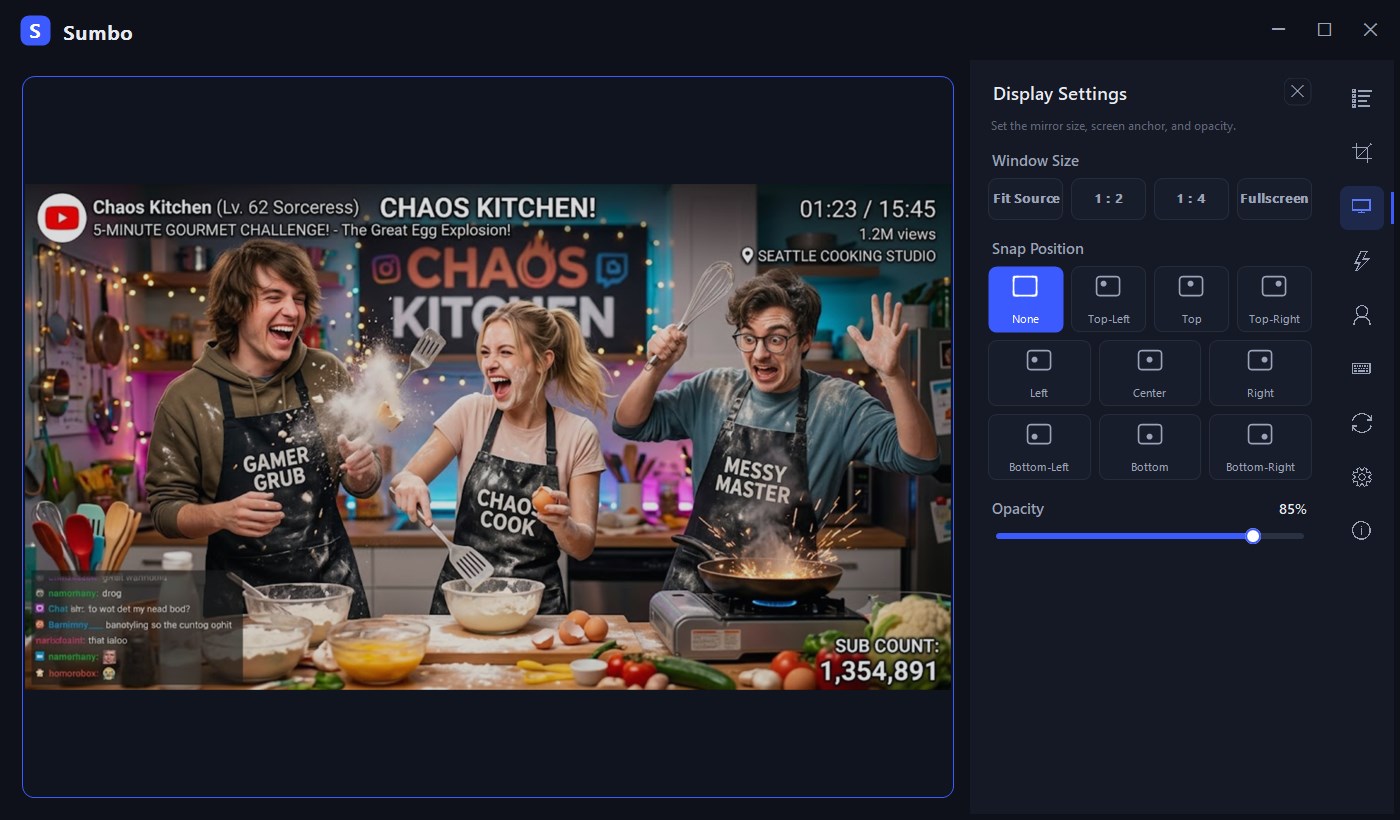
- Display / Behavior split — the display panel is now Display (size, screen anchor, opacity) and a new Behavior panel (click forward / through, position lock, border, always-on-top, overlay). The side rail is reordered to match.
- Group cycling UX — a running group shows a stop icon and blinks while it cycles; starting a group with a single member is guarded.
- Region clear fix — clearing a region now returns the mirror to the full source (the residual DWM crop is removed).
- Info panel — adds release-check, sponsor, and license links.
 |
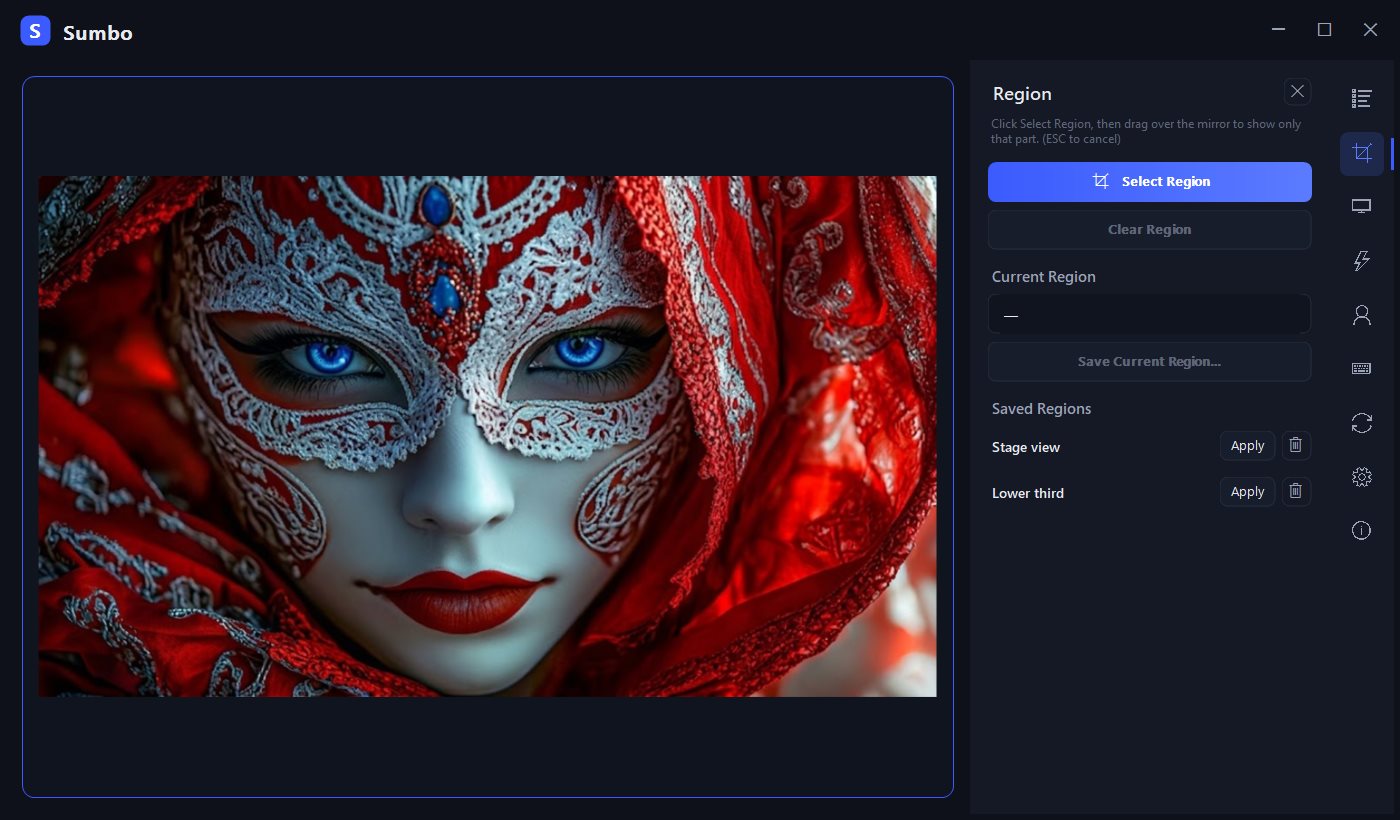 |
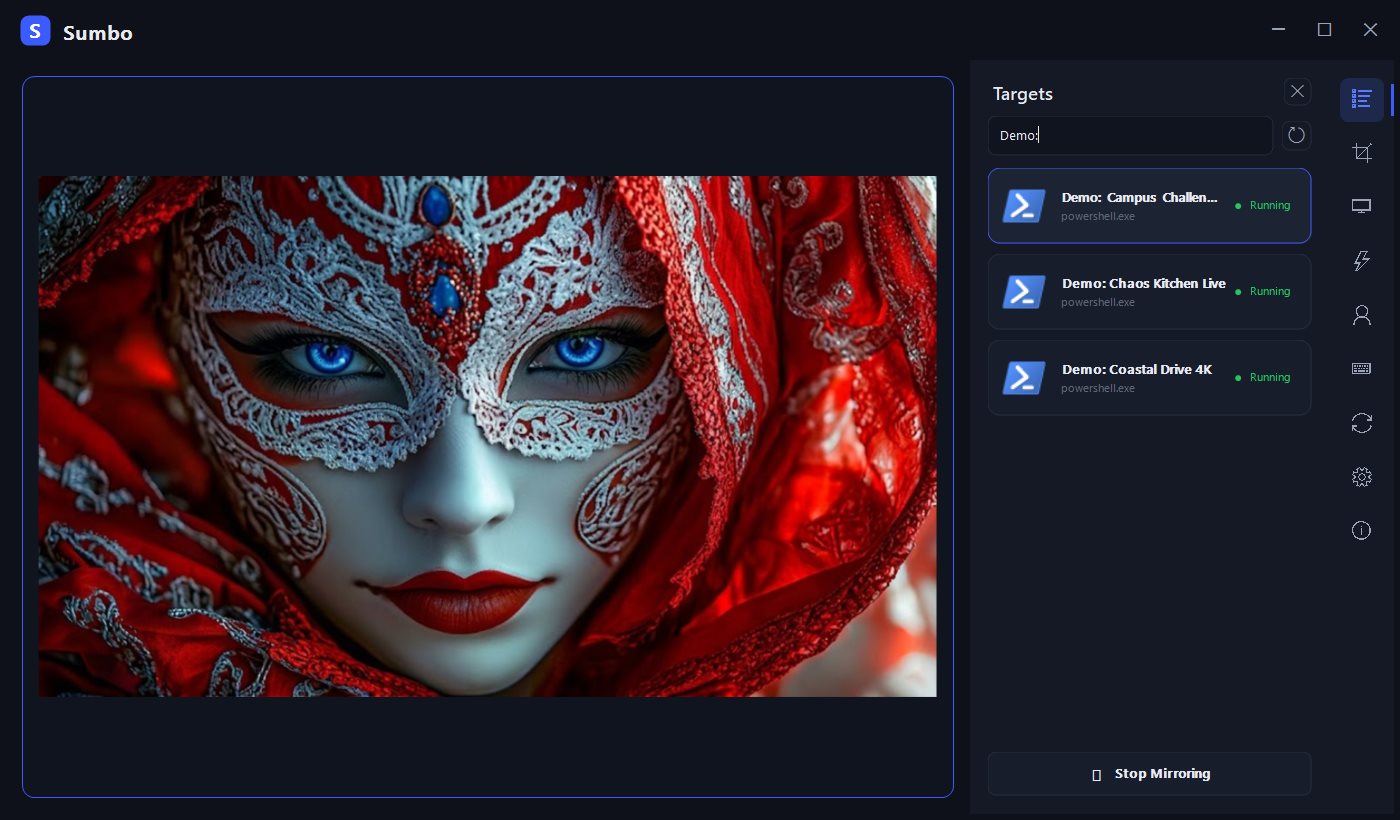
Interface shown in English with sample data.
Highlights
- Single-window mirror with a side icon rail (targets / region / display / behavior / profiles / hotkeys / group / settings / about)
- Region crop with saved regions (relative coordinates survive source resizing)
- Opacity 10–100%, click forwarding, click-through (
Ctrl+Alt+Cto escape) - Size presets (original / ½ / ¼ / fullscreen), 9-point anchoring, position lock
- Profiles, group switching (
Ctrl+Alt+G), 7 global hotkeys - Overlay mode (UI hide), tray resident, optional autostart
- English / Korean UI
Download
Sumbo-1.0.1-win-x64.zip— unzip and runSumbo.exe. No installer, no .NET required (self-contained, x64).- Verify with
SHA256SUMS.txt(PowerShell:Get-FileHash Sumbo.exe). - SmartScreen: binaries are not code-signed — choose More info → Run anyway, or build from source (see README).
Requirements
- Windows 10 / 11 x64. First launch may take a moment (self-contained single-file extraction).
Known limitations
- Click forwarding cannot reach elevated (administrator) windows (one-time notice shown).
- Multi-monitor per-monitor-DPI transitions have had limited real-hardware verification — reports welcome.
한국어
숨보("숨겨서 보자")는 임의의 창을 항상 위 하나의 창으로 미러링하는 무료 오픈소스 Windows 유틸리티입니다. 영역 크롭·불투명도·클릭 전달·클릭 통과를 지원하며, 원본 창에는 어떤 영향도 없습니다.
1.0.1 변경점
-
표시 / 동작 패널 분리 — 기존 표시 패널이 표시(크기·화면 앵커·불투명도)와 새 동작 패널(클릭 전달/통과·위치 잠금·테두리·항상 위·오버레이)로 나뉘고, 우측 레일 순서도 이에 맞춰 재배치되었습니다.
-
그룹 순환 UX — 순환 중인 그룹은 정지 아이콘과 함께 깜빡이며, 멤버가 하나뿐인 그룹의 시작을 가드합니다.
-
영역 해제 수정 — 영역을 해제하면 미러가 원본 전체로 복귀합니다(잔존 DWM 크롭 제거).
-
정보 패널 — 릴리스 확인·후원·라이선스 링크를 추가했습니다.
-
다운로드:
Sumbo-1.0.1-win-x64.zip압축 해제 후Sumbo.exe실행 — 설치·관리자 권한·.NET 설치 불필요. -
SmartScreen 안내 창이 뜨면 추가 정보 → 실행 선택.
-
자세한 안내: README.ko.md
숨보가 유용하다면 개발을 응원해 주세요 ☕ → https://github.com/sponsors/koprodev
Sumbo 1.0.0
Sumbo 1.0.0 — first public release 🎉
Sumbo mirrors any window into a single always-on-top view using native DWM thumbnails — crop a region, adjust opacity, forward clicks to the source, or make the mirror click-through. Zero impact on the mirrored window: no capture, no injection.
Watch a video while you game — pinned on the left, zero impact on the game window.
|
|
Interface shown in English with sample data.
Highlights
- Single-window mirror with a side icon rail (targets / display / region / profiles / hotkeys / group / settings / about)
- Region crop with saved regions (relative coordinates survive source resizing)
- Opacity 10–100%, click forwarding, click-through (
Ctrl+Alt+Cto escape) - Size presets (original / ½ / ¼ / fullscreen), 9-point anchoring, position lock
- Profiles, group switching (
Ctrl+Alt+G), 7 global hotkeys - Overlay mode (UI hide), tray resident, optional autostart
- English / Korean UI
Download
Sumbo-1.0.0-win-x64.zip— unzip and runSumbo.exe. No installer, no .NET required (self-contained, x64).- Verify with
SHA256SUMS.txt(PowerShell:Get-FileHash Sumbo.exe). - SmartScreen: binaries are not code-signed — choose More info → Run anyway, or build from source (see README).
Requirements
- Windows 10 / 11 x64. First launch may take a moment (self-contained single-file extraction).
Known limitations
- Click forwarding cannot reach elevated (administrator) windows (one-time notice shown).
- Multi-monitor per-monitor-DPI transitions have had limited real-hardware verification — reports welcome.
한국어
숨보("숨겨서 보자")는 임의의 창을 항상 위 하나의 창으로 미러링하는 무료 오픈소스 Windows 유틸리티입니다. 영역 크롭·불투명도·클릭 전달·클릭 통과를 지원하며, 원본 창에는 어떤 영향도 없습니다.
- 다운로드:
Sumbo-1.0.0-win-x64.zip압축 해제 후Sumbo.exe실행 — 설치·관리자 권한·.NET 설치 불필요. - SmartScreen 안내 창이 뜨면 추가 정보 → 실행 선택.
- 자세한 안내: README.ko.md
숨보가 유용하다면 개발을 응원해 주세요 ☕ → https://github.com/sponsors/koprodev