Bulk Editing
Recurring care work — thirty action items to close, a batch of stale contacts to remove, one status for a whole risk group — used to mean opening every record on its own. Every table now has a selection column for exactly this: one selection, one action.
Three ways to build a selection:
| Gesture | What it does |
|---|---|
| click a row's checkbox | adds or removes that one record |
Shift+click the next checkbox |
selects the range from the last clicked row |
| header checkbox | selects all visible rows — click again to release them |
While only part of the page is selected, the header checkbox shows its mixed (indeterminate) state. Selected rows carry an accent tint, so a large selection stays legible even without any drawer open.
Select-all means the visible page, and that is deliberate. A mass change must not reach rows nobody is looking at: whoever narrows the list with a filter narrows the target of the next bulk action with it. Sorting does not disturb the selection — it reorders ids, it does not drop them.
As soon as anything is selected, a bar appears above the table — "N selected" — with three actions:
- Set value works on enum fields and is offered only when the entity has one. With several enum fields a field dropdown comes first; with exactly one it goes straight to that field's values. Records already carrying the target value are left out rather than counted as changed.
- Delete selected, always behind a confirmation naming the count — see below.
- Clear selection empties the bar away again.
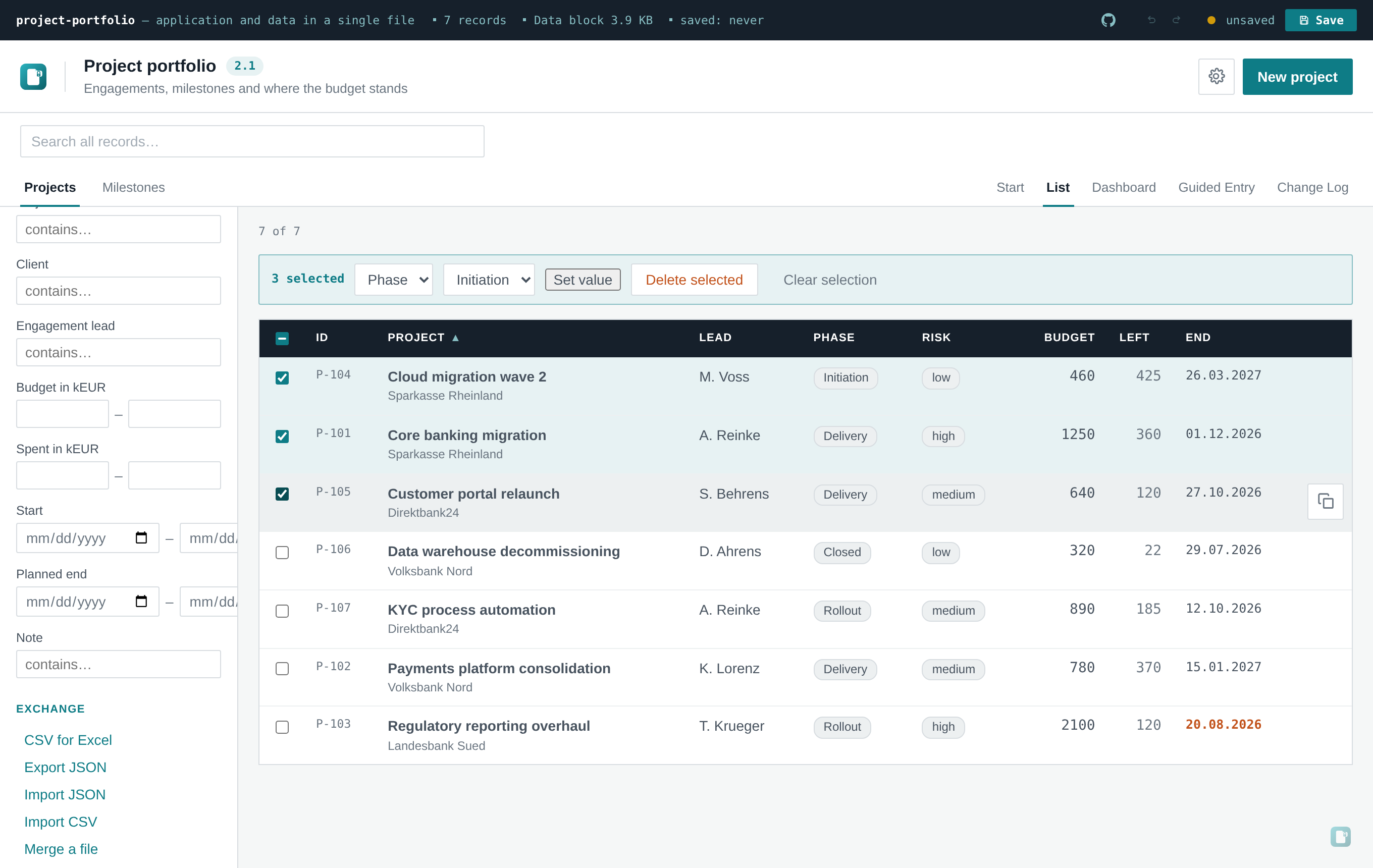
One frame with the whole mechanism at work: three rows selected — one click, then a Shift-click that takes the row in between — the tinted rows showing what the next action will hit, the header checkbox in its mixed state, and above the table the bar with the count, the field and value dropdowns for the enum, and the three actions.
Every bulk action runs through the same write path as a single edit — type checks, schema rules and objections included. A rule-violating record among the selected ones is skipped and named in the toast while its neighbours are set normally; nothing fails silently.
The whole action lands as one entry in the change log
(details) and comes back with one
Ctrl/Cmd+Z. Thirty corrections are one step of history, not thirty — but also: one slip is
undone as a whole or not at all, there is no partial rewind inside a bulk action.
- Deleting always asks first, and the prompt names the count ("N records will be removed"). Cancelling changes nothing and keeps the selection.
- From 50 records up, confirming requires typing the count back in. At that scale a single mouse click is not enough confirmation; a mistyped number costs nothing but a second try.
- Records still referenced from elsewhere are kept out of the deletion and named instead — reference protection applies here like everywhere else. The kept records appear in the same toast as the deleted ones, so nothing gets reported away.
The selection lives in the session only. Switching to another entity tab clears it — a selection
belongs to the list you were looking at, not to the one that came before — and reloading starts
clean. Deliberately without localStorage: browser storage is unreliable under file://, the
embedded data block is the only storage there is, and nothing about "which subset was I looking
at" belongs in data someone else will open. See also
Session scope for the same line
taken by search and filters.