Searching and Filtering
Two ways to cut a list down to the record you mean — and one of them reaches across every entity at once. Neither is configured anywhere; both read their shape from the schema.
The search box sits above the entity tabs. It reads every field of every record — not a configured subset — case-insensitively and live: type, and each tab shows how many of that entity's records match while the table narrows. In the table itself, the matches are highlighted.
It finds what you can see, not what is stored:
| Field kind | What counts as a hit |
|---|---|
text, enum, number, date
|
the value as displayed |
computed |
like any other field — it is searched, sorted and filtered, never stored |
reference |
the title of the record it points at — you search what you see, not the id behind it |
attachment |
the file name only; the embedded base64 is noise, not text |
| the record id | always counted |
The tab counts ignore the field filters on purpose: the search answers where does this stand across everything, the filters narrow the list you are looking at.
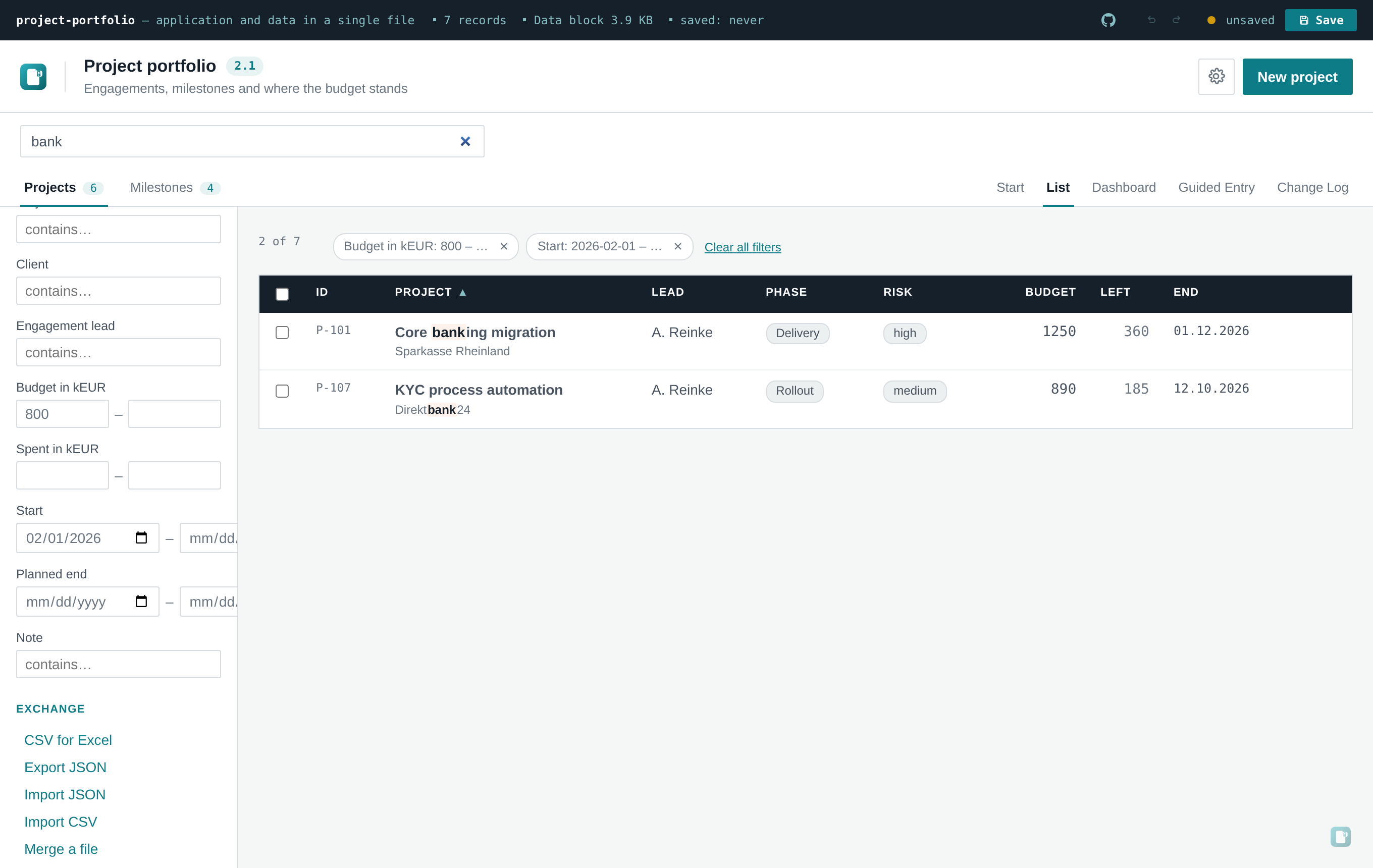
One frame with the whole mechanism at work: a term that finds its matches in two entities, two field filters narrowing the list to two rows, and above the table the chips that carry each filter — with clear all next to them.
Below the facet groups the sidebar gains a Filters section — one control per field worth filtering, shaped by its type:
| Type | Control | Matching |
|---|---|---|
text |
contains-input | case-insensitive contains, like the global search |
enum |
multi-select buttons | ticked values are alternatives — this one or that one |
number |
from / to | compared numerically; open ends don't constrain |
date |
from / to | ISO strings compare lexically, which for dates is exactly chronologically |
Enum fields that already run as facets stay quick filters with their counts. They are good at show me the Operational ones; the filter section adds what they cannot do: ranges, contains, multi-select for enums without a facet group of their own. An entity with no filterable field types gets neither the section nor chips — nothing appears that would do nothing.
Several filters combine with AND; within one filter, values combine with OR. A record without a value never passes a set range — nothing can be "from" or "to" something it has not got.
Every active filter appears as a removable chip above the table — Effort: 10 – 15, with open
ends shown as … — and once there is more than one, a clear all filters button next to them.
Removing a chip resets exactly that filter; the table updates live either way.
Reload the file and search, filters and facet picks are gone. That is not an omission:
- Browser storage (
localStorage,IndexedDB) is unreliable underfile://— the same reason the data itself lives in the embedded block rather than in the browser. - "Which subset was I looking at" is not data. It must not ride along when the file is saved and passed on: a saved copy shows everything, exactly like its print view.
Switching entity tabs clears facets, field filters and sort for that entity — they are per-schema, and carrying them between different fields would mean nothing. The global search stays up across tabs, because it runs across entities and the hit counts on the tabs live on it.
One more thing lives by the same rule: a multi-select for bulk actions. It also clears on tab switch and reload — and note that narrowing the list with a filter narrows what "select all visible" and the next bulk action can reach. That is deliberate: no mass change may reach rows nobody is looking at.