Security and Encryption
Encryption protects the data, not access to the application. This is worth internalising before relying on it: roles, views, or any notion of "some people can see this, others can't" implemented inside a file that runs entirely locally would be surface-level only. Whoever holds the file holds the code that reads it — there's no server-side boundary to enforce anything. What encryption does give you: without the passphrase, the data is an opaque blob. Lose the file to the wrong person without the passphrase, and they get nothing.
- AES-256-GCM for the actual encryption — authenticated encryption, so tampering with the ciphertext is detected, not just confidentiality.
- PBKDF2 with 310,000 rounds (SHA-256) to derive the encryption key from your passphrase — a deliberately expensive key derivation to make brute-force guessing costly, per current OWASP-adjacent guidance for this construction.
- A fresh random salt and IV on every encryption. Encrypting the same data twice with the same passphrase produces different ciphertext each time.
- No back door. There is no recovery mechanism, no master key, nothing. Losing the passphrase means losing the data — the settings page says this plainly before you set one.
Everything here is the browser's native Web Crypto API (crypto.subtle) — no crypto library is
bundled, which keeps the file small and means the primitives are whatever your browser's own,
audited implementation provides.
Settings (theme, title, colours, language, branding) are stored unencrypted, deliberately, even in an otherwise-sealed file. The alternative — encrypting everything — would mean the lock screen itself couldn't show the right title, logo, or colour scheme before you've entered the passphrase, which is a worse experience for no real security gain: none of that is sensitive.
The one exception that is sensitive and handled explicitly: if the AI integration's API key is stored with the file at all (opt-in, off by default — see AI Assistant), it only ever goes into the encrypted envelope if the file is sealed. Storing a key in an unsealed file is still possible if you explicitly ask for it (a "store the key" toggle), but the settings page says outright that the key would then sit in plain text in a file that gets passed around.
Settings shows a live strength rating (weak/usable/solid) as you type a passphrase, based on length and character variety. It never blocks you from proceeding with a short one. The reasoning: there are legitimate cases where a file only needs protection against casual, accidental reading — e.g. it already lives on a managed, access-controlled corporate drive — and forcing a long passphrase in that case is friction without benefit. The hint tells you the trade-off; you decide.
A separate feature with a separate purpose, and it is important not to confuse the two: encryption keeps data from being read; the settings lock keeps a settings page from being fiddled with.
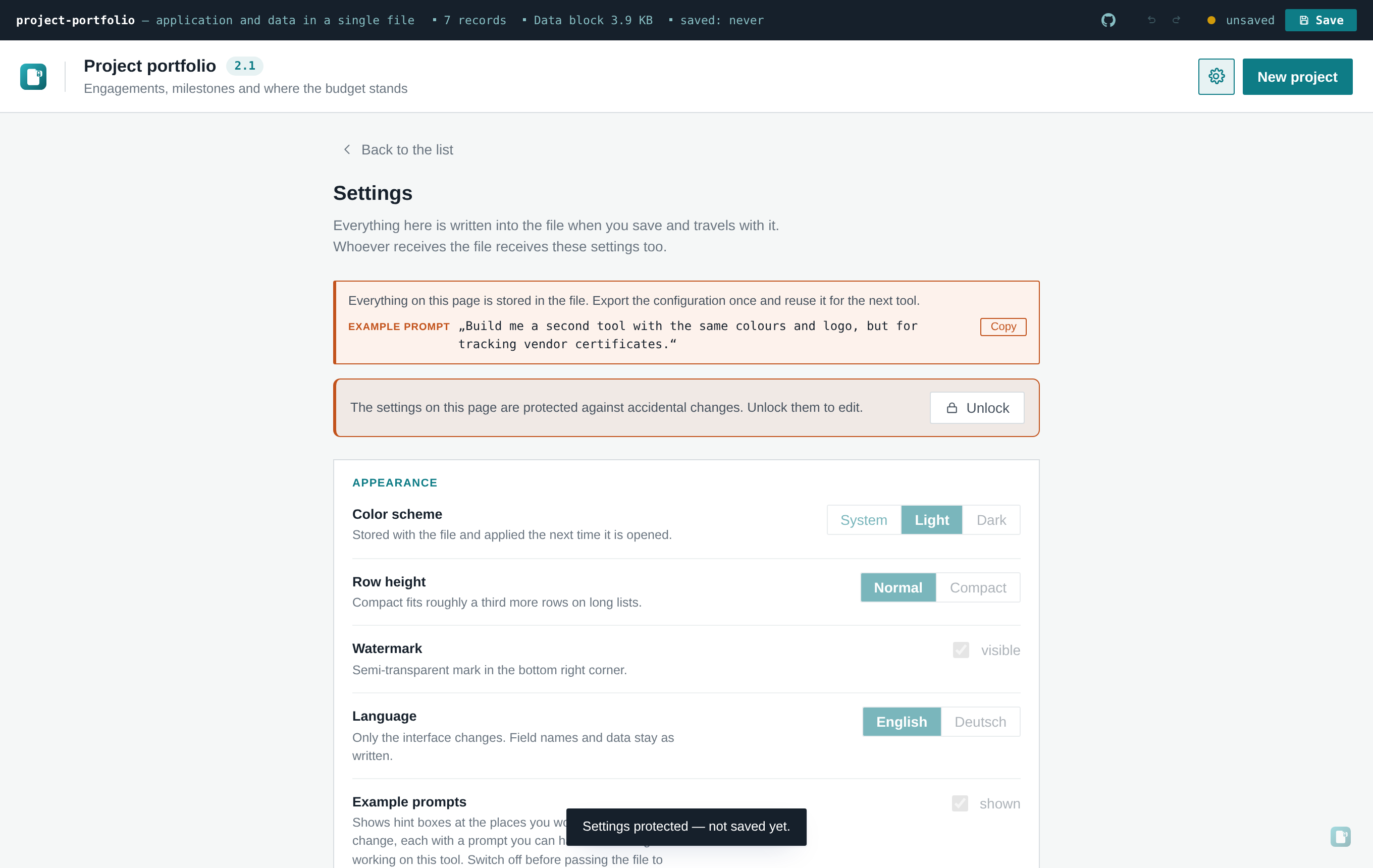
Settings → Security → Protect settings asks for a word and disables every control on that page. The fields stay visible with their values readable — the message is "not now", not "none of your business" — and the same word enables them again for the current session. Reopening the file locks them again, so the protection does not quietly disappear after the author's first save.
Use it whenever a finished tool goes to someone who only enters data. Their settings page contains colours, an AI endpoint, a counting endpoint, a file name — none of which they need, all of which a stray click carries forward into every subsequent save.
It is a guard against slips, not a security boundary. The same sentence that governs everything else on this page applies: whoever holds the file holds the code, and the lock entry can be removed from the payload with a text editor. It is a lid over a switch. If something genuinely must not be read, that is what the encryption above is for.
The word is not a password either. src/lib/lock.js stores a salted SHA-256 digest — not to
strengthen the guard, but so that no password sits in plain text in a file that gets passed around,
because people reuse words. The input field shows it openly on purpose: nobody should put a real
password behind a lid, and 123 is a perfectly good choice. There is no complexity rule and no
attempt to imply one.
To ship a tool already protected, set it once through the settings page and save; lock in
DEFAULT_SETTINGS holds either null or the { salt, hash } pair.
- Whoever holds the file holds the code. This is a client-only app; there's no way to hide business logic or "premium feature" gating from someone who has the HTML file, since that HTML file is the entire application.
- The unencrypted settings block is readable by anyone, including product name and branding — by design, and not sensitive.
-
Browser Web Crypto availability: if a browser context doesn't expose
crypto.subtle(rare, but possible in some restricted embedding contexts), the encrypt dialog says so plainly rather than failing silently — "open the file in a current Chrome or Edge" instead of a broken dialog. - No multi-user access control, ever. See Limits and Troubleshooting for what "one machine, one file" actually means in practice.
- The settings lock is not access control. It is described above as what it is: a guard against accidental change that a text editor defeats. Do not present it to a security reviewer as anything else.
A built file makes exactly one network request of its own accord: on open it sends a GET to the
endpoint in Settings → Security → Counting endpoint, carrying the kind of tool it is
(SCHEMA.singular, e.g. action item). Nothing else — no records, no field contents, no file
name, no title, nothing anyone typed into it.
It is on by default, and three things make that defensible rather than sneaky:
- The endpoint is a visible, editable setting, preset to the counter of whoever built the template. Point it at your own, or clear the field so nothing is counted. The setting travels with the file, so copies you hand on count where you decided.
- It's a labelled switch in Settings, sitting right under encryption, with the destination URL written out next to it — not a hidden pixel you'd have to find in a network log.
-
The path is deliberately not the file name.
fileStemis end-user editable and in practice carries client names (kunde-xy-risikoregister); sending that to a third party would leak something belonging to the file's recipient, so the tool kind is sent instead.
Turn it off, leave the AI integration off, and the file opens no network connection at all. The test suite asserts exactly this: a saved file with the counter switched off makes zero outbound requests of any kind.
For an air-gapped machine or a client that reviews every connection, analytics: false in
DEFAULT_SETTINGS (src/app.jsx) ships the tool with it already off.
The properties worth pointing a security reviewer at:
- Exactly two possible outbound destinations, both visible in Settings and both switchable off: the usage counter (above) and the AI endpoint. There is no third, and no hidden secondary destination behind either.
- With both switched off, no network access at all — verifiable by opening dev tools and watching the network tab, and asserted by the automated test suite on every build.
-
No external asset loading of any kind. The built file is fully self-contained; the CI check
in
.github/workflows/build.ymlfails the build if it finds an external<script src=or<link href="http. -
One place to audit each network call. The counter lives alone in
src/lib/count.js, the AI client insrc/lib/ai.js— both small enough to read in full in a few minutes. - Source is readable end-to-end — nothing obfuscated or minified beyond standard build minification, and the source repository is the same code that produces the shipped file.