Releases: mPhpMaster/echo-sub
Release list
EchoSub 1.1.1

EchoSub shows live, translated captions for anything your PC plays — videos, streams, calls, games. It listens to your speakers, recognizes speech in almost 100 languages, translates it on your own GPU, and shows it in a customizable always-on-top caption box, with a line and a color for every speaker.
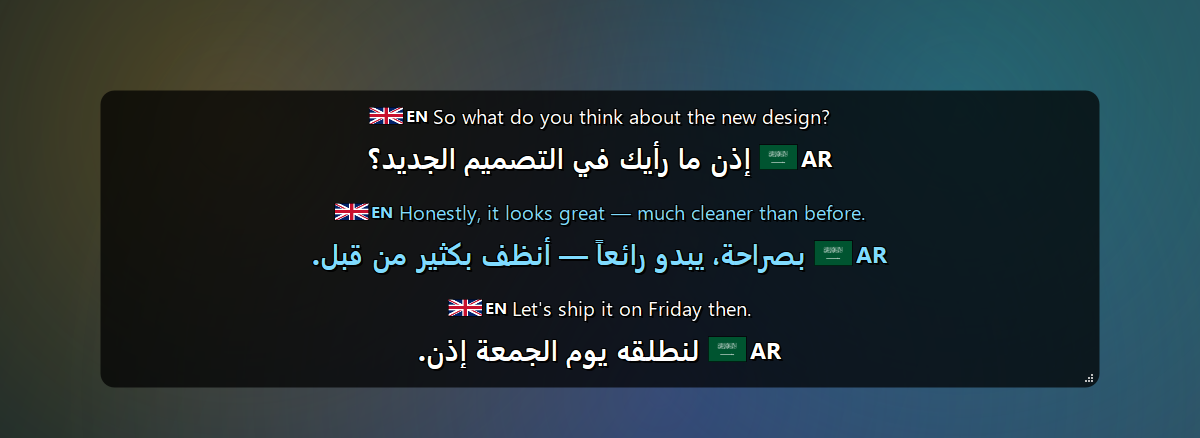
What's new in 1.1.1
Light mode can use the Base model. Measured here on a 39-second clip (words wrong, then time):
| Base | Small | Large v3 Turbo | |
|---|---|---|---|
| clear speech | 4 % · 0.8 s | 17 % · 1.6 s | 4 % · 8.5 s |
| noisy (10 dB) | 4 % · 0.8 s | 4 % · 3.9 s | 4 % · 9.6 s |
| very noisy (0 dB) | 4 % · 1.0 s | 4 % · 3.9 s | 4 % · 7.7 s |
| extremely noisy (-5 dB) | 11 % · 0.9 s | 4 % · 5.6 s | 6 % · 7.8 s |
So Base is two to six times faster and just as accurate on clear or merely noisy speech, while Small holds up in heavy noise. Small stays the default; pick Base in Settings → Language & Engine → Light mode uses.
Also: the code now passes a flake8 check end to end, imports left behind by the 1.1.1 split are gone, and the README and user guide have fresh screenshots — including the microphone captioned in its own colour.
Everything from 1.1.1, if you are updating from 1.0.x
- Your microphone, captioned too, in its own colour and with your own label.
- Voice commands for eighteen everyday apps and EchoSub's own controls, after a wake word, in about twenty languages — and nothing spoken can ever reach a shell.
- Light mode, a catch-up audio buffer you can put on a fast drive, bounded backlogs, cheaper speech detection, and far fewer made-up captions.
- A sound card that is unplugged and plugged back in now reconnects; daily update checks; a Settings window that fits every screen.
Download
EchoSub-Setup-1.1.1.exe (973 MB) — Windows 10/11, 64-bit
SHA-256: A0D7C1B126E8DB82FA955E80FEF594ABCFCFE56CB545A36A570BD08EA4113DB3
- Close EchoSub if it is running, then run the installer (no admin rights needed; you can also install for all users). Installing over an earlier version keeps your settings and models.
- Start EchoSub. The first start downloads the AI models (~2.3 GB) in a progress window — you can cancel and it resumes later.
- Play anything with speech. Right-click the caption box or the tray icon for the menu.
Windows SmartScreen: the installer isn't code-signed yet, so Windows may show "Windows protected your PC". Click More info → Run anyway. You can verify the file with the SHA-256 above:
Get-FileHash EchoSub-Setup-1.1.1.exe.
System requirements
| Minimum | Recommended | |
|---|---|---|
| Operating system | Windows 10, 64-bit | Windows 11, 64-bit |
| Processor | 64-bit, 4 cores | 6+ cores (e.g. Intel Core i5-9400F / AMD Ryzen 5 3600) |
| Memory (RAM) | 8 GB | 16 GB |
| Graphics | None required — CPU with the Small or Base speech model (captions lag several seconds) | NVIDIA GeForce GTX 1060 6 GB or better |
| Graphics memory | 4 GB (default models on an NVIDIA GPU) | 6 GB or more |
| NVIDIA driver | 527.41 or newer | Latest |
| Free disk space | 6 GB | 10 GB on an SSD |
| Internet | Once, to download the models (~2.3 GB) | Also for the optional Google Translate engine |
Highlights
- Any app, any language — WASAPI loopback capture, Whisper large-v3-turbo recognition with automatic language detection (~100 languages).
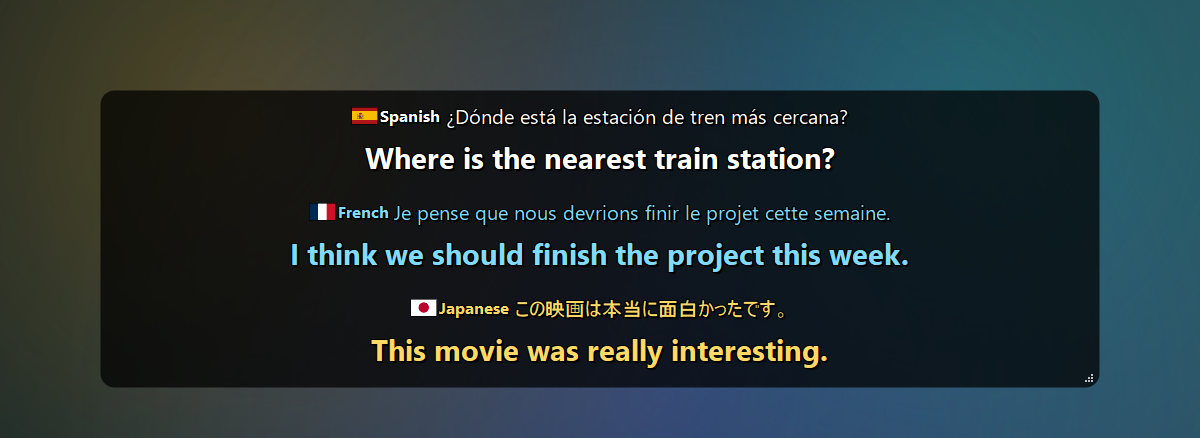
- On-device translation — NLLB-200 (600M / 1.3B), or Google Translate. The original text appears instantly and the translation follows a moment later.
- Speakers — each voice gets its own line and color.
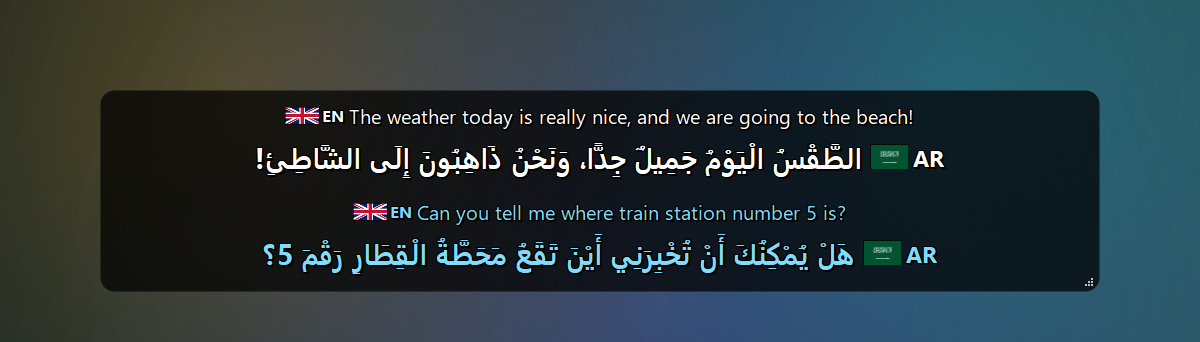
- Arabic — Moroccan Arabic (Darija) support and optional diacritics (تشكيل).
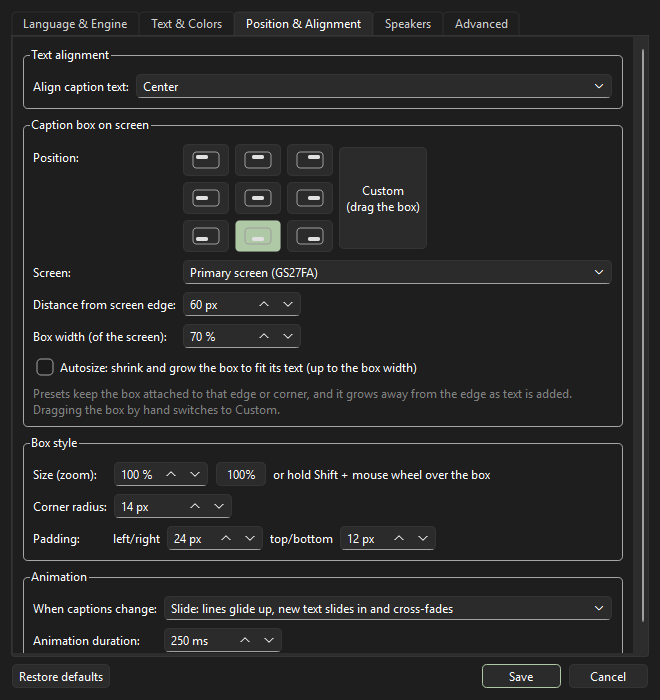
- Caption box your way — fonts, colors and spacing, language labels with flags, 9 screen positions or drag anywhere, autosize, corner radius, padding, smooth slide / fade animations.
- Handy — global hotkeys (
Ctrl+Alt+H/P/L), caption history and transcripts, click-through lock, auto-hide when nobody talks, cancelable model downloads, self-recovery when an audio device disappears.
| Any language in, your language out | Arabic diacritics (تشكيل) |
|---|---|
 |
 |
| Settings | About |
|---|---|
 |
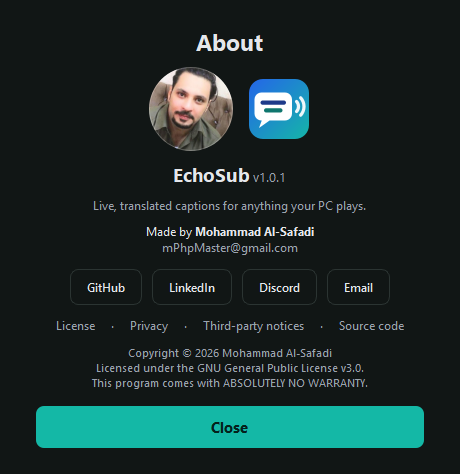 |
More screenshots in the README · full changelog · user guide.
License
Copyright © 2026 Mohammad Al-Safadi — GPL-3.0.
The default offline translation model (NLLB-200) is licensed for non-commercial use only; see third-party notices.
EchoSub 1.1.0
EchoSub shows live, translated captions for anything your PC plays — videos, streams, calls, games. It listens to your speakers, recognizes speech in almost 100 languages, translates it on your own GPU, and shows it in a customizable always-on-top caption box, with a line and a color for every speaker.
What's new in 1.1.0
Your microphone, captioned too
Settings → Language & Engine → Microphone (off by default). What you say is recognized and translated like everything else, in its own colour and with your own label ("You"), on its own line. Both sources share the one speech model, so nothing extra runs while nobody is talking, and a microphone that cannot be opened never stops the captions.
Voice commands
Off by default (tray menu, or Settings → Advanced). Say the wake word — "echo sub", or your own — and then one of a fixed list: open or close eighteen everyday apps (Calculator, Notepad, Paint, File Explorer, Windows Settings, Task Manager, Snipping Tool, on-screen keyboard, Magnifier, Character Map, Chrome, Edge, Firefox, VLC, VS Code, Discord, Steam, Spotify), or pause, resume, hide, show and clear captions. Understood in about twenty languages and in everyday wording. Nothing that is said ever reaches a shell or names a program: a spoken sentence can only pick one of the actions written into EchoSub. Closing an app is the same as clicking its X, so unsaved work is still protected.
Keeping up on a busy PC
Measured on a GTX 1060 6 GB while a game was using the card, on 39 seconds of speech:
- Light mode (tray menu) — the Small speech model and no live text: Whisper's work dropped from 15.2 s to 3.7 s, and every caption arrived about 1.0–1.3 s sooner.
- Live text is no longer translated on the recognition thread (it blocked it for 3.4 s), speech detection costs about a third of what it did, and captions can no longer fall behind without end.
- Catch-up audio buffer: when recognition is behind, the audio still waiting is kept in a temporary folder and used in order instead of being lost. Session-only, deleted as it is read; you choose the size and which drive it lives on (Settings → Advanced).
Fewer made-up captions
Whisper's own signals are weighed together, known filler phrases ("Thanks for watching") and looping repetitions are dropped, and text too dense for the audio it came from is rejected. Live text is judged more strictly than a finished caption and can never reach the history or a transcript file.
Also
- A sound card that is unplugged and plugged back in now reconnects. A failed attempt used to leave a PortAudio instance behind, so the device that came back kept failing with "Invalid device info". If the device you picked is missing, EchoSub uses the default one and says so, then moves back on its own.
- Update checks for the installed app, once a day, through the official releases — it only ever opens the download page, and can be switched off.
- The Settings window fits every screen, its fields line up, and no tab scrolls sideways.
Download
EchoSub-Setup-1.1.0.exe (973 MB) — Windows 10/11, 64-bit
SHA-256: 6E44BAF54F988AF338C74AF4AF09EE5762C65FC2FFA94B8A2F49994ADF76FFAE
- Close EchoSub if it is running, then run the installer (no admin rights needed; you can also install for all users). Installing over an earlier version keeps your settings and models.
- Start EchoSub. The first start downloads the AI models (~2.3 GB) in a progress window — you can cancel and it resumes later.
- Play anything with speech. Right-click the caption box or the tray icon for the menu.
Windows SmartScreen: the installer isn't code-signed yet, so Windows may show "Windows protected your PC". Click More info → Run anyway. You can verify the file with the SHA-256 above:
Get-FileHash EchoSub-Setup-1.1.0.exe.
System requirements
| Minimum | Recommended | |
|---|---|---|
| Operating system | Windows 10, 64-bit | Windows 11, 64-bit |
| Processor | 64-bit, 4 cores | 6+ cores (e.g. Intel Core i5-9400F / AMD Ryzen 5 3600) |
| Memory (RAM) | 8 GB | 16 GB |
| Graphics | None required — CPU with the Small or Base speech model (captions lag several seconds) | NVIDIA GeForce GTX 1060 6 GB or better |
| Graphics memory | 4 GB (default models on an NVIDIA GPU) | 6 GB or more |
| NVIDIA driver | 527.41 or newer | Latest |
| Free disk space | 6 GB | 10 GB on an SSD |
| Internet | Once, to download the models (~2.3 GB) | Also for the optional Google Translate engine |
Highlights
- Any app, any language — WASAPI loopback capture, Whisper large-v3-turbo recognition with automatic language detection (~100 languages).
- On-device translation — NLLB-200 (600M / 1.3B), or Google Translate. The original text appears instantly and the translation follows a moment later.
- Speakers — each voice gets its own line and color.
- Arabic — Moroccan Arabic (Darija) support and optional diacritics (تشكيل).
- Caption box your way — fonts, colors and spacing, language labels with flags, 9 screen positions or drag anywhere, autosize, corner radius, padding, smooth slide / fade animations.
- Handy — global hotkeys (
Ctrl+Alt+H/P/L), caption history and transcripts, click-through lock, auto-hide when nobody talks, cancelable model downloads, self-recovery when an audio device disappears.
| Any language in, your language out | Arabic diacritics (تشكيل) |
|---|---|
|
|
| Settings | About |
|---|---|
|
|
More screenshots in the README · full changelog · user guide.
License
Copyright © 2026 Mohammad Al-Safadi — GPL-3.0.
The default offline translation model (NLLB-200) is licensed for non-commercial use only; see third-party notices.
EchoSub 1.0.7
EchoSub shows live, translated captions for anything your PC plays — videos, streams, calls, games. It listens to your speakers, recognizes speech in almost 100 languages, translates it on your own GPU, and shows it in a customizable always-on-top caption box, with a line and a color for every speaker.
What's new in 1.0.7
- The Settings window fits your screen. On a 1920x1080 screen with Windows text scaling at 125 % or 150 % it could open taller than the screen, leaving the Save button below the bottom edge. Every tab now scrolls, the buttons stay at the bottom, and no window opens larger than the screen it appears on. The caption history window is sized the same way.
- The caption box can no longer be zoomed into a wall of text (from 1.0.6). Shift + wheel is also how Windows scrolls sideways, so scrolling in a window underneath the box zoomed it by accident. Zooming now stops while the box still fits the screen, and there are two ways back: right-click the box → Caption size: back to 100%, or the 100% button in Settings → Position & Alignment.
From 1.0.7, if you are updating from 1.0.4
Faster captions on a busy PC, measured on a GTX 1060 6 GB while a game was using the card:
- Light mode (tray menu, or Settings → Language & Engine) uses the Small speech model and turns live text off: Whisper's work dropped from 15.2 s to 3.7 s for a 39-second clip, and every caption appeared about 1.0–1.3 s sooner. Your own settings are kept and come back when you turn it off.
- Live text is no longer translated on the recognition thread (it blocked it for 3.4 s), captions can no longer fall behind without end, and speech detection costs about a third of what it did.
Download
EchoSub-Setup-1.0.7.exe (973 MB) — Windows 10/11, 64-bit
SHA-256: BAC15E0BB5A4D32B914247A3D531316A78EA94C1475FC63971598A5BE58DD105
- Close EchoSub if it is running, then run the installer (no admin rights needed; you can also install for all users). Installing over an earlier version keeps your settings and models.
- Start EchoSub. The first start downloads the AI models (~2.3 GB) in a progress window — you can cancel and it resumes later.
- Play anything with speech. Right-click the caption box or the tray icon for the menu.
Windows SmartScreen: the installer isn't code-signed yet, so Windows may show "Windows protected your PC". Click More info → Run anyway. You can verify the file with the SHA-256 above:
Get-FileHash EchoSub-Setup-1.0.7.exe.
System requirements
| Minimum | Recommended | |
|---|---|---|
| Operating system | Windows 10, 64-bit | Windows 11, 64-bit |
| Processor | 64-bit, 4 cores | 6+ cores (e.g. Intel Core i5-9400F / AMD Ryzen 5 3600) |
| Memory (RAM) | 8 GB | 16 GB |
| Graphics | None required — CPU with the Small or Base speech model (captions lag several seconds) | NVIDIA GeForce GTX 1060 6 GB or better |
| Graphics memory | 4 GB (default models on an NVIDIA GPU) | 6 GB or more |
| NVIDIA driver | 527.41 or newer | Latest |
| Free disk space | 6 GB | 10 GB on an SSD |
| Internet | Once, to download the models (~2.3 GB) | Also for the optional Google Translate engine |
Highlights
- Any app, any language — WASAPI loopback capture, Whisper large-v3-turbo recognition with automatic language detection (~100 languages).
- On-device translation — NLLB-200 (600M / 1.3B), or Google Translate. The original text appears instantly and the translation follows a moment later.
- Speakers — each voice gets its own line and color.
- Arabic — Moroccan Arabic (Darija) support and optional diacritics (تشكيل).
- Caption box your way — fonts, colors and spacing, language labels with flags, 9 screen positions or drag anywhere, autosize, corner radius, padding, smooth slide / fade animations.
- Handy — global hotkeys (
Ctrl+Alt+H/P/L), caption history and transcripts, click-through lock, auto-hide when nobody talks, cancelable model downloads, self-recovery when an audio device disappears.
| Any language in, your language out | Arabic diacritics (تشكيل) |
|---|---|
|
|
| Settings | About |
|---|---|
|
|
More screenshots in the README · full changelog · user guide.
License
Copyright © 2026 Mohammad Al-Safadi — GPL-3.0.
The default offline translation model (NLLB-200) is licensed for non-commercial use only; see third-party notices.
EchoSub 1.0.5
EchoSub shows live, translated captions for anything your PC plays — videos, streams, calls, games. It listens to your speakers, recognizes speech in almost 100 languages, translates it on your own GPU, and shows it in a customizable always-on-top caption box, with a line and a color for every speaker.
What's new in 1.0.5 — keeping up with the speaker
Measured on a GTX 1060 6 GB while a game was using the card, on 39 seconds of speech:
- Light mode (tray menu, or Settings → Language & Engine) — uses the Small speech model instead of a large one and turns live text off. Whisper's work dropped from 15.2 s to 3.7 s for the same clip, and every caption appeared about 1.0–1.3 s sooner. Your own model choice and settings are kept and come back when you turn it off.
- Live text no longer holds up recognition. It used to be translated on the recognition thread, which blocked it for 3.4 s. It is now translated separately, only the newest one, and a translation that arrives after the finished caption is discarded.
- Captions can no longer fall behind without end. At most 60 s of audio waits for recognition and at most six captions wait for translation; beyond that the oldest audio is dropped and the oldest captions are shown in their original language, and the status line says so. Before, a slow translator left the tenth caption 21 s late and growing.
- Cheaper speech detection. It ran for every 50 ms of audio (3.7 s of CPU per 39 s of speech); it now runs at most every 0.15 s, and less often for long buffers, down to 1.4 s — with a fresh check before a caption ends, so nothing is cut off mid-sentence.
Also new: tests under tests/ that run without a GPU, models or a sound card.
Coming from 1.0.3 or earlier? 1.0.5 added a copy button on every caption row.
Download
EchoSub-Setup-1.0.5.exe (973 MB) — Windows 10/11, 64-bit
SHA-256: AF4E9B002A8DDF1592867DEAE00C0FFBA72AF977CE486F5CFECAA379AAE8F1F4
- Close EchoSub if it is running, then run the installer (no admin rights needed; you can also install for all users). Installing over an earlier version keeps your settings and models.
- Start EchoSub. The first start downloads the AI models (~2.3 GB) in a progress window — you can cancel and it resumes later.
- Play anything with speech. Right-click the caption box or the tray icon for the menu.
Windows SmartScreen: the installer isn't code-signed yet, so Windows may show "Windows protected your PC". Click More info → Run anyway. You can verify the file with the SHA-256 above:
Get-FileHash EchoSub-Setup-1.0.5.exe.
System requirements
| Minimum | Recommended | |
|---|---|---|
| Operating system | Windows 10, 64-bit | Windows 11, 64-bit |
| Processor | 64-bit, 4 cores | 6+ cores (e.g. Intel Core i5-9400F / AMD Ryzen 5 3600) |
| Memory (RAM) | 8 GB | 16 GB |
| Graphics | None required — CPU with the Small or Base speech model (captions lag several seconds) | NVIDIA GeForce GTX 1060 6 GB or better |
| Graphics memory | 4 GB (default models on an NVIDIA GPU) | 6 GB or more |
| NVIDIA driver | 527.41 or newer | Latest |
| Free disk space | 6 GB | 10 GB on an SSD |
| Internet | Once, to download the models (~2.3 GB) | Also for the optional Google Translate engine |
Highlights
- Any app, any language — WASAPI loopback capture, Whisper large-v3-turbo recognition with automatic language detection (~100 languages).
- On-device translation — NLLB-200 (600M / 1.3B), or Google Translate. The original text appears instantly and the translation follows a moment later.
- Speakers — each voice gets its own line and color.
- Arabic — Moroccan Arabic (Darija) support and optional diacritics (تشكيل).
- Caption box your way — fonts, colors and spacing, language labels with flags, 9 screen positions or drag anywhere, autosize, corner radius, padding, smooth slide / fade animations.
- Handy — global hotkeys (
Ctrl+Alt+H/P/L), caption history and transcripts, click-through lock, auto-hide when nobody talks, cancelable model downloads, self-recovery when an audio device disappears.
| Any language in, your language out | Arabic diacritics (تشكيل) |
|---|---|
|
|
| Settings | About |
|---|---|
|
|
More screenshots in the README · full changelog · user guide.
License
Copyright © 2026 Mohammad Al-Safadi — GPL-3.0.
The default offline translation model (NLLB-200) is licensed for non-commercial use only; see third-party notices.
EchoSub 1.0.4
EchoSub shows live, translated captions for anything your PC plays — videos, streams, calls, games. It listens to your speakers, recognizes speech in almost 100 languages, translates it on your own GPU, and shows it in a customizable always-on-top caption box, with a line and a color for every speaker.
What's new in 1.0.4
A copy button on every caption. Move the mouse over the caption box and a small button appears next to each line — the original and the translation. Click it and that line's text goes to the clipboard; the button shows a check mark for a moment. The buttons sit in the box's padding so they never cover the text, they follow the lines while captions slide, and they grow with the box size. Turn them off in Settings → Text & Colors.
Also fixed: moving the mouse onto the box's resize grip (or a copy button) no longer counts as the mouse leaving the box.
Download
EchoSub-Setup-1.0.4.exe (973 MB) — Windows 10/11, 64-bit
SHA-256: F96F26BCD9919537ADE92189CA7CA43D9446BE075EAEEA3000CAA6A51885BB2A
- Close EchoSub if it is running, then run the installer (no admin rights needed; you can also install for all users). Installing over an earlier version keeps your settings and models.
- Start EchoSub. The first start downloads the AI models (~2.3 GB) in a progress window — you can cancel and it resumes later.
- Play anything with speech. Right-click the caption box or the tray icon for the menu.
Windows SmartScreen: the installer isn't code-signed yet, so Windows may show "Windows protected your PC". Click More info → Run anyway. You can verify the file with the SHA-256 above:
Get-FileHash EchoSub-Setup-1.0.4.exe.
System requirements
| Minimum | Recommended | |
|---|---|---|
| Operating system | Windows 10, 64-bit | Windows 11, 64-bit |
| Processor | 64-bit, 4 cores | 6+ cores (e.g. Intel Core i5-9400F / AMD Ryzen 5 3600) |
| Memory (RAM) | 8 GB | 16 GB |
| Graphics | None required — CPU with the Small or Base speech model (captions lag several seconds) | NVIDIA GeForce GTX 1060 6 GB or better |
| Graphics memory | 4 GB (default models on an NVIDIA GPU) | 6 GB or more |
| NVIDIA driver | 527.41 or newer | Latest |
| Free disk space | 6 GB | 10 GB on an SSD |
| Internet | Once, to download the models (~2.3 GB) | Also for the optional Google Translate engine |
Highlights
- Any app, any language — WASAPI loopback capture, Whisper large-v3-turbo recognition with automatic language detection (~100 languages).
- On-device translation — NLLB-200 (600M / 1.3B), or Google Translate. The original text appears instantly and the translation follows a moment later.
- Speakers — each voice gets its own line and color.
- Arabic — Moroccan Arabic (Darija) support and optional diacritics (تشكيل).
- Caption box your way — fonts, colors and spacing, language labels with flags, 9 screen positions or drag anywhere, autosize, corner radius, padding, smooth slide / fade animations.
- Handy — global hotkeys (
Ctrl+Alt+H/P/L), caption history and transcripts, click-through lock, auto-hide when nobody talks, cancelable model downloads, self-recovery when an audio device disappears.
| Any language in, your language out | Arabic diacritics (تشكيل) |
|---|---|
|
|
| Settings | About |
|---|---|
|
|
More screenshots in the README · full changelog · user guide.
License
Copyright © 2026 Mohammad Al-Safadi — GPL-3.0.
The default offline translation model (NLLB-200) is licensed for non-commercial use only; see third-party notices.
EchoSub 1.0.3
EchoSub shows live, translated captions for anything your PC plays — videos, streams, calls, games. It listens to your speakers, recognizes speech in almost 100 languages, translates it on your own GPU, and shows it in a customizable always-on-top caption box, with a line and a color for every speaker.
What's new in 1.0.3
Captions stay in the right alphabet. EchoSub gives Whisper the previous caption as context so names and punctuation stay consistent — but Whisper copies the alphabet of that context, so a single mis-recognized caption could make the following English captions come out spelled in Russian letters (while still labelled English). EchoSub now knows which script every language is written in: context from another script is not used, a caption that comes out in the wrong script is recognized again without context, and one that is still wrong is dropped instead of dragging the next captions with it.
Also in 1.0.3, if you are updating from 1.0.1:
- Zoom the caption box: hold Shift and turn the mouse wheel over the box (50–300 %), also in Settings → Position & Alignment → Box style → Size (zoom).
- Google Translate limits handled: requests are spaced out and retried, Google is paused after repeated refusals, and EchoSub translates offline meanwhile with an NLLB model you already downloaded.
- Translation errors appear as a short message that disappears, instead of a long one that stayed in the box.
Download
EchoSub-Setup-1.0.3.exe (973 MB) — Windows 10/11, 64-bit
SHA-256: 015FC9E7887625B61B1609BDBDDCDCA0486F800DF8A8050DEC6A5F045CD41DC6
- Close EchoSub if it is running, then run the installer (no admin rights needed; you can also install for all users). Installing over an earlier version keeps your settings and models.
- Start EchoSub. The first start downloads the AI models (~2.3 GB) in a progress window — you can cancel and it resumes later.
- Play anything with speech. Right-click the caption box or the tray icon for the menu.
Windows SmartScreen: the installer isn't code-signed yet, so Windows may show "Windows protected your PC". Click More info → Run anyway. You can verify the file with the SHA-256 above:
Get-FileHash EchoSub-Setup-1.0.3.exe.
System requirements
| Minimum | Recommended | |
|---|---|---|
| Operating system | Windows 10, 64-bit | Windows 11, 64-bit |
| Processor | 64-bit, 4 cores | 6+ cores (e.g. Intel Core i5-9400F / AMD Ryzen 5 3600) |
| Memory (RAM) | 8 GB | 16 GB |
| Graphics | None required — CPU with the Small or Base speech model (captions lag several seconds) | NVIDIA GeForce GTX 1060 6 GB or better |
| Graphics memory | 4 GB (default models on an NVIDIA GPU) | 6 GB or more |
| NVIDIA driver | 527.41 or newer | Latest |
| Free disk space | 6 GB | 10 GB on an SSD |
| Internet | Once, to download the models (~2.3 GB) | Also for the optional Google Translate engine |
Highlights
- Any app, any language — WASAPI loopback capture, Whisper large-v3-turbo recognition with automatic language detection (~100 languages).
- On-device translation — NLLB-200 (600M / 1.3B), or Google Translate. The original text appears instantly and the translation follows a moment later.
- Speakers — each voice gets its own line and color.
- Arabic — Moroccan Arabic (Darija) support and optional diacritics (تشكيل).
- Caption box your way — fonts, colors and spacing, language labels with flags, 9 screen positions or drag anywhere, autosize, corner radius, padding, smooth slide / fade animations.
- Handy — global hotkeys (
Ctrl+Alt+H/P/L), caption history and transcripts, click-through lock, auto-hide when nobody talks, cancelable model downloads, self-recovery when an audio device disappears.
| Any language in, your language out | Arabic diacritics (تشكيل) |
|---|---|
|
|
| Settings | About |
|---|---|
|
|
More screenshots in the README · full changelog · user guide.
License
Copyright © 2026 Mohammad Al-Safadi — GPL-3.0.
The default offline translation model (NLLB-200) is licensed for non-commercial use only; see third-party notices.
EchoSub 1.0.2
EchoSub shows live, translated captions for anything your PC plays — videos, streams, calls, games. It listens to your speakers, recognizes speech in almost 100 languages, translates it on your own GPU, and shows it in a customizable always-on-top caption box, with a line and a color for every speaker.
What's new in 1.0.2
- Zoom the caption box: hold Shift and turn the mouse wheel over the box to make the box and its text bigger or smaller (50–300 %). The value is also in Settings → Position & Alignment → Box style → Size (zoom).
- Google Translate limits handled: when Google answers "too many requests", EchoSub spaces out and retries requests, pauses Google for a while after repeated refusals, and meanwhile translates offline with an NLLB model you have already downloaded. It switches back to Google automatically.
- Translation errors now appear as a short message that disappears after a few seconds, instead of a long message that stayed in the caption box.
Download
EchoSub-Setup-1.0.2.exe (973 MB) — Windows 10/11, 64-bit
SHA-256: 554420654BA134784D35A49B1B9C774BED8CCDA2E1BE4C0F652FF34EB27FC3D6
- Close EchoSub if it is running, then run the installer (no admin rights needed; you can also install for all users). Installing over an earlier version keeps your settings and models.
- Start EchoSub. The first start downloads the AI models (~2.3 GB) in a progress window — you can cancel and it resumes later.
- Play anything with speech. Right-click the caption box or the tray icon for the menu.
Windows SmartScreen: the installer isn't code-signed yet, so Windows may show "Windows protected your PC". Click More info → Run anyway. You can verify the file with the SHA-256 above:
Get-FileHash EchoSub-Setup-1.0.2.exe.
System requirements
| Minimum | Recommended | |
|---|---|---|
| Operating system | Windows 10, 64-bit | Windows 11, 64-bit |
| Processor | 64-bit, 4 cores | 6+ cores (e.g. Intel Core i5-9400F / AMD Ryzen 5 3600) |
| Memory (RAM) | 8 GB | 16 GB |
| Graphics | None required — CPU with the Small or Base speech model (captions lag several seconds) | NVIDIA GeForce GTX 1060 6 GB or better |
| Graphics memory | 4 GB (default models on an NVIDIA GPU) | 6 GB or more |
| NVIDIA driver | 527.41 or newer | Latest |
| Free disk space | 6 GB | 10 GB on an SSD |
| Internet | Once, to download the models (~2.3 GB) | Also for the optional Google Translate engine |
Highlights
- Any app, any language — WASAPI loopback capture, Whisper large-v3-turbo recognition with automatic language detection (~100 languages).
- On-device translation — NLLB-200 (600M / 1.3B), or Google Translate. The original text appears instantly and the translation follows a moment later.
- Speakers — each voice gets its own line and color.
- Arabic — Moroccan Arabic (Darija) support and optional diacritics (تشكيل).
- Caption box your way — fonts, colors and spacing, language labels with flags, 9 screen positions or drag anywhere, autosize, corner radius, padding, smooth slide / fade animations.
- Handy — global hotkeys (
Ctrl+Alt+H/P/L), caption history and transcripts, click-through lock, auto-hide when nobody talks, cancelable model downloads, self-recovery when an audio device disappears.
| Any language in, your language out | Arabic diacritics (تشكيل) |
|---|---|
|
|
| Settings | About |
|---|---|
|
|
More screenshots in the README · full changelog · user guide.
License
Copyright © 2026 Mohammad Al-Safadi — GPL-3.0.
The default offline translation model (NLLB-200) is licensed for non-commercial use only; see third-party notices.
EchoSub 1.0.1
EchoSub shows live, translated captions for anything your PC plays — videos, streams, calls, games. It listens to your speakers, recognizes speech in almost 100 languages, translates it on your own GPU, and shows it in a customizable always-on-top caption box, with a line and a color for every speaker.
What's new in 1.0.1
- The author's photo in the About window.
- System requirements (minimum and recommended) plus download size, graphics memory and speed for every model — see below and the README.
- Screenshots in the README and user guide.
Download
EchoSub-Setup-1.0.1.exe (971 MB) — Windows 10/11, 64-bit
SHA-256: BCA6628FF3D7F57EC1EAF11DAD84830EEAB9B96D3F01013C612CD02A2575D3D9
- Close EchoSub if it is running, then run the installer (no admin rights needed; you can also install for all users). Installing over 1.0.0 keeps your settings and models.
- Start EchoSub. The first start downloads the AI models (~2.3 GB) in a progress window — you can cancel and it resumes later.
- Play anything with speech. Right-click the caption box or the tray icon for the menu.
Windows SmartScreen: the installer isn't code-signed yet, so Windows may show "Windows protected your PC". Click More info → Run anyway. You can verify the file with the SHA-256 above:
Get-FileHash EchoSub-Setup-1.0.1.exe.
System requirements
| Minimum | Recommended | |
|---|---|---|
| Operating system | Windows 10, 64-bit | Windows 11, 64-bit |
| Processor | 64-bit, 4 cores | 6+ cores (e.g. Intel Core i5-9400F / AMD Ryzen 5 3600) |
| Memory (RAM) | 8 GB | 16 GB |
| Graphics | None required — CPU with the Small or Base speech model (captions lag several seconds) | NVIDIA GeForce GTX 1060 6 GB or better |
| Graphics memory | 4 GB (default models on an NVIDIA GPU) | 6 GB or more |
| NVIDIA driver | 527.41 or newer | Latest |
| Free disk space | 6 GB | 10 GB on an SSD |
| Internet | Once, to download the models (~2.3 GB) | Also for the optional Google Translate engine |
Highlights
- Any app, any language — WASAPI loopback capture, Whisper large-v3-turbo recognition with automatic language detection (~100 languages).
- On-device translation — NLLB-200 (600M / 1.3B), or Google Translate. The original text appears instantly and the translation follows a moment later.
- Speakers — each voice gets its own line and color.
- Arabic — Moroccan Arabic (Darija) support and optional diacritics (تشكيل).
- Caption box your way — fonts, colors and spacing, language labels with flags, 9 screen positions or drag anywhere, autosize, corner radius, padding, smooth slide / fade animations.
- Handy — global hotkeys (
Ctrl+Alt+H/P/L), caption history and transcripts, click-through lock, auto-hide when nobody talks, cancelable model downloads, self-recovery when an audio device disappears.
| Any language in, your language out | Arabic diacritics (تشكيل) |
|---|---|
|
|
| Settings | About |
|---|---|
|
|
More screenshots in the README · full changelog · user guide.
License
Copyright © 2026 Mohammad Al-Safadi — GPL-3.0.
The default offline translation model (NLLB-200) is licensed for non-commercial use only; see third-party notices.
EchoSub 1.0.0
EchoSub shows live, translated captions for anything your PC plays — videos, streams, calls, games. It listens to your speakers, recognizes speech in almost 100 languages, translates it on your own GPU, and shows it in a customizable always-on-top caption box, with a line and a color for every speaker.
This is the first public release.
Download
EchoSub-Setup-1.0.0.exe (971 MB) — Windows 10/11, 64-bit
SHA-256: 08F8392301E3E4658C80C1830DE90C8ADCE4098AC4CB119411F34A20145A6226
- Run the installer (no admin rights needed; you can also install for all users).
- Start EchoSub. The first start downloads the AI models (~2.5 GB) in a progress window — you can cancel and it resumes later.
- Play anything with speech. Right-click the caption box or the tray icon for the menu.
Windows SmartScreen: the installer isn't code-signed yet, so Windows may show "Windows protected your PC". Click More info → Run anyway. You can verify the file with the SHA-256 above:
Get-FileHash EchoSub-Setup-1.0.0.exe.
Highlights
- Any app, any language — WASAPI loopback capture, Whisper large-v3-turbo recognition with automatic language detection (~100 languages).
- On-device translation — NLLB-200 (600M / 1.3B), or Google Translate. The original text appears instantly and the translation follows a moment later.
- Speakers — each voice gets its own line and color.
- Arabic — Moroccan Arabic (Darija) support and optional diacritics (تشكيل).
- Caption box your way — fonts, colors and spacing for original and translation, language labels with flags, 9 screen positions or drag anywhere, autosize, corner radius, padding, and smooth slide / fade animations.
- Handy — global hotkeys (
Ctrl+Alt+H/P/L), caption history and transcripts, click-through lock, auto-hide when nobody talks, self-recovery when an audio device disappears.
| Any language in, your language out | Arabic diacritics (تشكيل) |
|---|---|
|
|
| Settings | Model download (cancelable) |
|---|---|
|
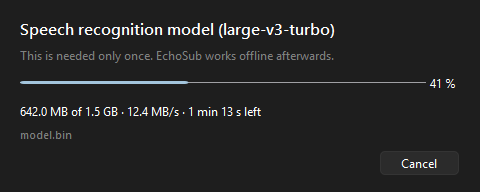 |
More screenshots in the README.
See the changelog for the full list and the user guide for every setting.
Requirements
- Windows 10 or 11, 64-bit
- NVIDIA GPU with 4 GB+ VRAM recommended (runs on CPU too, but slower)
- ~5 GB free disk space; internet once to download the models
License
Copyright © 2026 Mohammad Al-Safadi — GPL-3.0.
The default offline translation model (NLLB-200) is licensed for non-commercial use only; see third-party notices.