Repository navigation
What's new
These changes are in the development branch and are not included in 2026.3.4-p1.
In Magento settings, Published within lets you choose Month, Week, 2 days, or 12 hours for release and security notifications. Use a shorter period when you check frequently, or a longer one when returning to a project after time away.
- The selection applies to both automatic and manual checks.
- Automatic checks still run hourly; this setting changes the age of the publications shown, not the checking frequency.
- Release and security notices begin with their publication age, making it easier to see how recent a finding is.
- A tooltip explains the setting. Older advisories can still apply even when outside the selected period.
- Generated admin edit forms gain Save and Continue Edit, so you can save a new entity and keep working on its edit page.
- MCP assistants can discover installed n98-magerun commands and more reliably select the project's Magento CLI environment.
- Generating a CLI command with quotes or backslashes in its description preserves the text and produces valid PHP.
- Creating an admin menu without a parent produces valid Magento menu configuration.
- MCP tools remain discoverable across supported 2026.2 and 2026.3 IDE versions.
- Settings links and input hints are updated for 2026.3 IDE compatibility.
Monthly security fixes applied through Cloud Patches are recognized more accurately. The check accounts for all relevant components, including Adobe Commerce and B2B where installed, rather than treating an incomplete fix as full coverage. Resolved security alerts disappear after a recheck confirms coverage.
After applying patches, use Tools → Check Magento Updates to refresh the result. Local patch status does not verify the state of a deployed store.
Stay informed about recent Magento Open Source, Adobe Commerce, and Mage-OS releases and security advisories directly in your IDE. The feature works in all supported IDEs, including supported non-PHP IDEs such as WebStorm.
- Check automatically every hour or on demand through Tools → Check Magento Updates.
- See separate release and security notices, with links to release details and security reports.
- Snooze a finding for one day or switch off automatic checks for the project.
- Recognize supported local patch configuration when evaluating security advisories.
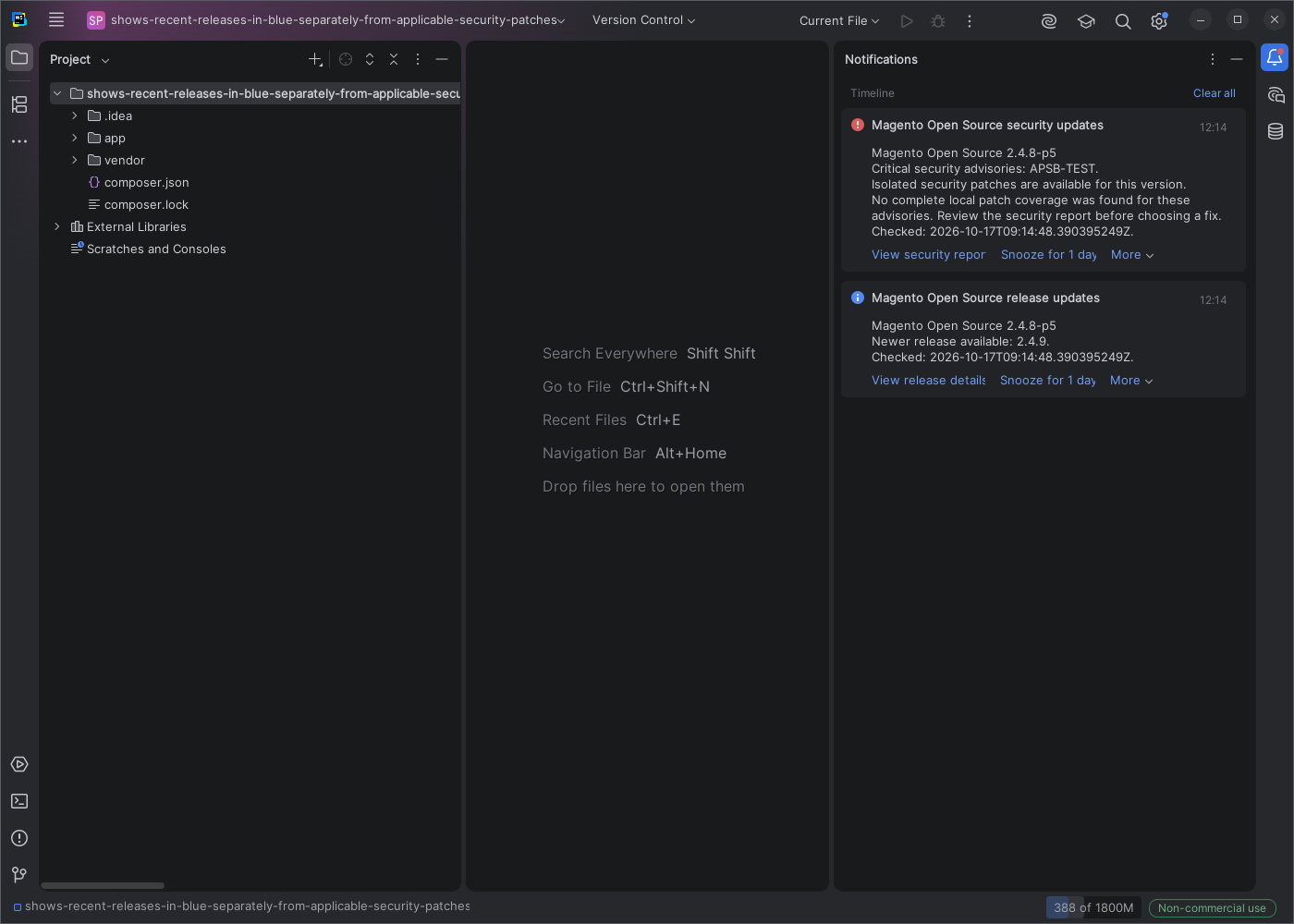
Actual screenshot of the released plugin using a demonstration project and sample advisories.
These releases show findings published within the past month. A quiet check does not rule out older advisories or verify your production deployment.
Read the illustrated setup and notification guide.
Also fixed: New Entity keeps the property name or type you are still editing when you click OK, instead of using the previous value.