Channel Point Rewards
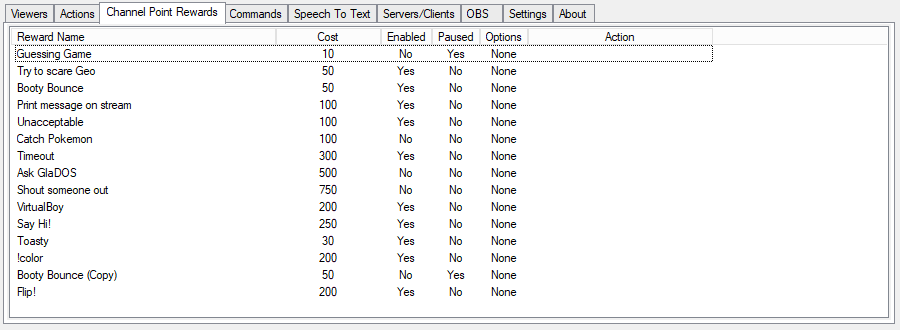
CPH can automatically execute actions when a Channel Point Reward is redeemed
When the Broadcaster account is connected, CPH will automatically pull a list of available rewards from the Twitch profile and actions can be assigned to them immediately.
You can also Add and Delete rewards directly from the application.
If a reward is created through CPH, the application will also have the ability to fully control that reward, otherwise most options will be unavailable.
To create a new reward Right-Click in the empty space and click Add
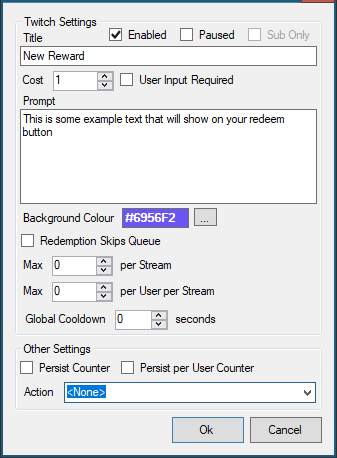
Title
The name of the reward
Enabled The reward is visible to the channel
Paused The reward can not be redeemed but can be seen if Enabled is also checked
Cost
The number of channel points needed to redeem this reward
User Input Required This will show a text box to the user to allow them to enter a message. This can be read by sub-actions with the %rawInput% variable
Prompt
This is the text that will be displayed to the user before they confirm redemption to explain what will happen
Background Colour Sets the colour of the button
Redemption Skips Queue Tells the action to ignore the Blocking flag on the action queue assigned to that action
Max per stream & Max per User per Stream Defines limits on how many times this reward can be redeemed in any one stream
Global Cooldown Defines the miniimum time in seconds before this reward can be redeemed again by anyone
Counters
Actions in CPH have per-session and per-command variables %counter% %userCounter% that records how many times that command has been used.
By default this clears when the application is closed but the following options will save the counts to a file so they will persist between sessions
Persist Counter Will save the total number of executions for this command
Persist per User Counter Will save details of how often each user has executed this command
Action Defines the action that will be executed when the reward is redeemed