-
Notifications
You must be signed in to change notification settings - Fork 0
Sub Action Set Active Scene
Geocym edited this page May 25, 2021
·
4 revisions
Change the scene being actively broadcast to the named scene
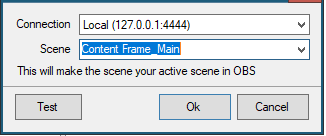
Connection
Any OBS connections you have configured in the OBS tab will be listed to choose from
Scene
If the selected OBS connection is currently connected, a dropdown list of available scenes will populate for selection, otherwise the scene name can be entered manually.
NOTE Scene names are case sensitive
- Streamer.bot 0.63 (WIP)
- Streamer.bot 0.62 (current)
- Streamer.bot 0.61
- Streamer.bot 0.60
- Streamer.bot 0.59
- Streamer.bot 0.58
- Streamer.bot 0.57
- Streamer.bot 0.56
- Archives
- WebSocket Server
- HTTP Server
- UDP Server
- WebSocket Clients
- General
- Twitch Accounts
- Streamlabs
- Groups
- Events
- File Watcher
- Timed Actions
- Pyramids
- Quotes
- Sub Counter