Sub Action Set Source Mute State
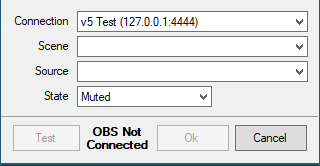
Sets a defined source to be muted or unmuted on the stream broadcast
Valid states are Muted Not Muted or Toggle
Connection
Any OBS connections you have configured in the OBS tab will be listed to choose from
Scene
If the selected OBS connection is currently connected, a dropdown list of available scenes will populate for selection, otherwise the scene name can be entered manually.
NOTE Scene names are case sensitive
Source
If the selected OBS connection is currently connected, a dropdown list of available sources will populate for selection, otherwise the source name can be entered manually.
NOTE Source names are case sensitive