Camera USB
The Camera USB is a tool that is used to store camera block data that can then be used to link cameras to monitors. To copy the data, the camera must be in the on state to use the Camera USB. When the data has been stored, the item will have a timeout delay before the item can be used again.
The Camera USB can be placed in the monitor's drive app, which can then be read by the camera app on the monitor.
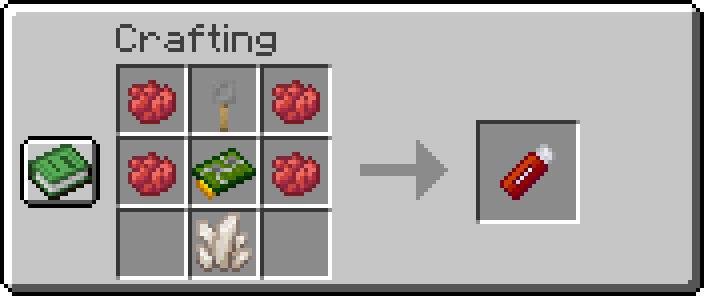
Camera USB:
-
x4Red Dye -
x1Nether Quartz -
x1Circuit Board -
x1Tripwire Hook
Full Breakdown:
-
x4Red Dye -
x3Iron Ingots -
x2Copper Ingots -
x2Nether Quartz -
x2Green Dye -
x1Redstone Dusts -
x1Glass Pane -
x1stick -
x1plank
| Item | Namespace | Tag |
|---|---|---|
| Red Dye | c | dyes/red |
| Nether Quartz | c | gems/quartz |
| Trpiwire Hook | cctvcraft | components/tripwire_hook |
| Circuit Board | cctvcraft | components/circuit_board |
 |
|---|
| CCTVCraft 5.0.0 - Update Video - Part 2 |
-
5.0.0- Added a new tool called Camera USB
- Camera USBs store Camera data by right-clicking on the camera when it's in the on state.
- Camera USBs can be used in the Monitor Drive App.
- Monitor Camera Apps use the Camera USB data to link cameras to the monitor.


