Secure Safe
The Secure Safe is a storage block designed for keeping valuables protected. It has the same storage capacity as a single chest and can be locked or unlocked using a Pinlock.
Locked safes can also be picked using Lockpicks for temporary access if the attempt is successful.
When a block is placed, the placing player becomes its owner. The owner can configure permissions, but when the block is unlocked, its functionality is accessible to anyone.
Once the block is locked, it remains inaccessible — even to the owner — until it is either unlocked or bypassed using Lockpicks.
Only the owner of a block can break it. The required tool depends on the block’s material:
- Wooden blocks – Require a stone axe or better.
- Metal blocks – Require a stone pickaxe or better.
When broken, the block will drop itself, allowing it to be collected and placed again.
When placed, the Secure Safe will have its front facing the player. It supports placement in all four cardinal directions: North, East, South, and West.
Secure Safes do not support redstone interaction. This is an intentional design choice to prevent players from using redstone mechanisms to bypass the safe's security.
Right-clicking a Secure Safe with a Link USB stores the safe's dimension, position, and name on the USB. This USB can then be used on a Pinlock to establish a link between the two.
Once linked, entering the correct pincode on the pinlock will toggle the safe's lock state between locked and unlocked.
After a block has been placed, its permissions can be modified using a Permission USB. This tool allows the owner to add or remove members from the block’s members list.
The copper variant of the Secure Safe follows custom oxidation mechanics, gradually changing appearance over time. It supports:
- Scraping – Removes oxidation and wax.
- Waxing – Prevents further oxidation until scraped.
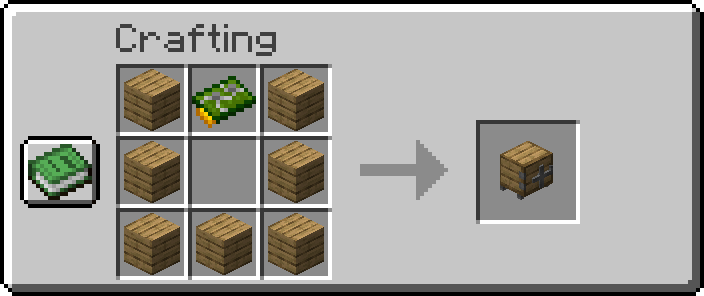
Iron Pinlock:
-
x5Safe material (see below) -
x1Circuit Board
Full Breakdown:
-
x7Safe material (see below) -
x2Copper Ingots -
x2Green Dye -
x2Iron Ingots -
x1Glass Pane -
x1Nether Quartz -
x1Redstone Dust
Door materials:
- Acacia Planks
- Bamboo Planks
- Birch Planks
- Cherry Planks
- Copper Ingots
- Crimson Planks
- Dark Oak Planks
- Iron Ingots
- Jungle Planks
- Mangrove Planks
- Oak Planks
- Spruce Planks
- Warped Planks
| Item | Namespace | Tag |
|---|---|---|
| Circuit Board | cctvcraft | components/circuit_board |
| Acacia Planks | c | planks/acacia |
| Bamboo Planks | c | planks/bamboo |
| Birch Planks | c | planks/birch |
| Cherry Planks | c | planks/cherry |
| Copper Ingots | c | ingots/copper |
| Crimson Planks | c | planks/crimson |
| Dark Oak Planks | c | planks/dark_oak |
| Iron Ingots | c | ingots/iron |
| Jungle Planks | c | planks/jungle |
| Mangrove Planks | c | planks/mangrove |
| Oak Planks | c | planks/oak |
| Spruce Planks | c | planks/spruce |
| Warped Planks | c | planks/warped |
 |
|---|
| CCTVCraft 5.1.0 - Update Video - Part 3 |
-
5.1.0- Added custom models and textures.
- Added blocks.
- Added crafting recipes.
- Added support for pinlocks, permission USB, link USB, and lockpicks.
- Added picking support.
- Added block ownership and members support.
-
SyrupBoy: Contributed to the secure, safe textures in version 5.1.0.


