Permission USB
The Permission USB is an item tool that is designed to set block permissions after the block has already been placed. They have a total of 64 uses before the item breaks.
To edit a block's permission, right-click on the block if you're the owner and a menu will appear. You can add the player's display name to the text box, then choose to set, which will add the player to the blocks members list or check the box to remove, then press set, which will then remove a player from the blocks members list.
Below is a list of supported blocks for this tool.
- Monitor Blocks
- Camera Blocks
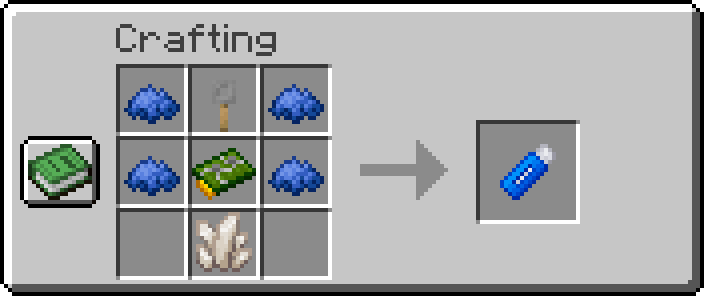
Permission USB:
-
x4Blue Dye -
x1Nether Quartz -
x1Circuit Board -
x1Tripwire Hook
Full Breakdown:
-
x4Blue Dye -
x3Iron Ingots -
x2Copper Ingots -
x2Nether Quartz -
x2Green Dye -
x1Redstone Dusts -
x1Glass Pane -
x1stick -
x1plank
| Item | Namespace | Tag |
|---|---|---|
| Blue Dye | c | dyes/blue |
| Nether Quartz | c | gems/quartz |
| Trpiwire Hook | cctvcraft | components/tripwire_hook |
| Circuit Board | cctvcraft | components/circuit_board |
 |
|---|
| CCTVCraft 5.0.0 - Update Video - Part 4 |
-
5.0.0- Added a new tool called Permission USB
- The permission USB works on some blocks to allow other players permission to use the block.
- Permission USBs have support for adding and removing permissions after a block is placed.


