Iron Pinlock
The Iron Pinlock is a block used to lock or unlock compatible blocks in CCTVCraft. It works with any block that supports the locking feature, including the Secure Safe, Secure Door, and Secure Hatch. By connecting an Iron Pinlock to these blocks, players can control access, enhancing security within their builds.
An Iron Pinlock can only be broken using a stone pickaxe or a stronger tool. When destroyed, it will drop itself, allowing it to be picked up and placed again elsewhere.
It can be placed on any block face, though it looks better on walls. It supports north, east, south and west rotations.
When a button is pressed in the GUI, the corresponding button on the block will animate simultaneously. This visual feedback reflects the exact button being pressed.
Note
Other players observing the Iron Pinlock in use may be able to see which buttons are pressed and in what sequence, potentially revealing the passcode.
When a block is locked, players can attempt to bypass its security using lockpicks. Successfully picking the player is granted temporary access to the block. For more details, see the Lockpicks page. The lockpicks item is consumed on use.
If the pincode is known, the player can also enter it to bypass the pinlock. However, without knowing the correct code, this method is typically more difficult than using lockpicks.
Using a Link USB on a device, then on a pinlock, will share the device’s information with the pinlock. Each pinlock supports only one link at a time, but the linked device can connect to multiple pinlocks.
This design allows for setups with multiple pinlocks controlling the same device, enabling features such as locking from both sides of a wall or providing remote access.
A pincode is a 4-digit number stored in the pinlock as a NeoForge NBT variable. When the Enter button is pressed, the pinlock compares the entered code to its stored pincode. If they match, the block’s state is toggled (locked ↔ unlocked).
The owner of the block can change the pincode by first entering 0000, then entering the desired new code. By default, all pinlocks use the pincode 5555.
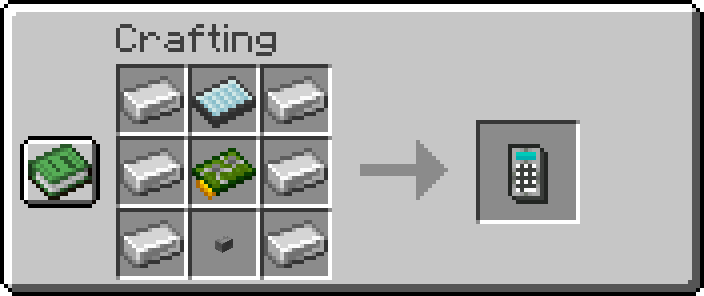
Copper Jammer:
-
x6Iron Ingots -
x1Display -
x1Circuit Board -
x1Stone Button
Full Breakdown:
-
x9Iron Ingots -
x4Nether Quartz -
x2Copper Ingots -
x2Glowstone Dust -
x2Green Dye -
x2Iron Nuggets -
x1Glass Pane -
x1Stone
| Item | Namespace | Tag |
|---|---|---|
| Button | cctvcraft | components/button |
| Circuit Board | cctvcraft | components/circuit_board |
| Display | cctvcraft | components/display |
| Iron Ingots | c | ingots/iron |
| Coming Soon! |
|---|
| CCTVCraft 5.1.0 - Update Video - Part 1 |
-
5.1.0- Added block animations for each button.
- Added custom textures and model
- Added block
- Added crafting recipe.
- Added support for secure door, secure hatch and secure safe blocks.
- Added block ownership and members support.


