Lockpicks
Lockpicks are a one-time use item. They are consumed when you right-click on a pickable block such as a Secure Safe, Secure Door or Secure Hatch.
Lockpicking is performed using the arrow keys:
- Down Arrow – Pick the currently selected pin.
- Right Arrow – Select the pin to the right.
- Left Arrow – Select the pin to the left.
- Up Arrow – Cancel the lockpicking attempt.
By default, players have 25 seconds to pick a lock. This limit can be adjusted via game rules.
Game rules also control pin speed behavior:
- Dynamic Pin Speeds – Some pins drop faster or slower than others.
- Default Pin Speed – Used when dynamic pin speeds are disabled.
When a pin is set, the light on the overlay turns green, indicating success. To set a pin:
- Hold the Down Arrow to pick the pin.
- When the pin starts to shake, release the Down Arrow quickly.
- Waiting too long will cause the attempt to fail, requiring you to try again.
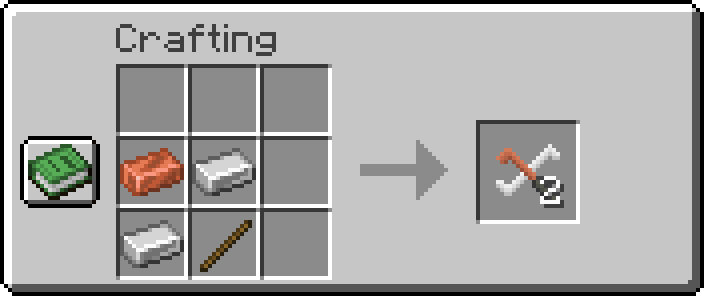
Lockpicks:
-
x1Copper Ingot -
x2Iron Ingots -
x1Stick
Full Breakdown:
-
x2Iron Ingots -
x1Copper Ingots -
x1stick
| Item | Namespace | Tag |
|---|---|---|
| Stick | c | rods/wooden |
| Iron Ingots | c | ingots/iron |
| Copper Ingots | c | ingots/copper |
 |
|---|
| CCTVCraft 5.1.0 - Update Video - Part 2 |
-
5.1.0- Added texture and item.
- Added crafting recipe.
- Added support for secure door, hatch and safe.
- Added picking mechanics using an overlay.


