Releases: renatomen/tasknotes-gantt
Release list
0.1.0-beta.10

TaskNotes Gantt 0.1.0-beta.10
Added
- A full documentation website — tngantt.com. (#248, #251)
- The canonical, feature-by-feature reference for the plugin: getting started, core concepts, a chapter for each feature (with images), and every view option grouped exactly as the plugin groups them. The README is now just a short overview and points here.
- It also documents how to drive the chart: a new "Chart controls" page covers the floating zoom/focus buttons, full screen, and collapse/expand, and every feature now spells out step by step where to find each control and how to trigger it — by click, right-click, or the command palette.
- Documentation and source links inside the plugin. (#250)
- The settings tab and the in-app "What's New" view now link straight to the documentation website and the GitHub repository, so help is one click away.
Changed
- The Bases view is now called "TaskNotes Gantt". (#251)
- It previously showed as "Gantt (OG)" in the view-type picker; the label now matches the plugin. Existing views keep working — only the display name changed.
- The Day scale opens at its most compact day columns. (#252)
- Choosing Day as the default scale used to open with wide day columns, so you had to zoom out by hand every time to reach a workable width. Day now opens at its narrowest day size — the same view you'd otherwise reach by zooming out, and identical on every device. You can still zoom back in with the timeline's + button.
Removed
- The "Gantt Task List" Bases view has been removed. (#249)
- The plugin used to offer a second, list-style view that added little over the timeline and made setup more confusing. The timeline view — now "TaskNotes Gantt" — is the single view going forward. If a base still uses the old list view, switch its view type to TaskNotes Gantt.
0.1.0-beta.9
TaskNotes Gantt 0.1.0-beta.9
Added
- Weekend day columns are now shaded in the timeline. (#241)
- Weekend days follow your locale — Saturday/Sunday in most regions, Friday/Saturday in much of the Middle East — and the shading follows the active light/dark theme. It appears at the day and hour zoom levels; coarser scales are unchanged.
- Turn it off per view with the new "Highlight weekends" toggle under Timeline, on by default. The toggle applies live, keeping your current zoom and scroll position.
0.1.0-beta.8
TaskNotes Gantt 0.1.0-beta.8
Added
-
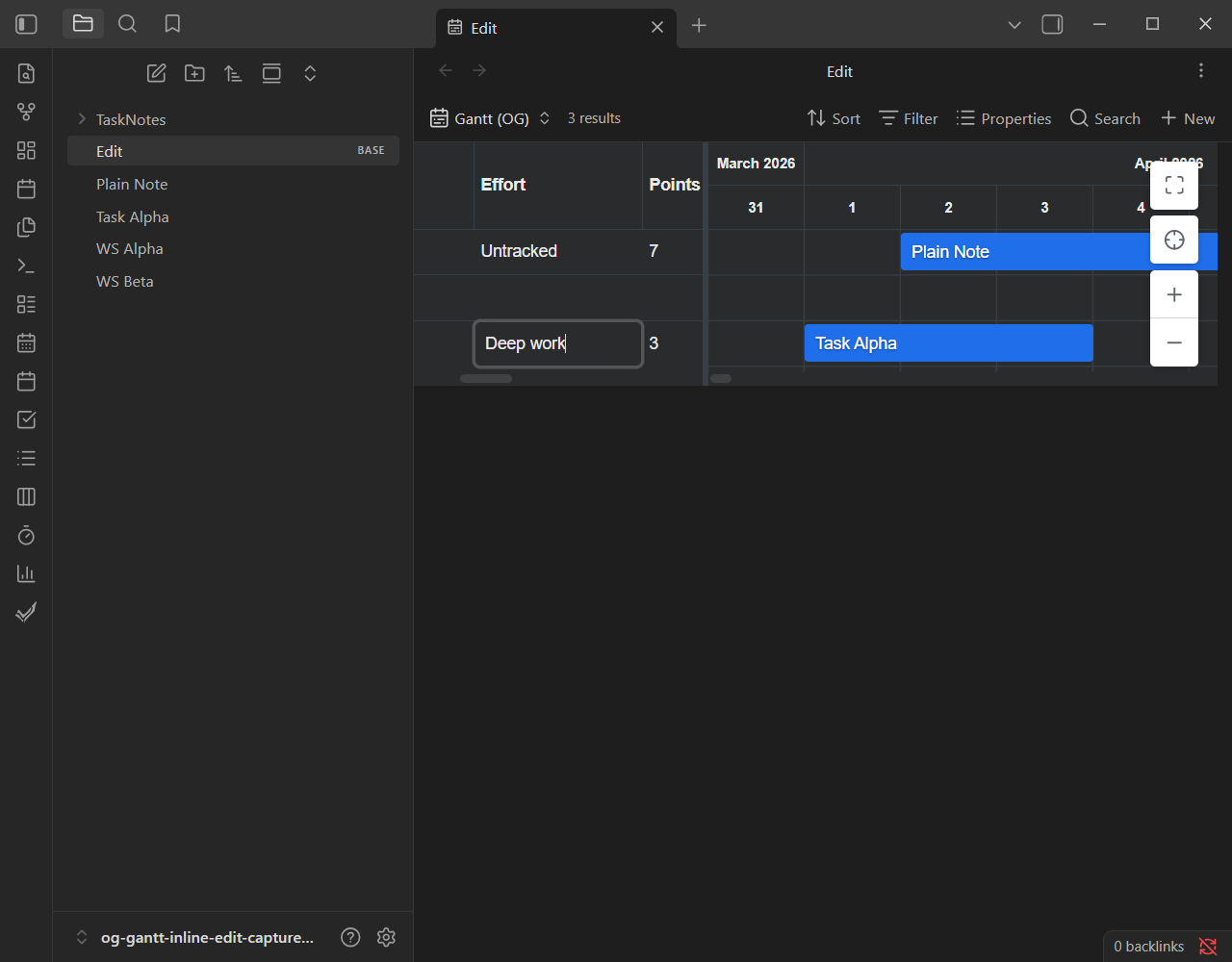
Edit task properties inline, right in the grid. (#224, #225, #226, #227, #228, #231, #232, #233, #234, #236)
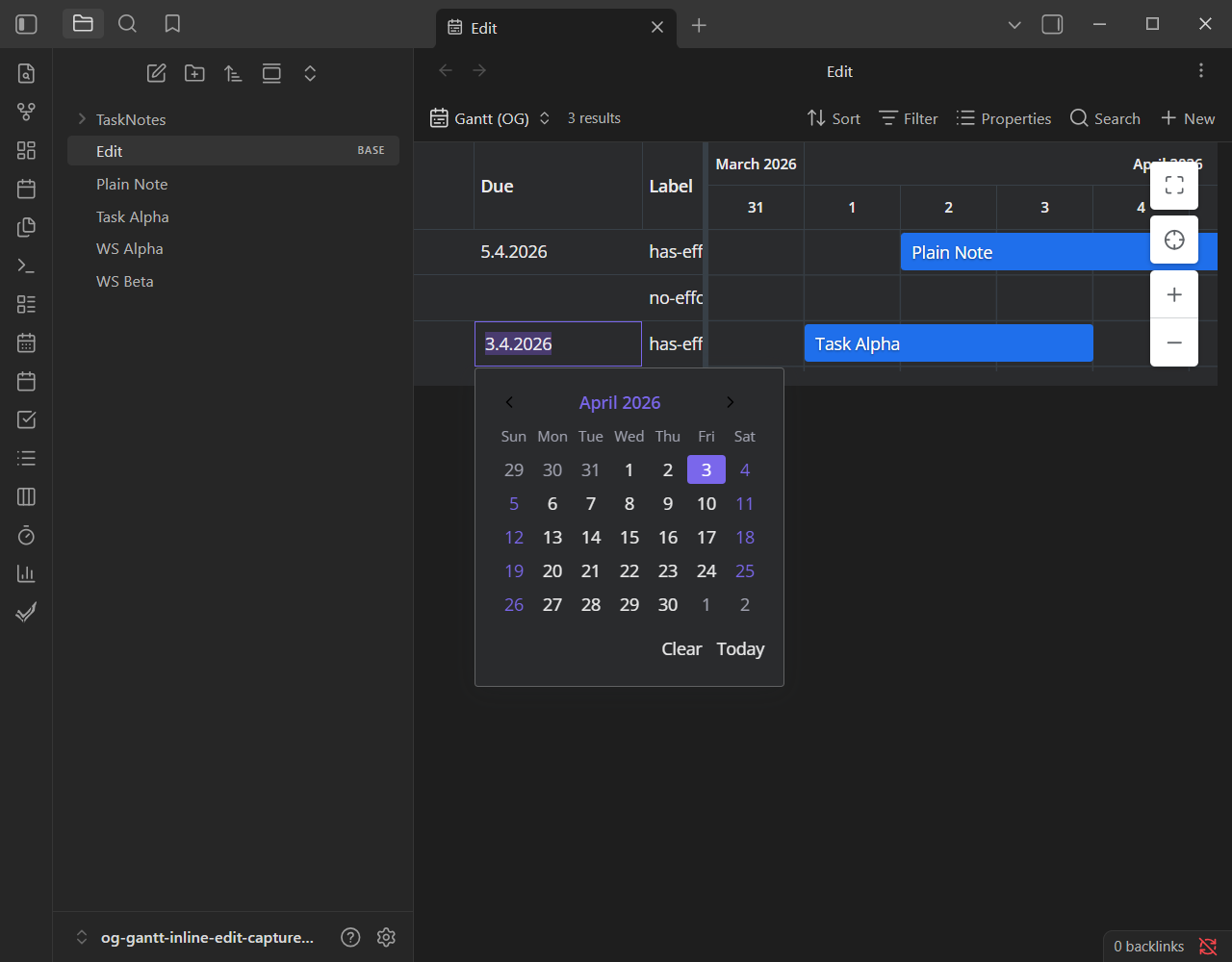
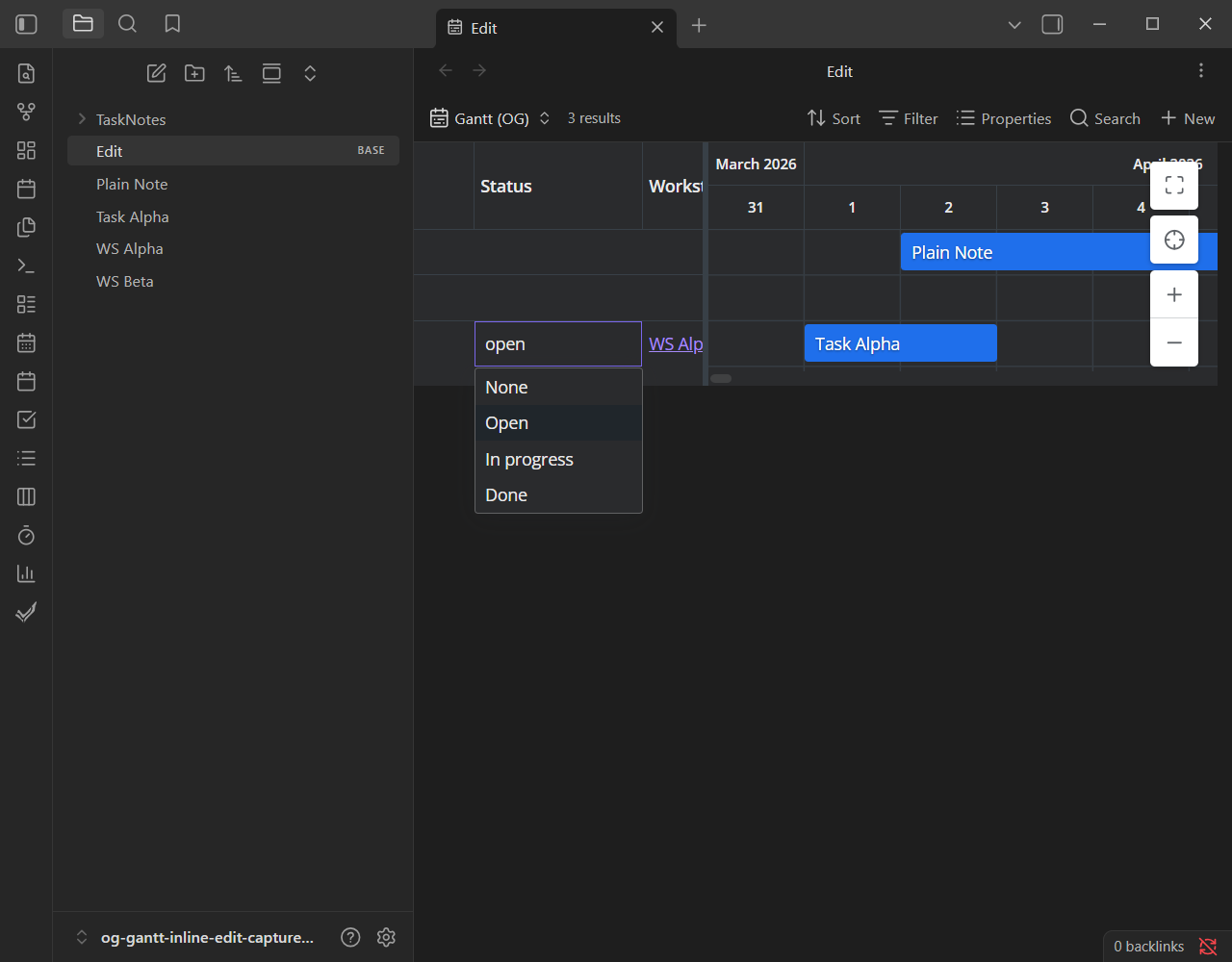
- Double-click a cell (or press F2) to edit a task without leaving the timeline. Editors are type-aware: text, numbers, checkboxes, dates, status, priority, and multi-value list fields each get the right control.
- Dates read and write in your regional locale — so
01/02/2026is never guessed — and come with a calendar dropdown. Status and priority are pickers fed from the values you've configured in TaskNotes, so only real options are offered. - Text and single-value fields use Obsidian's native
[[link suggester: start typing[[and pick a note exactly as you would in the editor. List fields edit as removable chips, so a multi-value property keeps every[[wikilink]]— including aliased links — intact. - Only rows TaskNotes recognizes as tasks are editable, and edits are written through the TaskNotes companion; a standalone (companion-free) timeline stays read-only.
-
Property cells render as Obsidian markdown. (#222)
- Wikilinks in a property column are now clickable internal links, tag values show as tag pills, and emphasis and lists render — instead of raw
[[...]]and#tagtext.
- Wikilinks in a property column are now clickable internal links, tag values show as tag pills, and emphasis and lists render — instead of raw
-
Two-way sync between a task's Time Estimate and its bar length. (#221)
- When a task is missing a start or end date, its TaskNotes Time Estimate now sets the bar's length — a per-task override of the view's Default duration. Real dates always win when both are present.
- A new per-view "Time Estimate Update" mode lets resizing a bar write the new span back to the estimate. Writing needs the TaskNotes companion and is off by default.
-
The grid/timeline split width is now an editable setting. (#219)
- A new "Table width (px)" control in a view's Appearance section sets where the grid meets the timeline; leave it empty to fall back to the first column's width. The value now survives tabbing away from the view and back.
-
The view-settings menu is grouped into collapsible sections. (#217)
- The Gantt view's config menu — around two dozen settings — now opens as five collapsible sections (Fields, Progress, Relationships, Timeline, Appearance), so related controls sit together instead of in one long flat list.
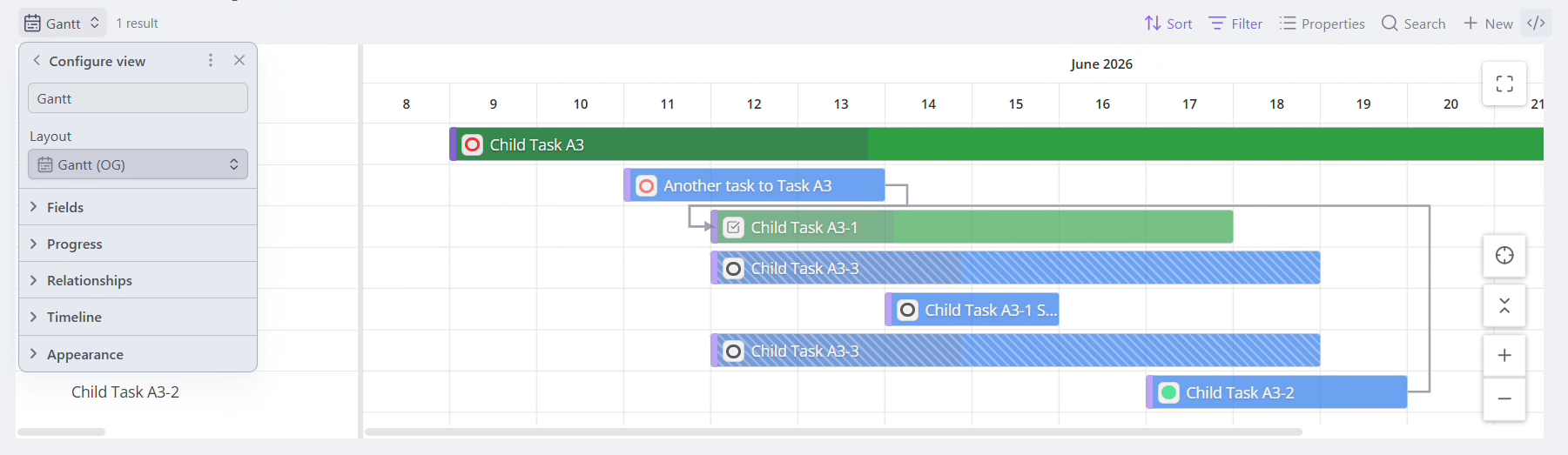
Changed
- "Context bar opacity (%)" is renamed "Expanded items opacity (%)" and moved directly under Expanded relationships. (#217)
- The saved value is unchanged, so existing views keep their setting.
Fixed
-
Editing gestures no longer trigger an accidental row reorder or parent collapse. (#234)
- Dragging to select text inside a cell editor is no longer read as a row reorder, and a small drag while double-clicking a parent row no longer folds it closed. Drag-to-reorder rows is disabled (it conflicted with editing); expand and collapse now happen only through the chevron.
-
Editing a list cell no longer drops its wikilinks. (#236)
- List fields previously committed their comma-joined display text, which could silently lose an aliased
[[link]]'s target note. They now edit as chips seeded from the raw frontmatter and commit the real values. In read mode a long list keeps showing links and adds a count badge when it's truncated.
- List fields previously committed their comma-joined display text, which could silently lose an aliased
0.1.0-beta.7
TaskNotes Gantt 0.1.0-beta.7
Added
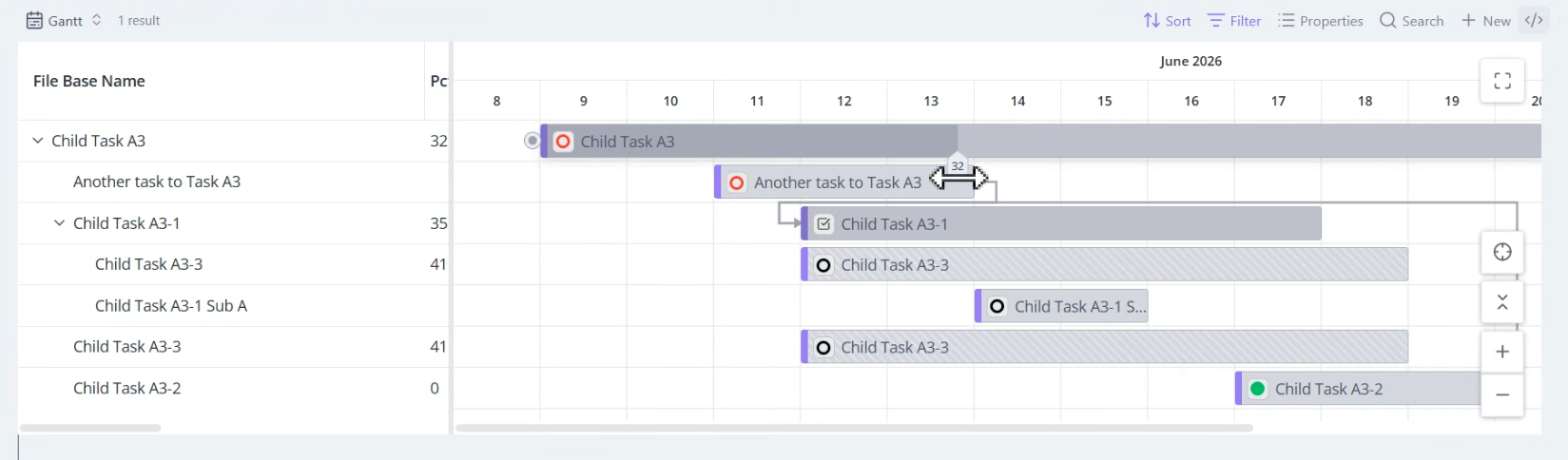
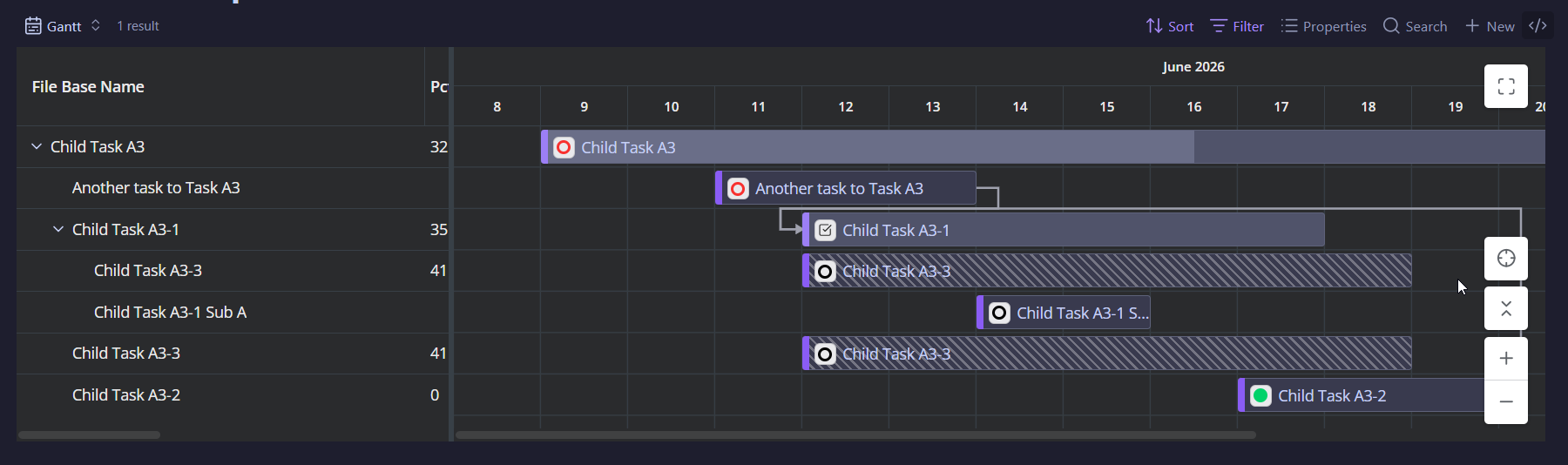
- Progress on the bars — choose where it comes from, per view. (#212)
- Each Gantt view has a new Progress mode setting with two sources:
- TaskNotes Progress — the bar mirrors the completion TaskNotes shows on its task card (computed from the note's checklist), and updates live as you tick checklist items. It's read-only, so the bar has no drag handle in this mode.
- Property — the bar reads a numeric 0–100 value from a property you pick in Progress Property. Values outside 0–100 are clamped to the nearest end.
- In Property mode you can drag the bar's progress handle to set the value; it saves back to your property on release. Writing requires the TaskNotes companion, and the property must be one TaskNotes recognizes (add it as a custom field in TaskNotes settings). A standalone (companion-free) view still shows the property, just read-only.
- Sensible defaults: a companion view defaults to TaskNotes Progress; a view that already has a Progress Property mapped keeps reading it (Property mode). Progress renders for every task in the chart, including relationship-expanded tasks pulled in from outside the current filter.
- Each Gantt view has a new Progress mode setting with two sources:
0.1.0-beta.6
TaskNotes Gantt 0.1.0-beta.6
Added
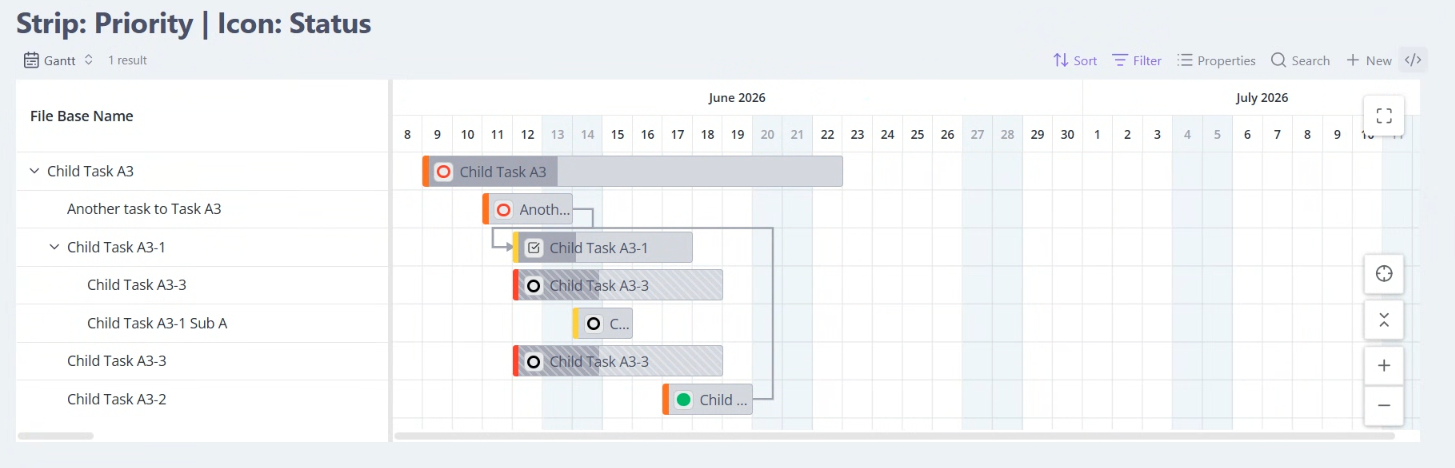
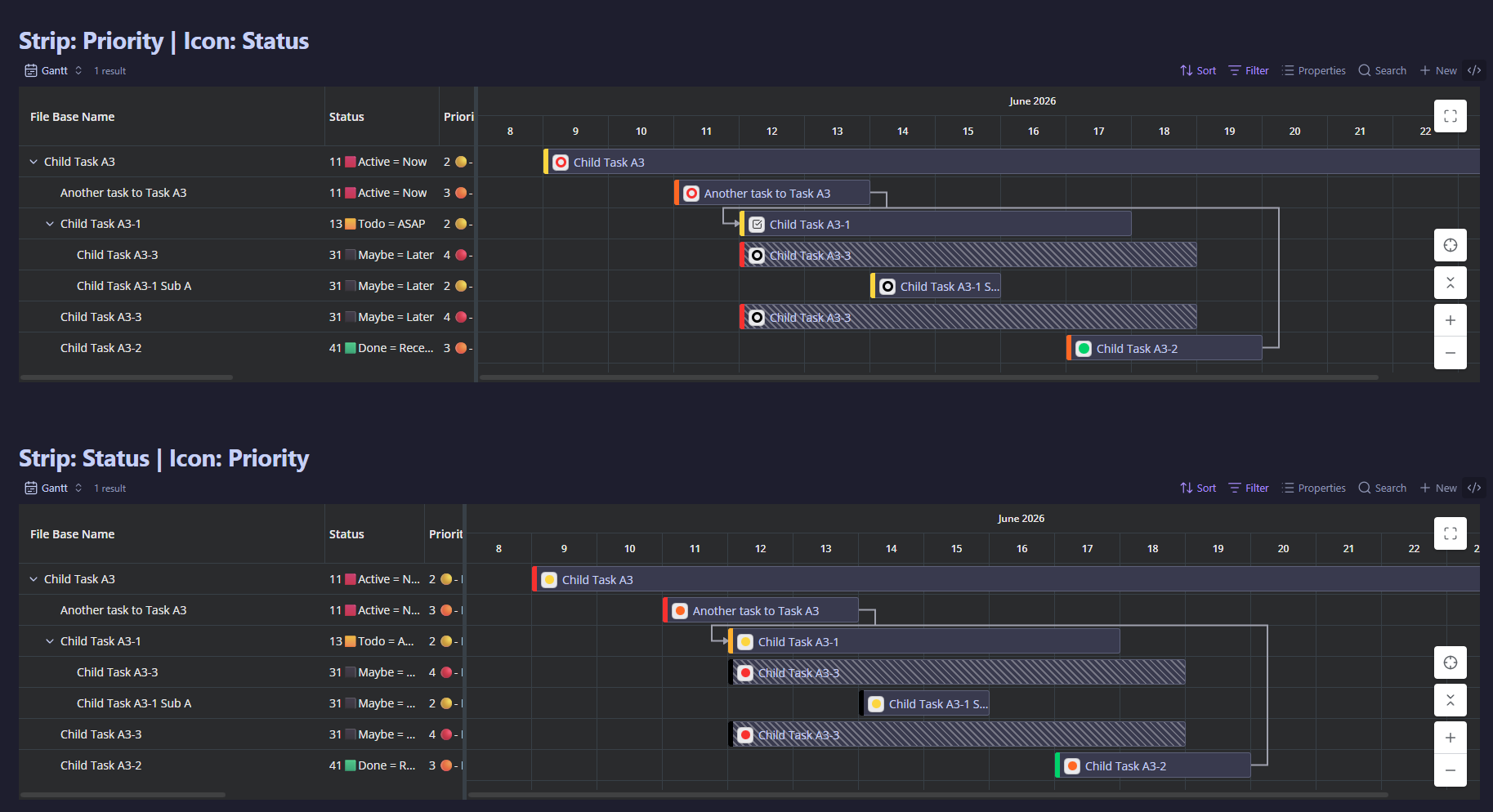
- Per-view control over bar colors and icons. (#201)
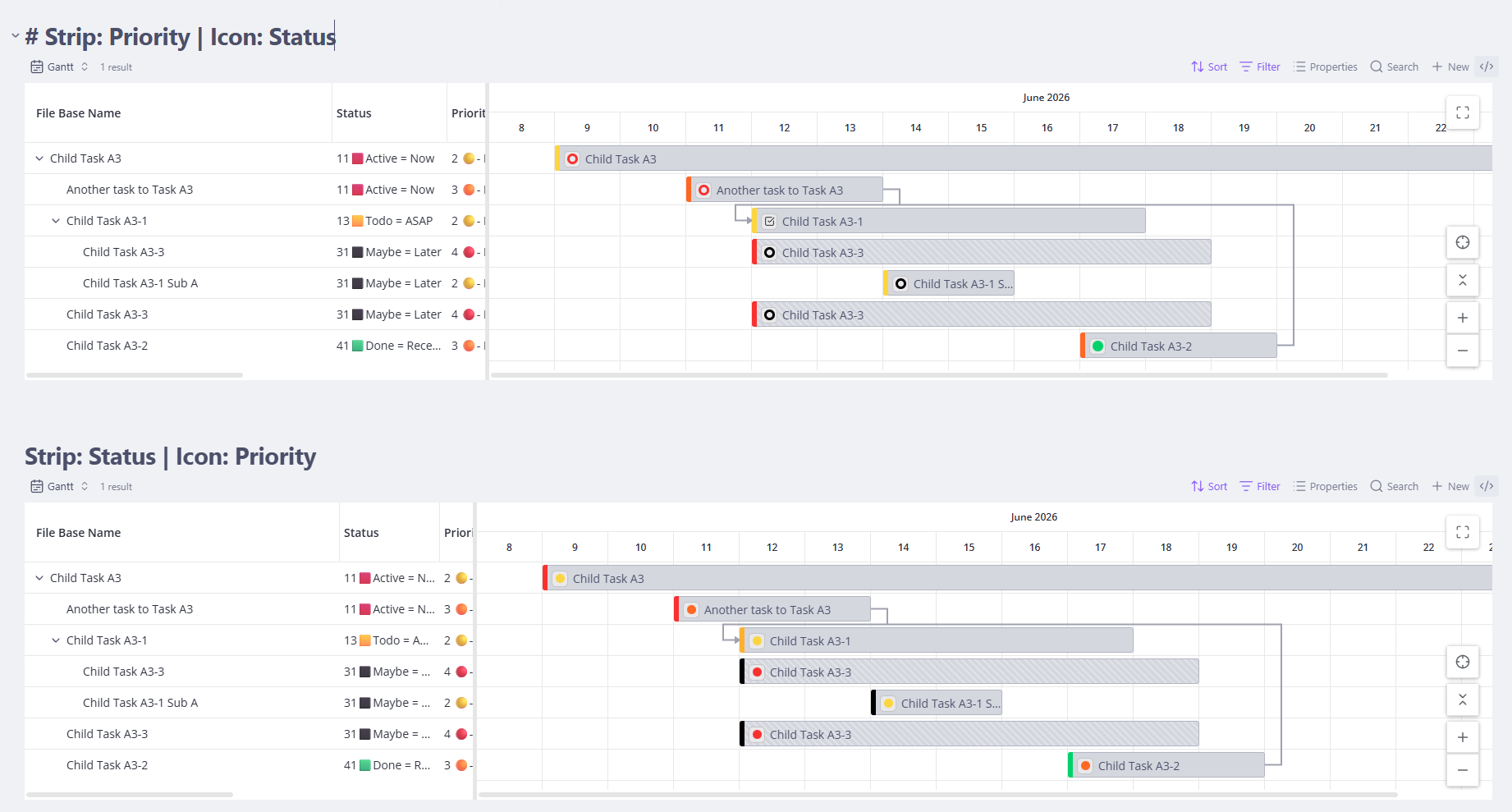
- Each Gantt view now has three independent options: Bar color mode (Fill or a left-edge Strip), Bar color source (Default, By status, By priority, or Obsidian theme), and a Task icon (None, Status, or Priority) shown in a neutral chip on the bar.
- Default colors the hierarchy — green parents, blue children. By status / By priority use the colors and icons configured in TaskNotes. Obsidian theme adapts the bars to your current theme (two harmonious accent colors for parents vs children) and re-tints instantly when you switch themes. By status / By priority need the TaskNotes companion; without it they fall back to Default.
- The Task icon chip reuses TaskNotes' own status ring / priority dot styling, and shows a colored dot when a value has no configured icon.
- For a colorblind-accessible view, pair a color source with the matching Task icon — color alone is not distinguishable for everyone.
Changed
- Bars now color the hierarchy by default (green parents, blue children) instead of by TaskNotes status. (#201)
- To color by status again, set a view's Bar color source to "By status" (mode "Fill").
Fixed
- Dark-mode expand/collapse chevrons and panel-resizer arrows are now visible, themed, and aligned. (#207)
- The grid's parent expand/collapse chevrons were painted near-black on dark chart surfaces, so they were almost invisible regardless of the theme; they now follow your theme's text color and lift to the accent color on hover. The split-panel resizer arrows got the same treatment, and leaf-row labels now line up with parent-row labels instead of sitting a few pixels to the right.
- Single-parent nested tasks are no longer wrongly marked as replicated. (#204)
- With "Hide top-level subtasks" on, a task shown exactly once could still be drawn with the diagonal "replicated" hatch as if it appeared in several places. The hatch now counts only the placements actually visible, so it shows up only for tasks genuinely displayed more than once.
- A completed status with no configured icon now shows a filled disc, matching TaskNotes. (#210)
- The on-bar icon chip drew a hollow ring for such statuses; TaskNotes fills that dot into a solid disc when the status is flagged completed in its settings, so the two views now agree. Statuses with a configured icon, priority dots, and non-completed statuses are unchanged.
0.1.0-beta.5
TaskNotes Gantt 0.1.0-beta.5
Changed
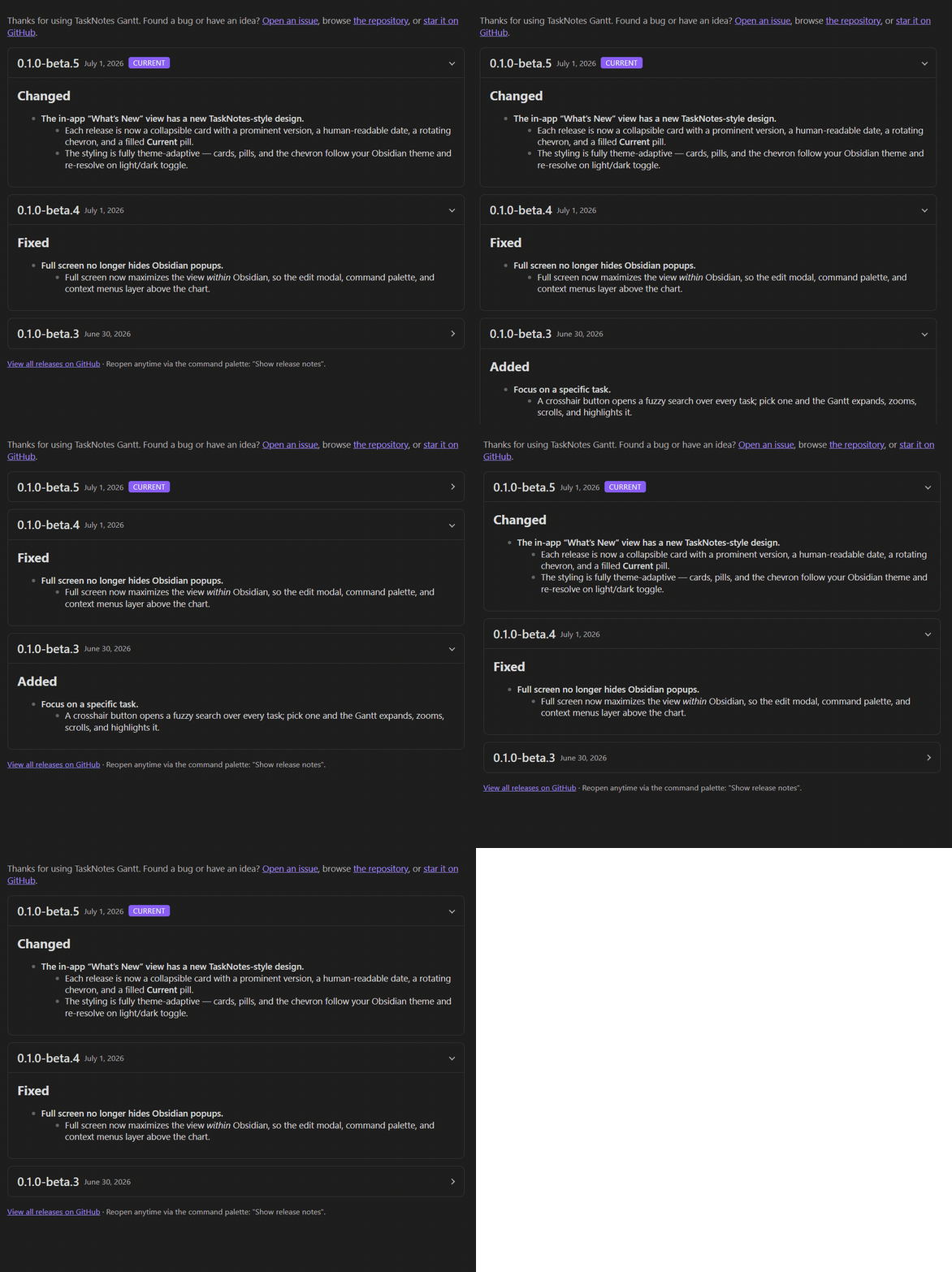
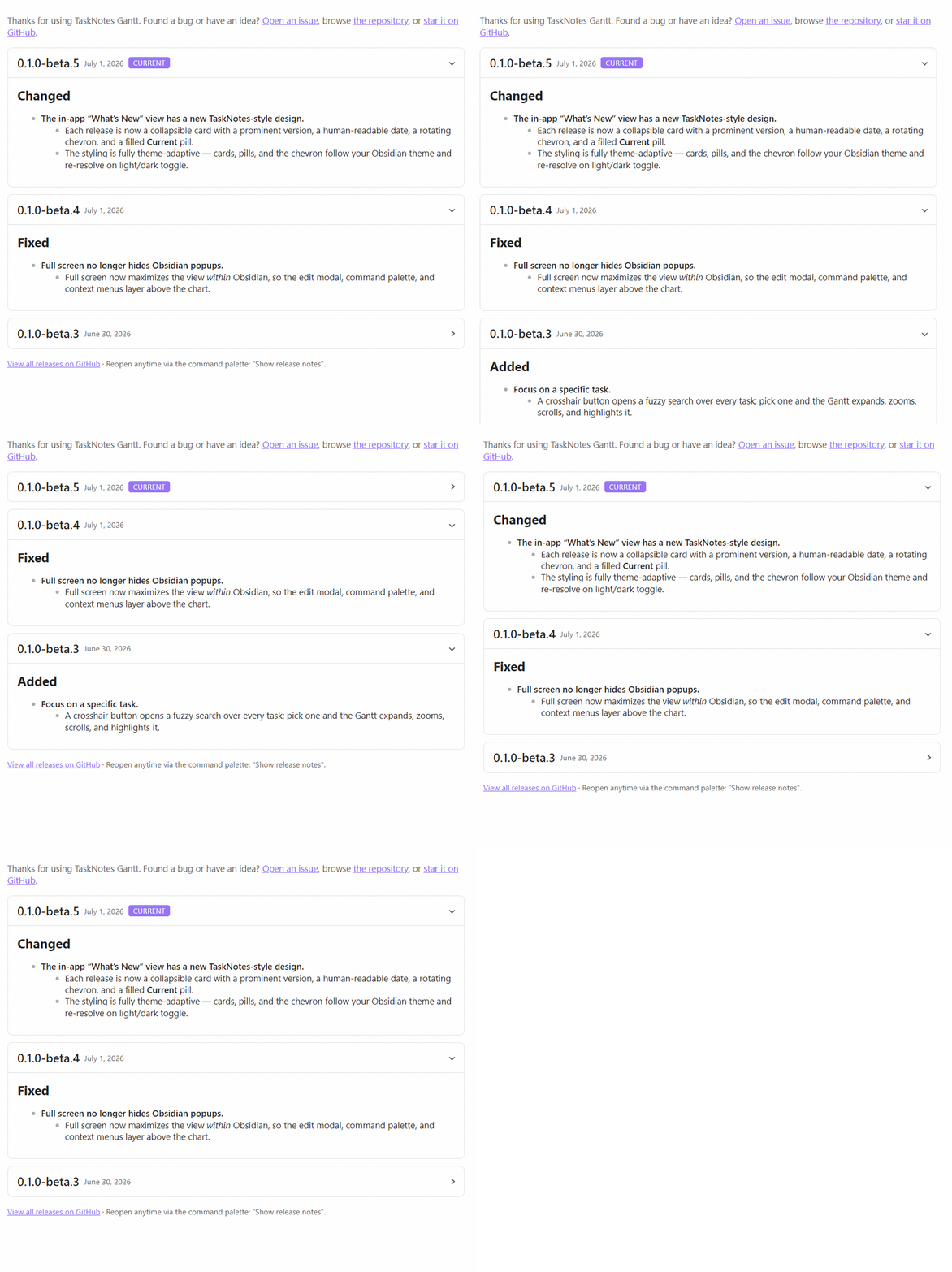
- The in-app "What's New" view has a new TaskNotes-style design. (#197)
- Each release now appears as its own collapsible card, with a prominent version number, a human-readable date, a chevron that rotates as you open it, and a filled "Current" pill marking the release you're on — matching the look of TaskNotes' own release-notes screen.
- The styling is fully theme-adaptive: the cards, pills, and chevron all follow your Obsidian theme's colours and re-resolve instantly when you switch between light and dark, so nothing looks out of place.
- Past beta releases are now included in the view, so the first time you open it after updating you get real, scrollable release history rather than an empty screen.
0.1.0-beta.4
TaskNotes Gantt 0.1.0-beta.4
Fixed
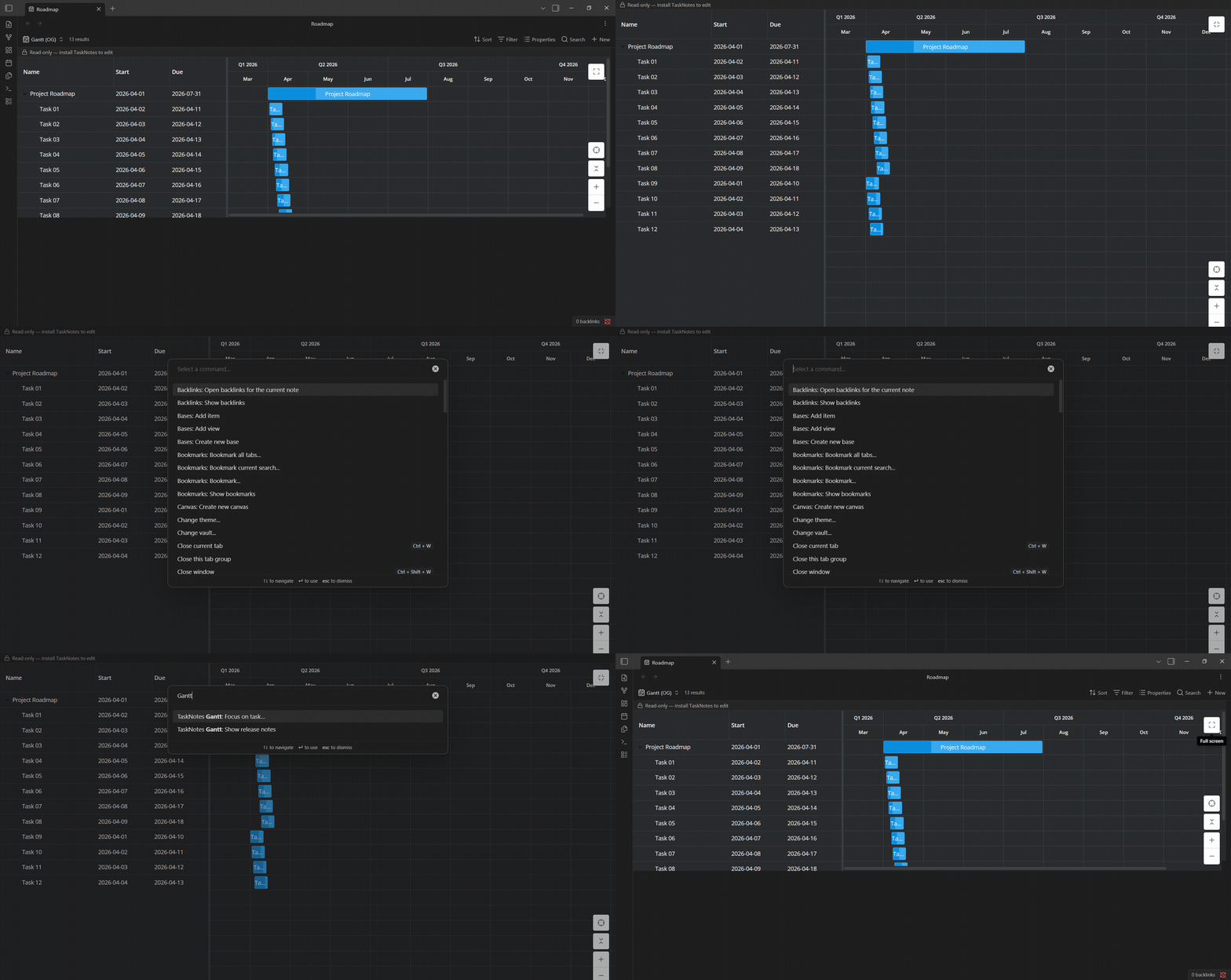
- Full screen no longer hides Obsidian popups. (#191)
- Previously, opening the Gantt in full screen pushed Obsidian's own popups behind it — double-clicking a bar to open the TaskNotes edit modal appeared to do nothing, and the command palette and context menus were unreachable without un-maximizing first. Full screen now maximizes the view within Obsidian, so the edit modal, command palette, context menus, and hover previews all layer above the chart as expected. The "Full screen" label and icon are unchanged.
0.1.0-beta.3
TaskNotes Gantt 0.1.0-beta.3
Added
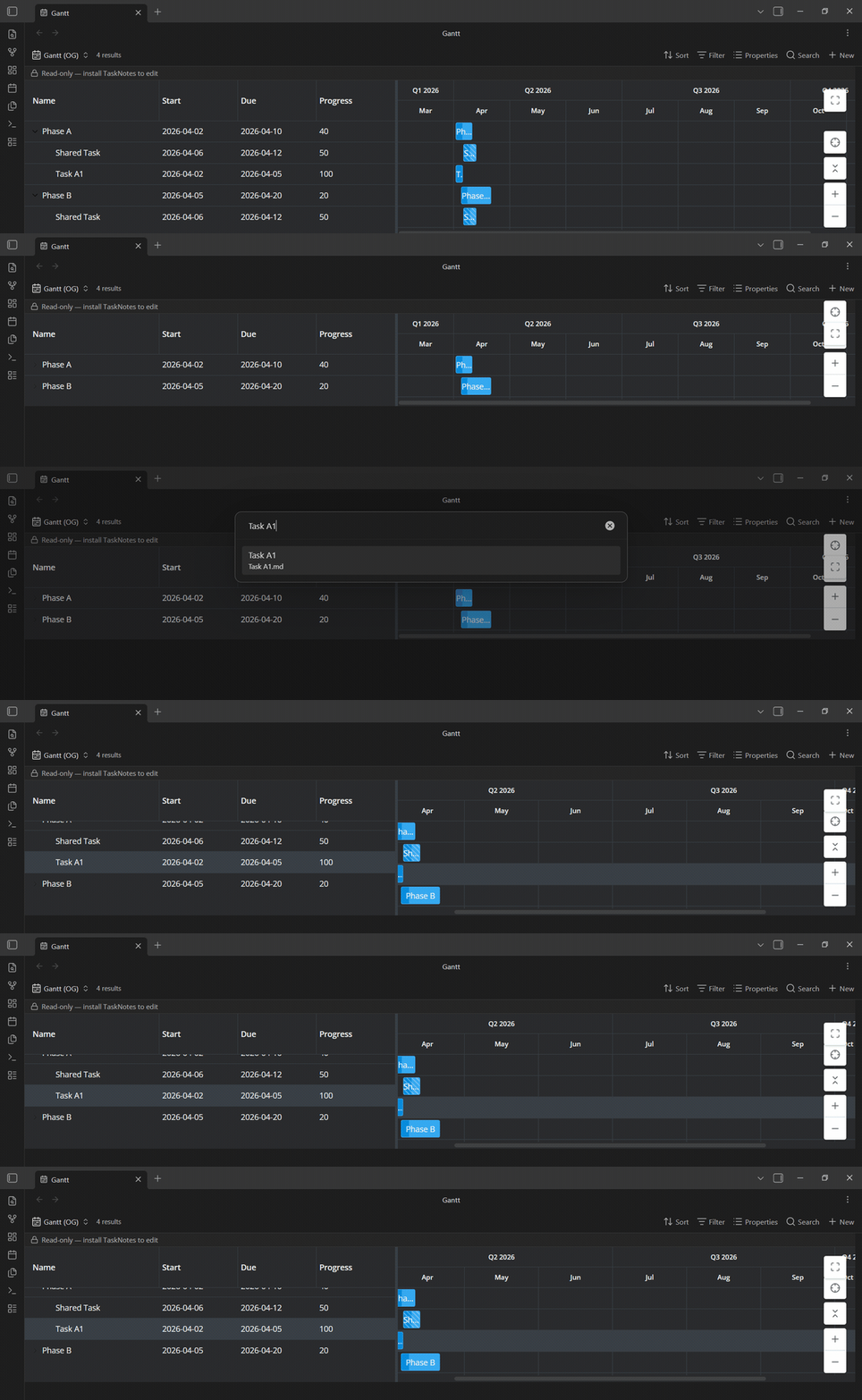
Focus on a specific task
- A new crosshair button in the chart controls — and a "Gantt: Focus on task…" command — opens a fuzzy search over every task in the chart (both the tasks matched by your Base and any pulled in through relationships).
- Pick one and the Gantt brings it into view for you: it expands only the parents needed to reveal it, zooms so the whole bar is visible without filling the chart, scrolls to it on both axes, and highlights it.
- Tasks without a full date range (milestones, unscheduled) are revealed at the current zoom. This is navigation only — focusing never opens or edits the task. (#189)
Changed
Clicking a task bar now selects it first, instead of immediately opening it
- A single click (or tap) on an unselected bar just selects and highlights its row, so you can pick out a task without the edit modal popping up.
- The configured TaskNotes click action runs when you click an already-selected bar, or on a double-click —
singleClickAction/doubleClickActionare honoured exactly as before. - Ctrl/Cmd-click still opens the note in a new tab, and the behaviour works the same on touch (tap to select, tap again or double-tap to open, long-press for the task menu). (#188)
0.1.0-beta.2
TaskNotes Gantt 0.1.0-beta.2
This beta focuses on render stability for large and changing result sets, and
introduces an in-app "What's New" view so updates are visible without leaving
Obsidian.
Added
- In-app "What's New" view. After updating the plugin, the release notes for
the new version open automatically once; you can reopen them any time with the
"Show release notes" command. Versions are listed newest-first and each is
collapsible, and a settings toggle lets you turn off the auto-open on update.
(#157)
Fixed
- Fixed a long freeze (up to roughly 25 seconds) when clearing a Bases search —
or otherwise swinging a large set of tasks out of and back into the view. Large
changes now re-seed the timeline in a single pass instead of applying thousands
of per-row updates, cutting the work by about 99.8% on large vaults. (#161) - Fixed a render loop that could be triggered by changing the result set —
clearing a search, changing a filter, or toggling a view display option. View
display options no longer feed back into how the task set is derived. (#161) - Fixed dependency edges and the Show all / Inherit dependency modes failing
to appear when the TaskNotes relationship index was still warming up as the view
mounted. The view now re-checks for a bounded window and self-heals once
TaskNotes relationships are ready, so dependencies show up without a manual
reload. (#161, #167)
0.1.0-beta.1
TaskNotes Gantt 0.1.0-beta.1
First public beta. TaskNotes Gantt adds an interactive Gantt timeline to Obsidian
as a Bases view: point it at your TaskNotes tasks (or any Base) and get a live schedule
with dependency arrows, drag-to-reschedule, and parent/child roll-up — edits written
straight back to your task notes through TaskNotes.
This is an early beta — expect rough edges, and please
report anything that looks off.
Added
Scheduling
- Task bars from each task's start → end dates (TaskNotes
scheduled→dueby default,
or any date properties you map). - Drag to reschedule and resize to change duration — persisted back to the task note.
- Parent/child roll-up: subtasks nest under their parent, and dragging a parent moves its
whole subtree. Choose whether parent dates update automatically, ask first, or never.
Dependencies
- Renders all four RFC 9253 relationship types — Finish-to-Start, Finish-to-Finish,
Start-to-Start, Start-to-Finish — plus gap/lag, from TaskNotes'blockedBy. - Create and delete Finish-to-Start dependencies by dragging between bars.
- Choose how arrows draw across duplicated multi-parent instances.
Task editing
- Click a bar to open the note or TaskNotes' edit modal (honoring your single-/double-click
settings; ⌘/Ctrl-click opens it in a new tab). - Right-click for TaskNotes' full task context menu — status, priority, contexts, tags, dates.
- Bars are colored by your configured TaskNotes statuses.
Structure & display
- Expand relationships beyond the Base filter ("Show all") to pull in related subtasks for
context (with adjustable context-bar opacity); optionally hide top-level subtasks. - Sort the grid by any column.
- Zoom the timeline by hours, days, weeks, or months.
- Resizable grid/timeline split that remembers its width.
- Full-screen mode.
- Optional toolbar with an Auto/Light/Dark theme switch.
- Configurable min/max height (fits content, then scrolls internally).
- Control how tasks with missing or partial dates appear, with on-bar date-status indicators.
Standalone (read-only, no TaskNotes)
- A read-only timeline over any Obsidian Base — map start/end properties and your notes
render as bars. (No write-back, dependency arrows, or status colors in this mode.)
Privacy
- Runs entirely on your device: no network requests, no telemetry, no remote code. Release
builds carry a verifiable GitHub build-provenance attestation.
Known limitations
- Only Finish-to-Start dependencies can be authored from the chart today; the other three
types render but are edited in TaskNotes. Editing relationship type and gap/lag from the
chart is in progress. - Standalone (no-TaskNotes) mode is read-only.
- Early beta — expect rough edges.
Requirements
- Obsidian 1.10.0+ with the core Bases plugin enabled.
- TaskNotes for the full read/write experience (optional for the read-only timeline).
Acknowledgements
- Built on SVAR Svelte Gantt; pairs with
TaskNotes by @callumalpass.
