Repository navigation
Home
Know when your pull requests need you. A small native macOS menu-bar app that tracks every GitHub pull request (and issue) you are involved in, across several accounts, and tells you when something happens: a review, a comment, a failing check, a request for your review.
brew install --cask roypadina/tap/pullping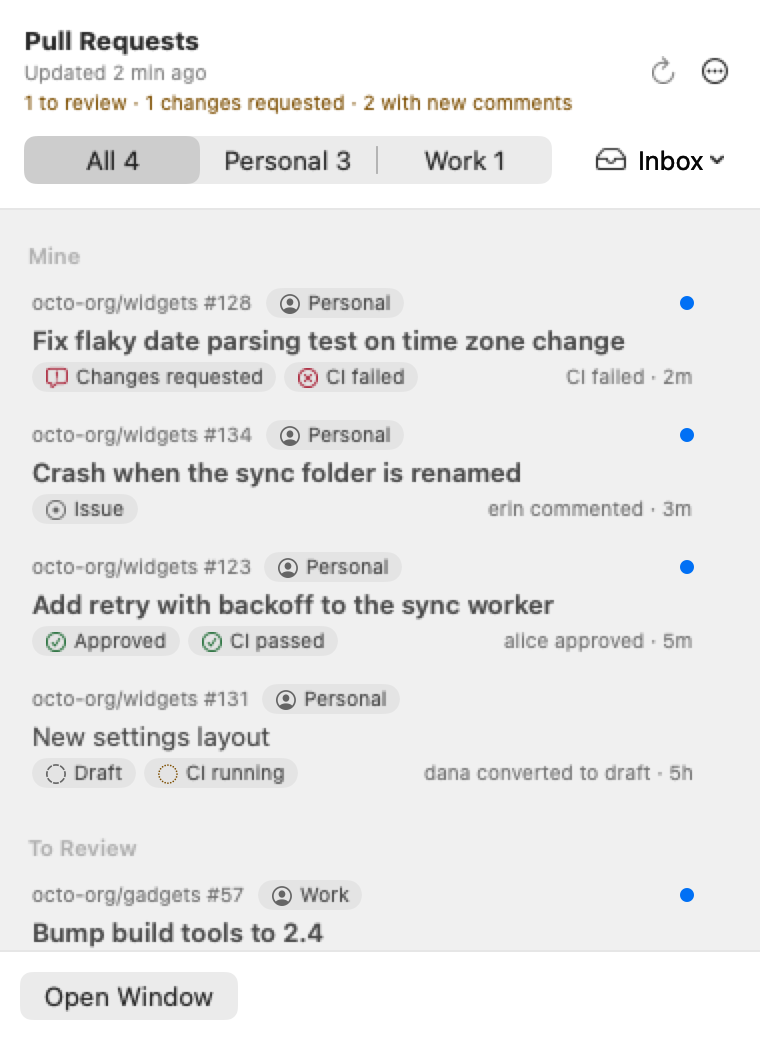
- Installation: Homebrew, release zip, first launch (not notarized), upgrade, uninstall.
-
Usage: what is tracked (issues too), the menu-bar panel, the main window, filters, row actions, shortcuts,
pullping://links. - Accounts and tokens: classic and fine-grained tokens, SSO, several accounts, rate limits.
- Notifications: Banner and Alert panels, review reminders, snooze, mute, hide, pause, phone pushes through ntfy.
-
Agent automations: start Claude Code or Codex on a pull request event: rules, agent hooks, Handle with Agent, linked sessions, the
pullpingcommand. - Permissions: none, and what that means for tokens and login.
- Troubleshooting: icon missing, nothing shows up, token problems, late or missing notifications.
- FAQ: what is tracked, issues, polling, Focus, GitHub Enterprise, privacy, going back a version.
-
Building from source: SwiftPM, tests,
build.sh, signing, release zip. - Feature requests and contributing: how to ask, supporters first, PR rules.
- Install with the command above and open PullPing from
/Applications. A menu-bar icon appears (no Dock icon). See first launch if macOS blocks it. - Add an account: Add Account… in the Welcome window, or Settings → Accounts. You need a personal access token: see Accounts and tokens.
- Click the menu-bar icon to see your pull requests and issues in three groups: Mine, To Review, Involved. ⌘1 opens the main window.
- Choose how loud PullPing is in Settings → Notifications: Off, Banner or Alert for each kind of event. See Notifications.
The first sync of an account is silent: PullPing learns what already exists and only tells you about what happens afterwards.
| Feature | What you get |
|---|---|
| Every pull request you are in | Opened by you, assigned to you, your review requested (directly or through a team), or you commented, reviewed or were mentioned |
| Issues too | Opened by you, assigned to you, or you commented or were mentioned; an Issue chip on the row, Completed or Not planned once closed; Settings → General → Track Issues turns them off |
| Several accounts | Personal and work, each with its own token and label; one unified inbox or one inbox per account |
| Menu-bar panel and main window | Mine, To Review, Involved; CI and review chips; unread dot; filters; search and a detail view in the main window |
| Calm notification panels | Banner (hides itself) or Alert (stays) per kind of event (label changes included), never takes keyboard focus, one panel per pull request or issue |
| Review reminders | A nudge every 15 to 240 minutes while your review is requested |
| Snooze, mute, hide | From the panel, the menu bar and the main window |
| Phone pushes | Optional, through ntfy, chosen per kind of event |
| Agent automations | Optional: start Claude Code or Codex in a terminal on a pull request event, from rules, agent hooks or the Handle with Agent button; asks first by default. See Agent automations |
Requirements: macOS 14 Sonoma or later · Apple Silicon and Intel (universal binary). Only GitHub is contacted (api.github.com; github.com for Sign in with GitHub and the daily update check; avatars.githubusercontent.com for account pictures), plus your ntfy server if you set up phone notifications. No analytics.
If PullPing saves you from a forgotten review, you can support its development. It's optional and always appreciated.
