Repository navigation
Notifications
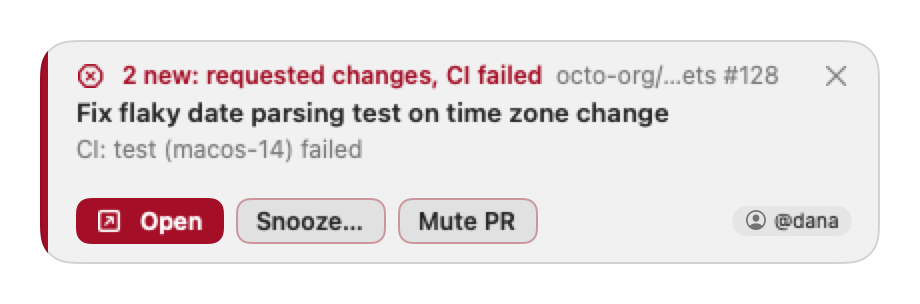
When something happens on a pull request or issue you are tracking, PullPing shows a small panel at the top right of the screen your mouse is on. It never takes keyboard focus, so typing in another app is never interrupted. Your own actions never notify you.
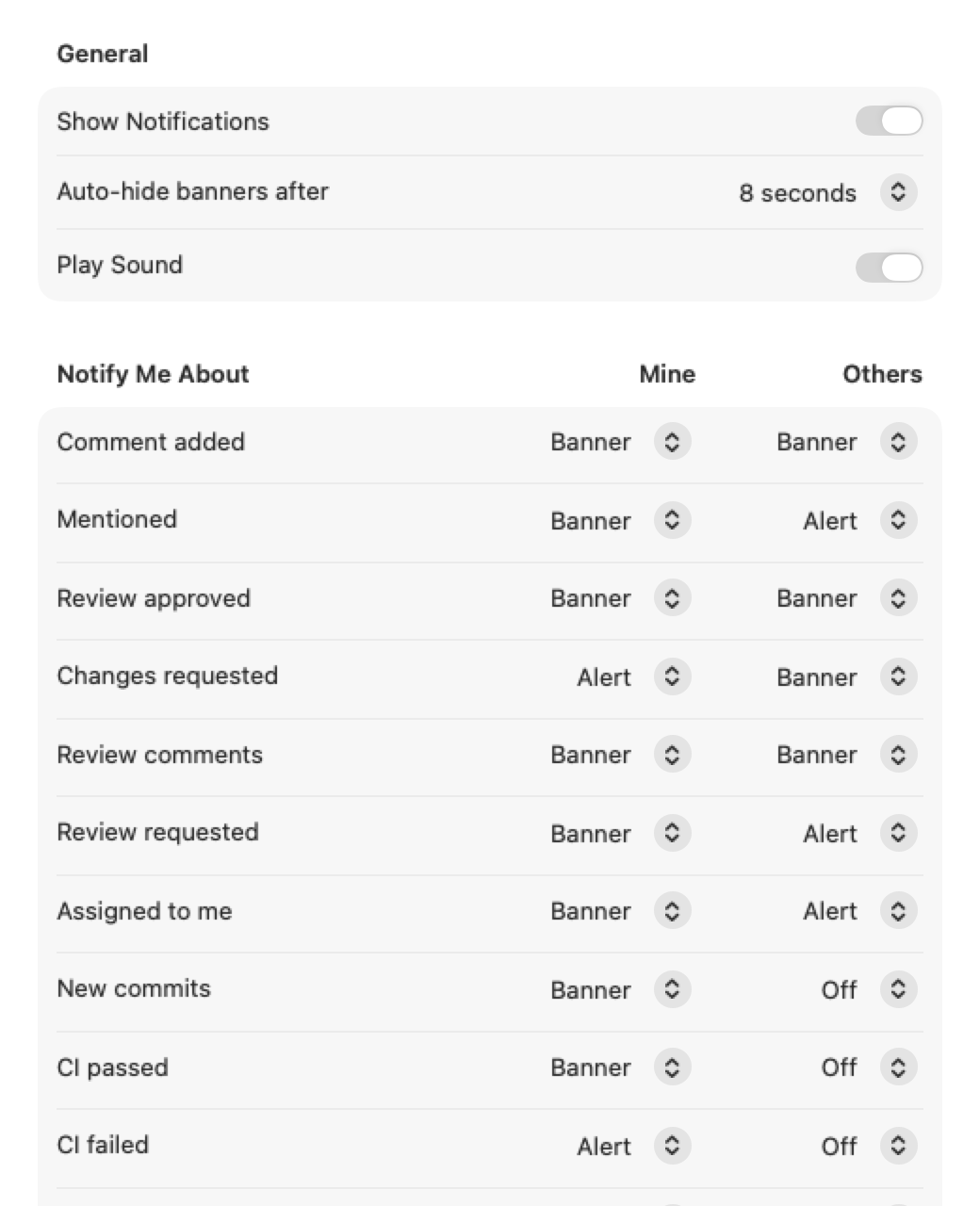
Set per kind of event in Settings → Notifications, separately for Mine (pull requests and issues you opened) and Others (ones you review, are assigned to, are mentioned in or comment on).
| Style | Behavior |
|---|---|
| Off | No panel for this kind of event. |
| Banner | Hides itself after 5, 8 (default), 12 or 20 seconds. Hovering pauses the timer. |
| Alert | Stays until you act on it. |
The kinds: comment added, mentioned, review approved, changes requested, review comments, review requested, assigned to me, new commits, CI passed, CI failed, ready for review, converted to draft, merged, closed, reopened, review dismissed, title changed and labels changed.
Issues use the same kinds: comment added, mentioned, assigned to me, closed (the panel adds "as completed" or "as not planned"), reopened, title changed and labels changed. Labels changed covers a label added or removed, on pull requests and issues alike ("added bug", "removed needs-triage").
Defaults. On your own pull requests and issues every event shows a banner, and changes requested, CI failed and merged show an alert. On the others, review requests, assignments and mentions show an alert; comments, reviews, merged and closed show a banner; the rest (labels changed included) stay off.
Other settings on that tab: Show Notifications (the master switch: off means no panels and no reminders, the menu-bar count still updates), Auto-hide banners after, and Play Sound (a sound once when panels appear).
Several events on the same pull request merge into one panel ("2 new: requested changes, CI failed"). Up to four panels are shown; the rest collapse into "+N more". Clicking the panel's Open opens the pull request in your browser and marks it read.
Every action on a panel also exists in the menu-bar panel and the menus, for keyboard and VoiceOver use. New notifications are announced to VoiceOver.
| Button | What it does |
|---|---|
| Open | Opens the pull request in your browser and marks it read |
| Snooze… | Silences the pull request for 15 minutes, 1 hour, 3 hours or until tomorrow 9:00 |
| Mute PR (Mute Issue on an issue) | Keeps it listed, silences its panels and reminders |
| Close (✕) | Dismisses this panel only |
While your review is requested on an open, non-draft pull request, the "Review requested" panel shows again every 15, 30, 60 (default), 120 or 240 minutes, or never. Set it in Settings → Notifications → Review Reminders → Remind me every.
Reminders stop when you review, the request is removed, the pull request is merged or closed, or you mute or snooze it.
| Action | Effect |
|---|---|
| Snooze | Silences its panels and reminders for a while (15 minutes, 1 hour, 3 hours, tomorrow 9:00). |
| Mute | Keeps the pull request listed (under the Muted filter), silences its panels and reminders, and leaves it out of the menu-bar count. |
| Hide | Removes it from every list and count (under the Hidden filter), but it still notifies you. |
| Stop tracking | Removes it and ignores it from then on. |
Use these from the panel, the menu-bar panel's right-click menu or the main window. Hide and Stop Tracking have an Undo (Edit → Undo).
Right-click the menu-bar icon → Pause Notifications for 1 hour, 3 hours or until tomorrow 9:00. Panels, phone notifications and reminders stay quiet until then. Dismiss All Notifications closes the panels on screen.
PullPing can also send pushes to your phone through ntfy, an open-source notification service. It is optional and off until you set a topic.
- Install the ntfy app on your phone (iOS or Android).
- Pick a topic name nobody else will guess, and subscribe to it in the ntfy app. Treat the topic like a password: on a public server, anyone who knows it can read it.
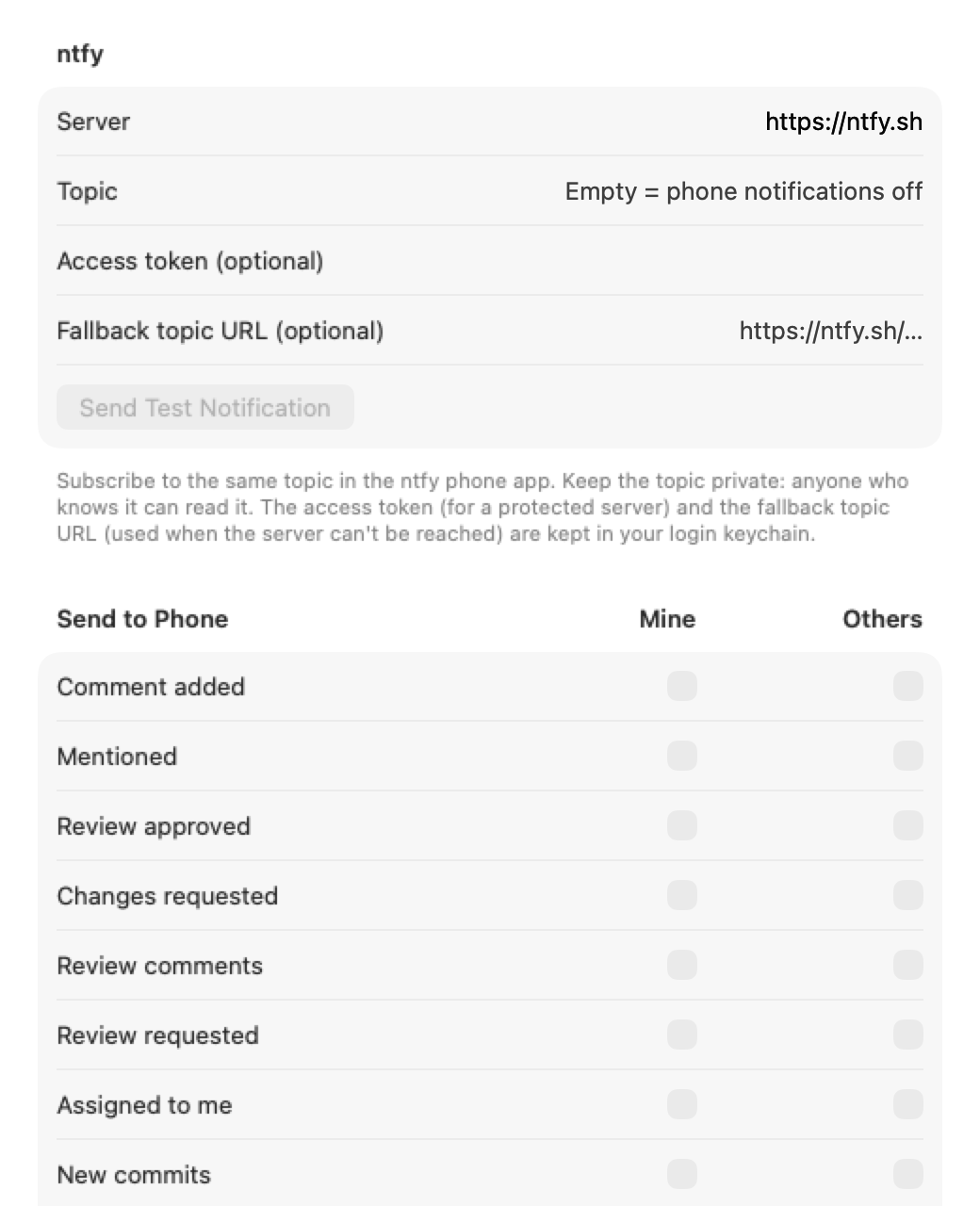
- In PullPing open Settings → Phone. Enter the Server (default
https://ntfy.sh; use your own server's address if you run one) and the Topic. - Click Send Test Notification. Your phone should buzz with "Phone notifications work."
- Tick the kinds of event to send, for Mine and for Others. Nothing is sent until you tick one.
Details:
- Same rules as panels: never your own actions, never muted, snoozed or paused pull requests. Review reminders follow "Review requested". If Show Notifications is off, nothing is sent.
- Independent of the desktop style: a kind can go to the phone only. Kinds that are set to Alert on the desktop go out at ntfy's high priority, the rest at default priority.
- Tap to open: tapping the notification opens the pull request or issue on GitHub.
- Access token (optional): for a protected ntfy server. Kept in your login keychain, never in a file.
-
Fallback topic URL (optional): a full topic URL (
https://host/topic) PullPing tries when your server times out or answers with an error. Also in the keychain. Fallback sends carry no access token. - What is sent: a title like "Review requested: owner/repo #12", the pull request's or issue's title, the actor and a short summary of the latest activity, and a small trace footer (sender, flow, event id, log hint). The sender line includes your Mac's short host name. Only your ntfy server (and the optional fallback) receives it.
PullPing polls GitHub, so an event can arrive up to one check interval late (3 minutes by default, 1 to 15 in Settings → General). macOS offers no API to detect Focus or Do Not Disturb, so panels appear even during a Focus; turn notifications off in Settings → Notifications, or use Pause Notifications, to silence PullPing.
