Repository navigation
Agent Automations
Since 0.5.0, PullPing can start a local coding agent (Claude Code or Codex) in a terminal when a pull request or issue event arrives. It writes the prompt to a file and a small script, opens a terminal that runs it, and stops there: it never talks to the agent, never reads its output and never adds a permission flag. Nothing runs until you (or an agent, with pullping) add a rule or hook, or turn on Handle with Agent.
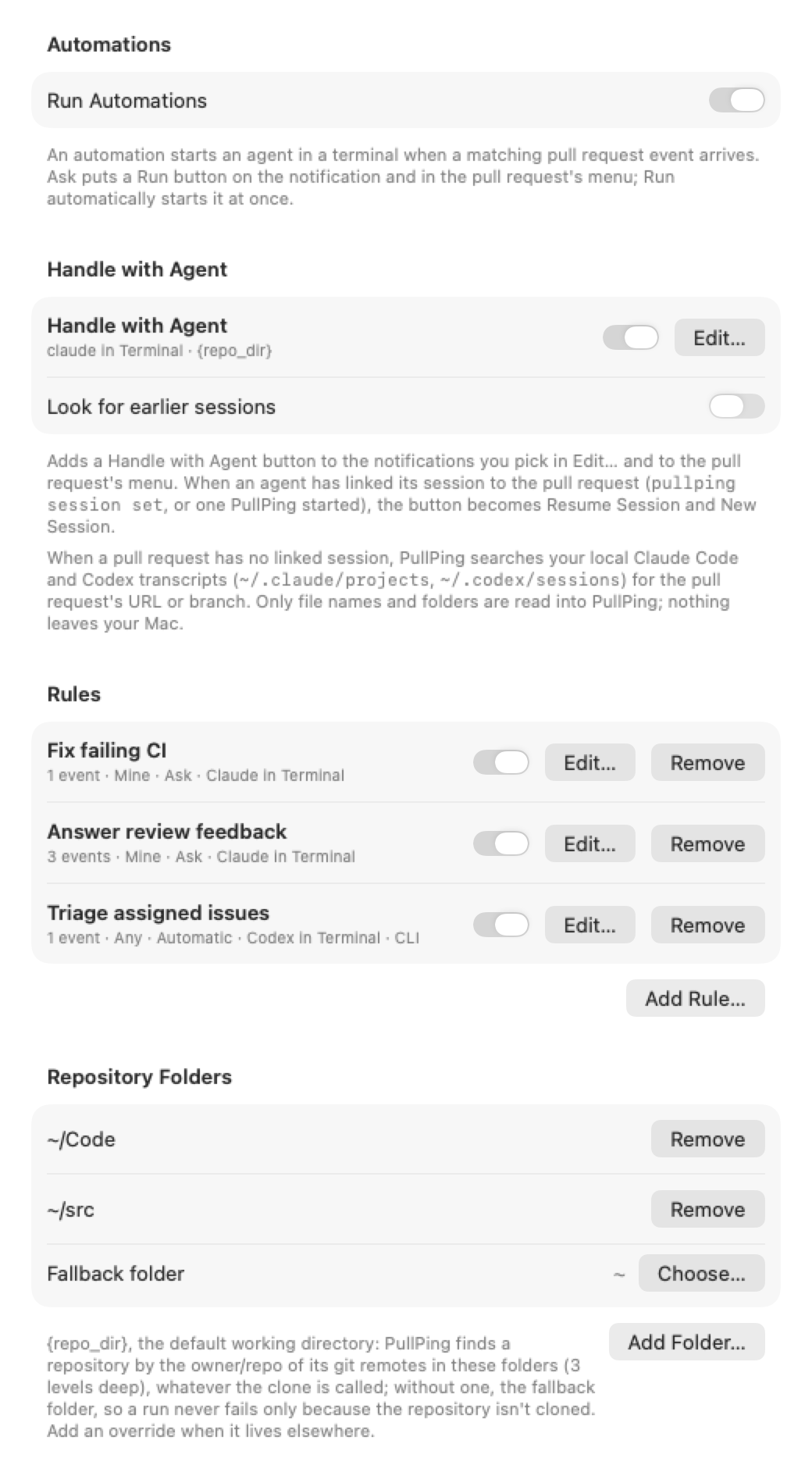
Settings → Automations → Add Rule… A rule says:
-
Events: the kinds of event it reacts to (comment added, CI failed, review approved, …;
pullping kindslists them). -
Pull requests: Any, Mine (pull requests and issues you opened) or Others; optionally only some repositories (
owner/nameorowner/*) and only events by some logins (Only from). - Mode: Ask (default) or Run automatically. See Ask or run.
-
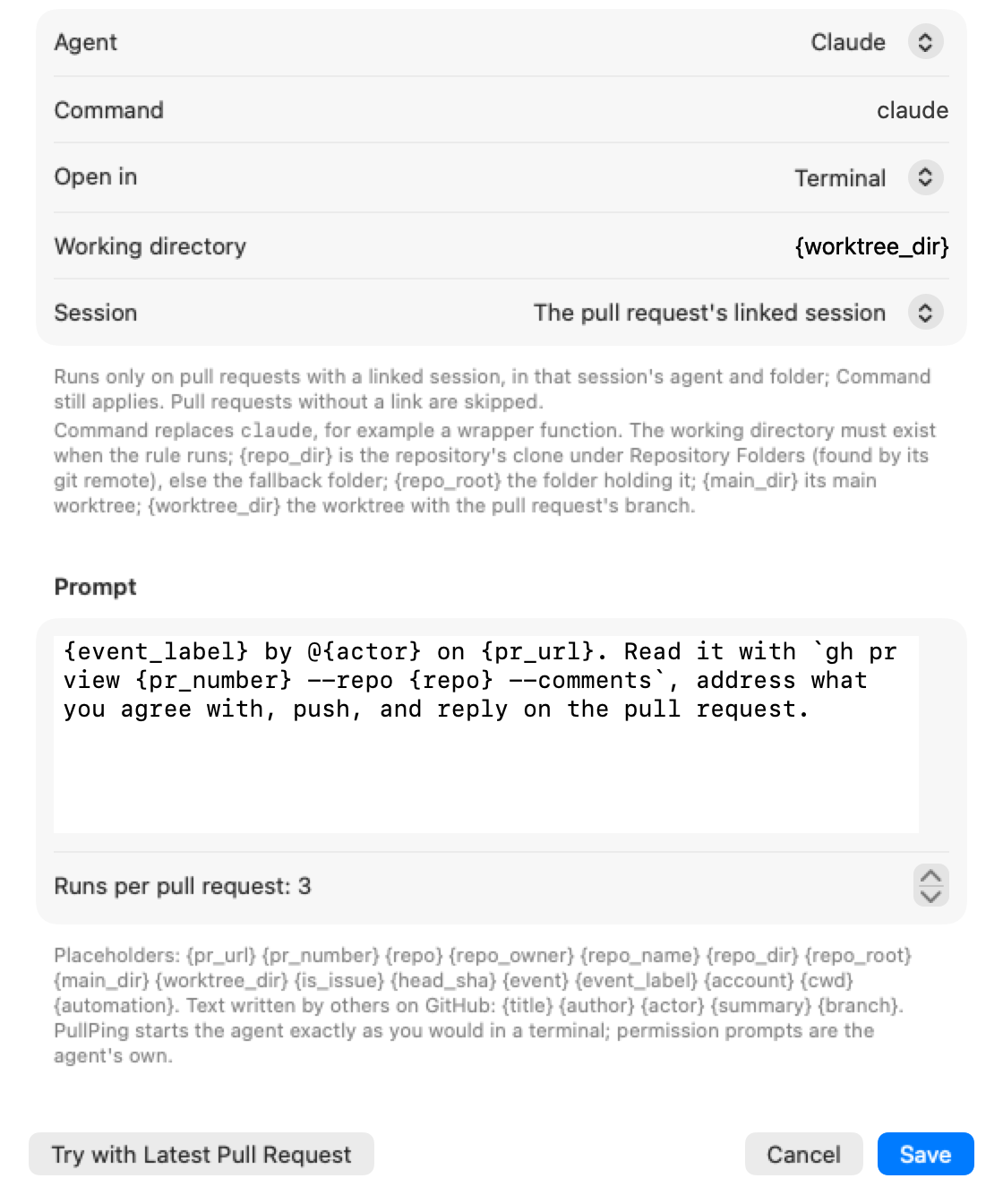
Agent: Claude or Codex, with an optional Command that replaces
claudeorcodex(a wrapper function, for example). - Open in: the terminal (see Where it opens).
-
Working directory: default
{repo_dir}, the repository's clone (see Repository folders). - Session: a new session, or The pull request's linked session (see Linked sessions).
- Prompt: text with placeholders, and Runs per pull request (3 by default, 1 to 10).
Try with Latest Pull Request runs the rule right away on your most recent pull request, so you can check the prompt. Recent Runs at the bottom of the tab shows what started and what failed, with the whole error message.
A hook is a rule for one pull request or issue, added from the command line, usually by the agent that opened it: "resume this session when the pull request is approved or commented on".
pullping hook add --pr "$(gh pr view --json url -q .url)" --on reviewApproved,reviewChangesRequested,comment \
  --session "$CLAUDE_CODE_SESSION_ID" --prompt "Review what changed on {pr_url} since my last turn and act on it."
A hook runs once and is then removed; an unused one expires after 14 days. Hooks show under Settings → Automations → Agent Hooks and in the main window's detail for their pull request.
An automation asks by default: the notification gets a Run … button and stays until you act, and the pull request's right-click menu and the main window's toolbar get Run Automation. Run automatically starts it at once. Settings → Automations → Run Automations (or pullping automations off) turns every automation off.
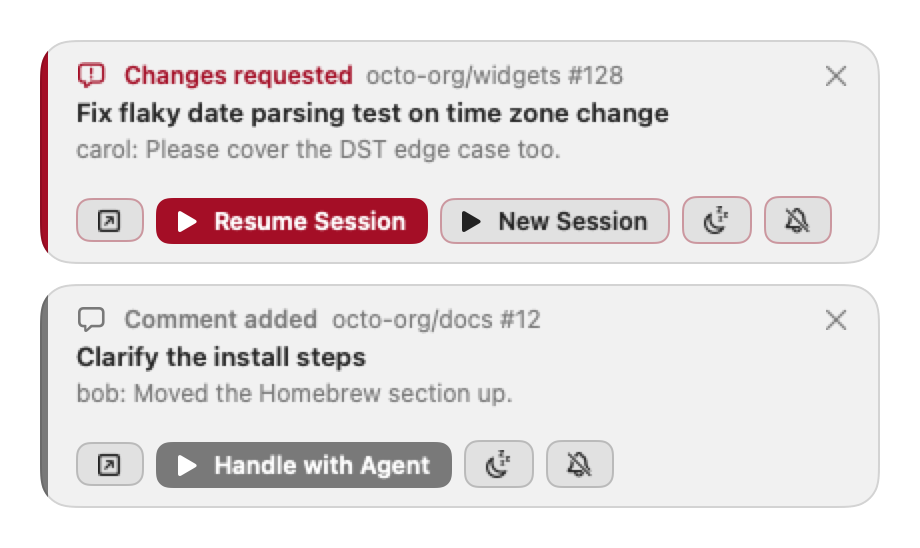
Turn it on in Settings → Automations → Handle with Agent (or pullping handler on). The notifications you pick, and the pull request's menu, get a Handle with Agent button: one click starts your agent on that pull request or issue with a prompt you can edit (by default: read it with gh, work out what it needs, do it, ask when unsure).
-
Which notifications: Edit… picks the kinds of event (
pullping handler set --on <kind,…|all>). By default all but CI passed, new commits, merged, closed, draft, title and label changes. -
Same choices as a rule: agent, optional command, where it opens and the working directory (
{repo_dir}). - With a linked session the button becomes Resume Session and New Session.
- It never runs on its own and has no run limit; a second click while the terminal opens does nothing.
A linked session is the agent session that last touched a pull request or issue: Resume Session opens it again with the new event as the next message. An agent links itself from inside its session whenever it creates, reviews or touches a pull request:
pullping session set --pr <url> --session "$CLAUDE_CODE_SESSION_ID" --agent claude --quiet-
hook add --session <id>links too, and every new Claude Code session PullPing starts on a pull request links itself (it starts with an id PullPing picks,claude --session-id). One link per pull request; the last writer wins. - Claude Code resumes a session only from the folder it was started in, so the link stores that folder, read from the session's transcript;
--cwdoverrides it. Codex resumes by id (--agent codex --session <thread id>). - A rule set to The pull request's linked session (
--session linked) runs only on pull requests with a link. - Links show in Settings → Automations → Linked Sessions and the main window's detail (
pullping session list|show|rm). They are dropped an hour after the pull request is merged or closed, a day after it stops being tracked, and 30 days after they were set. - If the session's folder is gone, Resume Session starts in
{worktree_dir}and says so in Recent Runs (Claude Code 2.1.223 and later and Codex resume by id from any folder). A session whose transcript was deleted fails with "The session's transcript is gone", and the panel keeps New Session.
When a pull request has no linked session, PullPing can look for the local session that worked on it. Turn on Look for earlier sessions under Handle with Agent (pullping handler set --find-sessions on; off by default, since it reads your agent history).
-
Where it looks: your Claude Code transcripts (
~/.claude/projects, and$CLAUDE_CONFIG_DIR) and Codex sessions (~/.codex/sessions), newest first. -
What it looks for: the record Claude Code writes when a session creates the pull request, then its URL or
owner/repo#12, then a session launched on its branch that names the repository. - Limits: at most the last 60 days, 1.5 GB or 10 seconds of reading, only into memory. Nothing is written and nothing leaves your Mac.
- A found session turns Handle with Agent into Resume Earlier and New Session. Find Earlier Session… in the pull request's menu searches now, whatever the setting.
Agents do the same from the shell:
pullping session find --pr <url> --link     # prints up to 3 sessions and their transcript paths; links the best one
pullping session resume --pr <url>          # Resume Session from the shell, then stop
session resume refuses a session whose transcript changed in the last 2 minutes (probably open in another terminal; --force starts it anyway), the calling session itself, and a second hand-off on the same pull request within a minute.
{repo_dir}, the default working directory, is where the repository is checked out:
- An override in Settings → Automations → Repository Overrides (
pullping automations repos set <owner/repo> <dir>) wins over everything. - The pull request's linked session's folder, when it is inside a clone of the repository.
- A clone whose git remote is the repository's
owner/repo(any host or SSH alias), found up to 3 levels below Repository Folders (default~/Code; add~/srcand others), whatever the clone is called. - A folder named like the repository.
- The fallback folder (default
~), so a run never fails only because the repository isn't cloned. The prompt has{pr_url}, so the agent can clone it.
{worktree_dir} is the worktree that has the pull request's branch checked out, else the main one; {main_dir} is the main worktree; {repo_root} is the repository folder that holds the clone. PullPing reads git's own files to find them and never creates worktrees. pullping automations folders list shows how many clones it finds; folders add|rm <dir> and fallback <dir> change the list.
| Choice | How |
|---|---|
| Terminal, iTerm2 | Open the run's script file |
| Ghostty | A new window through its AppleScript dictionary (macOS asks once to let PullPing control Ghostty) |
| Ghostex | ghostex terminal |
| Custom command | Your launch line with {script}, {cwd}, {title}, {prompt_file} and {agent_command}, for any other terminal (WezTerm, kitty, Alacritty, cmux, …) |
Only installed apps are offered (pullping launchers); a rule whose app is gone shows "(not installed)" and its runs fail with that message. The script runs in your interactive login shell, so your PATH, functions and profile apply.
The command is the app binary itself. The Homebrew cask puts it on your PATH as pullping; built from source, link it (Settings → Automations shows this line with a Copy button):
ln -s /Applications/PullPing.app/Contents/MacOS/PullPing /usr/local/bin/pullping| Command | What it does |
|---|---|
pullping rule add|edit|show|list|enable|disable|rm |
Rules |
pullping hook add|edit|show|list|enable|disable|rm |
Hooks on one pull request or issue |
pullping session set|show|list|rm|find|resume |
Linked and earlier sessions |
pullping handler show|set|on|off |
Handle with Agent |
pullping run <id> --pr <ref> |
Run Automation now; --dry-run only prints what it would start |
pullping runs |
Recent Runs |
pullping automations on|off|status |
The Run Automations switch |
pullping automations folders|fallback|repos |
Repository Folders and Overrides |
pullping kinds, pullping launchers
|
The event names and where it can open |
Every reader and writer takes --json in the shape automations.json stores, so an agent can read an automation and write it back with flags. pullping --help and pullping <command> --help list every option (--auto starts without asking). It works while PullPing is not running: the app picks changes up within 30 seconds. Automations written from the command line are marked CLI in Settings, and the first time one is set to run automatically PullPing tells you.
A Claude Code skill with these recipes is in the repo at docs/claude-skill/pullping; link that folder into ~/.claude/skills/.
| Placeholder | Value |
|---|---|
{pr_url}, {pr_number}
|
The pull request or issue |
{repo}, {repo_owner}, {repo_name}
|
owner/name and its two halves |
{repo_dir}, {repo_root}, {main_dir}, {worktree_dir}
|
The folders from Repository folders |
{is_issue}, {head_sha}
|
true or false; the head commit |
{event}, {event_label}
|
reviewApproved, Review approved; manual, Manual run from the menu |
{account}, {session_id}, {cwd}, {automation}
|
Your login, the session being resumed, the working directory, the rule or hook name |
{title}, {author}, {actor}, {summary}, {branch}
|
Written by others on GitHub: control characters removed and shortened; prompts only |
The working directory takes the same placeholders except the five written by others, and ~.
An automation lets an event on GitHub start a process on your Mac, so PullPing keeps that edge narrow:
-
No text from GitHub in a shell command. The prompt goes to a file the agent reads as its first message. Every value in the script is quoted, and repository names, numbers, session ids and the working directory are checked first. The only argument PullPing adds is
--session-idwith a UUID it generated. -
No comment bodies. The default prompt leaves out
{summary}and tells the agent to treat quoted GitHub text as input, not instructions. The agent reads the pull request itself withgh. -
No permission bypass. Never
--dangerously-skip-permissions,--full-autoor a similar flag. Shell aliases are skipped (\claude,\codex), so an alias that adds such a flag does not apply. -
A fresh session. Opened from a terminal agent, PullPing inherits that agent's session variables; it drops every
CLAUDE*andCODEX_*variable (and those of a few session-switching tools) before a launch, so the agent it starts never takes over the other one's session. - No loops. Your own comments and reviews never trigger anything. Once an automation has started an agent on a pull request, new commits there only offer it again. Each automation is capped per event, per pull request, per failed start and per check; the rest wait for a Run click.
- Agents' automations show. Automations written by agents are marked CLI, and the first time one is set to run automatically PullPing tells you.
- The usual switches apply. Pause, mute, snooze, hide and turning an account off stop automations too. An automatic rule with an empty Only from runs for anyone who can comment on the repository.
Rules, hooks, Handle with Agent and linked sessions live in ~/Library/Application Support/PullPing/automations.json; each run's prompt and script go in runs/ beside it, readable only by you, and are deleted after 7 days.
