Repository navigation
Usage
PullPing lives in the menu bar and has no Dock icon. Open it from /Applications again to bring up its window.
Open pull requests that you opened, that are assigned to you, that request your review (directly or through a team), or that you commented on, reviewed or were mentioned in. Merged and closed ones stay listed for 1, 3 (default), 7 or 14 days (Settings → General → Keep merged and closed pull requests for), so a late comment still reaches you.
The first sync of an account is silent: PullPing learns what already exists, and only tells you about what happens afterwards (plus review requests, assignments and mentions it finds).
Since 0.4.0, open issues are tracked too: ones you opened, are assigned to, commented on or were mentioned in. They sit in the same lists and groups as pull requests, with an Issue chip on the row; a closed issue shows Completed or Not planned and stays for the same retention time. Comments, mentions, assignments, label changes, renames, reopening and closing notify like pull request events (see Notifications). Issues have no reviewers, checks or review reminders.
Settings → General → Track Issues (on by default) turns them off and removes them from the lists. Issues you were already part of when you update, or when you turn the switch back on, arrive quietly, marked read.
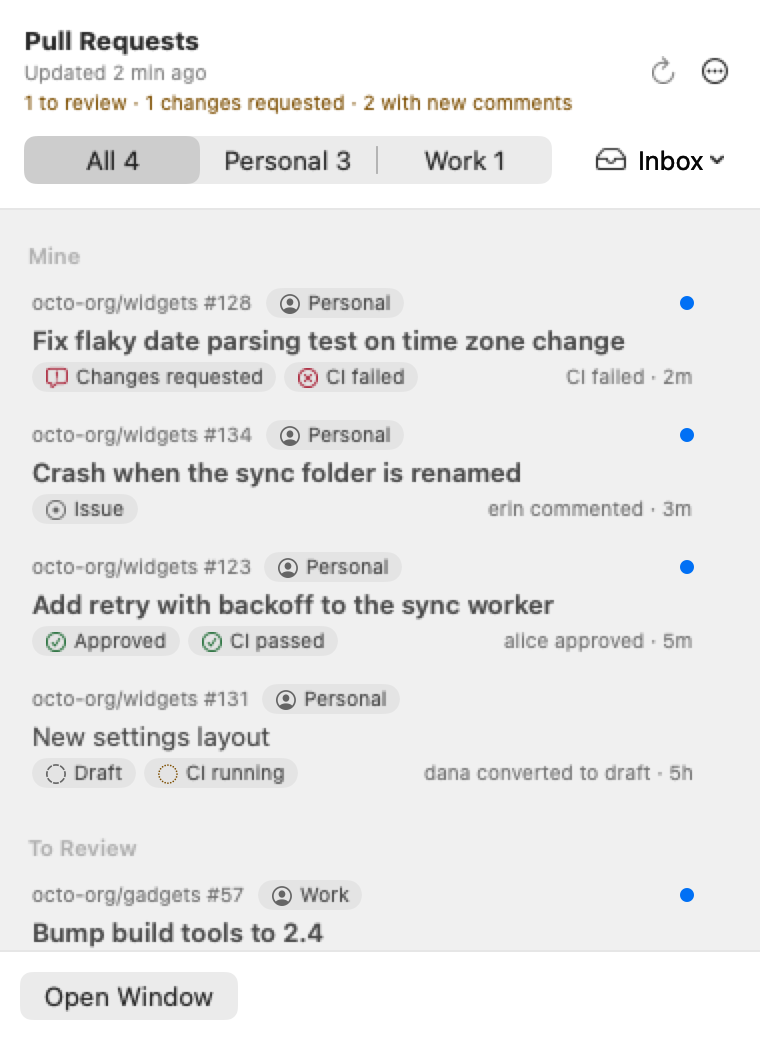
Click the menu-bar icon. Pull requests are grouped as Mine, To Review and Involved. Each row shows the repository and number, the account it belongs to, the title, chips for review state, CI status and draft/merged/closed (on issues: Issue, then Completed or Not planned once closed), the latest activity and an unread dot.
- Accounts: with several accounts, switch between All and each account at the top. The choice is remembered.
- Filter: the menu at the top right picks Inbox, All, Mine, To Review, Involved, Recently Closed, Muted or Hidden. Remembered too.
- Header: spells out what needs you, for example "1 to review · 1 changes requested".
- Keyboard: arrow keys move, ↩ opens the selected pull request in your browser, ⌘↩ opens it in the main window, Esc closes the panel.
- Right-click a row: Open in Browser, Mark as Read, Mute, Hide, Snooze and Stop Tracking.
Every list puts the pull requests that need you first, then ones with unread activity, then the most recently active. Merged and closed pull requests, and open ones that no longer need anything from you (not yours, no review requested from you or your team, not assigned to you, nothing unread), move to Done: collapsed at the bottom of the panel, a separate section at the bottom of the main window list. New activity brings a pull request back up; your own open pull requests and issues never go to Done, and neither do open ones assigned to you.
By default the number counts only pull requests and issues that need you: review requests, unread assignments and mentions, your own pull requests with changes requested, failed CI, new comments, or ready to merge, and new comments on issues you opened or are assigned to. Settings → General → Count in the Menu Bar has a switch per reason (Assigned to me among them). In Settings → General → Menu bar count you can count everything unread instead, or show no number.
Both open the same menu: Open PullPing, Activity, Refresh Now, Mark All as Read, Dismiss All Notifications, Pause Notifications (1 hour, 3 hours, until tomorrow 9:00), Settings, About, Support on Ko-fi and Quit. Control-click works too.
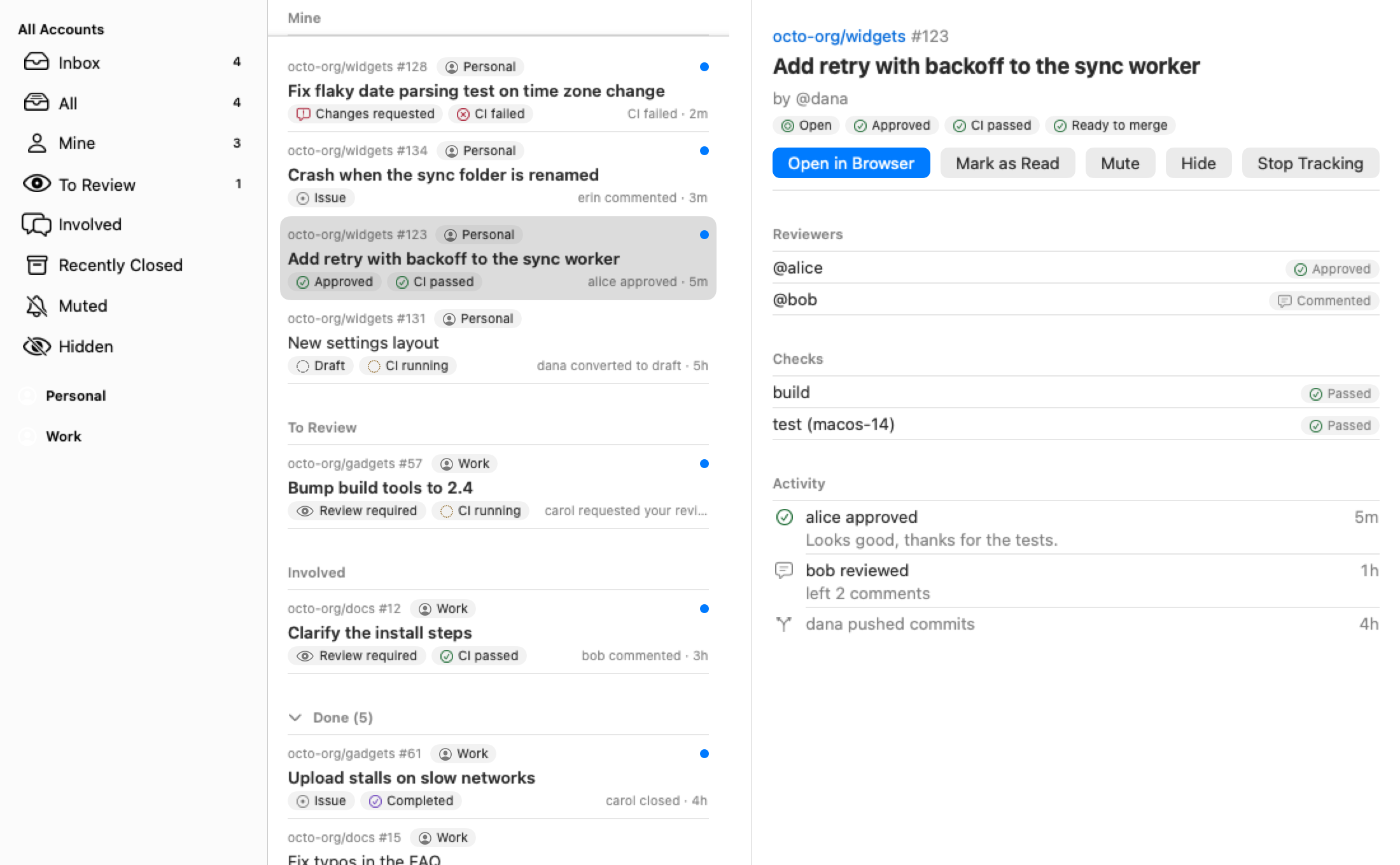
Open it with ⌘1, Open Window in the panel, or by opening PullPing again.
- Sidebar: Mail-style. The same filters for All Accounts and for each account, with counts. Prefer one inbox per account? Settings → General → Inbox → Per account. Unified lists all accounts together, then each account.
- List: search at the top, rows grouped like the panel.
- Detail: the selected pull request with its reviewers, checks and recent activity (an issue shows its activity only), and the buttons Open in Browser, Mark as Read, Mute, Hide and Stop Tracking.
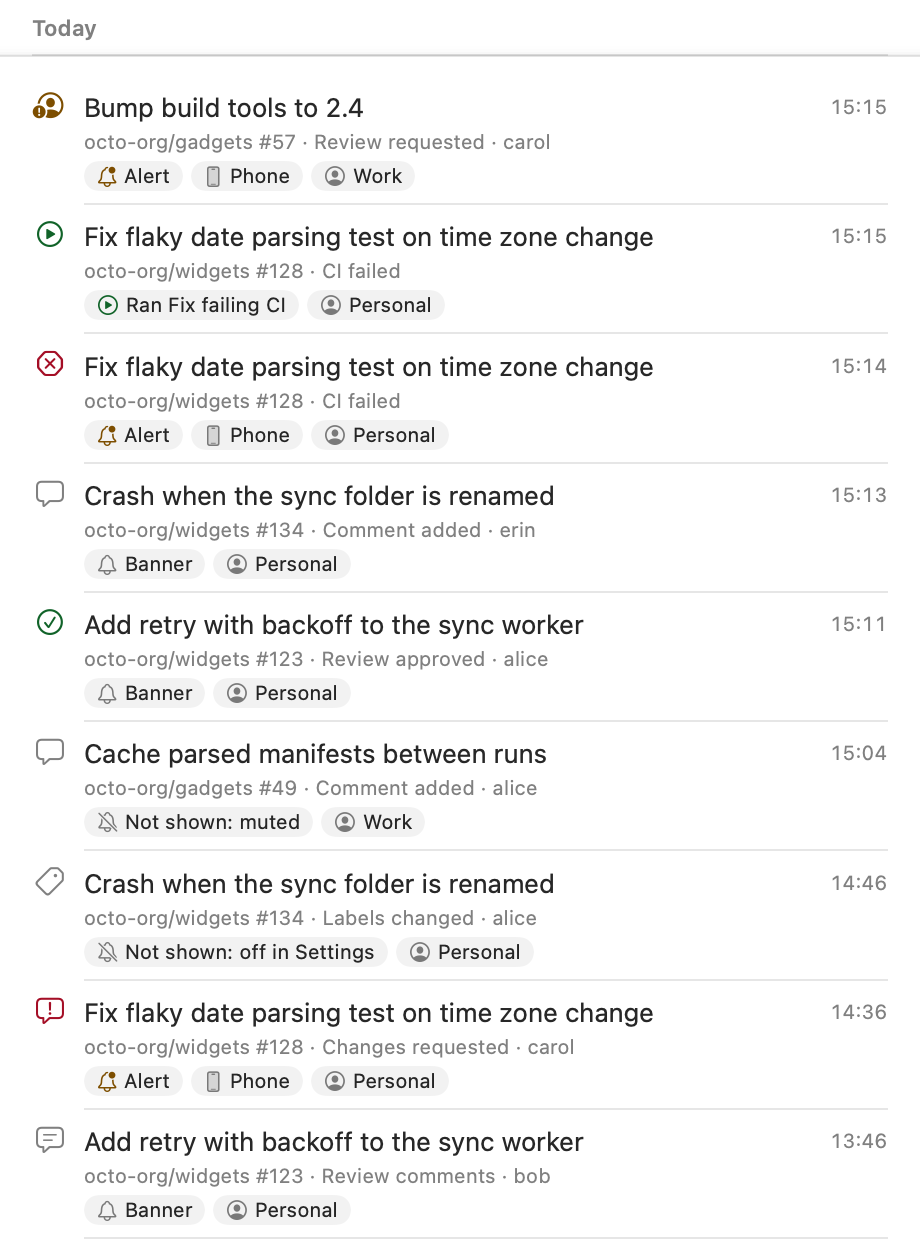
Activity, the last row under All Accounts and under each account in the sidebar (also in the menu-bar icon's menu and the Window menu), lists everything that happened, whether or not it showed a panel:
- every event on a tracked pull request or issue, with what PullPing did with it: Banner, Alert, Phone, or Not shown and why (your own, notifications off, paused, muted, snoozed, or off in Settings),
- review reminders,
- every automation run and Handle with Agent launch (Ran … or Failed: …, with the error).
Newest first, by day, with search (repository, number, title, who, automation). Select a row to see its pull request in the detail; double-click or Return opens it in the browser, also once PullPing no longer tracks it. A newly tracked pull request's earlier history is not listed (it would flood the list); the first sync of an account adds nothing either.
Entries are kept for 30 days (Settings → General → Keep activity for: 7, 30 or 90 days) and at most 5000, in ~/Library/Application Support/PullPing/activity.jsonl, one JSON object per line. pullping activity prints them, also while PullPing is not running: --since 2d (or 30m, 1h, a date), --pr <url | owner/repo#n>, --limit <n> (20 by default), --json.
| Action | Effect |
|---|---|
| Mark as read | Clears the unread dot; ⇧⌘U. Mark all as read: ⌥⇧⌘U. |
| Snooze | Silences its panels and reminders for 15 minutes, 1 hour, 3 hours or until tomorrow 9:00. |
| Mute | Keeps it listed, silences panels and reminders, leaves it out of the menu-bar count. Find it under the Muted filter. |
| Hide | Removes it from every list and count, but it still notifies you. Find it under Hidden. Undo available. |
| Stop tracking | Removes it and ignores it from then on. Edit → Undo brings it back; Settings → General → Reset Ignored Pull Requests clears the whole ignore list. |
| Command | Shortcut |
|---|---|
| Refresh now | ⌘R |
| Open the main window | ⌘1 |
| Open in browser | ⇧⌘O |
| Mark as read / Mark all as read | ⇧⌘U / ⌥⇧⌘U |
| Stop tracking | ⌘⌫ |
| Settings | ⌘, |
Refresh now checks immediately, at most once every 10 seconds. PullPing also checks after your Mac wakes and when the network comes back.
For Shortcuts, Raycast or scripts:
-
pullping://open: open the main window -
pullping://open?pr=<id>: open that pull request (or issue) in the main window -
pullping://refresh: refresh now -
pullping://settings: open Settings
| Tab | What is in it |
|---|---|
| General | Check GitHub every 1 to 15 minutes (3 by default), Open at Login, Show in the Menu Bar, menu-bar count and the reasons it counts, inbox layout (unified or per account), Track Issues, how long to keep merged and closed pull requests, how long to keep Activity, reset ignored pull requests, About (About PullPing, Welcome Guide, Support on Ko-fi) |
| Accounts | Add, label, pause (the switch) and remove accounts: Accounts and tokens |
| Notifications | Style per kind of event, auto-hide time, sound, review reminders: Notifications |
| Phone | ntfy server and topic, which events to send: Notifications |
| Automations | Run Automations, Handle with Agent, rules, repository folders, agent hooks, linked sessions, recent runs: Agent automations |
