Repository navigation
Accounts and tokens
PullPing talks to GitHub with a personal access token, one per account. Add as many accounts as you like: personal and work, for example, each with its own label.
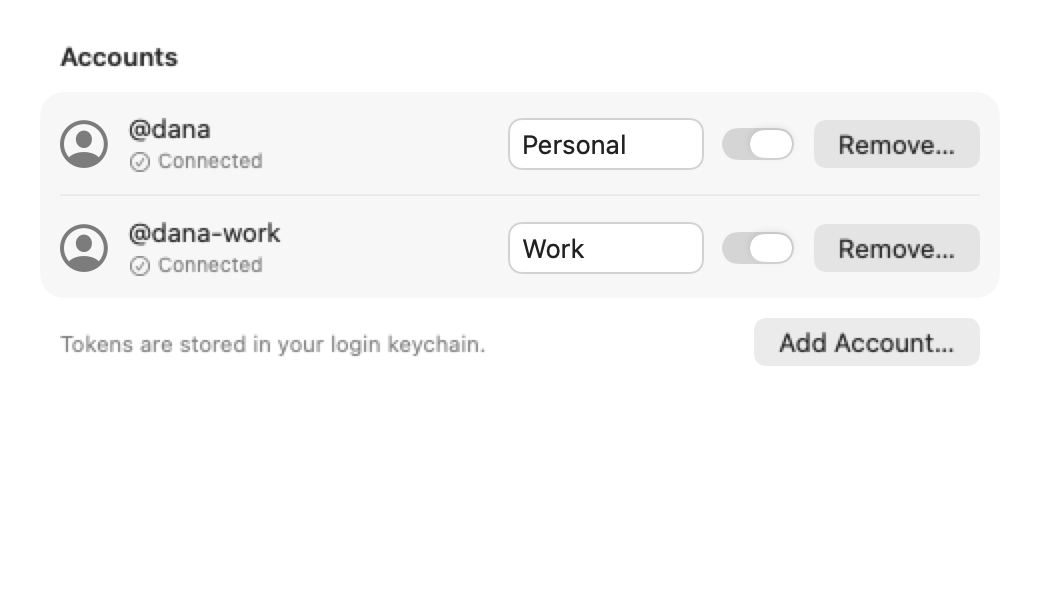
- Settings → Accounts → Add Account… (the Welcome window has the same button).
- Paste a token and click Verify. PullPing checks it and shows who it belongs to before you add it.
- Click Add. You can give the account a label (for example "Work") in the list. Pull requests show the account's
@login, so you can always tell them apart.
Each account has an Enabled switch to stop checking it without removing it, and a Remove… button that deletes its token from your login keychain.
Create it at GitHub → Settings → Developer settings → Personal access tokens → Tokens (classic), with these scopes:
-
repo: private repositories. Public repositories only:public_repois enough. -
read:org: team review requests, so a request sent to your team shows up.
Organizations with SAML single sign-on: open the token in GitHub and click Configure SSO, then authorize each organization. Until you do, the account shows "Needs SSO".
If a classic token lacks both repo and public_repo, PullPing still adds the account and shows "Missing repo scope" next to it.
- Resource owner: your user, or the organization (one token per organization).
- Repository access: All repositories, or select the ones you want.
- Permissions: Pull requests: Read, Issues: Read, Commit statuses: Read, Checks: Read. Metadata: Read is implied.
Organizations may require an admin to approve fine-grained tokens; until approved, the token sees only public data. CI status may be incomplete with fine-grained tokens (GitHub lists the Checks API as a gap), so use a classic token when CI matters.
Since 0.1.1, Add Account offers Sign in with GitHub (OAuth device flow) next to the token option. Click Copy Code and Open GitHub, paste the code on github.com, approve, and PullPing gets a token (scopes repo and read:org) without you creating one. Organizations that restrict OAuth apps block this token until an owner approves PullPing. Use a personal access token if a repository stays invisible.
The token GitHub issues this way expires after 8 hours. Since 0.5.0 PullPing keeps the refresh token that comes with it (in your login keychain, next to the token) and renews it by itself, so the account no longer shows "Token rejected" every day. Accounts signed in with an earlier version need one more sign-in: Add Account…, then remove the old entry.
| Status | Meaning |
|---|---|
| Connected | Working |
| Token rejected | GitHub says the token is invalid, expired or revoked. Remove the account and add a new token. |
| Missing repo scope | Classic token without repo or public_repo. Edit the token's scopes on GitHub. |
| Needs SSO | Authorize the token for the organization on GitHub (Configure SSO). |
| Rate limited until … | The token used its hourly budget; PullPing waits until the limit resets. |
| Offline | No network or GitHub unreachable; the last known data stays visible. |
GitHub gives each token a budget of 5,000 API points per hour. PullPing uses a small fraction of it.
In your login keychain, one item per account (com.padina.pullping.token.<id>). They are sent only to GitHub and never written to a file or a log. See Permissions.
