Compression Formats
When you connect over NTR, the connect screen shows a Compression dropdown. This picks how the 3DS encodes and sends the video — a trade-off between smoothness, latency, image fidelity and bandwidth.
These are the NTR-HR compression formats, ported into 3DSnickerStream from xzn's reference viewer, ntrviewer-hr.
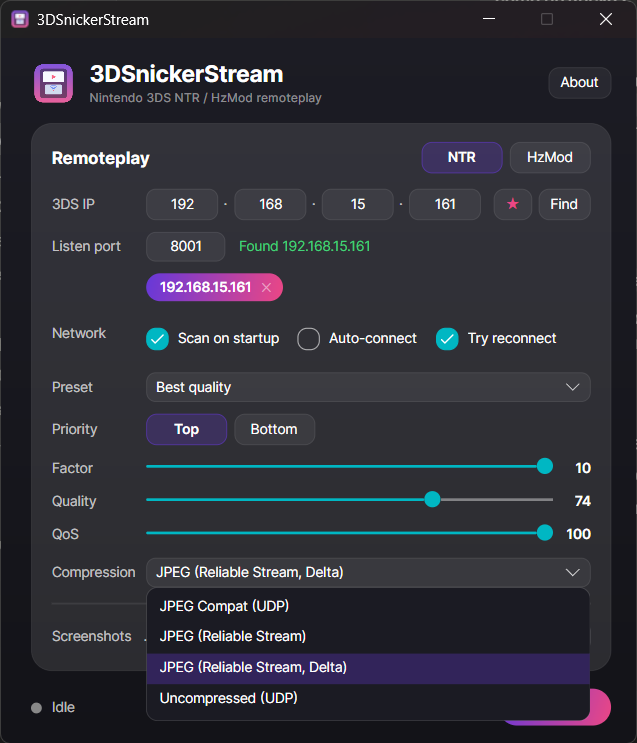
The classic mode — plain JPEG over UDP. Maximum compatibility; works like the original Snickerstream. Frames that lose a packet are simply dropped. A fine default if the others give you trouble.
NTR-HR's lossless-family stream over plain UDP — a bespoke YCbCr 4:2:0 image for higher colour fidelity than JPEG.
⚠️ Uncompressed is best-effort over UDP — heavy and lossy by nature (exactly as in the reference viewer). Expect a variable framerate and the occasional stale band under Wi-Fi packet loss. For smooth streaming, use one of the Reliable-Stream modes below.
The same JPEG picture, but delivered over NTR-HR's reliable transport (a KCP-style protocol with NACK-based retransmission). Lost packets are re-sent instead of dropping the frame, so the image stays clean and tear-free even under Wi-Fi loss. This is the smooth, everyday mode.
Like Reliable Stream, but each frame only carries what changed since the last one. Far less data on the wire, so quality and framerate hold up better — especially in busy scenes. Great when bandwidth is tight.
| If you want… | Use |
|---|---|
| Smooth, reliable everyday streaming | JPEG (Reliable Stream) |
| The lowest bandwidth / best framerate under load | JPEG (Reliable Stream, Delta) |
| Maximum colour fidelity, don't mind the roughness | Uncompressed (UDP) |
| Maximum compatibility / a fallback | JPEG Compat (UDP) |
On real hardware over Wi-Fi, the Reliable-Stream modes run around 60 fps on the Home menu and light games, dropping in heavy scenes. That ceiling is set by the 3DS encoder (the console's CPU and your Wi-Fi), not the PC client — the reference viewer behaves the same. The Delta mode helps most exactly in those heavy scenes, because it sends less per frame.
Quality itself (blockiness / colour) is driven by the Factor / Quality / QoS sliders and the 3DS's own settings — see Quality and Settings.
The Reliable-Stream and Uncompressed modes need NTR-HR on the 3DS (HzMod and older NTR builds only do JPEG-compat). Make sure NTR-HR is the homebrew running on the console — see Installation.