Repository navigation
Tradecraft Library
Tradecraft is the know-how of a trade: the techniques, payloads and tricks practitioners learn and write down. In RedAmon, Tradecraft is a library of the knowledge sites you trust, which the AI agent consults by itself while it attacks a target.
Contents
Understand it
Reference
- The Tradecraft tab
- The resource card
- Adding or editing a resource
- Live and Stored
- Site types and how each map is built
- Ingestion jobs: refresh, cancel, stale
- The ingestion report
- Configure ingestion
- Configure search
- Settings reference
- The Map view
- The librarian model
- In a project
- Who sees what
- Error codes
- Known limits
- Troubleshooting
Tradecraft helps the agent only when your library holds something the AI model does not already know. The big public sites, such as HackTricks and PayloadsAllTheThings, are almost certainly part of what the model learned in training. On a well-known vulnerability (a classic SQL injection, SSRF to a cloud metadata service, a famous Apache CVE) the agent usually solves the target from memory, and a library of those same sites adds little.
It pays off when your library holds what the model lacks:
| Your library holds | Why the agent needs it |
|---|---|
| Vulnerabilities and exploits published after the model's training | The model has never seen them, so it cannot recall the payload or the steps; the library can. |
| The documentation of a niche or in-house product | The model knows little or nothing about it: its endpoints, its configuration, its known weak spots. |
| Your team's private playbooks and methodology | Your own procedures, checklists and lessons learned, which no public model was trained on. |
| A CVE proof-of-concept archive, indexed | The exact exploit for the exact version, looked up by its CVE id instead of rebuilt from memory. The index needs a GitHub token (Private sources). |
It also helps more when the agent runs on a weaker or cheaper model: that model knows less, so the same library fills more of its gaps.
Where it adds little: a target whose weaknesses are textbook cases, attacked by a strong model, with a library made only of the big public wikis. The agent then solves the target as well without the library, and each step's Library now suggestions only take prompt space.
In practice: put your own and recent material first: your notes and playbooks, the documentation of the products you test, a CVE archive with its index. Keep the big public wikis for a cheaper model, or narrow them to the topics you care about with a focus.
An AI model knows a lot about hacking, but in general terms. Its knowledge stopped at training time, and it can get wrong exactly the details a test depends on: the payload that slips past a given filter, the right flags of a tool. What came later or was never public it does not know at all: the steps of a proof of concept for a CVE published last month, the documentation of a niche product, your team's own playbooks. A human pentester fills that gap from their bookmarks and notes, and looks the detail up at the moment they need it.
Tradecraft gives the agent those bookmarks, and the habit of using them. You choose the sites. RedAmon turns each one into a library the agent can search and read mid attack chain, one section at a time, before it acts.
flowchart LR
    A["You add sites<br/>(Global Settings → Tradecraft)"] --> B["Ingestion, in the background<br/>map of the pages · a card per page<br/>tags · optional stored copy"]
    B --> C[("Your library")]
    C --> D["The agent's prompt<br/>what the library covers<br/>+ Library now: pages for the next steps"]
    C --> E["The agent's tools<br/>search · read one section · ask the librarian"]
    D --> F["The agent's next action"]
    E --> F
- You add sources. A site by its URL, or one of 105 presets (HackTricks, PayloadsAllTheThings, GTFOBins, CVE PoC archives, tool docs, research blogs). You decide what each one keeps: every page, or only the pages about the topics you care about.
- RedAmon ingests them in the background. It maps every page of the site and gives each one a card: its title, its place in the site, its headings, a one-line description and tags (topic, content kind, technology). A Stored resource also keeps a clean copy of every page in your database; a Live one keeps the map and reads pages from the site when needed.
-
The agent uses the library during the chat, in every phase you allow:
- its prompt tells it what your library covers (and what it does not), so it knows when to look there and when to use its own knowledge or a web search;
- it searches the cards and reads the exact section it needs, with no model call;
- when its need is vague ("the WAF blocks SLEEP, find another delay"), it can ask the librarian, a small helper that reads the promising sections and answers with exact quotes;
- at each step, Library now shows it the pages that fit what it is about to do, with a rule to read a fitting page before acting.
An example. The agent's next step is "Probe the search parameter for PostgreSQL time-based blind SQL
injection". Library now shows it the PostgreSQL page of PayloadsAllTheThings. The agent reads that page's Time
based section, takes the exact pg_sleep payloads from it and sends them to the target. Without the library, it
would have written the payloads from memory.
RedAmon already has two kinds of skills (Agent Skills, Chat Skills). Tradecraft works like a third, larger kind: instead of one document chosen in advance, a whole shelf of sources that the agent browses on its own, step by step.
| Agent Skills | Chat Skills | Tradecraft | |
|---|---|---|---|
| What it is | A playbook: the workflow for one kind of attack | A reference document | A library of whole sites: thousands of pages |
| Who picks what the agent reads | A classifier, from your request | You, with /skill
|
The agent itself, at every step, helped by Library now |
| How much it reads | The playbook's text | The whole document | One section at a time (12,000 characters at most by default) |
| How it stays current | You edit the file | You upload it again | Refresh reads the site again; a Live page is always read fresh |
| What it costs | Prompt space | Prompt space | Prompt space at every step (the resource list, the coverage map, Library now); search and reads call no model, model calls only at ingestion and for the librarian |
They work together: the active skill says what to do, the library supplies how exactly. When the skill's topic is one your library covers, the agent's prompt says how many pages it holds on it, and search ranks higher the pages that match the current skill, phase and target technologies.
- Sources you trust, not the open web. The agent reads only the sites you added, and you can narrow what each one keeps, block single pages, and turn resources on or off per project.
- The exact detail at the right moment. Reads are one section long, and Library now points the agent at the right page as each step comes up, so the details come from a source rather than from memory.
- No model calls to search or read. Model calls happen when a resource is ingested, and when the agent asks the librarian (which you can turn off). The library does take prompt space: the resource list, the coverage map and Library now's pages are added to the agent's prompt at every step, so a run uses more input tokens. Configure search can shorten the resource list, drop the coverage map or turn Library now off.
- Up to date. A refresh picks up new pages and new CVE PoCs; a Live resource always reads the current page.
- Works when the site does not. A Stored resource answers from your database even when its site is down or the network has no internet.
- Private. The library belongs to your account. Logins for a paid knowledge base and your GitHub token are used only in your own chats, and only on the site or repository they belong to.
- Safe to read. The library's reads go only to its own sites, never to the target, and everything read from a page reaches the agent as data, never as instructions.
What it does not do: it does not replace the agent's reasoning or the web. When the library has nothing on a topic,
the agent's prompt says so, and the agent carries on with its own knowledge or web_search. How much it helps depends
on what you put in it.
How the agent uses the library in detail (the three tools, Library now, the prompt): Tradecraft Lookup. How it is built: README.TRADECRAFT.md.
You build the library in Global Settings → Tradecraft. It belongs to your account: you add a site once, and every project you own uses it. This tour explains each feature in plain words; the reference further down lists every button and setting.
Each site you add is a resource. Knowledge lives in very different places, so RedAmon understands seven kinds of source and reads each one in the way that suits it. You do not have to know which kind a site is: paste its URL and Check URL tells you what it found (and you can always force the kind yourself).
| Kind | What it is | Examples among the presets | How RedAmon reads it |
|---|---|---|---|
| Wiki | A documentation-style site built with MkDocs or mdBook: a big, organised knowledge base with a menu of chapters | HackTricks, The Hacker Recipes, CTF101 | It takes the list of pages from the site's sitemap or menu, so it gets every chapter without guessing |
| Docs site | A tool's official documentation, built with Sphinx or Docusaurus (often on Read the Docs) | Scapy, Volatility 3, pwntools, Mitmproxy | It reads the site's own search index, which lists every page with its title |
| GitBook | Notes and books published with GitBook | ired.team, Practical CTF | Like a wiki: from its sitemap or menu |
| GitHub repository | Cheat sheets, notes and lists kept as files in a GitHub repository | PayloadsAllTheThings, InternalAllTheThings, GTFOBins, SecLists | It walks the repository's folders and keeps the files you choose (Markdown and text by default); you can pick a branch and only some folders |
| CVE archive | A GitHub repository of proof-of-concept exploits filed by year and CVE id | trickest/cve, nomi-sec/PoC-in-GitHub | The agent reads one CVE at a time, by its id. With a GitHub token, RedAmon also indexes the archive, so a search for a CVE id finds it |
| A book, a paper or a cheat sheet published as a PDF | (any PDF's URL) | It extracts the text page by page, or chapter by chapter from the PDF's bookmarks, and always keeps a copy | |
| Website | Any other site: research blogs, advisories, personal pages, plain HTML | Project Zero, Trail of Bits blog, SpecterOps, watchTowr | It crawls the site: starting from the page you gave, a model picks the links worth following (or every link your rules allow, or the site's sitemap), and keeps the pages with real content |
The presets come ready to use: 105 well-known sources, a few of them with settings tuned for the site (the folders to read, the file types, where the search index lives).
For each resource you choose how it is kept:
- Live is like a bookmark. RedAmon remembers the list of pages and their cards, and reads a page from the site at the moment the agent needs it. Nothing is copied, but each read takes a few seconds, the site has to be up, and search sees the cards (titles, headings, descriptions), not the text inside the pages.
- Stored is like saving the pages for offline reading. RedAmon keeps a clean copy of every page in your RedAmon database: reads are instant, they work when the site is down, and search reaches the text inside every page. It uses storage (1 GB per account by default), and you should respect the site's terms of use.
Check URL recommends one for each site. A good rule: Stored for the sources you rely on most, Live for huge sites or ones whose terms do not allow copies. A PDF is always Stored; a CVE archive is always Live.
A big knowledge base covers everything from cloud to hardware. If you only test web applications, most of it is noise for the agent. The focus tells RedAmon what to keep: Everything (the default), only the pages about the topics and kinds of content you pick (Focused: for example SQL injection and XSS, payloads and bypasses), or every page labelled with what it covers (Tag only). A model judges each page from its title, and Preview shows you the result on 100 pages before you save. Nothing is lost: a dropped page stays visible in the Map view and can be restored.
Map shows every page the agent can read from one resource, and lets you correct the list: block a page you do not want the agent to read (outdated, off-topic, too noisy), pin a page the crawl missed, rename a page whose title says nothing, restore a page the focus dropped. Your corrections are kept across every refresh. You can also View a stored page, or Read now to see exactly what the agent would get.
Some knowledge sits behind a sign-in: a paid knowledge base, a team wiki, a private repository. A resource can carry a login (a cookie, custom headers, or a user name and password) and a GitHub token. They are sent only to that resource's own site or repository, only in your own chats, never shown back after you save them, and a change of a login is recorded in the audit log.
Sites change. Nothing refreshes on its own: click Refresh on a resource (or Save & refresh all for many), and RedAmon reads the site again in the background. The version in use stays until the new one is ready, so a failed or cancelled refresh never leaves the agent with less than before. A Stored refresh copies again only the pages that changed.
Every resource works with the defaults. Two dialogs let you change them for your whole account: Configure ingestion decides how sites are read and mapped (time limits, how far a crawl goes, how much is stored, the default focus), and Configure search decides how the agent searches (the librarian on or off, how many results, how strict a match must be, your own synonyms such as PATT = PayloadsAllTheThings, which resources rank higher, and Library now on or off). A single resource can override most ingestion settings in its own form.
Every project you own uses every enabled resource. To leave one out of a project, turn it off in the project's Agent Skills & Tradecraft tab; the chat shows how many resources the next message will use. On a project you share, your collaborators' chats use your library too, except resources with a login, and without your GitHub token.
During a chat the agent knows what your library covers, searches it, reads the section it needs, can ask the librarian for a vague need, and sees Library now at each step. All of that is described in Tradecraft Lookup.
-
Choose how the agent may search. Open Configure search → Librarian. With Librarian use at Agent
decides (the default) the agent also gets the librarian,
tradecraft_ask, which needs a Tradecraft librarian model (below). With Search only it uses plain search and no model is needed. - Add a site. Click Add Resource, type a name in Quick add (or click Browse 105 presets) and pick a preset, such as PayloadsAllTheThings. The form fills itself and runs Check URL. Pick the LLM model that will ingest it, then Add & ingest.
-
Watch the card. It shows the job's stage (Building the map, Tagging pages…). When the job ends, the card shows
its report line (
312 visited, 298 kept, stopped: …) and the number of entries. - Use it in a project. Every project you own uses every enabled resource. To leave one out of a project, open the project's settings → Agent Skills & Tradecraft → Tradecraft Resources and turn it off there.
- Chat. The agent sees your resources in its prompt, searches and reads them in every phase the Tool Matrix allows (all three by default), and gets Library now, the pages that fit its next steps.
The rest of this page is the reference of the Tradecraft tab: every button, badge, form field, dialog and setting, what each one does, and the limits to know about. You do not need to read it to use Tradecraft: come back to it when you want to know what a specific control does.
This is the page where your library lives: one card per resource, and the buttons to add resources and to change how they are read and searched.

| Element | What it does |
|---|---|
| Tradecraft Resources heading and its ⓘ button | The ⓘ opens Tradecraft Lookup |
| The hint under it | Each resource is ingested in the background; its card shows the stage, and Refresh becomes Cancel while a job runs. Live resources are read from their site at every read; Stored ones keep a copy in your database |
| Librarian model: <model> (change) | The model of the librarian, tradecraft_ask. It reads not set (choose) with no model, and <model> (not available: its provider is gone) (choose) when the provider was removed. The link opens the model picker (The librarian model) |
| Configure search | Your account's search settings (below) |
| Configure ingestion | Your account's ingestion settings (below) |
| Add Resource | The resource form (below) |
| Resource cards | One per resource (below). With none: No resources yet. Add a site the agent can read during an engagement. |
Two banners can appear above the cards:
- No librarian model: the agent can only use plain search on your resources, with Choose a model. It shows while Librarian use is Agent decides, you have at least one resource, and no usable librarian model is saved (none chosen, or its provider is gone). In a chat, the librarian then answers with plain search results.
- The one-off Save & refresh all offer: Your resources were converted to Tradecraft 2.0 from their saved maps, without reading their pages. Refresh them for headings, descriptions and search inside pages. It appears once, after an update converted the resources of the previous version. Save & refresh all opens the confirmation of Save & refresh all with your enabled resources ticked (nothing is saved on this path, although the confirmation's text says Saves the settings); Not now hides the offer for good. Either answer is recorded.
Each resource is a card. At a glance it tells you how the resource is kept, whether the agent may use it, whether an ingestion is running, and how the last one went.

| Part | Meaning |
|---|---|
| Name | The resource's name. A disabled resource's card is dimmed |
| Live / Stored badge | How its pages are read (Live and Stored) |
| Type badge | The site type as a code: mkdocs-wiki (wiki), sphinx-docs (docs site), gitbook, github-repo, cve-poc-db (CVE archive), pdf, agentic-crawl (website). A forced type shows the forced one |
| Ingested with older settings + Refresh | What the resource would be built with today differs from what its live version was built with (causes). The inline Refresh applies it (hidden while a job runs) |
| Ingested before 2.0: refresh for headings, descriptions and search inside pages | A resource converted from the previous version from its saved map. It works, with title-only cards; a refresh gives it headings, descriptions and search inside pages |
| Add a GitHub token to index this archive: … / Refresh to index this archive | A CVE archive with no index, so search and Library now cannot find the CVEs it holds; it is read by CVE id only. The tooltip: An index lets search and Library now find the CVEs this archive holds; without one, a CVE is read only by its id. See CVE archives |
| Enabled switch | Whether the agent may use the resource at all. Changing it asks first (Enabled and every project) |
| Refresh / Cancel | Ingest it again with its current settings. While a job runs the button is Cancel (greyed out once a cancel is asked) |
| Map | The Map view |
| ✏ Edit | The resource form. Greyed out while a job runs |
| 🗑 Delete | Deletes the resource after a confirmation (Deleting a resource) |
| The URL | The resource's address |
| Stage line | While a job runs: what it is doing, below |
| End line | Failed (<code>): the previous version is kept (error codes), Cancelled: the previous version is kept, or Not refreshed: the daily model budget is used up; the previous version is kept. A success shows no line |
| Last refreshed <time> · N entries | When the live version was built (never, just now, 5m ago…) and how many pages its map holds |
| Report line | The last successful ingestion in one line: N visited, N kept, stopped: <code>. Click it for the full report
|
Stage labels, in the order a job runs them: Queued, Reading the homepage, Detecting the site type, Building the map, Applying your curation, Applying the focus, Reading page titles, Checking what changed, Storing pages, Writing page cards, Splitting sections, Tagging pages, Finding names, Building the folder tree, Checking content, Saving the map, Writing the summary, Writing the report, Switching to the new version; Converting for a resource of the previous version being converted, Cancelling… after Cancel, Starting otherwise. A stage that does not apply is skipped (a Live resource stores nothing).
After a save, a toast reads Saved: ingestion started, Saved (no ingestion needed), or Saved, but the ingestion did not start (<code>).
Turning Enabled on or off (on the card or in the form) applies to every project you own, and forgets the choice each project made for that resource. The alert Every project follows says how many projects change: <name> will be disabled in all your N projects., or <name> will be enabled in all your N projects, including the M where it was turned off. (counts, not project names; it says all your 0 projects when you have none). Confirm applies it, Cancel leaves it. Turning a resource on asks for a librarian model first when one is needed (The librarian model).
The confirmation Delete tradecraft resource lists everything that goes, from every project: the map and the stored pages (or the map's entries for a Live resource), the summary and the ingestion report, the job running now (cancelled first), the site login, the resource's GitHub token, and the choices every project made for it. Conversations that quoted its pages keep their text. The button reads Confirm. A job that ends after the delete writes nothing.
Adding a resource needs only a name, a URL and a model: everything else has a default. The form starts with those basics, then folds each part of the ingestion into a collapsed section that you open only when you need it.
Add Resource opens Add Tradecraft Resource; ✏ on a card opens Edit Tradecraft Resource. Closing the form with unsaved changes asks first.

| Field | What to know |
|---|---|
| Quick add (Add only) | The curated presets: 105 of them, a Featured group of 5 first, then All presets by name. Type to search by name, URL or type, or click Browse 105 presets. Picking one fills the name, the URL and any settings the preset carries, and runs Check URL. A GitHub repository or CVE archive preset also forces its site type |
| Name | Required, free text (HackTricks) |
| Resource ID | The slug the agent names the resource and its pages by (hacktricks, page IDs hacktricks:412). Made from the name; while adding you can type your own: lowercase letters, digits and dashes, starting with a letter or a digit. It cannot change once added, and is unique in your account |
| URL + Check URL | Required. http(s) only, no login inside it (https://user:pass@… is refused: Put a site login in the resource's Access settings, not in its URL), no private or internal address. Unique in your account. On Edit, a new URL reads Saving a new URL ingests the resource again.
|
| Map of the saved pages (Edit only) | The Map view of the saved resource |
| LLM model | Required. Used to ingest this resource: crawl decisions, page triage and the summary. It is not used while the agent runs. An Agent in the Loop model is never offered. Configure ingestion → Default model for new resources pre-fills it |
| Content storage | Live: Read from the site at every read, nothing kept: a read takes seconds, and the resource cannot answer while its site is down. Stored: Reads take milliseconds and keep working when the site is down or the network has no internet. Stored keeps a copy of each page in your RedAmon database. Respect the site's terms of use. After Check URL: Live recommended for this site or Stored recommended for this site. A PDF is always Stored and a CVE archive always Live (the choice is greyed out). On Edit, Stored → Live warns Saving deletes the stored pages now. |
| Enabled | (the agent sees enabled resources only) |
Buttons. Adding: Cancel, Add & ingest (saves and starts the first ingestion). Editing: Cancel, Save (only when something changed and the URL did not; starts no ingestion), Save & re-ingest (saves, then refreshes; with a new URL the save itself re-ingests).
Check URL asks the agent what the URL is, before anything is saved. It calls no model and saves nothing; it reads with the GitHub token and site login in Access, the ones you are typing included. The answer is one line:
✓ Wiki (MkDocs/mdBook) · sitemap.xml found (1,231 pages) · robots.txt allows · Stored recommended, about 21 MB
- The type it detected (or type unknown).
- The index it found: sitemap.xml found (N pages), N files (a repository tree), search index (N pages), menu (N pages), N pages (a PDF), or no index found.
- robots.txt: robots.txt allows, robots.txt disallows crawling, or no robots.txt.
- needs the browser, when the start page shows its text only with JavaScript.
- The recommended storage and an estimated size. Next to a Live recommendation: Live reads the site at every read: seconds per read, and nothing while the site is down.
It also hands the form what it found: the branches, tags and top folders of a repository, a CVE archive's path pattern, a sitemap or search index URL, a PDF's page count. They appear as one-click suggestions in the type's section (below). With Default storage mode at The type's recommendation, a new resource takes the recommended mode (unless you picked one).
A failed check reads ✗ and why: the address is private or internal, and is never fetched, a login in the URL is
refused: use the Access settings, the URL is not valid, the site took too long to answer, the site could not be
reached, the site answered with an error. It gives up after 60 seconds.
Every setting a resource can have comes from your account (Configure ingestion) unless the resource overrides it. In the form, each field shows Using your setting: <value> (or Default: <value> for a setting only a resource has) and an Override checkbox. Ticking it unlocks the field, starting from the inherited value; unticking it goes back to inheriting. A list or a text the account also has (exclude and include paths, GitHub file types, the summary's extra instructions) can be overridden as Add to mine or Replace mine.
The sections are collapsed. Each header shows a one-line status: Inherit, 1 override or N overrides (plus the section's own state, such as Auto (detected: Website) or Focused: 2 topics, 1 content type). A value out of range is marked on its field and blocks the save.
| Section | Holds | Settings |
|---|---|---|
| Site type | Type: Auto (detect it) (after Check URL, Auto (detected: …)), or a forced type, which skips detection. With Auto, the detection thresholds |
detection.thinHomepageChars, detection.cveArchiveThreshold
|
| Focus | What the resource keeps (below). Not shown for a CVE archive | the resource's focus |
| The type's own section | Shown once the type is known (forced, detected, or found by Check URL): GitHub repository, CVE archive, Wiki, GitBook, Docs site, PDF or Website crawl. Before that: Pick a type, or run Check URL, to see the options of the site's type. | below |
| Access | The GitHub token override and the site login | |
| Fetching | Timeouts, User-Agent, Accept-Language, the browser fallback and its limits, Always use the browser (not offered on a resource with a login), Wait for element | the 11 fetching.* settings |
| Content | The article selector, the elements to remove, and the storage limits of this resource |
content.bodySelector, content.removeSelectors, storage.maxPages, storage.maxPageKb, storage.maxResourceMb, storage.incremental
|
| Summary | The summary editor (Edit only) and the summary's settings (below) |
summary.targetTokens, summary.homepageChars, summary.titles, summary.extraInstructions
|
| Refreshing | What a refresh that fails or comes back empty does: keep the previous version (default) or replace it | refreshing.onFailure |
What each setting does, with its default and range, is in the Settings reference.
A resource's focus decides which of its pages the map keeps. Its status line reads Everything, Focused: N topics, N content types or Tag only.
| Mode | Keeps |
|---|---|
| Everything (default) | No filtering: every page the site lists is kept, as before. |
| Focused | Pages outside the focus are dropped (they stay visible in the Map view, with the reason). |
| Tag only | Nothing is dropped; every page is tagged. Every page is tagged from the full lists, and content checks add a one-line description |
A new resource starts from your account's defaults (Configure ingestion → Ingestion focus). With Focused or Tag only, the section shows:
- Recipes: one click fills the chips. Shipped: Web payload library, SQL injection deep dive, Exploit code only, Active Directory attack paths, Linux and Windows privilege escalation, Cloud attacks, Bypass and evasion, Tool cheat sheets, CVE write-ups, Everything offensive, no defense; then your own recipes.
- Topics: SQL injection, XSS, SSRF, RCE, Path traversal, Access control, HTTP request smuggling, XXE, Deserialization, Crypto attacks, CVE exploitation, Brute force, Phishing, Denial of service, Active Directory, Cloud, Privilege escalation, Mobile, Wireless, Containers and Kubernetes, Network services, then your own agent skills by name. A topic of a skill you deleted since shows as Deleted skill (<id>), to turn off.
- Content type: Payloads & cheat sheets, Bypasses & evasion, Step-by-step techniques, Tool commands, PoC / exploit code, Write-ups & case studies, Theory & background, Detection & defense.
- Keep: written by the chips (Pages about SQL injection or XSS: payloads & cheat sheets.); edit it freely, up to 1,000 characters.
- Skip: what to leave out (theory without payloads, news), up to 1,000 characters, with Add to my Always skip or Replace my Always skip (your Always skip, from Configure ingestion, is shown under it).
- Strictness: Loose (keep anything related), Balanced (keep clear and likely matches, default), Strict (keep only clear matches).
- Preview on 100 pages: sorts up to 100 pages of the saved map (or of the page list Check URL found) with the form's model, and shows Would keep N, drop N, N uncertain, of N pages with each page's decision and reason. It saves nothing, and gives up after 120 seconds. Before Check URL on a new resource: Run Check URL first: the preview samples the page list it finds. Next to it, the cost: Estimated cost: title triage ≈ N small LLM calls · content checks up to N calls (or No model calls: every page is kept).
- Save as recipe: name the current chips to reuse them (at most 50 recipes; rename or delete them in Configure ingestion → My focus recipes).
How Focused works: a free keyword pre-sort by title and path (with Strict, a page with no link to the focus is dropped here); a title triage, where the resource's model reads titles and paths only, 100 at a time; and, for the pages it marked uncertain (every kept page with Strict), an optional content check, one model call per page reading its first 2,000 characters, at most Max content checks per resource pages. A pinned page is never dropped, a model error drops nothing, and the crawl follows links that name the focus first.
| Section | Settings | Check URL suggestions |
|---|---|---|
| GitHub repository | Branch (or tag), Folders to include, Folders to exclude, One entry per folder, GitHub file types, Max map entries | Its branches and tags, and its top folders as + folder (include) and − folder (exclude) |
| CVE archive | CVE file path patterns, Branch, Fall back to the repository README | Use the pattern Check URL found: … |
| Wiki (MkDocs/mdBook), GitBook | Sitemap URL, Menu selector, Language, Preferred language, Max map entries, Use real page titles, Max title fetches | Use the sitemap Check URL found: … |
| Docs site | Search index URL, Max map entries | Use the index Check URL found: … |
| First page, Last page, Map by (pages or chapters), Skip pages, PDF max pages; The document has N pages. | ||
| Website crawl | Start pages, Sitemap URL, Follow pagination, every crawl setting (strategy, limits, follow rules, robots.txt, delay, parallel requests), Max map entries | Use the sitemap Check URL found: … |
Some presets carry their own settings: LOLBAS (source) and Sigma rules add .yml to the GitHub file types and
YARA-Rules .yar; ExploitDB (mirror) includes only exploits/; the three CVE archives (trickest/cve,
nomi-sec/PoC-in-GitHub, 0xMarcio/cve) set their path patterns; Scapy docs and Volatility 3 set their search
index URL; the Web Hacking Techniques Index and HexBrain payloads websites use the Auto crawl strategy (HexBrain
also stays inside /payloads).
| Field | What to know |
|---|---|
| GitHub token override | A GitHub token for this resource only, used instead of your account's GitHub Access Token (Global Settings → API Keys). A saved one shows A token is set: type a new one to replace it |
| Cookies | The Cookie header for a site that needs a session, such as a paid knowledge base. Remove the cookie clears it |
| Custom headers | Up to 20 name and value pairs (Add a header, ✕ to remove one), such as X-Api-Key
|
| Basic authentication | A user name and a password |
The status line reads like GitHub token · cookie, 2 headers or no GitHub token · no cookies or headers. A saved secret is never shown back: its field reads set: type a new value to replace it, and leaving it as it is keeps it.
How a GitHub token is used:
- Only in your own chats. A chat on your project uses a GitHub token only when you run it yourself: the resource's override, else your account's GitHub Access Token. A collaborator's chat on your shared project, or a chat an administrator runs while acting as you, reads with no GitHub token at all.
-
Only inside the resource's own repository. The token goes only to requests for that repository (on
github.com,raw.githubusercontent.comorapi.github.com/repos/), never to the rest of your GitHub account. - When the library is ingested, the job uses it (a CVE archive's index needs one).
How a site login is used:
- Only to its own host. A redirect to another host never carries it.
- Never through the browser. A resource with a login is read with plain HTTP only (Always use the browser is not offered), and its pages are read only from its own map: A resource with a login is read without the browser, and only from its own map: its pages go to nobody but you.
- Only in your own chats. A collaborator's chat on your project, or one an administrator runs while acting as you, does not get the resource at all; others see it as Owner only.
-
Audited. Adding, changing or removing a login is recorded (
tradecraft.credentials_changed), never with its value. - While an administrator acts as you, the whole section is locked: Not available while acting as <name>: the logins stay the account's own.
The summary is what the agent reads to decide when the resource can help. On a saved resource, the section starts with the editor: The summary the agent reads (generated) or (written by me), up to 6,000 characters.
- Save summary saves your text at once (no ingestion) and makes it Written by me. Back to Generated returns to the generated one.
- Lock summary: a refresh rebuilds the map and keeps this summary.
- Regenerate writes a new summary now, in the background (one model call). Greyed out while the summary is locked (Unlock the summary to regenerate it) or written by you (Switch back to Generated to regenerate it).
The status line reads Generated or Written by me, with locked and the overrides. A written or locked summary is never replaced by an ingestion, and a failed summary call keeps the previous one.
| Change | Effect |
|---|---|
| Name, LLM model, Enabled, the summary | Saved at once; no ingestion. Enabled also resets every project's choice (above) |
| Site type, overrides, focus, Live → Stored | Saved; the card reads Ingested with older settings until the next refresh (or use Save & re-ingest) |
| A new URL | Checked like a new resource and ingested again at once |
| Stored → Live | The stored pages are deleted at once |
| The login, the GitHub token override | Used from the next request; a login change is audited |
| Resource ID | Cannot change |
While a job runs, ✏ is greyed out, and a save that changes the URL, the storage mode or the login is refused: A job is running for this resource: cancel it before changing its URL, its storage or its login. A resource's search priority is not in this form: it is in Configure search → Search → Resource priority.
| Message | Cause |
|---|---|
| Name and URL are required / A name is required / A URL is required | An empty required field |
| Pick the model that ingests this resource | No LLM model |
| Agent in the Loop answers only inside a chat run; pick a provider model for this resource | A loop model was sent |
| Some settings are out of range: see the marked fields | An override outside its range |
| Only http(s) URLs are allowed / Invalid URL / private address blocked | The URL. The form refuses private and internal addresses by their name and literal form; a public name that resolves to a private address is refused when the job fetches it (blocked_private_address) |
| Put a site login in the resource's Access settings, not in its URL |
user:pass@ in the URL |
| A resource ID is lowercase letters, digits and dashes, starting with a letter or a digit | The Resource ID |
| You already have a resource with this ID / A resource with this URL or slug already exists | Not unique in your account |
| An account holds at most 200 Tradecraft resources | The account's limit |
| Access: A header needs a name / … is not a header name (letters, digits and -) / The header … is named twice / Type the value of … / Basic authentication needs a user name / A user name cannot hold ":" / Type the basic authentication password | The login as typed |
| A job is running for this resource: … | See What a save does |
| Only the account itself can change this | An administrator acting as you (Who sees what) |
| Choose a model for this feature first | The librarian gate (The librarian model) |
The two storage modes side by side (in plain words in the tour).
| Live (default) | Stored | |
|---|---|---|
| What your database keeps | The map and the cards (titles, headings when known, descriptions, tags), no page text | The map, the cards and the cleaned text of each page, split into sections by its headings |
| An agent read | Downloads the page from its site at that moment (live) |
Returns the stored copy (stored copy from <date>); a page past the storage limits is read live (live (not stored)) |
| Search | The cards only | The cards and the text of every stored section |
| A refresh | Builds the map again | Builds the map again, and stores again only the pages whose text changed (Incremental refresh) |
| While the site is down | Nothing can be read | Stored pages still read |
- Fixed types: a PDF is always Stored (its pages are read once from the document); a CVE archive is never stored (its index holds no text, and a CVE's file is read live at each lookup).
- Storage limits (Configure ingestion → Content storage, and per resource in Content): pages per resource (2,000), size per page (200 KB; a longer page is cut), size per resource (50 MB), your account's total (1 GB, at most 10 GB). Above them the install has a ceiling of 20 GB of stored text for all accounts. When a limit is reached, storing stops and the remaining pages are read live.
- Stored → Live deletes the stored text at once. Live → Stored stores the pages at the next refresh.
- A Live wiki, GitBook or docs site still gets headings and descriptions for up to 500 of its pages, read once at ingestion without keeping their text.
How RedAmon recognises each kind of source and builds its list of pages (the kinds are introduced in the tour).
| Type (card code) | Detected by | The map comes from |
|---|---|---|
Wiki: MkDocs, mdBook (mkdocs-wiki) |
The generator's markers | The sitemap (custom URLs and the Sitemap: line of robots.txt too), else mkdocs.yml's navigation, else the site's menu (at most 1,000 pages) |
Docs site: Sphinx, Docusaurus (sphinx-docs) |
The generator's markers, or a Read the Docs host | The search index (searchindex.json, search-index.json, searchindex.js, or a custom URL); when it lists nothing, the sitemaps inside the resource's folder; when they list only the start page, a crawl of that folder. A map of the start page alone fails the refresh |
GitBook (gitbook) |
The generator's markers | The sitemap, else the menu (at most 500 pages) |
GitHub repository (github-repo) |
The host and path | The repository tree on the chosen branch or tag, the chosen folders and file types; optionally one entry per folder with a README |
CVE archive (cve-poc-db) |
A GitHub page naming more distinct CVE ids than CVE archive threshold (20) | With a GitHub token, an index of its CVE files, up to the 20,000 largest. A lookup reads one CVE's file by the path patterns, else the year folder's listing, else (optionally) the README. See CVE archives |
PDF (pdf) |
The content | Its pages in the chosen range, or its chapters from the bookmarks |
Website (agentic-crawl) |
Anything else | A crawl: LLM-guided (the resource's model picks the links to follow, until a limit or it says stop), Rule-based (every link the rules allow, no model), or Auto (the site's sitemap, without visiting the pages; with no usable sitemap, LLM-guided) |
- Auto or forced. Site type Auto detects the type at each ingestion; a forced type skips detection. You can turn a detector off for the whole account (Enabled detectors), so those sites are crawled as websites.
- A thin start page (less text than Thin homepage limit) is treated as a website and crawled.
- Every type stops at its own map limit (Max map entries), at most 20,000.
- Translated sites: a sitemap of per-language copies is read in the language Language asks for (Auto: the resource folder's language, then English).
- The crawl's follow rules apply before any model decision: exclude and include patterns, staying in the starting folder, the host scope, links with a query string, and robots.txt when turned on. Each skipped page is counted in the report by reason.
- Fetching: a page is downloaded with a plain request first; when it has too little text (or the resource asks for it every time), it is rendered in the sandbox browser. Every request passes the address guard on every redirect hop.
An ingestion is the background job that reads a site and builds its map. These are the rules it follows.
- Nothing refreshes on its own. A resource is ingested when you add it, change its URL, click Refresh or Save & re-ingest, or run Save & refresh all.
- One job at a time per account. The agent runs at most 2 jobs at once (per agent copy) and 1 per account, so your resources ingest one after another; up to 200 can wait.
- The previous version stays in use until the new one is ready, then is swapped in at once. A Cancel (read between pages) or a failure keeps it. With When a refresh fails or comes back empty at Replace it, a failed or empty result replaces it instead.
- A job has no overall time limit. The crawl's own limits (pages, model calls, time budget) bound a website; a Stored resource downloads its pages one at a time.
-
Model calls go to the resource's own model, on your providers. A failed call is not retried (an unreadable crawl
answer gets one stricter request). If an
administrator's daily quota on an instance-shared provider stops a call, the job fails
(
llm_budget_exhausted) and the previous version stays. -
If the agent restarts during a job, the job fails (
agent_restarted) and the previous version stays; click Refresh again.
The card shows Ingested with older settings when what the resource would be built with today differs from what built its live version:
- a setting it uses changed, in Configure ingestion or in its own overrides;
- its forced site type, focus or login changed, or its GitHub token override was set or removed;
- it was switched from Live to Stored and its last ingestion stored nothing.
Changing Default storage mode or Default focus mode in Configure ingestion also marks every resource, although those two only pre-fill new resources. The next successful refresh clears the badge.
Save & refresh all (in Configure ingestion, and the one-off offer) refreshes the resources you tick, in the background, one at a time. Its confirmation lists every enabled resource, all ticked: Saves the settings, then refreshes X of Y enabled resources with them. They are refreshed one at a time, in the background. The batch stops if the daily model budget is used up, so your chats keep their calls. Save & refresh N starts it; with no enabled resource it reads No enabled resource to refresh: Save keeps the settings for the next add or refresh. The toast names the resources it skipped and why.
The budget stop applies only to models on an instance-shared provider with an administrator's daily quota. The resource that hits the quota reads Failed (llm_budget_exhausted): the previous version is kept; the ones still waiting read Not refreshed: the daily model budget is used up; the previous version is kept. With your own providers there is no daily stop.
The card's report line is the last successful ingestion; click it for the full report (counts and codes only, never a URL or page text):
| Row | Meaning |
|---|---|
| Pages visited | Pages the job opened |
| Pages kept | Pages in the map |
| Skipped | By reason: excluded (an exclude pattern), out of scope (host or folder rules), too little text, robots.txt, outside the focus; or none |
| Stop reason | Why the map stopped growing, in words and code: the page limit (max_pages), the model call limit (max_llm_calls), the time limit (time_budget), the map entry limit (max_map_entries), every link was visited (frontier_empty), no model to guide the crawl (no_llm), the model said stop (llm_stop), a model call failed (llm_error), the model's answer was unreadable (llm_parse_error), cancelled, the sitemap was read (sitemap). Some types write their own line: auto: robots (21 pages), docs: searchindex (812 pages), cve index: largest 20000 of 31544 files
|
| Model calls | Model calls the job made |
| Duration | Seconds |
| Stored copy | N pages, X MB, or no page stored; plus N not stored (storage quota) and N not stored (page too large). The second counts pages the resource's page or size limits left out; a page longer than Max size per page is cut and stored, and that cut is not counted |
| Focus | Focused: focus kept 120 of 4,800 pages, 15 of them as maybe, or Tag only: nothing dropped |
| Readiness | The share of kept pages with a real title, headings, a description and a topic (92% real titles, 40% headings, …), with a suggestion when one is low: Few pages have headings or a description: Stored mode keeps a copy that gives every page both. or Few pages have a description: a focus with content checks writes one for each page it checks. Not shown for a CVE archive |
| Errors | Counts by code (fetch_failed × 3, cve_index_needs_token × 1) |
The card's short line prints the stop reason as its code (stopped: max_pages); the full report gives the words.
Configure ingestion holds your account's ingestion settings: every resource inherits them unless its form overrides one. Most people never need to change them. Applies to all your resources the next time each one is added or refreshed.

- The estimate at the top: Worst case per website: about <time>, up to N LLM calls, and The crawl stops first at …, the limit one website crawl reaches first with the values you are editing.
- Ingestion stages, the sections on the left, with the number of fields each holds: Fetching (9), Site detection (3), Known site types (11), Website crawl (20), Content storage (6), Summary (5), Refreshing (1), Ingestion focus (5, plus My focus recipes). ● marks a section changed from the defaults, ! a value that is not allowed.
- Each field shows its range and default. A field used only when another has a given value is dimmed, with a note (Used only when "When the LLM says stop" is "Ignore until N pages".).
- My focus recipes (in Ingestion focus): your saved recipes, renamed or deleted at once (No recipe yet. Save one from a resource's Focus section (Save as recipe); at most 50.).
- Buttons: Reset section, Reset to defaults (every section), Cancel, Save (toast: Saved: each resource uses the new settings the next time it is added or refreshed), and Save & refresh all, which saves and opens its confirmation.
The settings themselves are in the reference. Settings only a resource has (its type's options, Always use the browser, Wait for element, the content selectors) are not in this dialog.
Configure search holds how the agent searches your library. Applies from the next message to the agent; nothing is re-ingested. Downloads use the fetching settings of Configure ingestion.

| Section | Holds |
|---|---|
| Librarian | The librarian model line, Librarian use, model calls, pages and time per question, questions per agent run. With Search only the four limits are dimmed (Used only when Librarian use is "Agent decides".). Note: On Stored resources the librarian checks the stored copy and searches inside it; a Live page is downloaded while it checks it. |
| Search | Results shown to the agent, Use the attack session, Match strictness, My synonyms and Resource priority |
| Reading pages | Characters per read. Note: Stored resources are read section by section; a Live page is downloaded at each read. |
| What the agent sees in its prompt | The resource list (Auto, Full summaries, One line each) and the coverage map |
| Hints during the attack | Library now on or off |
-
My synonyms: your own pairs, one per line (
PATT = PayloadsAllTheThings); each works both ways. Up to 200 pairs. - Resource priority: High, Normal (default) or Low for each resource: ranks that resource's pages higher or lower in search. It is saved on each resource.
- The estimate: Worst case per question: …, or Search only: the agent uses plain search, and no librarian model call is made.
- Buttons: Reset section, Reset to defaults (also puts every priority back to Normal), Cancel, Save (toast: Saved: the agent uses the new search settings from the next message).
Every Tradecraft setting, 95 in all: 83 ingestion settings and 12 search settings. Each has a range and a ceiling that no value can pass; the agent checks them again. No setting is an environment variable. Your account stores only the values you changed, so a default changed in a later release reaches you unless you set that value yourself.
Where says where a setting is changed:
- Account: Configure ingestion only;
- Account + resource: Configure ingestion, and overridable in the resource form;
- Resource: the resource form only.
The search settings are all in Configure search.
| Setting | Key | Where | Default | Allowed | What it does |
|---|---|---|---|---|---|
| Request timeout | fetching.requestTimeoutSec |
Account + resource | 30 s | 5–120 s | Time limit for one plain HTTP request. Crawled pages use it too |
| User-Agent | fetching.userAgent |
Account + resource | RedAmon-Tradecraft/1.0 |
up to 200 characters | The browser name sent to sites; some block unknown ones |
| Accept-Language | fetching.acceptLanguage |
Account + resource | empty | up to 100 characters | Asks sites for a language, such as en, fr;q=0.8. Empty: not sent |
| Browser rendering | fetching.browserEnabled |
Account + resource | On | On / Off | Allows the browser fallback at all. A resource with a login never uses the browser |
| Use the browser when the page text is below | fetching.browserBelowChars |
Account + resource | 800 chars | 0–20,000 chars | A page with less text is rendered in the browser (it probably needs JavaScript) |
| Use the browser during a crawl when the HTML is below | fetching.crawlBrowserBelowBytes |
Account + resource | 4,000 bytes | 0–50,000 bytes | The same check for crawled pages |
| Browser waits until | fetching.browserWaitUntil |
Account + resource | Network idle | Page load / DOM ready / Network idle | When a rendered page counts as loaded |
| Browser page timeout | fetching.browserTimeoutSec |
Account + resource | 30 s | 5–50 s | Time limit for one rendered page. The browser server stops any script after 60 s |
| Max page size from the browser | fetching.browserMaxChars |
Account + resource | 40,000 chars | 10,000–500,000 chars | How much of a rendered page comes back from the browser: a transfer limit, not a storage limit |
| Always use the browser | fetching.alwaysBrowser |
Resource | Off | On / Off | For sites that need JavaScript: skip the plain request. Needs Browser rendering on. Not offered on a resource with a login |
| Wait for element | fetching.waitForSelector |
Resource | empty | up to 300 characters | A CSS selector the browser waits for before reading the page |
| Setting | Key | Where | Default | Allowed | What it does |
|---|---|---|---|---|---|
| Thin homepage limit | detection.thinHomepageChars |
Account + resource | 500 chars | 0–5,000 chars | A start page with less text is treated as a website and crawled |
| CVE archive threshold | detection.cveArchiveThreshold |
Account + resource | 20 CVE ids | 5–200 CVE ids | A GitHub page naming more distinct CVE ids than this is treated as a CVE archive |
| Enabled detectors | detection.enabledDetectors |
Account | all five | MkDocs/mdBook, Sphinx/Docusaurus, GitBook, GitHub, CVE archive | Turn one off and those sites are crawled as websites. Per resource, a forced site type does this job |
| Setting | Key | Where | Default | Allowed | What it does |
|---|---|---|---|---|---|
| Max map entries: wiki (MkDocs/mdBook) | knownTypes.maxMapEntries.wiki |
Account + resource | 20,000 pages | 100–20,000 | Pages kept in one wiki's map. A map read from the site's menu (no sitemap) keeps at most 1,000 |
| Max map entries: docs site (Sphinx/Docusaurus) | knownTypes.maxMapEntries.docs |
Account + resource | 3,000 pages | 100–20,000 | Pages kept in one docs site's map |
| Max map entries: GitBook | knownTypes.maxMapEntries.gitbook |
Account + resource | 1,000 pages | 100–20,000 | Pages kept in one GitBook's map. A map read from the menu keeps at most 500 |
| Max map entries: GitHub repository | knownTypes.maxMapEntries.github |
Account + resource | 5,000 files | 100–20,000 | Files kept in one repository's map. A very large repository is better narrowed by folder |
| Max map entries: website | knownTypes.maxMapEntries.website |
Account + resource | 2,000 pages | 100–20,000 | The most pages the Auto crawl strategy takes from a site's sitemap |
| Use real page titles | knownTypes.realTitles |
Account + resource | Off | On / Off | Fetches each page's real title (its <h1> or <title>) instead of guessing it from the URL: better matching, slower ingestion. Wikis, docs sites, GitBooks and repositories, not websites |
| Max title fetches | knownTypes.maxTitleFetches |
Account + resource | 500 pages | 1–5,000 | Limits the cost of real page titles |
| Language | knownTypes.language |
Account + resource | Auto (English) | Auto (English) / Keep all languages / Preferred language | For translated sites: Auto keeps English, Keep all keeps every language, Preferred keeps the language below |
| Preferred language | knownTypes.preferredLanguage |
Account + resource | empty | up to 20 characters | A language code such as fr, used when Language is Preferred language |
| GitHub file types | knownTypes.githubFileTypes |
Account + resource |
.md, .txt, .rst
|
up to 50; a resource adds or replaces | Which files of a repository are mapped, such as .py or .yml
|
| PDF max pages | knownTypes.pdfMaxPages |
Account + resource | 200 pages | 1–1,000 | Pages extracted from a PDF |
| Setting | Key | Where | Default | Allowed | What it does |
|---|---|---|---|---|---|
| Crawl strategy | crawl.strategy |
Account + resource | LLM-guided | LLM-guided / Auto / Rule-based | LLM-guided: a model picks the links to follow. Auto: the site's sitemap when it has one, LLM-guided otherwise. Rule-based: every link the rules allow, no model |
| Max pages visited | crawl.maxPages |
Account + resource | 200 pages | 1–500 | Pages opened during one crawl. The crawl ends at the first limit it reaches |
| Max LLM calls | crawl.maxLlmCalls |
Account + resource | 20 calls | 0–200 | Model decisions during one crawl |
| Time budget | crawl.timeBudgetSec |
Account + resource | 180 s | 30–1,800 s | Wall-clock limit of one crawl (also of a docs map and a CVE archive's index) |
| Max link depth | crawl.maxDepth |
Account + resource | 3 clicks | 1–10 | Clicks away from the start page |
| Links offered to the LLM per page | crawl.linksPerPage |
Account + resource | 20 links | 5–100 | Candidate links the model sees on each page |
| Prefer links from the page body | crawl.preferBodyLinks |
Account + resource | Off | On / Off | Offers article links before menu and footer links |
| When the LLM says stop | crawl.onLlmStop |
Account + resource | Obey | Obey / Ignore until N pages | Obey ends the crawl at the model's first stop; Ignore until N pages keeps crawling until the count below |
| Ignore a stop until this many pages | crawl.ignoreStopUntilPages |
Account + resource | 50 pages | 1–500 | Used when When the LLM says stop is Ignore until N pages |
| Min text to keep a page | crawl.minTextChars |
Account + resource | 500 chars | 0–10,000 | A page with less text is visited but not added to the map |
| Require a page title | crawl.requireTitle |
Account + resource | On | On / Off | A page without a title is not added |
| Exclude paths | crawl.excludePaths |
Account + resource | 36 patterns: login, signup, register, privacy, cookies, contact, about, tos, terms, author/, tag/, category/, page/*, feed, rss, sitemap, search, and images, styles, scripts, fonts, archives and media (*.png … *.mp3) |
up to 200; a resource adds or replaces | Links never followed. A pattern matches at the start of any path segment; * matches any characters |
| Include paths | crawl.includePaths |
Account + resource | empty | up to 200; a resource adds or replaces | When set, only matching links are followed, such as /writeups/*
|
| Stay inside the starting folder | crawl.stayInFolder |
Account + resource | Off | On / Off | Starting at site.com/blog/ keeps the crawl under /blog/
|
| Host scope | crawl.hostScope |
Account + resource | Exact host | Exact host / Also www / All subdomains | Which hosts the crawl may follow |
| Links with a query string | crawl.queryStrings |
Account + resource | Keep | Keep / Drop the query / Keep up to N per path | What to do with ?… links |
| Query-string links kept per path | crawl.queryStringsPerPath |
Account + resource | 5 links | 1–100 | Used when Links with a query string is Keep up to N per path |
| Respect robots.txt | crawl.respectRobots |
Account + resource | Off | On / Off | Skips paths the site asks crawlers to avoid. A robots.txt answering 4xx allows everything; one that answers 5xx or not at all blocks every page |
| Delay between requests | crawl.delaySec |
Account + resource | 0 s | 0–10 s | Politeness towards the site |
| Parallel requests | crawl.parallel |
Account + resource | 1 | 1–8 | 1 means one page at a time |
| Setting | Key | Where | Default | Allowed | What it does |
|---|---|---|---|---|---|
| Default storage mode | storage.defaultMode |
Account | Live | Live / Stored / The type's recommendation | The mode a new resource starts with. With The type's recommendation, a new resource takes the mode Check URL recommends |
| Max pages stored per resource | storage.maxPages |
Account + resource | 2,000 pages | 1–20,000 | Pages beyond this are read live |
| Max size per page | storage.maxPageKb |
Account + resource | 200 KB | 10–2,048 KB | A longer page is cut |
| Max total per resource | storage.maxResourceMb |
Account + resource | 50 MB | 1–500 MB | Storing stops here; the remaining pages are read live |
| Max total for all my resources | storage.userQuotaMb |
Account | 1,024 MB | 1–10,240 MB | Your quota of stored pages. When it is reached, storing stops and the rest is read live |
| Incremental refresh | storage.incremental |
Account + resource | On | On / Off | A refresh asks the site for each stored page again with a conditional request. A page the site reports unchanged (304), or whose text is the same, keeps its stored copy and costs no model call. Every page is still requested |
| Setting | Key | Where | Default | Allowed | What it does |
|---|---|---|---|---|---|
| Summary length | summary.targetTokens |
Account + resource | 300 tokens | 100–800 | The summary's target length |
| Homepage text sent | summary.homepageChars |
Account + resource | 6,000 chars | 1,000–30,000 | How much start-page text the model reads |
| Page titles sent | summary.titles |
Account + resource | 50 titles | 0–300 | How many map titles the model reads |
| Extra instructions | summary.extraInstructions |
Account + resource | empty | up to 1,000 characters; a resource adds or replaces | Such as: always list the vulnerability classes covered as keywords |
| Default model for new resources | summary.defaultModel |
Account | empty | a model of yours | Pre-fills the LLM model of the resource form, which stays required. Never an Agent in the Loop model |
| Setting | Key | Where | Default | Allowed | What it does |
|---|---|---|---|---|---|
| When a refresh fails or comes back empty | refreshing.onFailure |
Account + resource | Keep the previous version | Keep the previous version / Replace it | Whether a failed or empty refresh keeps the version in use |
| Setting | Key | Where | Default | Allowed | What it does |
|---|---|---|---|---|---|
| Default mode | focus.defaultMode |
Account | Everything | Everything / Focused / Tag only | The focus mode a new resource starts with |
| Default strictness | focus.defaultStrictness |
Account | Balanced | Loose / Balanced / Strict | How a new resource treats borderline pages |
| Always skip | focus.alwaysSkip |
Account | empty | up to 500 characters | Skip text added to every focused resource, such as: news, marketing, job posts |
| Max content checks per resource | focus.maxContentChecks |
Account + resource | 100 pages | 0–2,000 | The page-by-page check costs one model call per page |
| Tag every page | focus.tagEveryPage |
Account + resource | Rules + model for the rest | Rules + model for the rest / Rules only | Pages are tagged by rules first; with Rules + model for the rest, the model tags (from their titles) the pages the rules cannot classify |
The last two can be overridden per resource only through the API: the resource form has no field for them.
These are in a resource's form only (its type's section, Fetching or Content).
| Setting | Key | Default | Allowed | What it does |
|---|---|---|---|---|
| Branch (GitHub repository) | type.github.branch |
empty | up to 200 characters | Any branch or tag. Empty: the repository's default branch |
| Folders to include | type.github.includeFolders |
empty | up to 100 | Chosen folders only, such as SQL Injection/. Empty: the whole repository |
| Folders to exclude | type.github.excludeFolders |
empty | up to 100 | Such as .github/, tests/, images/
|
| One entry per folder | type.github.folderEntries |
Off | On / Off | A folder with a README becomes one entry |
| CVE file path patterns | type.cve.pathPatterns |
{year}/{cve}.md, {year}/{cve}/README.md
|
up to 20 | An ordered list using {year}, {cve} and {cve_lower}, such as {year}/{cve}.json
|
| Branch (CVE archive) | type.cve.branch |
empty | up to 200 characters | Empty: the repository's default branch |
| Fall back to the repository README | type.cve.readmeFallback |
On | On / Off | Used when no pattern finds the CVE |
| Sitemap URL (wiki) | type.wiki.sitemapUrls |
empty | up to 10 | Custom sitemap URLs. The Sitemap: line of robots.txt is also read |
| Menu selector (wiki) | type.wiki.menuSelector |
empty | up to 300 characters | A CSS selector for the site's menu, used when there is no sitemap |
| Sitemap URL (GitBook) | type.gitbook.sitemapUrls |
empty | up to 10 | As for a wiki |
| Menu selector (GitBook) | type.gitbook.menuSelector |
empty | up to 300 characters | As for a wiki |
| Search index URL | type.docs.searchIndexUrl |
empty | up to 2,000 characters | Versioned docs often keep it under /en/latest/. Empty: searchindex.json, search-index.json or searchindex.js at the resource's root |
| First page | type.pdf.firstPage |
1 | 1–100,000 | The page range starts here; at most PDF max pages are read |
| Last page | type.pdf.lastPage |
0 | 0–100,000 | 0: as many pages as PDF max pages allows |
| Map by | type.pdf.mapBy |
pages | pages / chapters | Each page, or chapters from the PDF's bookmarks |
| Skip pages | type.pdf.skipPages |
empty | up to 200 characters | Such as 1-4, 300-310 (the table of contents and the index) |
| Start pages | type.website.startPages |
empty | up to 20 | More start URLs on the same site, such as /blog/ and /research/
|
| Sitemap URL (website) | type.website.sitemapUrls |
empty | up to 10 | A custom sitemap for the Auto strategy. The Sitemap: line of robots.txt is also read |
| Follow pagination | type.website.followPagination |
Off | On / Off | Follows page/N links, so older posts are reached |
| Body selector | content.bodySelector |
empty | up to 300 characters | A CSS selector for the article text. Empty: the first of article, main, .md-content, [role=main], .post-content, .content that has text |
| Remove elements | content.removeSelectors |
empty | up to 50 | Selectors to drop besides nav, header, footer, aside, script, style, form and iframe: banners, comments, related posts |
Always use the browser and Wait for element (Fetching) are resource-only too; they are listed under Fetching.
| Setting | Key | Default | Allowed | What it does |
|---|---|---|---|---|
| Librarian use | librarian.use |
Agent decides | Agent decides / Search only | Agent decides: the agent gets the librarian (tradecraft_ask). Search only: plain search, no librarian model needed |
| Model calls per question | librarian.maxModelCalls |
5 calls | 2–10 | The librarian's cost limit per question, its second try included |
| Pages inspected per question | librarian.maxPages |
4 pages | 1–10 | How many pages it opens to check |
| Time limit per question | librarian.timeLimitSec |
30 s | 10–120 s | Then it answers PARTIAL, with the best result so far |
| Questions per agent run | librarian.questionsPerRun |
10 questions | 1–50 | Stops a confused agent from looping |
| Results shown to the agent | search.results |
8 cards | 3–20 | Cards per search |
| Use the attack session | search.useSession |
On | On / Off | Ranks pages that match the current skill, phase and target technologies higher. A boost, never a filter |
| Match strictness | search.strictness |
Balanced | Strict / Balanced / Loose | How strong a match must be to count as FOUND (and to fit a step in Library now) |
| Characters per read | reading.charsPerRead |
12,000 chars | 2,000–40,000 | The most text in one read; pages are read section by section |
| Resource list | prompt.resourceList |
Auto | Auto / Full summaries / One line each | Auto: each resource's full summary while a project uses at most 10 resources, then one line each |
| Coverage map | prompt.coverageMap |
On | On / Off | The library's topic map in the agent's prompt, Not covered included |
| Hints | hints.enabled |
On | On / Off | Library now: the library's best pages for the agent's step in progress and its next step, at the end of its prompt |
Map on a card (or Map of the saved pages in the Edit form) opens Map of <name>: the pages of the resource's live map, and your curation of them.
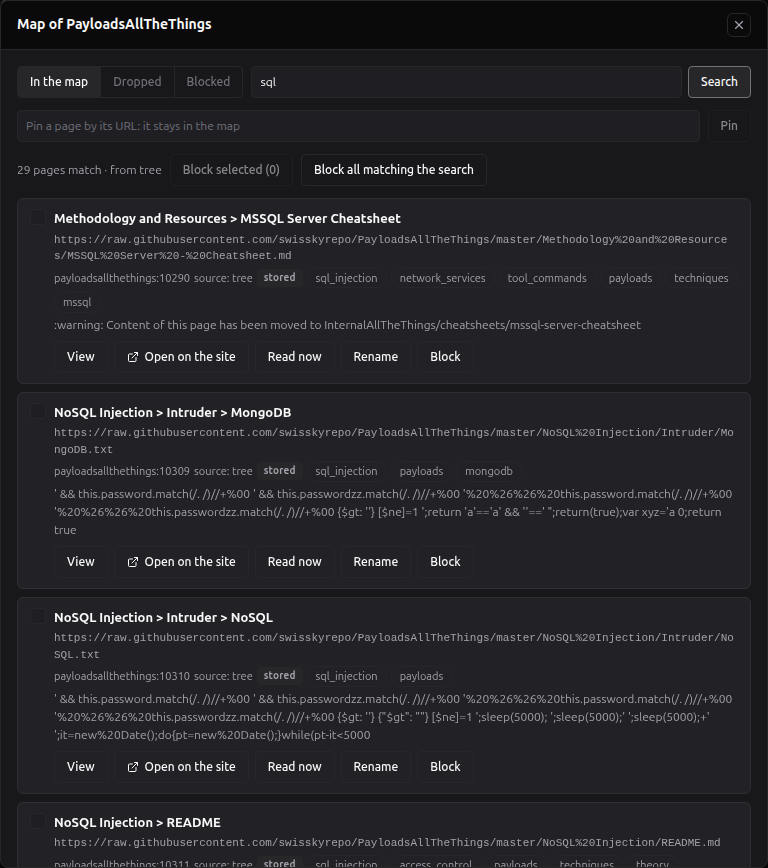
- Tabs: In the map, Dropped (pages the focus dropped, each with its reason) and Blocked.
- Search the map (Search titles and URLs, e.g. /tag/) + Search; click a tag on a row to filter by it, and its ✕ to clear it.
- The count line: N pages · from <sources> (N pages match while searching).
-
Each row: the page's title ((renamed) when you renamed it), its URL, one-line description, tags and whether it
is stored, with:
- View: the stored text, as plain text, with its date. A Live resource's page reads A Live resource keeps no text: Open it on the site, or Read now; a Stored page past the limits reads Not stored (beyond the storage limits): …;
- Open on the site: the page in a new tab;
- Read now: downloads it now the way the agent reads it (Downloaded now the way the agent reads it; nothing is kept.), within 45 seconds;
- Rename: a new title, Save title; shown at once (Renamed), used from the next refresh. An empty title goes back to the page's own (The page keeps its own title);
- Block: blocks the page at once, without asking, and deletes its stored text;
- a checkbox, to act on several pages.
- Pin a page by its URL: it stays in the map + Pin: Pinned: the page joins the map at the next refresh. On a resource with a login, only a URL on its own host.
- Block selected (N) and Block all matching the search: these ask first: Block N pages matching "<search>"? Their stored text is deleted now, and a refresh never adds them back. If the count changed meanwhile, you are asked again with the new count. Then: Blocked N pages.
- Blocked tab: Unblock or Unblock selected (N): Unblocked N pages: back in the map at the next refresh. A blocked page reads Blocked: unblock it to read it.
- Dropped tab: Restore keeps the page now and pins it, so the next refresh keeps it too: Restored and pinned: <title>. With nothing dropped: The focus dropped no page.
Blocks, pins, renames and restores are kept by URL and hold across every refresh. The agent never reads a blocked page, by page ID, by URL or by CVE id. With no map yet: No pages in the map yet: refresh the resource to build it.
Read-only mode. A project's Pages button opens the same view for the owner, read-only: Read-only: pins, blocks, renames and restores are made in Global Settings > Tradecraft. Search, tags, descriptions, View, Open and Read now still work.
The librarian (tradecraft_ask) runs on your Tradecraft librarian model, chosen once for your account in
Global Settings → LLM Providers → Models by feature. It is shown in three
places: the tab's Librarian model line, Configure search → Librarian, and the project accordion. It never falls
back to the agent's model.
While Librarian use is Agent decides and no librarian model is saved, these ask for one: Add & ingest, a save that turns Enabled on, and the card's Enabled switch turned on. The dialog Choose a model for Tradecraft librarian (Finds and checks library pages for vague needs while the agent works.) lists the models it can use, with the hint A small or mid-size fast model is enough, but it must follow instructions well… and the note Saved for your account; also in Global Settings → LLM Providers → Models by feature. If you had chosen a model for the previous version's Tradecraft section picker and it is still available, it is pre-selected: Suggested: <model> (your Tradecraft section picker model). Nothing is saved until you confirm. Save and continue saves the model and carries on with the add or the change; Cancel stops it.
With Search only, nothing asks for a model and the agent has no tradecraft_ask.
The gate checks that a model is saved, not that its provider still exists: a removed provider shows the No librarian model banner in the tab, and in a chat the librarian then answers with the plain search results.
A resource is used in a project when it is Enabled in Global Settings and not turned off in the project. A project can only turn a resource off.
The project's settings → Agent Skills & Tradecraft tab, and the chat drawer's window of the same name, hold the Tradecraft Resources accordion; see Creating a Project. A change there saves with the project and applies from the next message. The chat's phase bar counts the resources the next message will use.
Your library is yours. This is what other people see of it, and what their chats use, on a project you share or while an administrator acts as you.
| Who | Global Settings → Tradecraft | The project's accordion | Their chats on your project |
|---|---|---|---|
| You, the owner | Everything; every change | Every resource with its details, report and Pages; every switch | Every enabled resource not turned off, logins included; your GitHub token, only inside each resource's repository |
| A collaborator on your shared project | Not your library: their own | Names and on/off only; a login resource is Owner only and locked; no details or Pages. They change switches only with write access that includes project settings | Your enabled resources except those with a login, read with no GitHub token: public pages read normally, a private GitHub resource left Live cannot be read (make it Stored), and a CVE archive's lookups count against GitHub's 60 unauthenticated calls an hour |
| An administrator acting as you | Your resources with every secret masked. On an account that can sign in, every change is refused (Only the account itself can change this); on a passwordless managed account changes are allowed. The Access section is locked. With the permissions switch (RBAC_PERMISSIONS_ENABLED) on, a login resource's stored pages and Read now are refused and its Map view lists only titles and URLs; with it off, they read them and Read now sends the login |
As yours, except that a login resource is Owner only and locked and its summary is not shown (Not shown while acting as the owner: it was built from pages behind a login) | Like a collaborator's: no login resource, no GitHub token |
| Another administrator (not acting) | With the user directory permission (users:read, every admin while the permissions switch is off), your resource list: names, URLs, summaries, reports, login header names; never a secret value or page text |
As for their own access to the project | — |
See Identity and Access Management and Sharing Projects.
A failed job shows Failed (<code>): the previous version is kept on the card (the same words show after a failed first add, which had no previous version, and under Replace it, where the failed result did replace it).
| Code | Meaning | What to do |
|---|---|---|
fetch_failed |
The site could not be reached, or the map could not be built (a GitHub repository whose API did not answer, a docs site with only its start page) | Check the URL in a browser, then Refresh |
blocked_private_address |
The URL, or a redirect, leads to a private or internal address | Use a public URL |
homepage_http_error |
The start page answered an HTTP error | Check the URL, or the site's access rules |
thin_homepage |
The start page had less text than Thin homepage limit, and the crawl that followed kept no page | Force the right site type, or turn on the browser for a JavaScript site |
bad_url |
The URL is not valid, or not what its type needs (a CVE archive that is not a GitHub repository) | Fix the URL or the type |
userinfo_refused |
A login inside the URL | Use Access |
timeout |
The time budget ran out before the map was built (a docs map, a CVE archive's index) | Raise Time budget, or Refresh again |
model_unavailable |
The resource's model could not be used (the provider is gone or refused it) | Pick another LLM model in the form |
loop_model_not_supported_here |
The resource's model is an Agent in the Loop model | Pick a provider model |
llm_budget_exhausted |
An administrator's daily quota on an instance-shared provider stopped a model call | Wait for the quota, or use your own provider |
agent_restarted, agent_lost
|
The agent stopped during the job | Refresh |
agent_unreachable |
The webapp could not reach the agent to start the job | Check that the agent is running, then Refresh |
resource_deleted, resource_changed
|
The resource was deleted, or its URL or storage changed, while the job ran | Refresh if it still exists |
job_running |
Another job was running for the resource | Refresh once it ends |
job_not_claimed |
The job was cancelled or taken before it started | Refresh |
queue_full |
200 jobs were already waiting for your account | Wait, then Refresh |
internal_error |
An unexpected error; the agent log has the details |
Refresh; if it repeats, check docker compose logs agent
|
Read now answers page_blocked (the page is blocked) and outside_map (a login resource's page outside its map).
What Tradecraft does not do, or does in a way you should know about.
- Logins and GitHub tokens are stored unencrypted in RedAmon's database (like the account's GitHub token), and are masked in every answer.
- Summaries are not secret. An administrator who can read your account sees every resource's summary in Global Settings, a login resource's included; only the project accordion hides a login resource's summary from an administrator acting as you. Do not put a secret in a summary.
- A Live resource is searched by its cards only. Its headings and descriptions come from the card pass (a wiki, GitBook or docs site: the first 500 pages) or from a stored copy. A website crawled with the Auto strategy has titles guessed from its URLs, and Use real page titles does not apply to websites.
- Some overrides are missing from the form: Max content checks per resource and Tag every page are account-wide in the form, and Use real page titles and Language are offered only for wikis and GitBooks, not docs sites or repositories (where the account's value still applies).
- Incremental refresh still requests every page. It saves storing and model calls, not requests.
- The daily model budget is an administrator's quota on instance-shared providers. There is no daily stop for your own providers.
- robots.txt is ignored by default (Respect robots.txt off). When on, a robots.txt that answers 5xx or does not answer blocks every page.
- Crawl costs. The default crawl is LLM-guided: up to 20 model calls, 200 pages and 180 s. A job has no overall time limit. A Stored resource downloads its pages one at a time, with a browser render (up to 30 s) for thin pages.
-
CVE archives have an index only with a GitHub token, holding at most the 20,000 largest files; a CVE outside it is
read by
cve_idonly. A first index that listed nothing (a revoked token, a rate limit) shows no card notice: the report line is the only sign. - A login disables the browser. A site behind a login that shows its text only with JavaScript cannot be read.
- Always use the browser needs Browser rendering on. With the browser turned off, such a resource fetches nothing and every add, refresh and read fails.
- Changing the URL keeps the login. It is then sent to the new host at the next ingestion: remove the login first when you move a resource to another host.
-
A PDF detected by Auto shows as a website: its card reads
agentic-crawl, the form shows Auto (detected: Website), and its storage is not fixed to Stored. Set Site type to PDF (or run Check URL before adding). - Changing an account default that only pre-fills new resources (Default storage mode, Default focus mode) marks every resource Ingested with older settings, and their next refresh skips the incremental shortcut.
-
Live → Stored during a job is saved, and the running job then ends
resource_changed; refresh it again. - Block on a row acts at once, without the confirmation Block selected asks for, and deletes the stored text.
-
The type badge shows codes (
agentic-crawl,cve-poc-db) while the form uses names; see the card table. - An account holds at most 200 resources, and 50 focus recipes.
Common symptoms and what to check.
| Symptom | What to check |
|---|---|
| The card stays on Queued | Another of your resources is being ingested (one job at a time per account), or the agent is busy with 2 jobs |
| Failed (<code>): … | The error codes table |
| Saved, but the ingestion did not start (<code>) | The agent could not start the job; check that it is running, then Refresh |
| Check URL says the site could not be reached but the site works in a browser | The site may block unknown clients (change User-Agent), need a session (Access → Cookies), or answer only with JavaScript |
| A wiki or docs site maps only a few pages | Give its sitemap (Sitemap URL) or its search index (Search index URL), or a Menu selector; raise Max map entries |
| A website crawl stops early | The report's stop reason names the limit: raise Max pages visited, Max LLM calls or Time budget, set When the LLM says stop to Ignore until N pages, or try the Auto strategy for a site with a sitemap |
| Search finds only titles | The resource is Live, or converted from the previous version: refresh it, make it Stored, or turn on Use real page titles |
| Every card reads Ingested with older settings | An account setting changed in Configure ingestion. Refresh the resources (or Save & refresh all) to apply it |
| Add a GitHub token to index this archive | Set your GitHub Access Token (Global Settings → API Keys) or the resource's GitHub token override, then Refresh |
| No librarian model banner | Choose a model (Choose a model), or set Configure search → Librarian use to Search only |
| Adding a resource opens Choose a model for Tradecraft librarian | The same: choose one, or use Search only |
| ✏ is greyed out | A job is running: wait or Cancel it |
| A collaborator's chat cannot read a private GitHub resource | Their chats read with no GitHub token: make the resource Stored so its pages are read from your database |
The Tool Matrix's tradecraft_lookup row reads No Tradecraft Resources key - Add
|
Tradecraft needs no key: none of your resources is enabled. Add or enable one here |